
The best high-quality USB speakers depend on whether you want simple wired audio, clearer dialogue, or a more flexible desktop setup. The Creative Pebble V3 is best for listeners who want USB-C connectivity and dialogue processing; the Pebble 2.0 suits a simple USB-powered desktop system; and Amazon Basics is a straightforward choice with convenient inline volume control. Two larger desktop speaker listings are also included, but their supplied product details do not confirm USB connectivity, so check connection requirements before choosing them.
| Product | Best for | Key listed feature |
|---|---|---|
| Creative Pebble V3 | USB-C users and dialogue clarity | USB-C, Bluetooth 5.0, Clear Dialog processing |
| Creative Pebble 2.0 | Simple computer audio | Single USB cable and elevated drivers |
| Amazon Basics Stereo 2.0 | Basic wired desktop listening | USB power and inline volume control |
| Edifier M90 | Buyers comparing larger desktop speakers | Product name lists 100W RMS |
| Audioengine A2 HD (HD3) | Buyers considering wireless desktop audio | Product name identifies Bluetooth |
Creative Pebble V3

Best for: Computer users who want compact USB-C speakers with an emphasis on speech clarity. The listed features include USB-C connectivity, Bluetooth 5.0, Clear Dialog audio processing, and a built-in gain switch for amplified audio.
The Pebble V3 uses larger custom-tuned 2.25-inch full-range drivers than the product description’s prior-model comparison, and its listed output is 8W RMS with peak power up to 16W. Its 45-degree-style projection is not specified here, so the key distinguishing details are its dialogue processing and connection options. A USB-C to USB-A converter is included for older computers with USB-A ports.
Why it stands out: It offers more connection flexibility than the simpler USB-only options in this list. Bluetooth is also identified in the product name and features, while the single USB-C cable is described as supporting audio and power.
Limitation: The gain switch requires a 10W USB-C or USB-A port for amplified audio. Check the computer’s available port and power output if that feature matters.
Creative Pebble 2.0
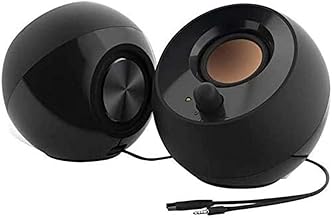
Best for: Buyers who want a straightforward pair of USB-powered speakers for a computer or laptop. The product features describe a single USB cable and no need for a separate power adapter.
Creative lists far-field drivers and rear-facing passive radiators, which are intended to support audio reproduction and bass response. The speakers also have 45-degree elevated drivers designed to project sound toward the listener. Those features make this a practical option for a desktop where the speakers sit below ear level.
Why it stands out: Choose this model if uncomplicated USB power and angled sound projection matter more than extra connectivity. Compared with the Pebble V3, the supplied feature list does not identify Bluetooth or Clear Dialog processing.
Limitation: The listed features do not specify a USB-C connection or wireless playback. Confirm the connection you need before buying, especially if your computer has limited ports.
Amazon Basics Stereo 2.0

Best for: People who want basic stereo speakers with easy-to-reach volume control. This pair is described as external speakers for amplifying PC or laptop audio, with USB power and a 3.5mm auxiliary input.
The inline volume control is a useful distinction for listeners who frequently adjust sound without using computer settings. The listed setup uses USB for power and a 3.5mm input for audio, so it is not described as carrying both power and sound through one USB cable.
Why it stands out: Choose this model if an accessible physical volume control and a conventional auxiliary audio connection fit your desk setup. It is a simpler alternative to the Creative Pebble V3, whose features include Bluetooth and dialogue processing.
Limitation: The product details do not list Bluetooth, enhanced dialogue processing, or a one-cable USB audio connection. Check that your computer has the required audio output as well as a USB port for power.
Edifier M90

Best for: Buyers comparing desktop speakers marketed for computer use who want to investigate a higher-output model. The supplied product name identifies the Edifier M90 as computer speakers and lists 100W RMS.
Why it is included: Its stated output makes it a relevant comparison for shoppers looking beyond compact USB-powered pairs. However, the supplied listing information does not include a feature description confirming USB audio, USB power, Bluetooth, or other connection details.
Limitation: Do not assume this is a USB speaker based on the product name alone. Review the current listing for connection type, power requirements, and included cables before deciding whether it suits a computer setup.
Audioengine A2 HD (HD3)

Best for: Shoppers considering wireless desktop speakers as an alternative to a USB-only setup. The product name identifies this model as wireless computer speakers with Bluetooth.
Why it is included: Bluetooth provides a different kind of desktop connection from the USB-powered Creative Pebble and Amazon Basics pairs. It may be worth comparing if wireless playback is important, but the supplied details do not establish its USB audio or power capabilities.
Limitation: The listing data provided here gives no detailed feature specifications beyond its name. Check the product listing for supported wired connections, power arrangement, and included accessories before treating it as a USB speaker choice.
Buying Guide: How to Choose USB Speakers
Do the speakers use USB for audio, power, or both?
“USB speakers” can describe different setups. Some models use USB to power the speakers while receiving audio through a separate 3.5mm cable. Others are described as using one USB cable for both audio and power. Check the connection details rather than relying on the category name.
The Amazon Basics pair lists USB power and a 3.5mm auxiliary input. The Creative Pebble 2.0 lists a single USB cable without a separate power adapter. The Pebble V3 specifies single-cable USB-C connectivity, with a USB-C to USB-A converter included. These descriptions make the Creative models easier to compare for cable needs.
Which connection fits your computer?
Check the ports on your desktop or laptop before purchasing. A USB-C model may need an adapter for a computer with USB-A ports; the Pebble V3 listing says a converter is included. A speaker using a 3.5mm audio input needs a compatible audio output in addition to USB power.
Bluetooth can be useful when you want wireless playback, but it is a different connection from USB audio. The Pebble V3 lists both Bluetooth 5.0 and USB-C. The Audioengine product name identifies Bluetooth, but the supplied product data does not describe its wired connections.
Is dialogue clarity or general desktop audio the priority?
For spoken content, the Pebble V3 is the clearest match in this selection because its features specifically mention Clear Dialog audio processing for speech in videos and shows. The Pebble 2.0 instead highlights far-field drivers, rear-facing passive radiators, and elevated driver positioning. The Amazon Basics pair emphasizes a conventional stereo setup and accessible inline volume control.
These feature descriptions indicate different priorities, not a guarantee that one speaker will sound best in every room. Consider your listening position, desk layout, and the types of audio you play most often.
How much desk space and wiring do you want?
Compact desktop pairs can fit near a monitor, while larger computer speakers may need more room. The supplied Edifier M90 information provides a 100W RMS figure in the product name but no dimensions or connection details. Confirm the size and setup requirements on the current listing if desk space is limited.
For fewer cables, look for explicit one-cable audio and power information. For easy manual adjustment, the Amazon Basics model’s inline volume control is a useful listed feature. Cable convenience and control placement are practical considerations alongside sound-related specifications.
What should you verify before ordering?
- Connection type: Confirm whether USB handles audio, power, or both.
- Computer ports: Check for USB-C, USB-A, and 3.5mm audio output as needed.
- Power needs: The Pebble V3 gain switch requires a 10W USB port according to its feature description.
- Extra features: Decide whether Bluetooth, dialogue processing, or inline volume control matters to your use.
- Unlisted specifications: For the Edifier M90 and Audioengine model, verify details not included in the supplied product information.
Frequently Asked Questions
Can USB speakers work with a laptop?
Yes, if the speakers’ connection matches the laptop’s available ports and power requirements. Check whether the model uses USB-C, USB-A, a 3.5mm audio input, or Bluetooth.
Do all USB speakers send audio through the USB cable?
No. Some use USB only for power and require a separate audio connection. The Amazon Basics product, for example, lists USB power and a 3.5mm auxiliary input.
Which listed speakers include Bluetooth?
The Creative Pebble V3 features list Bluetooth 5.0, and Bluetooth appears in the Audioengine product name. Confirm connection details on the listing before purchase, especially for the Audioengine model.
Which option lists dialogue processing?
The Creative Pebble V3 lists Clear Dialog audio processing intended to make spoken dialogue clearer without unnecessarily raising volume.
Which speakers have inline volume control?
The Amazon Basics Stereo 2.0 listing specifically identifies an inline volume control. The supplied product information for the other models does not list that feature.
Are the Edifier M90 and Audioengine models confirmed USB speakers?
Not by the product details supplied here. Their names identify them as computer or wireless desktop speakers, but the information provided does not confirm USB audio or USB power. Verify the current listings before choosing either for a USB-specific setup.