
The best gaming headphones depend on whether you prioritize wireless freedom, a wired connection, multi-platform use, or a distinctive look. The products below cover those needs, from the wired HyperX Cloud III to the feature-rich SteelSeries Arctis Nova Pro Omni and the pink EASARS cat-ear headset. No star ratings or review counts were provided, so this guide compares the listed features rather than claiming a verified ranking by customer rating.
| Headset | Best For | Connection |
|---|---|---|
| Razer BlackShark V2 X | Simple wired gaming | 3.5mm |
| SteelSeries Arctis Nova Pro Omni | Wireless features and platform mixing | 2.4GHz and Bluetooth |
| HyperX Cloud III | Wired play with multiple connection options | USB-C, USB-A, and 3.5mm |
| EASARS Wireless Cat Ear | Style-focused smartphone use | Bluetooth 5.0 |
| Razer BlackShark V3 X HyperSpeed | Wireless play and long listed battery life | 2.4GHz and Bluetooth |
Razer BlackShark V2 X

The Razer BlackShark V2 X is a wired gaming headset with 50mm drivers, memory foam cushioning, and a 3.5mm audio jack. Its product name also lists 7.1 surround sound and compatibility with PC, PS4, PS5, and Nintendo Switch. Because it uses a standard audio jack, it is a straightforward option for players who prefer a wired connection over wireless pairing.
Best for: Players seeking a simple wired headset for the listed gaming platforms. The 3.5mm connection and memory foam cushion make it a practical choice for buyers who want a direct connection and cushioned ear contact.
Why it stands out: It provides a clear feature set without adding wireless modes or app requirements to the listed specifications. That may appeal to buyers who want to keep setup simple.
Limitation: It is not a wireless model, and its listed connection is a 3.5mm audio jack. Check the connection requirements of your device before choosing it.
SteelSeries Arctis Nova Pro Omni

The SteelSeries Arctis Nova Pro Omni is a wireless headset with listed 96kHz/24-bit audio, active noise cancellation (ANC), a ClearCast Pro microphone, and AI noise rejection. Its connection options include 2.4GHz wireless and Bluetooth, and the listing describes OmniPlay for PC, PlayStation, and Xbox. A mobile app is also listed.
Best for: Players who want a broad feature set and use more than one listed platform. The combination of 2.4GHz and Bluetooth is useful for buyers comparing wireless connection options, while ANC and microphone noise-rejection features may suit gaming in environments with background sound.
Why it stands out: Among these picks, it has the most explicitly listed audio, noise-control, and platform-mixing features. Choose it if those capabilities matter more than keeping the headset simple.
Limitation: The feature list does not specify battery life or explain every detail of platform setup. Confirm the connection method and requirements for your intended devices before buying.
HyperX Cloud III
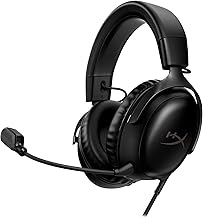
The HyperX Cloud III is a wired gaming headset with angled 53mm drivers, spatial audio, memory foam, a durable frame, and a 10mm microphone described as ultra-clear in the product name. It includes USB-C, USB-A, and 3.5mm connection options. The listing names PC, PS5, and Xbox Series X|S as platforms.
Best for: Buyers who want a wired headset with several connection types listed. USB-C, USB-A, and 3.5mm provide more connection choices than the single-jack Razer BlackShark V2 X, although buyers should still verify which connection works with their specific setup.
Why it stands out: Its combination of memory foam, a durable frame, spatial audio, and a stated 10mm microphone gives shoppers several concrete features to compare. It is a strong fit for someone who does not need wireless operation.
Limitation: This model is wired. Choose another option if avoiding a cable is a primary requirement.
EASARS Wireless Cat Ear Headphones

The EASARS headset is a pink wireless model with cat-ear styling, Bluetooth 5.0, 50mm drivers, RGB lighting, and a retractable microphone. Its listing describes it for smartphone use and states that a USB dongle is not included. That missing accessory is important for shoppers considering a wireless gaming setup.
Best for: Buyers who prioritize a colorful design and Bluetooth smartphone use. Its distinctive appearance, RGB lighting, and retractable mic set it apart from the more traditional headsets in this comparison.
Why it stands out: It combines a gaming-oriented design with Bluetooth connectivity and a retractable microphone. Choose it if those features suit your use, rather than assuming it offers the same platform support as the other models.
Limitation: The listing explicitly says the USB dongle is not included. The supplied details do not establish compatibility with specific consoles, so verify device support before purchasing for console gaming.
Razer BlackShark V3 X HyperSpeed

The Razer BlackShark V3 X HyperSpeed is a wireless PC gaming headset with 50mm drivers, a cardioid microphone, 2.4GHz wireless, Bluetooth, and a listed battery life of up to 70 hours. The product name also identifies USB and lists use with Mac, PS5, Nintendo Switch, and smartphones.
Best for: Players who want wireless connection choices and a clearly stated battery-life figure. The 2.4GHz and Bluetooth options give buyers two listed wireless modes to consider, while the 70-hour figure is useful for comparing advertised battery life.
Why it stands out: It offers a more specific battery-life claim than the other products in this group and names several devices. It is a better fit than the wired options for shoppers who want to move around without an audio cable.
Limitation: Battery life is a listed maximum, not a guarantee of runtime in every use. Check the details for your device and preferred connection before choosing it.
Buying Guide: How To Choose Gaming Headphones
Should you choose wired or wireless?
Wired headsets connect by cable, so buyers do not need to compare wireless modes or advertised battery life. The Razer BlackShark V2 X uses a 3.5mm jack, while the HyperX Cloud III lists USB-C, USB-A, and 3.5mm connections. Check your device’s available ports and connection requirements before purchasing, because a connector listed on a headset does not by itself confirm suitability for every setup.
Wireless headsets can be more convenient when you want to avoid a cable, but their connection methods differ. The SteelSeries and Razer BlackShark V3 X list both 2.4GHz and Bluetooth. The EASARS model lists Bluetooth 5.0 and states that its USB dongle is not included. Do not assume Bluetooth and 2.4GHz behave identically or are both supported by your gaming device.
Which connection types should you compare?
Start with the device you use most often. A 3.5mm headset may suit a setup with a compatible audio jack, while USB connections offer another wired route on devices that support them. For wireless models, check whether your intended use calls for Bluetooth, 2.4GHz, or a particular supplied accessory. The listed information does not provide complete setup instructions, so verify the product details if you need a specific connection for a console or computer.
Multi-device shoppers should compare the platforms named in each listing rather than relying on a general “gaming headset” label. The SteelSeries product name lists PC, PlayStation, and Xbox through OmniPlay. The HyperX listing names PC, PS5, and Xbox Series X|S. The Razer BlackShark V2 X names PC, PS4, PS5, and Switch. The V3 X product name lists Mac, PS5, Nintendo Switch, and smartphones. Confirm the exact model and connection for your device.
How important are the microphone and noise features?
If clear team communication is a priority, compare the microphone descriptions. The HyperX Cloud III lists a 10mm microphone, the SteelSeries includes a ClearCast Pro mic and AI noise rejection, and the Razer BlackShark V3 X lists a cardioid mic. The EASARS microphone is retractable. These descriptions identify features, but they do not provide a direct, controlled comparison of microphone performance.
Noise-related features also differ. The SteelSeries listing names active noise cancellation and AI noise rejection. These are separate features: ANC is a headset noise-control feature, while AI noise rejection is listed alongside its microphone. Buyers who need quiet listening or voice filtering should confirm what each feature does in the full product details.
What should you consider for comfort?
Look for specific comfort details, such as cushion materials and frame design, while recognizing that fit is personal. The Razer BlackShark V2 X and HyperX Cloud III list memory foam cushioning. The EASARS listing focuses on cat-ear styling, and the provided details for the other two models do not specify cushion materials. If you wear a headset for long sessions, check its fit information and return terms before deciding.
Weight, clamping force, and headband adjustment are not specified in the provided product descriptions. Do not infer those qualities from the brand or model name. Buyers with fit sensitivities should look for those details in the full listing and compare them with their own needs.
Does a larger driver mean better sound?
Driver size is one specification, not a complete measure of sound quality. The Razer BlackShark V2 X and BlackShark V3 X list 50mm drivers, as does the EASARS headset. The HyperX Cloud III lists angled 53mm drivers. The SteelSeries listing instead emphasizes 96kHz/24-bit audio. These numbers describe different aspects of the products and should not be treated as a simple ranking of sound performance.
Consider the full feature set alongside your intended use. A buyer who wants a wired connection may favor the HyperX or BlackShark V2 X, while a buyer seeking wireless options may compare the SteelSeries and BlackShark V3 X. A shopper focused on appearance and phone use may prefer to investigate the EASARS model, while paying attention to its missing dongle.
How should you interpret “highest rated”?
A product’s rating depends on current customer reviews and the retailer’s displayed review data. No ratings, review counts, or review summaries were included with the product information for this guide. As a result, these picks should be understood as feature-based options, not a verified order from highest to lowest customer rating. Check current rating data and recent review details on the retailer’s product page if customer scores are essential to your decision.
Frequently Asked Questions
Which headset in this list is wireless?
The SteelSeries Arctis Nova Pro Omni, EASARS Wireless Cat Ear Headphones, and Razer BlackShark V3 X HyperSpeed are listed as wireless models. Their connection options differ, so verify which one works with your intended device.
Which option lists the longest battery life?
The Razer BlackShark V3 X HyperSpeed lists up to 70 hours of battery life. Actual runtime can vary, and the supplied product details do not provide comparable battery figures for the other models.
Which headsets offer a wired connection?
The Razer BlackShark V2 X lists a 3.5mm audio jack. The HyperX Cloud III lists USB-C, USB-A, and 3.5mm connections. Check your device’s supported connection before selecting either headset.
Does the EASARS headset include a USB dongle?
No. Its product name states that the USB dongle is not included. The listing identifies Bluetooth 5.0, so buyers should verify how they plan to connect it before ordering.
Can these headsets be called the highest-rated models?
Not based on the information provided here. No star ratings or review counts were supplied, so this article compares listed specifications and does not claim a customer-rating ranking.
Which headset is best for more than one gaming platform?
The SteelSeries listing describes OmniPlay for PC, PlayStation, and Xbox, while several other product names also list multiple devices. Compare the exact platforms and connection requirements for your setup, since compatibility details can vary by device.