
The best in-car WiFi system depends on whether you need internet access for passengers, wireless phone mirroring, or fast access to dashcam footage. For shared internet, choose a dedicated mobile hotspot such as the BNBDE device. For wireless CarPlay or Android Auto, consider a compatible adapter; for video playback, an AI box may be a better fit. The REDTIGER dashcam offers a different kind of WiFi connection for camera access, not a general-purpose internet hotspot.
| Product | Best suited for | Connection type |
|---|---|---|
| BNBDE Portable WiFi Hotspot | Internet sharing with multiple devices | Cellular hotspot |
| TECHLANE Wireless Adapter | Wireless CarPlay and Android Auto | Phone-to-car connection |
| Smarter CarPlay Pro 2-in-1 | Wireless phone projection | CarPlay and Android Auto adapter |
| FAIMEE AI Box | Compatible-car entertainment and wireless projection | AI box with WiFi and Bluetooth |
| REDTIGER 4K STARVIS 2 Dashcam | Dashcam footage access | Dashcam WiFi |
BNBDE Portable WiFi Hotspot

Best for: Drivers who want to share a cellular internet connection with passengers, tablets, or other devices. Unlike a wireless CarPlay adapter, this product is described as a mobile hotspot designed to provide internet access.
The listing specifies prepaid data, 10GB of USA data, vSIM connectivity, and support for up to 16 devices. It also describes 4G LTE Cat4 and WiFi 6. The battery-free design is positioned for vehicle use, including cars, trucks, and RVs. Its listed international coverage extends to more than 150 countries, with network selection handled through vSIM technology.
Why it was selected: It is the clearest match for shoppers searching for an in-car WiFi system that connects multiple devices to the internet. Check the data allowance and service terms before relying on it for frequent streaming or travel.
Limitation: The listed USA data allowance is 10GB, so it may not suit households that stream heavily. The supplied product information does not explain ongoing data-plan costs or renewal terms.
TECHLANE Wireless CarPlay And Android Auto Adapter

Best for: Drivers whose vehicle already has factory-wired CarPlay or Android Auto and who want to connect a compatible phone wirelessly. This is not a cellular internet hotspot; it changes how the phone connects to the car system.
The listing describes support for both Apple CarPlay and Android Auto, 5G WiFi, Bluetooth 5.4, and automatic connection after startup. It includes USB-C and USB-A plugs and is described as plug-and-play, without an app download or additional converter. The product page names vehicles including Mazda CX-5, Honda Accord, Mercedes-Benz, and Lexus, but fit depends on the vehicle’s existing wired system.
Why it was selected: It combines two common phone-projection systems and offers both USB connector types. It is a better match than a hotspot when the goal is reducing cable use for navigation, calls, and phone audio.
Limitation: The listing says it is for vehicles with factory wired ports. Confirm that the exact vehicle already supports wired CarPlay or Android Auto before buying.
Smarter CarPlay Pro 2-In-1 Adapter

Best for: Drivers looking for a 2-in-1 wireless adapter for CarPlay and Android Auto. The supplied product name identifies it as a wireless adapter, making it a phone-projection option rather than a standalone source of cellular internet.
The listing describes the device as a “2-in-1” wireless CarPlay and Android Auto adapter. That dual-platform positioning may be useful in a vehicle shared by drivers with different phone types. Product details supplied here do not specify connector types, setup steps, or a vehicle compatibility list.
Why it was selected: It directly addresses the need to convert a wired phone-projection setup to a wireless one, and its stated dual-system support distinguishes it from single-platform adapters.
Limitation: The available product information does not provide enough detail to verify which vehicle systems or ports it supports. Check the product listing and vehicle manual for compatibility before choosing it.
FAIMEE AI Box CarPlay
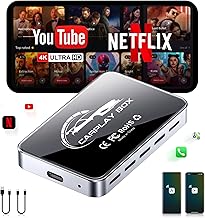
Best for: Drivers with a compatible factory-wired CarPlay touchscreen who want wireless phone projection and the listed video-app features. It is an entertainment-oriented alternative to a basic wireless adapter, but its video features do not make it a cellular hotspot.
The listing states that the device is intended for OEM wired CarPlay touchscreen vehicles from 2016 onward and phones running iOS 10 or Android 11 and later. It specifies dual-band 2.4GHz and 5GHz WiFi, Bluetooth 5.3, and preloaded apps including Netflix, YouTube, TikTok, Disney+, and Prime Video. The description says streaming requires connection to a phone hotspot.
Why it was selected: It combines wireless projection with entertainment features, so it may suit compatible-car owners who want more than cable-free CarPlay or Android Auto.
Limitation: Streaming depends on a phone hotspot or another internet source, and the listed vehicle compatibility is specific. Video content should be used only when safely parked.
REDTIGER 4K STARVIS 2 Dashcam

Best for: Drivers who want WiFi as part of a front-and-rear dashcam setup, particularly for accessing camera functions or footage. Dashcam WiFi serves a different purpose from a hotspot that provides internet to passengers.
The product name identifies 4K STARVIS 2 recording, front and rear cameras, 5GHz WiFi with a stated 20MB/s transfer rate, and a free 128GB card. These details make it relevant to buyers searching broadly for in-car WiFi equipment, but not to someone whose main requirement is shared cellular data.
Why it was selected: It represents a distinct in-car WiFi use case: connecting with a dashcam rather than connecting devices to the internet. This distinction helps buyers avoid selecting a camera connection when they need a mobile router.
Limitation: The supplied information does not describe cellular connectivity or passenger internet sharing. Choose a dedicated hotspot for those tasks.
Buying Guide: How To Choose An In-Car WiFi System
Do you need internet, phone projection, or dashcam access?
Start with the job you want the system to do. A cellular hotspot provides an internet connection that can be shared with passenger devices, subject to its data plan and network service. A wireless CarPlay or Android Auto adapter connects a compatible phone to the vehicle’s existing infotainment system. A dashcam’s WiFi usually supports camera-related functions rather than general browsing.
An AI box can add features beyond a basic adapter, but its advertised apps may still require an internet connection from a phone hotspot. In other words, “WiFi” in a product name does not necessarily mean that the device supplies internet access by itself.
Will it work with your car and phone?
Check the vehicle’s current equipment before ordering. Many wireless adapters require factory-wired CarPlay or Android Auto. The FAIMEE listing, for example, specifies an OEM wired CarPlay touchscreen and minimum phone operating-system versions. A device that plugs into USB cannot add a compatible infotainment system where one is not already present.
For hotspots, confirm how the device receives cellular service, what coverage it supports, and how its data allowance works. For adapters, check whether your car has the required USB-A or USB-C port. Where a product listing provides only limited compatibility information, verify the exact make, model, year, and infotainment configuration.
How many devices will connect?
Families and frequent passengers may benefit from a hotspot that supports several devices. The BNBDE listing specifies connections for up to 16 devices, but the usable experience can depend on cellular coverage, network conditions, and how much data each device uses. If only the driver’s phone needs to connect to the dashboard, a wireless adapter may be more appropriate and does not replace a shared hotspot.
How much mobile data do you need?
Navigation and messaging generally use a different amount of data from video streaming or repeated downloads. Compare the included allowance with your expected use, and review whether the listing explains renewal, additional data, or service charges. The BNBDE product description states that it includes 10GB of USA data but does not provide renewal details in the supplied information.
Some in-car entertainment devices rely on a separate phone hotspot. That means the hotspot’s data plan—not simply the AI box’s WiFi specifications—may determine whether streaming is practical. Avoid assuming that a device with dual-band WiFi includes unlimited internet.
Which connection details matter?
For mobile internet, cellular network availability and data terms matter most. For a phone adapter, the vehicle’s wired system, USB connection, and supported phone platform are more important. WiFi band and Bluetooth version are product specifications, but they do not by themselves prove compatibility or guarantee a particular connection experience.
For a dashcam, consider the camera’s recording setup, storage, and the stated method for transferring or viewing footage. Its wireless link should be understood as a camera feature unless the product information explicitly describes internet sharing.
Is a single device enough?
Some drivers may need two complementary devices: a hotspot for passenger internet and an adapter for wireless dashboard projection. An AI box may combine selected projection and entertainment functions, but the FAIMEE listing says streaming requires a phone hotspot. A dashcam remains a separate category because its WiFi is used in relation to the camera.
Choose the simplest setup that covers your actual needs. Combining devices can add extra ports, setup steps, and data-plan considerations. Check how many USB ports are available and whether the vehicle can power the intended devices at the same time.
Frequently Asked Questions
Does a wireless CarPlay adapter provide internet?
Not necessarily. A wireless CarPlay adapter connects a compatible phone to the vehicle’s infotainment system. The phone may use its own cellular data, but the adapter itself is not automatically a cellular hotspot.
Can I use an in-car hotspot for passengers?
Yes, if the hotspot supports internet service and its data plan permits the intended use. Check the coverage, data allowance, renewal terms, and supported device count before relying on it for a trip.
Can a dashcam’s WiFi connect my passengers to the internet?
The REDTIGER product information supplied here describes 5GHz WiFi for the dashcam, not passenger internet service. Choose a dedicated mobile hotspot when shared internet access is the goal.
Do wireless adapters work in every car?
No. The adapters in this article are intended for compatible wired CarPlay or Android Auto systems, and compatibility can vary by vehicle and infotainment configuration. Check the product requirements against the vehicle before purchasing.
Does the FAIMEE AI Box stream video without a hotspot?
The supplied listing says to connect to a phone hotspot for streaming. Its advertised video apps therefore should not be treated as proof that the box independently provides cellular internet.
What is the best in-car WiFi system for a road trip?
For shared internet, a cellular hotspot is the most relevant category. For cable-free phone projection, choose a compatible wireless adapter. If you need both, you may need separate devices or a compatible AI box plus a hotspot.