
Best in-Dash Touch Screen Navigation Systems for Your Car
Find the best in-dash touch screen navigation for your vehicle. This guide highlights five top options suited for different drivers, from road-trippers to daily commuters. Each pick is explained with clear reasons to help you choose based on screen size, updates, and smart features. The buyer persona ranges from tech enthusiasts seeking live traffic to practical owners prioritizing easy installation and reliable maps.
| Product | Brand | Why it’s a fit |
|---|---|---|
| Garmin DriveSmart 76 | Garmin | Large 7″ display, North America maps, live traffic and voice assist |
| Car GPS Navigation Truck RV | LONGRUF | Huge 9″ screen, lifetime map updates, multiple route options |
| Migrandsea Car Stereo | Migrandsea | 9.7″ IPS touchscreen, CarPlay & Android Auto, Ford Fiesta fit |
| VQU Car Stereo for Honda Civic | VQU | Wireless CarPlay/Android Auto, GPS navigation, mirrorlink |
| OiLiehu Android Car Stereo | OiLiehu | Android 15, 9″ touchscreen, built-in CarPlay/Android Auto, WiFi |
Garmin DriveSmart 76 – 7-Inch Navigation with Voice Assist

The Garmin DriveSmart 76 features a 7″ high-resolution display with North America map updates and a suite of driver aids. Best for daily drivers who value hands-free calling, voice guidance, and smart notifications. It also offers live traffic, weather, and parking information to help avoid congestion. Use it for road trips thanks to a National Parks directory and Tripadvisor integration. Note: the device relies on a Bluetooth connection for hands-free calling and may require phone pairing for voice commands.
Car GPS Navigation Truck RV – 9 Inch Touch Screen

LONGRUF offers a 9″ touch display with free lifetime map updates for North America (USA, Canada, Mexico). Best for long-haul drivers and multi-vehicle households who want frequent map refreshes and multiple routing options. It includes speed camera alerts, lane guidance, and a choice of language voices. Caution: some advanced features require additional setup and may need updates via PC or TF card, depending on the system compatibility.
Migrandsea 9.7-Inch IPS Car Stereo for Ford Fiesta
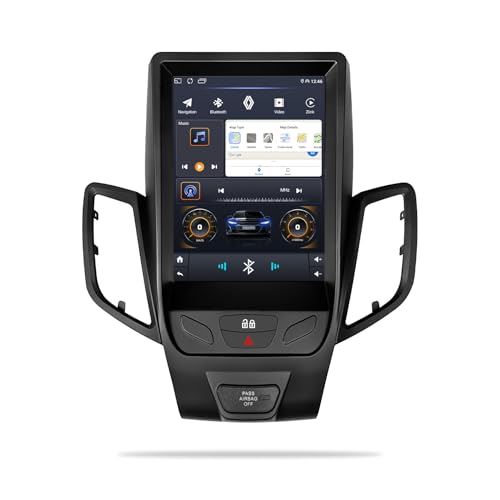
Migrandsea’s 9.7-inch IPS touchscreen integrates Apple CarPlay and Android Auto for seamless smartphone control. Best for Ford Fiesta owners seeking a large display and easy access to maps, music, and messages via voice or touch. It emphasizes in-dash fit and smart connectivity. Limitation: designed specifically for Ford Fiesta models; verify fit with your year and trim to avoid installation issues.
VQU Car Stereo with Wireless CarPlay for Honda Civic

VQU’s Honda Civic 2012–2015 radio supports wireless CarPlay and Android Auto with built-in GPS navigation. Best for Civic owners who want a modern infotainment upgrade without losing factory feel. MirrorLink is included for broader smartphone compatibility. Caution: may require vehicle-specific adapters or dash modification for a clean installation in some trims.
OiLiehu Android 15 Car Stereo for Hyundai Sonata

OiLiehu offers an Android 15 car stereo with 9″ touchscreen, 5G WiFi, and built-in Wireless CarPlay and Android Auto. Best for Hyundai Sonata drivers seeking a robust Android experience, offline maps assistance, and frequent app access. It includes GPS navigation and a backup camera. Limitation: performance depends on the Android ecosystem and may vary with app load times on some devices.
Buying Guide
What should you consider when choosing an in-dash touch screen navigation system?
- Display size and readability: Larger screens improve visibility, but installation space matters. Look for 7″–9″ panels with high resolution.
- Navigation updates: Free lifetime maps are ideal for long-term value. Check whether updates cover your regions and how updates are delivered.
- Smart phone integration: Wireless CarPlay and Android Auto offer safer, hands-free control. Confirm compatibility with your phone and OS version.
- Vehicle compatibility: Some units are model-specific. Verify dash fit, mounting, and wiring requirements before purchasing.
- Audio and expansion: Consider Bluetooth, FM transmission, backup cameras, and steering-wheel controls for a complete upgrade.
Frequently Asked Questions
- Q: Do these in-dash units require professional installation? A: Many can be installed at home with basic tools, but some models or vehicles may require professional installation for best results.
- Q: Can I still use my phone’s maps with these systems? A: Yes, many units support Apple CarPlay and Android Auto, offering maps from your phone on the dashboard screen.
- Q: Do these devices offer live traffic updates? A: Some models provide live traffic and weather features; verify feature availability in the product description.
- Q: Are map updates free? A: Some products include free lifetime map updates; others require paid updates or use of PC/TF card for updates.
- Q: Will I lose factory radio features after installation? A: It depends on the model and vehicle; some head units preserve existing functions while replacing the factory radio.
- Q: Is a backup camera included? A: Several units support or include a backup camera; verify with each model’s listing.