
The best internet radio receiver with built-in Wi-Fi depends on how you plan to listen. The Grace Link and Ocean Digital WR-50 are best for adding internet stations to an existing stereo, while the WR-03M suits listeners who want a compact tuner with flexible audio outputs. The C. Crane CC WiFi 3 and Ocean Digital WR-393 are better for listeners who want a radio with its own speaker. Compare the five options below by setup, streaming features, and whether you need an external amplifier.
| Product | Best For | Built-In Speaker |
|---|---|---|
| Grace Link | Streaming services and app control with a stereo | No |
| Ocean Digital WR-50 | Full-size stereo component with wired network option | No |
| Ocean Digital WR-03M | Compact tuner with optical and line outputs | No |
| C. Crane CC WiFi 3 | Standalone listening and station discovery | Not specified in the supplied features |
| Ocean Digital WR-393 | All-in-one radio with display and physical controls | Yes |
Grace Link Internet Radio Tuner

The Grace Link is best for listeners who want to add internet radio and supported streaming services to a traditional stereo or receiver. It has no built-in speaker, so it must connect to an external audio system for listening.
- Offers access to 100,000 internet radio stations and up to 100 presets, according to the product information.
- Lists Spotify Connect, Pandora, Amazon Music, iHeartRadio, BBC, NPR, podcasts, and other built-in services.
- Chromecast built-in allows streaming from compatible apps on a phone, tablet, or laptop.
- Control options include a smartphone app, infrared remote, and front-panel controls with a 2.8-inch color display.
Choose this if app-based streaming and a broad selection of listed services matter more than a built-in speaker. SiriusXM is included as a listed service, but a subscription is sold separately. Avoid this model if you need a self-contained radio that plays audio without connecting to a stereo or speakers.
Ocean Digital WR-50 Hi-Fi Tuner

The Ocean Digital WR-50 is best for owners of a traditional stereo stack who want a full-width internet radio component. Its 16.9-inch profile, aluminum front panel, and metal housing are designed for a component-style setup. It does not list a built-in speaker, so plan to use a connected audio system.
- Receives internet radio and podcasts over Wi-Fi or wired Ethernet, and also includes FM radio.
- Provides optical and coaxial outputs, Bluetooth receiving, and external Wi-Fi and Bluetooth antennas.
- Its 2.4-inch color display, front control dial, and included remote support direct control.
- Stores up to 150 custom presets and allows custom station stream URLs to be added through a web browser.
Choose the WR-50 if component size, Ethernet connectivity, and a large preset capacity match your setup. Its wired network option can be useful when you prefer not to rely on Wi-Fi. A limitation is that it is a tuner component rather than an all-in-one speaker radio; the listed features do not include built-in speakers.
Ocean Digital WR-03M Compact Tuner

The Ocean Digital WR-03M is best for listeners who want a smaller internet radio component for an existing home audio system. It has no built-in speaker driver and is designed to connect to external speakers or an amplifier.
- Accesses internet stations through Wi-Fi or LAN and also supports local FM radio and podcasts.
- Stereo line-out and optical output provide options for connecting to a home audio system.
- Bluetooth lets users stream audio from a phone, while UPnP and DLNA support streaming from networked PCs or NAS devices.
- Includes an alarm clock and is described as a home-audio component.
Choose this model if you want multiple connection types and network music streaming without replacing your existing stereo. It is a better fit for a system that already has amplification than for a bedroom or kitchen that needs a standalone radio. The key limitation is explicit: an external speaker or amplifier is required because the WR-03M has no built-in speaker.
C. Crane CC WiFi 3 Internet Radio
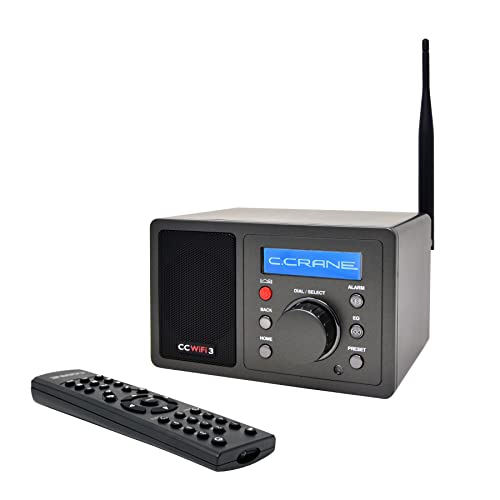
The C. Crane CC WiFi 3 is best for listeners focused on discovering worldwide stations and who may want to connect the radio to another sound system. The provided features describe a line-out for use with an amplified speaker system or an AM/FM stereo receiver, but do not specify whether the radio itself has a built-in speaker.
- Lists more than 25,000 internet radio stations organized by location, genre, and popularity.
- Uses Skytune, where users can submit a valid URL to add a favorite station.
- Bluetooth receiving lets a phone or tablet send audio to the radio.
- Includes a 5 dBi external antenna for 2.4 GHz Wi-Fi reception, plus line-out, an adjustable equalizer, and a 3D setting.
Choose the CC WiFi 3 if station browsing, Bluetooth receiving, and sound adjustment options are priorities. It is also a practical option for a listener who plans to use line-out with an amplified system. Check the speaker arrangement before buying if standalone listening is essential, because the supplied product details do not confirm a built-in speaker.
Ocean Digital WR-393 Wi-Fi Radio

The Ocean Digital WR-393 is best for buyers who want an all-in-one radio with a built-in speaker, display, and accessible physical controls. Unlike the tuner-only models in this list, it is described as a Bluetooth speaker as well as an internet radio.
- Connects to 2.4 GHz Wi-Fi for internet radio and podcasts, and also receives FM with a telescopic antenna.
- Bluetooth 5.3 supports audio streaming from a phone or tablet.
- UPnP and DLNA support playback from a PC or network-connected device.
- Its 3.5-inch color display shows station and track information; front controls include navigation knobs and five preset keys.
- Includes a remote, dual alarms, and a sleep timer.
Choose this if you want a radio for a room without a separate stereo and value a larger display with physical controls. It can also switch between online stations, FM, Bluetooth, and network music. A limitation is that its Wi-Fi connection is specified as 2.4 GHz, so check your home network settings if you are unsure whether that band is available.
Buying Guide: How to Choose an Internet Radio Receiver
An internet radio receiver uses a network connection to play online radio stations and, depending on the model, podcasts or other streaming audio. The term can describe a tuner that connects to a stereo or a self-contained radio with its own speaker. Identify which type you need before comparing station counts or extra features.
Do you need a tuner for an existing stereo or a radio with speakers?
A tuner-only component is a good match when you already own an amplifier, receiver, or powered speaker system. The Grace Link, WR-50, and WR-03M are described as products without built-in speakers. They connect to external audio equipment, and the connection choices vary. The WR-50 lists optical and coaxial outputs; the WR-03M lists optical and stereo line-out; the Grace Link is intended to connect to a traditional stereo or receiver.
For a simpler room setup, a radio with a built-in speaker avoids the need to assemble a separate audio system. The WR-393 is explicitly described as having a Bluetooth speaker. If you are considering the CC WiFi 3, confirm the speaker arrangement from its product information because the supplied feature list does not state whether it has an internal speaker.
Which network connections should you compare?
All five selected products include Wi-Fi in their descriptions, but some offer another way to connect. The WR-50 supports wired Ethernet as well as Wi-Fi. The WR-03M lists Wi-Fi and LAN. A wired connection may be useful if the radio will sit near a network connection or if you prefer not to depend on wireless reception. Check the product’s supported network details against your home setup before choosing.
Wi-Fi band information also matters. The WR-393 specifies 2.4 GHz Wi-Fi, and the CC WiFi 3 includes an external antenna for 2.4 GHz reception. Do not assume that every model supports every Wi-Fi band or network configuration; use the supplied product specifications to verify details that matter for your router.
How important are stations, presets, and streaming services?
Station totals can help compare the listed breadth of internet radio catalogs, but they do not tell you whether a particular local station or service is available. Grace Link lists 100,000 internet stations and 100 presets. The WR-50 lists over 30,000 stations and podcasts, with up to 150 custom presets. The CC WiFi 3 lists more than 25,000 stations. For a specific station, look for search, URL entry, or station-directory details rather than relying only on a headline number.
Streaming-service support is a separate consideration from internet radio. Grace Link lists services including Spotify Connect, Pandora, and Amazon Music, plus Chromecast built-in. The WR-393 and WR-03M list Bluetooth, which can send audio from a compatible phone or tablet. The WR-03M also lists UPnP and DLNA, as do the WR-393 and other network-focused products. Match the features to how you actually play audio: a service app, Bluetooth, or music stored on a network device.
What controls and display features make daily use easier?
Consider whether you want phone control, front-panel buttons, a remote, or a combination. The Grace Link lists app control, an infrared remote, and front-panel controls. The WR-50 includes an IR remote and front control dial, while the WR-393 has navigation knobs, preset keys, and a remote. A larger or more informative display can make station selection easier, but display size alone does not determine how simple the menus are.
Preset capacity matters if you frequently switch among saved stations. The WR-50 lists up to 150 custom presets, while Grace Link lists 100. The WR-393 provides five dedicated front preset keys. These are different approaches: a large saved-station library favors capacity, while dedicated keys provide quick physical access to a smaller group.
Should you consider FM, alarms, and wired audio outputs?
FM can provide another listening option when you want local broadcast radio or internet access is unavailable. The WR-03M, WR-50, and WR-393 list FM reception. For bedside use, compare alarm, sleep-timer, and snooze features. The WR-393 lists dual alarms and a sleep timer, while the WR-03M lists an alarm clock.
For stereo integration, check output types before purchase and confirm that they match your amplifier or receiver. Optical, coaxial, and line-level outputs are not interchangeable in every setup. The WR-50 lists optical and coaxial outputs; the WR-03M lists optical and stereo line-out. The product features provided for Grace Link describe stereo connection but do not specify particular output connectors, so verify the exact connection requirements if they are important.
Frequently Asked Questions
Does an internet radio receiver need Wi-Fi?
Wi-Fi is needed for online stations and network services when Wi-Fi is the chosen connection. Some models, such as the WR-50, also list wired Ethernet. FM reception may work without an internet connection on products that include an FM tuner.
Can an internet radio receiver connect to an existing stereo?
Yes. The Grace Link, WR-50, and WR-03M are described as tuners or components for use with an existing stereo or amplifier. Check the receiver’s outputs and your audio system’s inputs before buying.
Can I play music from my phone through these radios?
Several models list Bluetooth receiving, which allows a phone or tablet to send audio to the radio. Grace Link also lists Chromecast built-in, and some Ocean Digital models list UPnP or DLNA for network music playback.
Do all Wi-Fi internet radios include speakers?
No. The Grace Link, WR-50, and WR-03M are explicitly described without built-in speakers. The WR-393 is described as a Bluetooth speaker radio. Confirm the speaker details for any model where the supplied specifications are unclear.
Can I listen to FM if my internet connection is down?
A model with an FM tuner can receive FM broadcasts without using internet radio. The WR-03M, WR-50, and WR-393 list FM reception. Local reception depends on the broadcast signal and the radio’s antenna setup.
What should I check before choosing a model?
Confirm whether you need a built-in speaker, which audio outputs your stereo accepts, whether Wi-Fi or Ethernet suits your room, and which stations or services you want. Also compare controls, preset capacity, FM support, and alarm features against your daily listening habits.