
The best lapel mic for video depends on your device, recording setup, and whether you need one or two microphones. MAYBESTA is a practical pick for creators who want a two-mic kit and broad phone compatibility; Labstandard suits two-person recordings with noise reduction and real-time mixing; DJI is a compact option with a stated 300-meter maximum transmission range; wedaniya emphasizes wind protection; and NPTCL stands out for its charging case and stated extended use time.
| Microphone | Best For | Standout Feature |
|---|---|---|
| MAYBESTA Wireless Mini Microphone | Phone creators who want two microphones | Longer receiver designed to work with many phone cases |
| Labstandard Wireless Lavalier | Interviews and two-person recordings | Two microphones, noise reduction, and real-time mixing |
| DJI Mic Mini | Mobile recording and outdoor shoots | Ultralight transmitters and up to 300-meter maximum range |
| wedaniya Wireless Lavalier | Outdoor and on-the-go video | Foam and deadcat windshields |
| NPTCL Wireless Lavalier | Longer recording sessions | Charging case and stated 24-hour extended usage time |
MAYBESTA Wireless Mini Microphone

Best for: Phone-based creators who want two microphones and a receiver intended to fit many phones without removing the case. This set is also a useful option for people recording with different devices, since the listing describes compatibility with iPhone, iPad, Android phones, laptops, and tablets.
The product is designed for plug-and-play use. The listed setup is to connect the appropriate receiver, turn on the microphone, and check for solid green lights to confirm connection. The listing says no app or separate adapter is needed for the described setup, but buyers should confirm that the included connector matches their device before recording.
- Two wireless microphones for content creation, interviews, or online teaching.
- Longer receiver designed to connect while many phone cases remain on.
- Automatic connection indicated by green status lights.
Why it was selected: Its two-microphone format, stated device range, and case-friendly receiver address common mobile-video needs. Limitation: The product information does not specify battery runtime or transmission distance.
Labstandard Dual Wireless Lavalier Microphone

Best for: Interviews, conversations, and other recordings where two people need individual microphones. The set is described as including dual wireless microphones and support for iPhone and iPad devices using Lightning or USB-C connections.
Labstandard lists a built-in noise-reduction chip, 2.4 GHz transmission, and real-time audio synchronization. Its stated latency is 0.008 seconds. The product also supports multi-channel real-time mixing, including synchronizing background music with voice. These features may suit creators who want to capture dialogue and music in one recording workflow.
- Two microphones for simultaneous use by two speakers.
- Noise reduction and real-time synchronization features.
- Approximately six hours of battery life, according to the listing.
- Real-time mixing for voice and background music.
Why it was selected: It offers a clearly described two-person setup and audio-mixing features suited to interviews and podcasts. Limitation: The stated battery life is about six hours, so longer sessions may require a charging plan. Check the receiver connector for your device before buying.
DJI Mic Mini With Two Transmitters

Best for: Creators who prioritize a lightweight microphone and need to record with two transmitters. The listed package includes two transmitters and one mobile receiver, which makes it relevant for interviews, co-hosted videos, and other two-person shoots.
DJI states that each Mic Mini transmitter weighs 10 grams and describes the system as having active noise cancelling. The listed maximum transmission range is 300 meters, and the product information gives a maximum operating time of 11.5 hours for the two transmitters and mobile receiver. These figures are manufacturer specifications; actual performance can depend on the recording environment and setup.
- Two ultralight transmitters for one- or two-person recording.
- Active noise cancelling for managing unwanted sound.
- Stated maximum transmission range of 300 meters.
- Stated maximum operating time of 11.5 hours for the kit.
Why it was selected: It combines a compact design with stated range and operating-time figures, making it a useful comparison for mobile and outdoor creators. Limitation: Confirm that the included mobile receiver works with your specific recording device and connection needs.
wedaniya Wireless Lavalier Microphone

Best for: Creators who record outdoors or in places where wind and surrounding noise can interfere with speech. The listing highlights both high-density foam and deadcat windshields, along with digital signal processing noise reduction.
The microphone is described as connecting through an included USB-C or Lightning receiver, with no app or Bluetooth pairing required. Its stated compatibility includes phones, tablets, and laptops. Buyers should verify the connector included in the package against their device, particularly if they use a case or a less common recording setup.
- Foam and deadcat windshields for wind management.
- Noise-reduction processing for busy environments and live streams.
- USB-C and Lightning receiver options, according to the listing.
- Plug-and-play connection without an app or Bluetooth pairing.
Why it was selected: Its included wind protection makes it a distinct choice for outdoor video, where wind noise can make dialogue difficult to hear. Limitation: The listing does not provide a specific battery runtime or transmission range, so compare those requirements before choosing it for long shoots.
NPTCL Wireless Lavalier With Charging Case
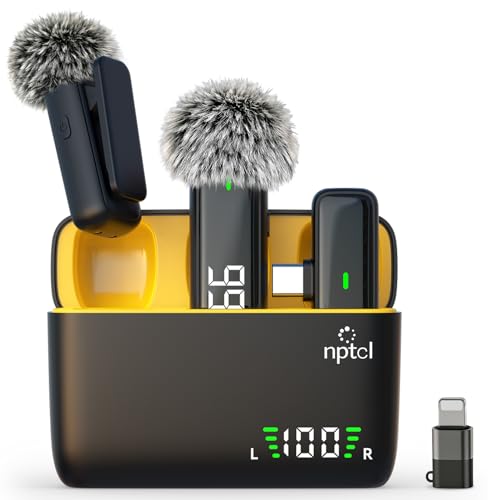
Best for: Creators who want a charging case and a microphone system described for extended use. NPTCL states that each microphone runs for up to six hours on a full charge and that the system provides up to 24 hours of extended usage with its rechargeable case.
The USB-C lavalier microphone is described as using a digital signal-processing chip to reduce background noise and a windscreen to help manage plosive sounds. Its plug-and-play design automatically pairs with a phone without an app or Bluetooth setup. The listing also includes a digital battery indicator, which can help users check remaining charge.
- Up to six hours of use per microphone on a full charge.
- Up to 24 hours of extended usage with the charging case, as stated by the manufacturer.
- Digital battery indicator and automatic connection.
- Windscreen and noise-processing features for voice recording.
Why it was selected: Battery information and the included charging case make it easier to assess for longer recording days. Limitation: This listing identifies a USB-C model, so confirm that your device has a compatible connection before purchasing.
Buying Guide: How To Choose A Lapel Mic For Video
Which connector does your phone or camera need?
Start by identifying the input on the device that will record your video. USB-C and Lightning are common phone connections, but they are not interchangeable. Some kits include more than one receiver or an adapter; others are listed for a specific connection. Check the product details and package contents rather than assuming a microphone will connect directly to every phone.
If you use a phone case, also consider the receiver’s physical length and clearance. A connector may be electrically suitable but still have trouble reaching the port through a thick or unusually shaped case. MAYBESTA specifically describes a longer receiver intended to work with many cases, but fit can vary.
Do you need one microphone or two?
A single microphone can suit solo narration, tutorials, and direct-to-camera clips. Two-microphone systems are more practical when two people speak during the same recording, such as an interview or co-hosted video. Among these picks, MAYBESTA, Labstandard, DJI, and NPTCL are listed as two-microphone options or systems; review each package description to confirm exactly what is included.
Two transmitters do not automatically mean the recording app will handle two voices the way you expect. Check whether the receiver and app support the recording workflow you plan to use, particularly if you need separate tracks or independent volume control.
How important are noise reduction and wind protection?
Noise reduction can help limit unwanted background sound, but it does not make every recording environment quiet. For better dialogue, position the microphone near the speaker, reduce nearby noise where possible, and make a short test recording before filming. Wind protection is especially relevant outdoors: wedaniya lists foam and deadcat windshields, while NPTCL describes a windscreen and noise-processing features.
For indoor interviews, consider room echo and sounds such as fans or traffic. A lapel mic captures nearby speech, but placement and environment still affect the result. Test the microphone in the actual room or location when possible.
What battery life and range should you plan for?
Match stated operating time to the length of your sessions, and leave time for charging between shoots. Labstandard lists about six hours of battery life, while NPTCL states up to six hours per microphone and up to 24 hours of extended usage with its charging case. DJI lists up to 11.5 hours for the transmitters and mobile receiver. Treat these as manufacturer specifications, not guaranteed results in every recording situation.
Transmission range matters when the speaker moves away from the recording device. DJI lists a maximum range of 300 meters, and KUKIHO’s listing gives 66 feet in unobstructed conditions, but range claims should not be compared as though they were measured under identical conditions. Walls, interference, and obstacles may affect a wireless signal.
What should you check before recording?
- Confirm that the receiver matches the phone, tablet, computer, or camera input you intend to use.
- Charge the microphones and receiver, and review any battery indicators.
- Connect the receiver and verify that the microphone has paired as directed.
- Record a short test clip and listen for voice level, background noise, and wind.
- Check that clothing does not rub against the microphone while the speaker moves.
- For two-person videos, test both microphones at the same time before the full session.
Frequently Asked Questions
Is a lapel mic useful for phone video?
Yes. A wireless lapel mic can place the microphone closer to the speaker than the phone’s built-in microphone, which can make spoken audio more direct. Confirm that the receiver matches the phone’s port and test the setup before recording.
Do wireless lapel microphones need Bluetooth?
Not always. Several products in this roundup describe plug-and-play or automatic pairing without Bluetooth or an app. Follow the setup instructions for the specific microphone and device.
Should I choose a one-mic or two-mic kit?
Choose a one-mic setup for solo recording if it meets your device and workflow needs. Choose a two-mic kit when two people need to speak during the same video. Check whether the recording setup supports both microphones as intended.
Can a lapel mic reduce wind noise?
A windscreen or deadcat can help manage wind reaching the microphone, but it cannot guarantee wind-free audio. For outdoor shoots, use the supplied wind protection and make a test recording in the same conditions.
How far can I move from the phone while using a wireless mic?
It depends on the microphone, surroundings, and obstacles between transmitter and receiver. Use the manufacturer’s range as a reference, not a guaranteed working distance, and test the connection at the distance you plan to film.