
If you specifically need diagnostic software that runs on a laptop, none of the five products below is identified as a laptop-connected interface; they are handheld OBD2 scanners. They can still help diagnose engine and emissions issues, and the Innova 5210 also advertises Bluetooth compatibility with a repair app. The ANCEL AD410 is best for detailed basic engine data, while the FOXWELL NT301 is a straightforward check-engine-light reader. Use the comparison below to identify a suitable scanner, and verify laptop and vehicle compatibility before buying if a computer-based setup is essential.
| Product | Best suited for | Key capabilities listed |
|---|---|---|
| ANCEL AD310 | Basic code reading | Read and clear engine codes, live data, freeze frame, readiness |
| FOXWELL NT301 | Check-engine-light and readiness checks | Read and clear engine codes, I/M readiness indicator |
| Innova 5210 | Engine checks plus battery testing | Engine and some ABS codes, live data, battery and alternator tests |
| MOTOPOWER MP69033 | Basic functions with a larger display | Code lookup, live data, freeze frame, vehicle information |
| ANCEL AD410 | Broader OBD2 engine diagnostics | Live data, code lookup, readiness, O2 and EVAP tests |
ANCEL AD310 For Basic Engine Codes

The ANCEL AD310 is a compact, handheld OBD2 reader for drivers who want to check an engine warning without setting up laptop software. Its listed functions include reading and clearing emission-related diagnostic trouble codes, viewing live and hard-memory data, checking freeze-frame information and reviewing I/M monitor readiness. It also collects vehicle information.
Best for: Drivers who want a simple, self-contained tool for common engine and emissions checks. Its labeled buttons, large screen and vehicle-powered operation make it a practical choice when a laptop workflow is not required. The listed 2.5-foot cable gives some reach from the diagnostic connector.
Limitation: Product information does not identify laptop connectivity or advanced system coverage. Choose another solution if laptop-based diagnostics or non-engine modules are essential.
FOXWELL NT301 For Check Engine Checks

The FOXWELL NT301 focuses on reading and clearing engine fault codes through a vehicle’s 16-pin diagnostic connector. Its listed features include one-click I/M readiness checks and a red-yellow-green indicator, plus a built-in speaker for audio feedback. The product description says a code should be cleared after the underlying issue has been repaired; if the fault remains, it can return.
Best for: Owners who want a direct way to read a check-engine code and check emissions-monitor readiness before an inspection. It is better suited to focused engine diagnostics than a buyer seeking a laptop-based software system.
Limitation: The supplied information does not list laptop connectivity, live-data functions or diagnostics beyond engine-related codes. Confirm that its functions meet your needs before choosing it for a broader diagnostic job.
Innova 5210 For Engine And Battery Checks

The Innova 5210 combines an OBD2 scanner with a battery tester. Listed capabilities include reading and clearing check-engine codes, checking battery and alternator health, and viewing live data such as RPM, engine temperature, fuel trims and oxygen-sensor readings. It also supports drive-cycle readiness checks. The product states that ABS-code coverage may vary and directs buyers to verify vehicle coverage.
Best for: Drivers who want to investigate engine warnings and check the vehicle’s battery or alternator using one handheld tool. It is also the only product in this group whose supplied description mentions Bluetooth compatibility with a car-repair app.
Limitation: Bluetooth compatibility with an app does not establish laptop compatibility. ABS coverage varies, and the product information recommends checking coverage for a specific vehicle before purchase.
MOTOPOWER MP69033 For Basic Live Data
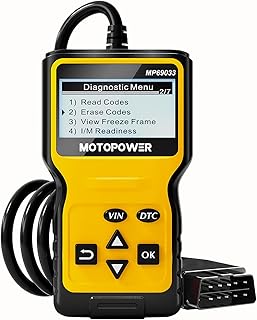
The MOTOPOWER MP69033 is a handheld code reader with a built-in diagnostic trouble code lookup library. Its listed functions include reading and erasing codes, viewing freeze-frame data, checking I/M readiness, showing vehicle information and displaying data flow and real-time curves. It also reports vehicle speed, engine speed, coolant temperature and calculated load value.
Best for: Drivers who want a range of basic OBD2 readings displayed on a dedicated screen. The 2.8-inch LCD has a white backlight and contrast adjustment. The listed language options are English, German, Dutch, Spanish, French and Italian.
Limitation: Its described functions are OBD2-oriented and do not establish laptop connection or advanced, manufacturer-specific diagnostics. The product’s broad vehicle-support statement should not replace checking the applicable vehicle protocol and coverage.
ANCEL AD410 For Broader OBD2 Functions

The ANCEL AD410 offers a broad set of OBD2 engine-related functions in a handheld reader. The listing names code reading and clearing, code definitions, live data, freeze frame, I/M readiness, O2 sensor testing, EVAP testing, vehicle information and MIL status. It also describes a built-in database of more than 42,000 diagnostic trouble code lookups.
Best for: DIY users who want more than a basic check-engine code reader but do not require a laptop-connected interface. Live readings include available parameters such as RPM, coolant temperature, fuel trim and oxygen-sensor data, which can help owners discuss a fault with a repair shop.
Limitation: The listed functions do not show laptop connectivity or comprehensive diagnostics for every vehicle system. Confirm that its OBD2 functions and vehicle coverage fit the intended repair task.
Buying Guide: How To Choose A Diagnostic Setup
“Laptop-based automotive diagnostics” can describe several different setups. Some buyers want a scan tool that connects to a computer and displays data in software. Others want a handheld reader for checking a warning light, then use a laptop to research the code or document repair information. These products are handheld devices based on the supplied descriptions, so treat them as alternatives for basic OBD2 checks rather than confirmed laptop interfaces.
Do you need a tool that connects directly to a laptop?
Check the product documentation for an explicit computer connection method, such as USB or a supported wireless adapter, and for compatible operating systems and diagnostic software. None of the five descriptions specifies that it connects to a laptop. The Innova 5210 mentions Bluetooth compatibility with a repair app, but that alone does not confirm computer support. If laptop connection is a firm requirement, compare products that clearly state their computer interface, software, and supported vehicle protocols.
What vehicle information should you check?
Confirm the vehicle’s model year, make, model, engine and diagnostic connector before choosing a scanner. The listings describe OBD2 support for many vehicles from 1996 onward, but coverage can vary by function and vehicle. The Innova listing specifically says ABS coverage may vary and recommends checking coverage. A general claim of OBD2 compatibility does not guarantee access to every system or manufacturer-specific function.
Which functions matter for your job?
- Basic warning-light diagnosis: Look for engine-code reading and code definitions. The AD310, FOXWELL NT301, MOTOPOWER MP69033 and AD410 all list engine-code functions.
- Repair verification: Read codes after addressing the fault and check whether the issue returns. Clearing a code does not itself repair the cause.
- Live-data checks: The AD310, Innova 5210, MOTOPOWER MP69033 and AD410 list live or real-time data functions. Available parameters vary by vehicle.
- Emissions readiness: Look for I/M readiness or drive-cycle readiness features. The FOXWELL NT301 has a dedicated readiness indicator; other listed models also include readiness functions.
- Additional checks: The Innova 5210 lists battery and alternator testing, while the AD410 lists O2 sensor and EVAP tests.
Do you need ABS or other system diagnostics?
Do not assume that an engine-code reader can diagnose every vehicle module. A tool may read standard engine and emissions codes without supporting ABS, airbag, transmission or body-system diagnostics. The Innova 5210 lists ABS-code reading with a coverage caveat. For any other module, look for explicit support for the vehicle and function rather than relying on the words “OBD2 scanner.”
Would a handheld reader be more practical?
A handheld scanner can be useful when you want to plug into the vehicle and inspect results directly on a screen. Several models listed here draw power from the vehicle’s OBD2 connector, so no separate battery or charger is specified for those products. A laptop-based setup may offer a different screen and software workflow, but it requires confirmed interface and software compatibility. Decide whether portability or computer-based data review is more important before comparing features.
How should you use codes and live data?
A diagnostic trouble code points toward a system or condition; it is not always a complete diagnosis or a definitive list of parts to replace. Record the code and relevant freeze-frame or live-data information before clearing it. Readiness monitors can also be affected when codes are cleared or vehicle conditions change. Use scanner results as diagnostic information, and consult a qualified technician when the cause is unclear or a repair involves safety-critical systems.
Frequently Asked Questions
Can these five scanners connect to a laptop?
The supplied product details do not confirm laptop connections for any of these models. The Innova 5210 mentions Bluetooth compatibility with a repair app, but does not specifically establish laptop support. Check the manufacturer’s documentation for the exact computer, software and vehicle compatibility you need.
Which product is best for checking a check-engine light?
The FOXWELL NT301 is a focused choice for reading and clearing engine fault codes and checking I/M readiness. The ANCEL AD310 and AD410 also list engine-code functions. Choose based on the additional readings and tests you need.
Which scanner includes battery testing?
The Innova 5210 is the only product in this comparison whose listed features include battery testing and checking alternator health, alongside OBD2 diagnostics.
Can clearing a code fix the vehicle?
No. Clearing a diagnostic trouble code removes or resets the stored warning information; it does not repair the underlying problem. If the fault remains, the code or warning may return.
Do all five tools diagnose ABS problems?
No broad ABS capability is established across all five products. The Innova 5210 lists ABS-code reading but says coverage may vary. Verify support for the exact vehicle and system before relying on a scanner for ABS diagnosis.
What is the difference between a code reader and laptop diagnostics?
A code reader is a device for retrieving vehicle diagnostic information, often through a built-in screen. Laptop diagnostics requires a compatible vehicle interface and software that works with the computer and vehicle. These listings describe handheld scanners, not confirmed laptop-based systems.