
Best Lavalier Microphones for Laptop Recordings: Clear Audio on Your Computer
If you’re shopping for a lavalier mic to use with a laptop, you want models that are easy to connect, reliable, and deliver crisp voice capture in varied environments. This guide highlights five top options, explains who they’re best for, and compares key strengths. The featured products suit vloggers, remote professionals, interviewers, and content creators who need hands-free, portable audio for meetings, streaming, and on-the-go recording. A quick summary table is provided to help you compare at a glance.
| Product | Best For | Key Strength | Limitations |
|---|---|---|---|
| GoorDik USB C Lavalier | Android/PC users needing noise reduction | Active denoise, dual modes, long battery | Wireless latency possible in busy wireless environments |
| ordele Wireless Lavalier (iPhone/Android) | Cross-platform mobile creators | 2.4GHz stability, wide range | OTG function required on some USB-C devices |
| Mini Mic Pro | Mobile and laptop creators needing plug-and-play | USB-C and Lightning, simple setup | Wind protection included but outdoor wind may still impact |
| MAONO UL10 USB Lavalier | Budget-conscious vloggers | 192kHz/24bit quality, wide compatibility | Basic build compared to premium models |
| APOMOV 2 Pcs 3-in-1 Wireless | Dual-mic setups for interviews | Charging case, LCD display, long run time | Case heavy—carry case adds bulk |
GoorDik USB C Lavalier Microphone

The GoorDik USB C wireless lavalier offers active denoise with a choice between noise reduction and original sound modes. It includes two furry windscreen muffs and four foam covers, making it well-suited for noisy or outdoor shoots. Best for laptop users who want clearer dialogue with minimal editing effort.
Who it’s best for: freelancers, streamers, and interviewers who record on USB-C devices and value on-device noise control. Why selected: the dual denoise modes and long battery life support extended sessions without frequent recharges.
Limitation: occasional wireless interference may affect latency in crowded wireless environments.
ordele Wireless Lavalier Microphone

The ordelle wireless lavalier uses 2.4GHz transmission with up to 20m range. It supports iPhone, Android, and computers via USB-C, and includes easy auto-pairing for quick setup. Best for cross-platform mobile use with plug-and-play simplicity.
Who it’s best for: creators who shoot on multiple devices and want reliable wireless audio without app dependencies. Why selected: strong range and automatic pairing streamline on-the-go recording.
Caution: ensure OTG is enabled on USB-C devices before pairing for smooth operation.
Mini Mic Pro

Mini Mic Pro is a compact wireless lavalier for iPhone and Android, featuring USB-C and Lightning adapters for quick laptop or phone connections. It’s designed for crystal-clear voice with on-board wind protection and simple plug-and-play setup.
Who it’s best for: creators who need a tiny, travel-friendly mic that works across devices. Why selected: reliable out-of-box compatibility and minimal setup steps.
Limitation: outdoor wind may still affect sound quality without protective accessories.
MAONO UL10 USB Lavalier
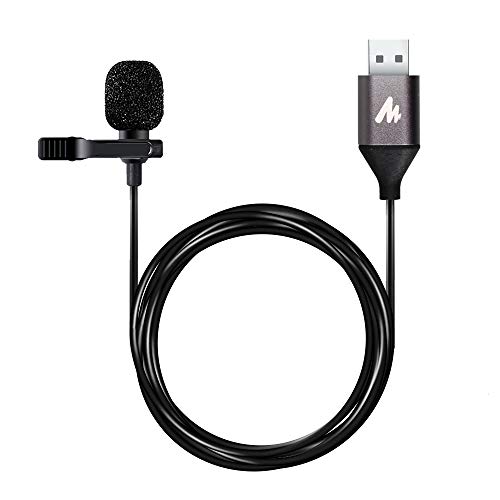
MAONO UL10 offers high-quality sampling at 192kHz/24bit and broad compatibility with Windows, Mac, and USB devices. It’s designed for interviews, vlogging, meetings, and classroom settings, providing solid, professional-sounding audio with straightforward USB connection.
Who it’s best for: budget-conscious creators who want studio-like sound without complexity. Why selected: strong core specs and wide compatibility at a lower price point.
Limitation: build quality is more basic than premium contenders, which may matter for frequent travel use.
APOMOV 2 Pcs 3-in-1 Wireless Lavalier

This set includes two wireless lavaliers with a charging case and an LCD display. It supports iPhone, iPad, USB-C Android devices, and laptops, with up to 24 hours of operation when used with the charging case. Best for dual-mic situations like interviews or co-host podcasts.
Who it’s best for: teams or solo creators who need a reliable two-mic setup with easy recharging. Why selected: long run time and the charging case make all-day shoots practical.
Caution: carrying the charging case adds bulk, which may affect portability.
Buying Guide: Essential Considerations For Your Laptop Lav Microphone
- Connection Type: USB-C is common on modern laptops; check compatibility with your device and whether adapters are needed for USB-A or Lightning.
- Audio Quality: Look for sampling rate (ideally 192kHz/24-bit) and signal-to-noise ratio to ensure clear, natural voice capture.
- Power & Battery Life: For wireless mics, longer battery life reduces interruptions during sessions; consider kits with charging options.
- Noise Handling: Active denoise or wind protection helps in noisy environments; consider location and typical recording conditions.
- Ease of Use: Plug-and-play with auto-pairing reduces setup time; check for LCD displays or indicators that simplify operation.
- Portability: If you travel often, compact designs and bundled windshields matter; consider the overall weight and case size.
- Compatibility Notes: Some devices require enabling OTG or specific settings; verify device-specific requirements before purchase.
- Best Use Scenarios: In-studio interviews, remote meetings, vlogging, or live streaming each benefit from different features (range, wind protection, two-mic kits).
FAQ
- What is the best lavalier mic for laptop use? — The best option depends on your needs: USB-C models with noise reduction for busy environments, or cross-platform wireless mics for device flexibility.
- Do these mics require apps to work? — Most reviewed models are plug-and-play and do not require apps; some may need basic device settings like OTG activation.
- Can I use wireless mics while charging my laptop? — Yes, many include USB-C charging on the receiver, allowing simultaneous charging for uninterrupted use.
- Which mic is best for outdoor recording? — Models with wind protection and windscreen muffs perform better outdoors; consider exterior wind guards and higher wind noise mitigation.
- Do I need two mics for interviews? — If you need a second voice or a host and guest, a dual-mic kit (like APOMOV) is advantageous for synchronized audio capture.
- Are USB-C lavalier mics compatible with Windows and Mac laptops? — Yes, most listed options support Windows and Mac through USB-C or USB adapters, ensuring broad compatibility.