
The best 5-inch LCD monitor depends on whether you need a touchscreen, a sharper image, or a compact screen for a specific device. The ELECROW is best for buyers who want touch input and Raspberry Pi support; the VIEWMEI is better for those prioritizing 1280 × 720 resolution and wide viewing angles; and the Hosyond is another 5-inch touchscreen option. The list also includes an 8-inch security monitor and a 24-inch gaming display, neither of which is a 5-inch monitor.
| Product | Best suited for | Screen size | Standout feature |
|---|---|---|---|
| ELECROW Mini Touchscreen | Touch-enabled Raspberry Pi projects | 5 inches | Five-point capacitive touch |
| VIEWMEI Mini Monitor | Buyers seeking a sharper, wider-view screen | 5 inches | 1280 × 720 IPS display |
| Hosyond Touch Screen | Touchscreen projects with HDMI | 5 inches | Built-in OSD menu |
| Eyoyo Security Monitor | Security and multi-input setups | 8 inches | HDMI, VGA, BNC, and AV inputs |
| KTC Gaming Monitor | Desktop gaming, not compact projects | 24 inches | QHD fast IPS panel |
ELECROW 5-Inch Mini Touchscreen Monitor

This ELECROW model is a compact 5-inch LCD monitor with an 800 × 480 TN display and five-point capacitive touch. Its listed device support includes Raspberry Pi 5, 4, 4B, 3B+, 3B, and B+, as well as PCs and laptops. The product name also describes it as driver-free.
Best for: Raspberry Pi builders and other users who need a small touchscreen for interactive controls or a compact project display. It is the strongest fit in this list for buyers who specifically want touch input and named Raspberry Pi compatibility.
Why it was selected: It combines a 5-inch form factor, touch operation, and an expressly listed range of Raspberry Pi models. That makes it relevant to small computer builds and embedded projects.
Limitation: The listed resolution is 800 × 480, and the panel is TN. Buyers who prioritize higher resolution or wider viewing angles should compare it with the VIEWMEI IPS model.
VIEWMEI 5-Inch IPS Mini Monitor

The VIEWMEI is a 5-inch mini monitor with a 1280 × 720 resolution and an IPS panel. The product information specifies a 178-degree viewing angle and HDMI and USB power ports. Listed use cases include computers, laptops, mini TV boxes, Raspberry Pi projects, CCTV systems, rear-view camera monitoring, and secondary PC displays.
Best for: Buyers who want more pixels than the 800 × 480 options in this group, or who need a small screen that can be viewed from different positions. Its IPS panel and stated wide viewing angle make it a better fit for shared viewing than a TN-screen option.
Why it was selected: It combines a 5-inch size with a higher listed resolution and a broad range of stated applications.
Limitation: The listing describes HDMI and USB power, so buyers should check the required cable and power arrangement for their particular device. Its small physical size may also make fine text difficult to read at a distance.
Hosyond 5-Inch IPS Touchscreen Display
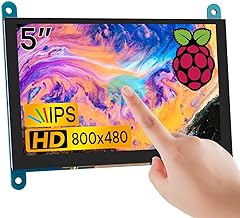
The Hosyond is a 5-inch IPS LCD display with an 800 × 480 resolution, HDMI monitor connection, and five-point capacitive touchscreen. It has a built-in OSD menu. The product name lists Raspberry Pi 5, 4, and 3, as well as BB Black and Windows 10, 8, and 7 PCs.
Best for: Buyers building a compact touchscreen setup who want an IPS panel and an on-screen display menu. It is an alternative to the ELECROW for Raspberry Pi projects, with its own stated operating-system and board list.
Why it was selected: It matches the requested 5-inch LCD size and includes both touch input and named device support. Its built-in OSD menu is useful when adjusting display settings on the monitor itself.
Limitation: Its listed resolution is 800 × 480, so it offers fewer pixels than the VIEWMEI’s 1280 × 720 screen. Confirm the connection and touch setup requirements before choosing it for a particular system.
Eyoyo 8-Inch Security Monitor
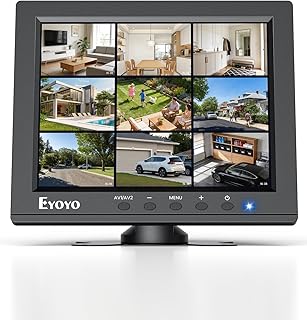
This Eyoyo model is not a 5-inch monitor: it has an 8-inch, 1024 × 768, 4:3 LCD screen. It accepts HDMI, VGA, BNC, AV, and USB inputs, and the listing specifies built-in speakers, VESA 75 × 75 mounting, and image-flip functionality. Its described uses include CCTV, PC setups, and DIY projects.
Best for: Buyers who can accept a larger screen and need several input types for security or equipment monitoring. The range of listed connections makes it more relevant to multi-source setups than to a strict 5-inch search.
Why it was selected: It is the closest listed alternative for buyers seeking a compact LCD monitor with security-system inputs and mounting options.
Limitation: Its 8-inch size does not meet a 5-inch requirement. Choose one of the three 5-inch models above if fitting a small enclosure or matching a specific screen dimension is essential.
KTC 24-Inch QHD Gaming Monitor

The KTC H24T7 is a 24-inch QHD gaming monitor, not a 5-inch LCD. Its listed features include a 1440p Fast IPS panel, 180Hz refresh rate with overclocking to 185Hz, 1ms response time, G-Sync and FreeSync support, HDR400, height adjustment, HDMI, and DisplayPort.
Best for: Desktop gamers who need a full-size high-refresh-rate display and are not looking for a miniature monitor. It is included only as a clear size and use-case contrast with the 5-inch options.
Why it was selected: It is a listed monitor, but its specifications target desktop gaming rather than Raspberry Pi builds, portable displays, or small enclosures.
Limitation: At 24 inches, it does not satisfy a 5-inch size requirement. Avoid this option if compact dimensions are central to the purchase.
Buying Guide: How to Choose a 5-Inch LCD Monitor
A 5-inch monitor is generally suited to project displays, small computer builds, portable viewing, and equipment monitoring. The right choice depends on screen resolution, panel type, input and power requirements, touch support, and the physical space available. Compare the monitor’s stated features with the exact device and project before buying.
Do you need a touchscreen?
Choose a model that explicitly lists touch input if you want to tap controls or interact directly with the display. The ELECROW and Hosyond product names specify five-point capacitive touch. Do not assume that a monitor is touch-enabled just because it has an LCD panel. Also verify how the touch function connects to your computer or single-board computer; video and touch may use different connections.
Is resolution or viewing angle more important?
Resolution affects how much image detail a screen can display, while panel type and viewing angle affect how the image looks from different positions. Among the listed 5-inch products, the VIEWMEI specifies 1280 × 720 resolution and a 178-degree viewing angle on an IPS panel. The ELECROW and Hosyond list 800 × 480 resolution. A higher resolution can help with detailed content, but small text may still be hard to read on a screen only five inches across.
Which connections and power arrangement should you check?
Confirm the monitor’s video input, power connection, and the ports available on the device you plan to connect. VIEWMEI lists HDMI and USB power. Product descriptions may specify particular cables for different Raspberry Pi generations, so check the connection notes rather than assuming one cable works for every board. Make sure the planned setup can provide the required power as well as a video signal.
How important is device compatibility?
Look for the specific computer, operating system, or board model named by the product listing. The ELECROW names several Raspberry Pi generations and PCs and laptops. The Hosyond listing names Raspberry Pi 5, 4, and 3, BB Black, and several Windows versions. These stated lists are useful starting points, but they do not establish compatibility with every device or configuration.
Will the screen fit your project?
Check the screen’s dimensions and mounting needs against the enclosure, stand, or equipment space. A five-inch display is compact, but the full monitor assembly can take up more room than the visible panel. If the project needs mounting holes, a VESA pattern, or a particular orientation, look for those details in the product information. The Eyoyo listing specifies VESA 75 × 75 mounting, but it is an 8-inch monitor rather than a 5-inch one.
Which listed option fits each kind of buyer?
- For touch controls: Compare ELECROW and Hosyond; both product names specify five-point capacitive touch.
- For higher stated resolution: Consider VIEWMEI, which lists 1280 × 720 rather than 800 × 480.
- For broad security-system inputs: Eyoyo lists HDMI, VGA, BNC, and AV, but its screen is 8 inches.
- For desktop gaming: KTC is a full-size 24-inch option and does not meet a 5-inch requirement.
Frequently Asked Questions
What is the best 5-inch LCD monitor for Raspberry Pi?
For a touchscreen setup, the ELECROW and Hosyond are relevant options because their listings name Raspberry Pi models and five-point capacitive touch. Check the exact board, cable, power, and touch requirements before selecting either one.
Is a 5-inch monitor large enough for everyday computer use?
A 5-inch monitor is better suited to compact projects, controls, and secondary displays than to extended desktop work. Its small viewing area can make long documents and detailed interfaces difficult to use.
What does IPS mean on a 5-inch monitor?
IPS describes a screen panel type. The VIEWMEI listing specifies an IPS panel with a 178-degree viewing angle. That stated wide angle may help the image remain consistent when viewed from different positions.
Can I use a 5-inch monitor with a laptop?
The ELECROW listing names laptops, and the VIEWMEI listing names laptops and computers. Confirm that your laptop provides a compatible video connection and that the monitor’s power requirements can be met.
Are all compact monitors in this list five inches?
No. The Eyoyo is an 8-inch monitor, and the KTC is a 24-inch monitor. Only the ELECROW, VIEWMEI, and Hosyond products in this comparison are described as 5-inch displays.