
The best choice depends on whether you need a physical Lightning dock or a speaker built into a modern wireless charging station. The Bose SoundDock Portable is the clearest match for a Lightning-equipped iPhone, while the Bose SoundDock Series II is a 30-pin option for older Apple devices. For newer phones and multi-device setups, the wireless stations below combine charging with Bluetooth audio, but they are not described as physical Lightning docks.
| Product | Best For | Connection or Main Features |
|---|---|---|
| Bose SoundDock Portable | Lightning and 30-pin users | Speaker dock; listed as Lightning and 30-pin compatible |
| Bose SoundDock Series II | Owners of older 30-pin devices | 30-pin speaker dock |
| Fast Charging Wireless Charger | Everyday charging and Bluetooth audio | 4-in-1 station with hands-free calling |
| Meifigno 45W 5-in-1 Station | Bedside charging and audio | Bluetooth speaker, alarm clock, night light |
| 6-in-1 Wireless Charging Station | Multi-device charging with ambient lighting | Bluetooth speaker, digital clock, ambient lights |
Bose SoundDock Portable
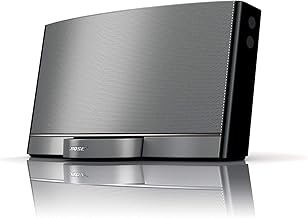
Best for: Buyers looking for a speaker dock that is explicitly listed with both Lightning and 30-pin compatibility. Its product name also lists an 8W speaker output and one port, making it the most direct match here for someone searching for a Lightning docking station with speakers.
The stated compatibility covers iPhone and iPod devices, but the listing information provided does not identify specific models. Check the exact connector and device requirements before buying, particularly if you have a newer iPhone that charges through USB-C rather than Lightning.
Why it was selected: Unlike the wireless charging stations in this roundup, this product is identified as a speaker dock and explicitly includes Lightning in its listed connector details. That distinction matters for shoppers who want a dock connection rather than Bluetooth audio.
Limitation: The product name lists only one port and does not describe multi-device wireless charging or extra bedside features such as a clock or light. Choose another option if those functions are a priority.
Bose SoundDock Series II

Best for: Owners of compatible older iPods or iPhones with a 30-pin connector who want a dedicated speaker dock. This product is specifically identified as a 30-pin iPod/iPhone speaker dock, so it is a legacy-connector choice rather than a general-purpose modern charging station.
Why it was selected: It offers a direct dock-and-speaker format for shoppers whose main requirement is audio from a device with the older connector. Its simple description makes it easier to compare with the Lightning-equipped SoundDock Portable and the wireless Bluetooth stations.
Limitation: The listed connector is 30-pin, not Lightning. Avoid this option if your device has a Lightning or USB-C port and you need a matching physical dock connection. The provided product information does not specify an included adapter or other connection method, so confirm the listing details for your setup before purchasing.
Fast Charging Wireless Charger With Bluetooth Speakers

Best for: Buyers who want charging and Bluetooth audio in one station, with hands-free calling as an additional listed feature. The product name describes it as a 4-in-1 station and lists iPhone models from the X through the iPhone 17, as well as Samsung Galaxy models.
Why it was selected: This is a practical alternative for people searching broadly for an iPhone dock with speakers but who do not require a physical Lightning connector. Bluetooth provides the stated audio connection, while wireless charging is the product’s central charging feature.
Limitation: The product name does not identify a built-in Lightning connector. Its broad phone-model list should not be treated as confirmation that every model charges wirelessly at the same speed or supports every station function. Check the detailed listing for device-specific requirements.
Meifigno 45W 5-in-1 Charging Station

Best for: Shoppers who want a bedside station with a Bluetooth speaker, alarm clock, and night light alongside charging. The product name also specifies a 45W 5-in-1 design and a Qi2.2 25W wireless charging feature for compatible MagSafe charging setups.
Why it was selected: It combines several functions that can reduce bedside clutter, while adding a speaker rather than serving as a charging stand alone. The name lists support targets including iPhone 17 and 16, Apple Watch, and AirPods, which helps buyers identify the intended device categories.
Limitation: This is a wireless charging station with Bluetooth audio, not a listed Lightning speaker dock. Wireless charging speed and device compatibility can vary by device and setup; confirm the detailed specifications before relying on a particular charging rate.
6-in-1 Wireless Charging Station With Speaker

Best for: Buyers who want wireless charging, Bluetooth audio, a digital clock, and ambient lights in one station. Its name lists multiple Apple device categories, including iPhone, Apple Watch, and AirPods, and gives examples from iPhone 12 through iPhone 17.
Why it was selected: This option is better suited to a multi-device charging area than a single-purpose phone dock. Its listed clock and lighting features distinguish it from the more basic speaker-and-charger format, while Bluetooth provides the stated audio function.
Limitation: The listing name does not state that it has a physical Lightning dock or a Lightning audio connection. Choose it for the combined wireless-charging and speaker format, not if a plug-in Lightning dock is essential.
Buying Guide: How to Choose a Lightning Dock With Speakers
Do you need a physical Lightning connector?
Start by checking the port on the iPhone or iPod you plan to use. A physical Lightning dock is different from a wireless charging stand that plays audio over Bluetooth. In this group, the Bose SoundDock Portable is listed with Lightning and 30-pin compatibility. The SoundDock Series II is specifically listed as a 30-pin dock, while the other three products are described as wireless charging stations with Bluetooth speakers.
If you own a newer iPhone with USB-C, do not assume that a Lightning dock will connect directly. Confirm the connector and the exact device requirements in the product listing. If you only need wireless charging and Bluetooth audio, a station without a physical phone connector may be a better fit.
Would Bluetooth audio or docked audio suit you better?
A dedicated speaker dock is the more direct match when you want the phone or iPod to connect to the dock itself. A Bluetooth charging station separates charging from audio: the device charges wirelessly while Bluetooth handles sound. Consider how you plan to use the station, including whether you want to keep the phone on its charging spot while playing audio or make calls.
The wireless charger with hands-free calling explicitly lists a built-in mic. The Meifigno and 6-in-1 products list Bluetooth speakers, but the supplied product names do not mention a microphone. Do not assume calling features are available unless the full listing confirms them.
Which extra functions are useful?
- Choose a simpler speaker dock if your priority is a dedicated audio dock for a compatible older device.
- Choose the 4-in-1 station if hands-free calling and broad phone-model listings matter to your setup.
- Choose the Meifigno station if an alarm clock and night light are useful bedside additions.
- Choose the 6-in-1 station if a digital clock and ambient lighting are features you want alongside charging and Bluetooth audio.
Product names can summarize functions without explaining how each one operates. Review the listing for details such as which devices charge simultaneously, whether a power adapter is included, and how to control the speaker, clock, and lights.
How should you compare charging claims?
Compare the stated charging standard and wattage only after confirming that your device supports them. The Meifigno product name lists Qi2.2 and 25W wireless charging, while the other station names do not provide a comparable wattage figure. A feature label alone does not establish the charging speed you will get with every phone or accessory.
Also consider whether you intend to charge a phone, watch, and earbuds together. The product names identify device categories, but buyers should check the full specifications for simultaneous charging details and any required accessories.
What should you check before buying a legacy dock?
Confirm the connector on your device and whether the dock’s listed connector matches it. A 30-pin dock is not the same as a Lightning dock. The provided information for the SoundDock Series II identifies a 30-pin connector, while the SoundDock Portable name identifies both 30-pin and Lightning. Check the listing for model-specific details rather than relying only on a broad iPhone or iPod label.
Frequently Asked Questions
Which product listed here is explicitly described as a Lightning speaker dock?
The Bose SoundDock Portable is the product name that explicitly lists Lightning along with 30-pin compatibility. Verify that its connector suits your specific device before buying.
Is the Bose SoundDock Series II a Lightning dock?
No. The supplied product name identifies the SoundDock Series II as a 30-pin iPod/iPhone speaker dock. It is intended for compatible 30-pin devices, not described as a Lightning dock.
Do the wireless charging stations have Lightning connectors?
The supplied names describe them as wireless charging stations with Bluetooth speakers and do not identify physical Lightning connectors. They may suit buyers seeking wireless charging and Bluetooth audio, but they are not listed as plug-in Lightning docks.
Which option includes a hands-free calling feature?
The Fast Charging Wireless Charger is described as having a built-in mic for hands-free calls. The other supplied product names do not state that feature.
Which station includes an alarm clock and night light?
The Meifigno 45W 5-in-1 Charging Station is described with an alarm clock and night light. The 6-in-1 station is described with a digital clock and ambient lights.
What should I verify before choosing a charging station?
Check your device’s connector, wireless charging support, desired charging speed, and whether the station can charge your devices in the way you need. Also confirm any required accessories and device-specific limitations in the full product listing.