
Best Loop Pedals for Keyboard Players in 2026
Answering the question “which loop pedal is best for keyboard use,” these five models are chosen for compatibility with keyboard setups and ease of use in live and studio scenarios. They suit beginners, touring players, and home studio performers seeking hands-free looping, reliable overdubs, and clear audio paths. Below, you’ll find concise why-to-choose guidance for each product, followed by a practical buying guide and FAQ to help you decide.
| Product | Brand | Why It’s a Good Fit |
|---|---|---|
| BOSS RC-1 Loop Station Pedal | BOSS | User-friendly, dependable, compact for keyboard setups |
| GOKKO GK-27 Looper Pedal | GOKKO | 10-minute recording, straightforward overdubs |
| LEKATO Looper Pedal (9 Loops) | LEKATO | Longer total time, clear visual indicators |
| Zoom MS-90LP+ MultiStomp Looper | Zoom | High-capacity loops, multiple effects in one unit |
| Donner Triple Looper Pedal | Donner | Three loops, vinyl-like screen and solo-friendly |
BOSS RC-1 Loop Station Pedal

The BOSS RC-1 is a straightforward looping pedal designed for keyboard players seeking reliability and ease of use. It offers a compact footprint, easy-to-read indicators, and basic looping functions like record, playback, overdub, undo, and redo. Best for players who want a no-nonsense looping process that integrates well into live performance or studio practice.
Who it’s best for: keyboard players new to looping or performers who want a dependable, simple tool for adding texture to performances. Why selected: its intuitive operation reduces setup time and mistakes during live use.
Limitation: It provides essential features without advanced layers or effect chains, so users needing heavy multi-layered textures may prefer a more feature-rich model.
GOKKO GK-27 Looper Pedal
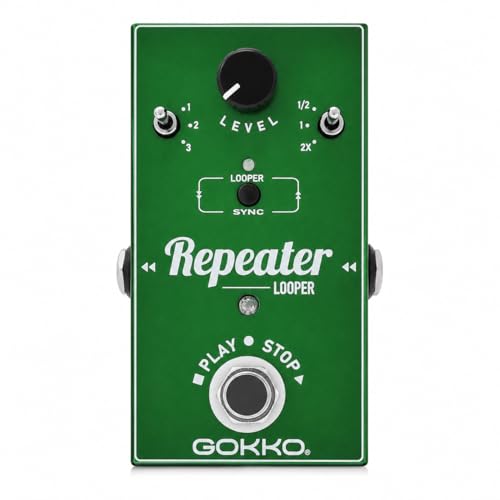
The GOKKO GK-27 offers up to 10 minutes of looping with unlimited overdubs and a simple undo/redo operation. It’s compact and beginner-friendly, making it a solid choice for keyboard players who want to layer melodies, chords, and bass-like lines without complex setup.
Who it’s best for: keyboard players who want extended solo practice or small live setups with quick layering. Why selected: it balances a practical seconds-to-minutes loop time with straightforward control. Limitation: no dedicated tuner or advanced sync features, which could be a drawback for precise tempo work in complex pieces.
LEKATO Looper Pedal (9 Loops, 40 Minutes)

LEKATO’s 9-loop looper provides a longer total recording time and a clear 48K/24-bit uncompressed audio path. It includes an analog-dry-through design and a built-in tuner function, which helps keyboard players maintain tuning during live loops.
Who it’s best for: performers who want longer ideas across multiple sections (verse/chorus/bridge) and a visible timing indicator. Why selected: strong memory and audio quality support for more complex keyboard arrangements. Limitation: some models require careful power supply choices (verify 9V negative tip) to ensure uninterrupted operation.
Zoom MS-90LP+ MultiStomp Looper

The Zoom MS-90LP+ offers up to 90 minutes per loop with a total capacity for 100 loops, plus five dedicated footswitches for independent control over undo, stop, loop effects, and rhythm. Its multi-stomp design suits keyboard players who want a more expansive live setup with flexible texture options and rhythm backing.
Who it’s best for: players performing longer sets or composing in the studio who need multiple loops and built-in rhythm. Why selected: high-capacity looping with independent controls helps reduce pedal-twitch during performances. Limitation: the unit’s feature set is broad, which may require a learning curve for fresh users.
Donner Triple Looper Pedal

Donner’s Triple Looper provides three independent loops with up to 30 minutes per loop and a total of 90 minutes of recording time. It features a bright, built-in screen for loop status and a straightforward single-footswitch control for recording, overdubbing, and playback. This model is versatile for keyboard players who want quick, live-loop changes without switching devices.
Who it’s best for: performers who want a robust, standalone looping station with a user-friendly interface. Why selected: the visible loop status and simple flow make it useful for live keyboard arrangements. Limitation: some users might want more advanced MIDI or external control features that aren’t listed here.
Buying Guide
- Loop time vs. memory: If you need long performances, look for pedals offering extended loop time per track and higher total memory (like 90 minutes per loop). Short loops are better for practicing ideas or layering quick motifs.
- Overdubs and undo/redo: For keyboard compositions, multiple overdubs and easy undo/redo are essential to refine textures without resetting the loop.
- Audio quality and path: Seek devices with uncompressed or high-fidelity audio paths and, if possible, an analog-dry-through design to preserve your keyboard’s natural tone while looping.
- Controls and accessibility: Footswitch layout, LCD or LED indicators, and straightforward operation reduce on-stage errors. A dedicated tuner is a plus for keyboard players relying on precise pitch.
- Size and power: Stage rigs benefit from compact form factors and stable power needs. Check if a pedal uses a 9V power supply and whether adapters are included or required.
- Expandability: If you anticipate adding more gear, consider looper pedals that integrate with other effects or DAW setups and offer MIDI or external control where available.
FAQ
- What is a loop pedal best used for on a keyboard?
It allows recording a phrase and layering additional phrases to build harmonies, rhythms, and textures in live or studio settings. - Do loop pedals work with pianos and MIDI keyboards?
Yes, most can be used with MIDI-enabled keyboards; check input/output options and any USB or MIDI features if you need sync with other gear. - Can I undo mistakes while looping on these pedals?
Most models support undo/redo or overdub removal during playback to help refine phrases without restarting. - Is a longer loop time necessary for keyboard playing?
It depends on your performance style. Longer loops suit extended pieces and live jams, while shorter loops fit practice sessions and quick ideas. - Do these pedals require a power adapter?
Many units run on a 9-volt battery or a dedicated power adapter; verify power options before use to ensure continuous operation on stage.