
The best mic amp for a PC depends on the microphone and how you use it. The Focusrite Scarlett Solo is best for recording with an XLR microphone, while the FIFINE AmpliGame SC3 is better suited to gaming and streaming controls. For a compact 3.5mm electret microphone, consider the Bewinner or SUNGOOYUE amplifier. The FIFINE KS5 bundle combines a gaming microphone and mixer for buyers who want both components together.
| Product | Best For | Key Distinction |
|---|---|---|
| Focusrite Scarlett Solo 3rd Gen | XLR recording | 24-bit/192kHz interface with Air Mode |
| FIFINE AmpliGame SC3 | PC gaming and streaming | Fader, mute button, voice changer, RGB |
| Bewinner Microphone Amplifier | Electret microphones | 3.5mm interface and headphone output |
| SUNGOOYUE Microphone Amplifier | Portable 3.5mm mic setups | Built-in 250mAh battery |
| FIFINE AmpliGame KS5 Bundle | All-in-one gaming setup | Dynamic XLR/USB microphone and mixer |
Focusrite Scarlett Solo 3rd Gen USB Audio Interface

The Scarlett Solo is a compact USB audio interface with one XLR microphone preamp and one Hi-Z instrument input. Its specifications include 24-bit/192kHz audio and a 56dB gain range. Air Mode is included as an input option, and the product is listed as compatible with macOS, Windows, and iPadOS.
Best for: PC users who want to record an XLR microphone, such as for voice recording, podcasts, or music, and may also connect an instrument. Its dedicated XLR preamp makes it a more recording-focused choice than a basic gaming mixer.
Choose this if audio recording quality and a standard XLR input matter more than gaming effects or multiple mixer controls. The Hi-Z input also gives the interface a separate instrument connection.
Limitation: It has one XLR mic preamp, so it is not the right pick for recording multiple XLR microphones at once. The listed features do not describe built-in RGB or voice-changing controls.
FIFINE AmpliGame SC3 Gaming Audio Mixer

The FIFINE AmpliGame SC3 is a USB plug-and-play gaming audio mixer for PC. Its listed features include an XLR preamp, an individual fader and volume control, a mute button, RGB lighting, a voice changer, monitoring, and 48V phantom power. These controls make it oriented toward interactive PC use rather than only adding microphone gain.
Best for: Gamers, streamers, and podcast users who want hands-on controls for adjusting audio and muting the microphone. The voice changer and RGB features distinguish it from a straightforward recording interface.
Choose this if you value accessible mixer controls and streaming-oriented features. The inclusion of 48V phantom power may also matter for a compatible microphone setup; check the microphone’s requirements before connecting it.
Limitation: This is a mixer with gaming features, not a bundle that includes a microphone according to the product name. Buyers should confirm that their existing mic and connection needs match the mixer before choosing it.
Bewinner 3.5mm Microphone Amplifier

The Bewinner amplifier is described as a high-gain mic amp for an electret condenser microphone. The product name lists 1000X gain, a 3.5mm interface, ALC level control, a stereo switch box made with an aluminum alloy, and a headphone output. This is a specialized option for users looking to amplify a compatible 3.5mm microphone rather than connect a conventional XLR mic.
Best for: Buyers with an electret condenser microphone and a setup built around a 3.5mm connection. ALC level control and a headphone output are listed features that may suit a compact voice-recording or monitoring arrangement.
Choose this if your microphone matches the stated electret type and 3.5mm interface. It may be a closer fit than an XLR interface when you specifically need a small-format mic amplifier.
Limitation: The listed features do not establish compatibility with every PC microphone or explain the required connection path to a computer. Confirm the mic type and PC input arrangement before buying; the stated 1000X gain alone does not guarantee a suitable signal.
SUNGOOYUE 3.5mm Microphone Amplifier

The SUNGOOYUE mic amplifier is described as an ABS and aluminum-alloy preamp with a 3.5mm interface and DC 5V power. The listing also specifies 1000x gain and a built-in 250mAh battery. Its stated uses include vocal recording, podcasting, and streaming.
Best for: Users who need a compact amplifier for a compatible 3.5mm microphone and value having a built-in battery. The battery makes this model distinct from the other small 3.5mm amplifier in this selection, although the listed information does not state battery runtime.
Choose this if your mic and PC setup suit a 3.5mm amplifier and you want the listed battery-powered feature for a portable arrangement. The product is framed for voice-focused applications such as recording, podcasts, and streams.
Limitation: The product name does not specify microphone types beyond its mic-preamp description, nor does it explain how it connects to every computer. Check the required power and signal connections rather than assuming that a 3.5mm plug is sufficient for your setup.
FIFINE AmpliGame KS5 Microphone and Mixer Bundle
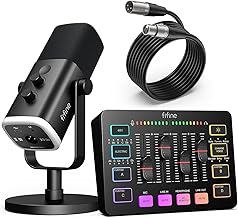
The FIFINE AmpliGame KS5 is listed as a gaming equipment bundle with a dynamic XLR/USB microphone and streaming audio mixer. Features in the product name include RGB, a volume fader, and an XLR interface. It is positioned for PC gaming, podcast recording, video, and vocal use.
Best for: PC users who want a microphone and mixer in one bundle rather than selecting those components separately. Its dynamic XLR/USB microphone description gives buyers two stated connection formats to consider, while the mixer adds a fader and gaming-oriented RGB.
Choose this if you are building a gaming or streaming desk setup and want the microphone included. It may be more convenient than buying a separate preamp and mic, provided the listed connection types suit your computer and preferred setup.
Limitation: The product name does not provide detailed specifications for the mixer’s controls or the microphone’s performance. Buyers who need a particular gain range, sampling rate, or advanced recording feature should verify those details before choosing this bundle.
Buying Guide: How to Choose a Mic Amp for a PC
A mic amp for a PC can refer to several kinds of equipment: a USB audio interface, a gaming mixer with a preamp, or a small amplifier for a particular 3.5mm microphone. These products are not automatically interchangeable. Start with the microphone’s connector and type, then decide whether you need recording features, live controls, or a bundled microphone.
What connection does your microphone use?
Check the microphone’s connection before comparing products. An XLR microphone points toward an interface or mixer with an XLR input, such as the Scarlett Solo or AmpliGame SC3. A 3.5mm electret microphone may be better matched to the Bewinner amplifier. The SUNGOOYUE also lists a 3.5mm interface, but buyers should verify its exact compatibility with their mic.
The KS5 bundle is described as including a dynamic XLR/USB microphone. That can suit buyers who want a mic in the box, but it is different from purchasing an amplifier alone. Do not assume that a product with “mic amp” in its description will work with every microphone plug or PC input.
Do you need an interface or a gaming mixer?
An audio interface is generally the more relevant category when the goal is to connect a microphone for recording. The Scarlett Solo lists one XLR preamp, an instrument input, 24-bit/192kHz audio, and Air Mode. This makes its feature set easier to compare against recording needs.
A gaming mixer prioritizes accessible controls and streaming-oriented functions. The SC3 lists a fader, volume control, mute button, voice changer, RGB, monitoring, and 48V phantom power. Those features can be useful at a gaming or streaming desk, but they do not make the device identical to a recording-focused interface.
How many microphones or inputs do you need?
Count the inputs you will use at the same time. The Scarlett Solo specifies one XLR microphone preamp and one Hi-Z instrument input. It is a single-mic choice based on the listed specifications, not a multi-XLR recording solution. The SC3 lists an XLR preamp, but its product information here does not give a full input count. Check the manufacturer’s details if you need multiple simultaneous sources.
If you need only a small amplifier for one compatible 3.5mm mic, a compact model may make more sense than a larger interface. If you need a microphone and mixer together, compare the KS5 bundle with buying separate components, while confirming what is included and what connections your PC supports.
Which features matter for recording, streaming, or gaming?
- Recording: Look for the input type, preamp count, and audio specifications. The Scarlett Solo lists 24-bit/192kHz audio and a 56dB gain range.
- Streaming and gaming: Consider a physical mute control, fader, monitoring, and voice effects. The SC3 lists these types of controls, along with RGB.
- Portable or compact use: Compare dimensions and power requirements using the full product details. SUNGOOYUE lists a built-in 250mAh battery and DC 5V power.
- Electret microphone amplification: Match the mic type and connector carefully. Bewinner specifically names electret condenser microphones and a 3.5mm interface.
- All-in-one setup: A bundle such as the KS5 includes a dynamic XLR/USB microphone and mixer, according to its product name.
Is more gain always better?
No. A large gain number by itself does not establish that an amplifier will be appropriate for your microphone or PC. The Bewinner and SUNGOOYUE names both list 1000X gain, but their connections and other specifications should be checked against the microphone and intended use. For XLR recording, consider the actual preamp specifications and input type rather than choosing only by a stated gain figure.
Also check whether your microphone requires phantom power. The SC3 lists 48V phantom power, but this feature should be used only when appropriate for the connected microphone. Do not assume every microphone needs phantom power or that all devices provide it.
What should you verify before ordering?
Confirm the computer operating system, connection cable, microphone connector, power requirements, and whether the product includes a microphone. The Scarlett Solo explicitly lists macOS, Windows, and iPadOS compatibility. The other provided product names focus on PC, streaming, or recording, but do not state a complete list of compatible operating systems.
For a 3.5mm amplifier, confirm how its output will connect to the PC and whether the computer accepts that signal as expected. For an XLR product, check the required cable and microphone type. These basic checks help avoid buying an amplifier that has the right general description but the wrong connection for the actual setup.
Frequently Asked Questions
What is a mic amp for a PC?
A mic amp boosts a microphone-level signal, while a USB audio interface or mixer can also provide a connection between a microphone and a computer. The right device depends on the microphone’s connector and whether you need recording, streaming, or gaming controls.
Which product is best for an XLR microphone?
The Focusrite Scarlett Solo is a clear option for one XLR microphone because it lists one XLR mic preamp and a 56dB gain range. The FIFINE SC3 also lists an XLR preamp and adds gaming and streaming controls.
Which option is best for gaming and streaming?
The FIFINE AmpliGame SC3 is designed as a gaming audio mixer and lists a fader, mute button, voice changer, RGB, monitoring, and 48V phantom power. The KS5 bundle is another option for buyers who want a dynamic XLR/USB microphone included.
Can I use a 3.5mm microphone amplifier with any PC mic?
No. A 3.5mm amplifier should be matched to the microphone’s type and connection. The Bewinner model specifically names electret condenser microphones. Check the amplifier and microphone requirements, plus the PC connection path, before purchasing.
Should I choose a microphone bundle or buy an amp separately?
Choose a bundle if you want both a microphone and mixer in one product, as with the FIFINE KS5. Choose a separate interface or amplifier if you already own a microphone and need a device suited to its connector and your intended use.