
The best microphone for lecture recording depends on where you sit and how you plan to use the audio. The EVIDA digital voice recorder is best for standalone, long-form lecture capture; the Blue Yeti suits a stationary desk setup; and the Mini Mic Pro and MAYBESTA are better for recording a lecturer or student on a phone. The FIFINE K669B is a straightforward USB option for computer-based classes and spoken notes.
| Microphone | Best For | Recording Setup |
|---|---|---|
| EVIDA 128GB Digital Voice Recorder | Standalone lecture recording | Portable voice recorder |
| Logitech Blue Yeti | Stationary desk recording | USB computer microphone |
| Mini Mic Pro | Recording a nearby speaker on a phone | Wireless clip-on microphone |
| FIFINE K669B | Computer-based lectures and notes | USB microphone with tripod |
| MAYBESTA Wireless Mini Microphone | Phone recording with two lavalier mics | Wireless clip-on microphone |
EVIDA 128GB Digital Voice Recorder
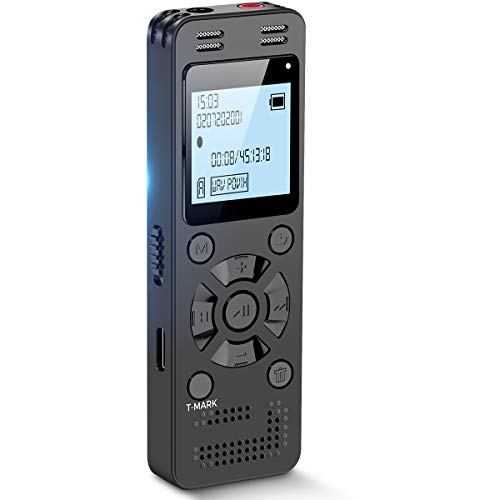
Best for: Students who want to capture lectures without connecting a microphone to a phone or computer. This is a dedicated voice recorder with built-in storage and playback, so it can serve as a separate recording device.
The EVIDA recorder offers 128GB of storage and supports MP3 recording at 128 or 192 kbps, as well as WAV at 1536 kbps. Its listed capacity is up to 9,296 hours of recordings, and the stated continuous battery life is up to 54 hours. Those specifications make it the most self-contained choice in this group for longer lecture sessions.
- Voice activation offers six adjustable sound-level settings to reduce silent gaps.
- Playback is built in, and recordings can be transferred to a computer.
- The product listing describes a noise-cancelling microphone and PCM recording.
Why it was selected: It is the only product here designed as a standalone digital recorder, with substantial listed storage and voice-activated recording. Limitation: The provided features do not specify wireless microphone input or a separate external mic, so check the recording arrangement you need before choosing it.
Logitech Blue Yeti USB Microphone

Best for: Recording lectures at a desk, capturing online classes, or recording spoken notes directly to a computer. The Blue Yeti is a stationary USB microphone rather than a pocket recorder or clip-on mic.
Its three-capsule array and four pickup patterns—cardioid, omnidirectional, bidirectional, and stereo—allow different recording approaches. For one speaker at a desk, cardioid is the most directly relevant pattern. Omnidirectional recording may suit a discussion involving several people near the microphone, while bidirectional can be useful when two speakers are positioned on opposite sides.
- USB connection supports computer recording on PC and Mac, according to the product name.
- Blue VO!CE software provides vocal effects and audio samples.
- The listing identifies uses including meetings, podcasts, and music recording.
Why it was selected: Its selectable pickup patterns make it more adaptable than a single-pattern desktop mic for different lecture or discussion setups. Limitation: A desk microphone is less convenient for students who need to record while moving around a classroom or campus.
Mini Mic Pro Wireless Lavalier

Best for: Recording a lecturer or student who can wear a clip-on mic while audio is captured on a phone, tablet, or laptop. Its small wireless design is more suited to a nearby, individually mic’d speaker than to recording an entire room from the back.
The Mini Mic Pro listing says it works with iPhone, Android, tablets, and laptops. It includes USB-C and Lightning adapters and is described as plug-and-play, with no app or Bluetooth setup required. The microphone clips onto clothing, and the package includes foam and dead-cat wind protection for recording in breezier conditions.
- Compact lavalier format can be clipped to a shirt or carried in a pocket.
- Listed noise reduction and included wind protection support voice recording in varied settings.
- Adapters are included for the stated USB-C and Lightning connections.
Why it was selected: It is a practical option when the speaker can wear the microphone and the recording device is a phone or computer. Limitation: A clip-on mic requires the wearer to carry or connect the recording device; it is not a standalone recorder.
FIFINE K669B USB Microphone

Best for: Students who record online lectures, spoken assignments, or study notes at a computer. This condenser microphone connects directly to a USB-A port and includes a 5.9-foot USB cable and tripod stand.
The K669B has a built-in volume knob for adjusting the microphone level, including turning it down to zero. Its metal construction and included stand make it a simple desktop setup for a fixed recording position. The listing also identifies uses such as meetings, voice-overs, and computer recording.
- Plug-and-play connection is intended for PC and laptop USB-A ports.
- The volume knob allows quick level adjustment at the microphone.
- A tripod stand keeps the mic positioned on a desk or table.
Why it was selected: It offers a direct USB setup and a physical volume control for students recording at a computer. Limitation: The listing says it is not compatible with phones or Xbox, and the USB-A connection makes it a less flexible choice for mobile recording.
MAYBESTA Wireless Mini Microphone

Best for: Phone-based lecture recording when the speaker can wear a lavalier microphone, or when two microphones are useful for an interview or discussion. The product is supplied as a two-pack and is described for use with phones, tablets, and laptops.
The MAYBESTA system is designed for automatic connection after the appropriate receiver is inserted and the microphone is switched on. The listing says the receiver has a longer interface intended to work with many phone cases, which can reduce the need to remove a case before recording. It also describes support for Android and a range of iPhone and iPad models, including USB-C devices.
- Two clip-on microphones are included, according to the product name.
- Automatic pairing is intended to simplify setup without an app.
- The longer receiver interface is designed for use with many phone cases.
Why it was selected: It is a useful alternative to a single lavalier when recording two speakers or keeping a second mic available. Limitation: It relies on a compatible phone, tablet, or laptop as the recording device, so it is not a standalone voice recorder.
Buying Guide: How To Choose A Microphone For Lecture Recording
Do you need a standalone recorder or a microphone for another device?
A standalone recorder stores audio itself. The EVIDA is the clearest fit in this group if you want to record without relying on a phone or computer during the session. A USB microphone, such as the Blue Yeti or FIFINE K669B, sends audio to a connected computer. Wireless lavaliers such as the Mini Mic Pro and MAYBESTA send audio to a connected phone, tablet, or laptop.
Think about what you will do immediately before and after class. A dedicated recorder can simplify lecture capture if you do not want to set up a computer. A phone-connected mic may be easier if your workflow already involves recording video or saving audio on your phone. A desktop USB mic is most appropriate for remote classes or note-taking at a desk.
Will the microphone record one speaker or a whole room?
Microphone placement and pickup pattern affect which voices are captured clearly. A lavalier mic is clipped to the person speaking, making it a strong choice when the lecturer or student can wear it. It may be less suitable when the speaker cannot access or operate the equipment.
For a desk discussion, the Blue Yeti’s four pickup patterns offer more configuration choices than a clip-on microphone. An omnidirectional setting can capture sound from different directions around the mic, while cardioid focuses on the front. No microphone can guarantee clear audio from every seat in a large room, so consider distance, room noise, and where the device will sit.
Which connection works with your device?
Check the actual port on your recording device before buying. The FIFINE K669B connects to USB-A and is listed as incompatible with phones. The Mini Mic Pro includes USB-C and Lightning adapters. MAYBESTA describes compatibility with Android, iPhone, iPad, laptops, and tablets, but the connector still needs to match your device. The Blue Yeti is a USB microphone for computer recording.
Compatibility details can vary by device model and operating system. If the listing names a required setting or connection, verify that your device supports it. For example, connection type and receiver fit can matter when a phone case is installed.
How important are storage, battery life, and recording length?
For long lectures, compare how the system handles power and saved files. The EVIDA listing specifies 128GB of storage and up to 54 hours of continuous recording, along with voice activation. Wireless lavaliers and USB microphones depend on a separate recording device, so that device’s available storage and battery also matter.
Do not treat a maximum storage or recording-time figure as a guarantee for every format or use. Higher-quality audio files can use more storage than lower-bitrate files, and actual recording time can depend on settings and operating conditions. Choose a format that balances audio detail with the space you have available.
How can you reduce missed or hard-to-hear audio?
Place the microphone close to the intended speaker when possible. Before class, make a short test recording from the seat or location you plan to use, then listen back with headphones. This helps reveal low volume, handling noise, distant voices, or interference before an important lecture.
- Keep a clip-on microphone near the speaker’s mouth without placing it where clothing rubs against it.
- Position a desktop mic on a stable surface and avoid tapping the table.
- Use wind protection outdoors when the microphone supports it.
- Check the recording level and confirm that the device is actually saving audio.
- Follow the instructor’s and school’s rules before recording a class.
Is noise reduction always the best setting?
Noise reduction can help limit distracting sounds, but it is not a substitute for good placement. The ZealSound product listing specifically describes a noise-reduction mode intended to reduce sounds such as keyboard clicks, fan noise, and background chatter. The Mini Mic Pro listing also describes noise reduction. For any microphone, test the result because aggressive processing can affect how natural a voice sounds.
When recording in a quiet room, a natural or default mode may preserve the voice more faithfully. In a noisy environment, a closer microphone position may improve speech clarity more reliably than relying on processing alone.
Frequently Asked Questions
What is the best type of microphone for recording a college lecture?
A dedicated digital voice recorder is a practical choice when you want self-contained recording. A lavalier is better when the speaker can wear a mic, while a USB microphone suits desk-based or online lectures.
Can I record a lecture with a wireless lavalier microphone?
Yes, if the lavalier connects to a phone, tablet, or laptop that can record audio. The Mini Mic Pro and MAYBESTA are listed as wireless clip-on options for compatible devices.
Is a USB microphone suitable for recording in a classroom?
It can work if you can connect it to a computer and place it near the speaker. A USB desktop microphone is less convenient for mobile recording and may not capture distant voices clearly.
Should I choose a voice recorder or a phone microphone?
Choose a voice recorder if you want a separate device with built-in storage and playback. Choose a phone microphone if you prefer to record directly to a compatible phone or use the audio in a phone-based video workflow.
How can I make lecture recordings easier to understand?
Place the microphone close to the lecturer, test the setup beforehand, and listen to a sample recording. Confirm that the device has enough storage and power, and select a recording location with minimal background noise.
Do I need permission to record a lecture?
Check the instructor’s requirements and your school’s recording policy before recording. Rules can vary by class and institution, so do not assume that recording is permitted without approval.