
The best microphone that connects to a car depends on whether you need clearer hands-free calls or want to sing along to music. ViaBecs is a practical choice for compatible stereos with a 3.5mm mic input, while QKVCX is designed for wireless karaoke and car audio playback. Tesla owners looking for a karaoke mic can consider PUREMIC, but should check the receiver setup and vehicle compatibility before buying.
| Product | Best For | Connection Type |
|---|---|---|
| QKVCX Wireless Car Karaoke Kit | Wireless karaoke and travel sing-alongs | Receiver with Bluetooth, USB, and FM modes |
| PUREMIC Tesla Karaoke Microphone | Tesla karaoke and voice effects | USB-A receiver; 3.5mm cable for compatible audio inputs |
| ViaBecs Car Microphone | Hands-free calls with compatible stereos | 3.5mm TRS plug |
| FingerLakes Microphone Assembly | Basic replacement mic for a 3.5mm input | 3.5mm plug |
| MICMXMO Car Microphone | Long cable reach and selectable 3.5mm/2.5mm connection | 3.5mm plug and 2.5mm adapter |
QKVCX Wireless Car Karaoke Kit

The QKVCX kit is best for drivers and passengers who want a wireless microphone for karaoke, road trips, or group gatherings rather than a simple replacement mic for hands-free calls. Its receiver is designed to connect with car audio using several playback modes.
- Bluetooth, USB, and FM modes provide different ways to connect or play audio.
- The microphone offers up to 30 hours of use per charge and a stated wireless range of 10 meters.
- One-click original-sound elimination and voice effects support karaoke use.
- The receiver includes USB-A and USB-C charging ports.
Choose this if you want a karaoke-focused system with rechargeable wireless microphones and multiple audio modes. The product description recommends karaoke apps for the best results, so app-based singing may require setup on a phone. It is not presented as a standard wired external microphone for a stereo’s dedicated mic input.
PUREMIC Tesla Karaoke Microphone

The PUREMIC microphone is best for Tesla owners seeking karaoke features, including selectable voice effects. The listing names Model 3, Model Y, Model S, and Model X, and includes a USB-A receiver. It also includes USB-A and auxiliary cables for use with other compatible cars or speakers.
- Eight sound effects include standard, male, female, children, monster, concert, living room, and K.T.V. modes.
- The package includes one microphone and a portable case.
- A 3.5mm jack and included auxiliary cable provide another connection option for compatible equipment.
Choose this if Tesla-focused karaoke and built-in effects are priorities. The product information notes that some buyers have reported that the mic did not work in their Tesla. It also says the receiver must be powered on after insertion and that users should check for its blue light. Confirm that the connection method suits your vehicle before choosing it.
ViaBecs 3.5mm Hands-Free Microphone

The ViaBecs microphone is best for people who want an external mic for clearer hands-free calls through a compatible car stereo or head unit. It uses a 3-pole 3.5mm TRS connector and is described for Android head units, Bluetooth stereos, GPS radios, and DVD players that have a microphone input.
- A 3-meter cable gives placement flexibility within the vehicle.
- The package features a clip and adhesive mount.
- The mic can be positioned closer to the driver than a built-in or dashboard-mounted microphone.
Choose this if your stereo has a matching 3.5mm TRS microphone input and you want to mount the mic near the driver. The main limitation is connection-specific: a 3.5mm plug will not be useful if the head unit lacks a compatible mic input. Check the stereo manual or input labels before ordering.
FingerLakes 3.5mm Car Microphone
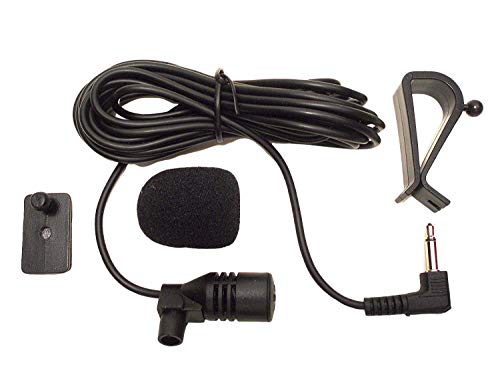
The FingerLakes microphone is best for replacing or adding a basic external mic to a car radio with a 3.5mm microphone input. Its listing describes an electret condenser cartridge with high sensitivity, low impedance, and anti-noise and anti-interference characteristics.
- The 3.5mm connection is intended for most car radios with a matching mic input.
- The product description highlights fast, accurate data transmission and stable voice pickup.
- Its straightforward format suits buyers who do not need wireless karaoke features.
Choose this if your main goal is a simple wired microphone for a compatible head unit. The listing does not specify a cable length or include detailed vehicle-specific compatibility information, so verify the input type and installation requirements before purchase. “Most” radios with a mic input does not mean every 3.5mm audio jack supports a microphone.
MICMXMO Car Microphone With Adapter

The MICMXMO microphone is best for buyers who need a longer cable or want the option of connecting through a 3.5mm or 2.5mm mic input. Its listed cable length is 16.4 feet, and the package includes a 3.5mm-to-2.5mm adapter.
- The listing describes it as a mono omnidirectional condenser microphone.
- It is presented for compatible Sony, Pioneer, Kenwood, Boss, JVC, Jensen, and Alpine receivers, among other head units.
- The product description mentions hands-free calling and anti-noise and anti-interference features.
Choose this if cable reach and the included adapter are useful for your installation. Although the listing names several stereo brands, the receiver still needs a compatible microphone input. Avoid assuming that the adapter makes it suitable for every 2.5mm connection; check your head unit’s specifications and input requirements.
Buying Guide: How To Choose A Microphone That Connects To A Car
Do you need a microphone for calls or karaoke?
Start with the intended use. For hands-free calls, look for an external wired microphone designed to connect to a car stereo or head unit’s microphone input. ViaBecs, FingerLakes, and MICMXMO fit this general category, subject to input compatibility. For singing and group entertainment, consider a karaoke kit such as QKVCX or the Tesla-focused PUREMIC. Karaoke microphones and call microphones are not interchangeable by default: they may use different receivers, connections, and audio paths.
Which connector does your car stereo use?
Check the stereo or head-unit manual for a microphone input and its connector type. A 3.5mm plug may be TRS or another configuration, and a port that looks like an auxiliary audio input may not accept a microphone. MICMXMO includes a 2.5mm adapter, but an adapter only changes the physical plug size; it does not guarantee electrical or functional compatibility. Match the microphone’s connector and input requirements to the specific receiver.
How much cable length do you need?
Measure a route from the head unit to a safe mounting point near the driver, allowing enough slack to route the cable neatly. ViaBecs lists a 3-meter cable, while MICMXMO lists a 16.4-foot cable. The FingerLakes product details provided do not state a cable length. A longer cable can offer more placement options, but cable routing should not interfere with controls, pedals, airbags, or the driver’s view.
Where should a wired microphone be mounted?
Positioning a wired mic closer to the driver can help voice pickup compared with relying on a built-in or distant dashboard microphone, according to the ViaBecs product description. Use the included mounting accessories when available, and choose a position that does not obstruct driving. Before permanently attaching a mic, check that the cable reaches and that the placement works for the driver’s normal seating position.
What should you check for a wireless car karaoke mic?
Confirm how the receiver connects to your car audio system and whether the included playback modes suit your setup. QKVCX lists Bluetooth, USB, and FM modes, plus a stated 10-meter range and up to 30 hours of microphone use. PUREMIC lists a USB-A receiver and an auxiliary cable for compatible equipment. For PUREMIC, follow the listed instruction to power on the receiver and check for the blue indicator.
How can you compare the main options?
| Need | What To Prioritize |
|---|---|
| Hands-free calls | A compatible stereo mic input, suitable connector, and convenient mounting position |
| Long installation route | Listed cable length and a practical cable path |
| Karaoke and voice effects | Wireless receiver connection, playback modes, and included effects |
| Uncertain head-unit compatibility | Manual or manufacturer specifications for the exact microphone input |
Frequently Asked Questions
Can I plug any 3.5mm microphone into my car?
No. The car stereo must have a microphone input that supports the microphone’s connector and configuration. A 3.5mm auxiliary input is not necessarily a microphone input.
What is the difference between a car call mic and a karaoke mic?
A call mic is typically a wired external microphone for a compatible stereo or head unit. A karaoke mic may use a wireless receiver, music playback modes, and voice effects. Check the intended use and connection method before buying.
Will a 3.5mm car microphone work with a factory stereo?
Only if the factory stereo has a compatible external microphone input. Check the vehicle or stereo documentation; the presence of a 3.5mm audio jack alone does not confirm microphone support.
Does a 2.5mm adapter guarantee compatibility?
No. An adapter changes the plug size, but it does not guarantee that the microphone’s wiring or signal requirements match the head unit. Confirm the receiver specifications.
What should Tesla owners check before choosing a karaoke mic?
Verify that the product supports the specific Tesla model and follow its receiver setup instructions. The PUREMIC listing advises powering on the receiver after insertion and checking for a blue light, and it reports that some users have experienced connection problems.