
For recording a Let’s Play, choose a real USB microphone rather than a toy stage prop. The ZealSound USB microphone is best suited to creators who want listed controls such as gain, mute, and monitoring, while the gaming USB microphone is a better fit for gamers looking for a quick-mute button and pop filter. The other listed products are pretend microphones, not recording devices; they may suit a costume or video prop but cannot capture game commentary.
| Product | Best suited for | Recording microphone? |
|---|---|---|
| ZealSound Podcast Microphone | Commentary and streaming with onboard controls | Yes, according to its listing |
| Gaming Microphone for PC | Gaming videos and streaming | Yes, according to its listing |
| 16 Pack Fake Toy Microphones | Group costumes or party props | No |
| 3 Pack Plastic Fake Microphones | Stage-themed decorations or props | No |
| Zhanmai Inflatable Microphones | Large groups and music-themed parties | No |
ZealSound Podcast Microphone

Best for: Let’s Play creators who want a USB microphone with several listed controls for managing voice capture during recording or streaming.
The product listing describes this as a PC podcast microphone with noise cancellation, gain and volume adjustment, a mute button, monitoring, and an echo function. Those controls may be useful when recording game commentary: gain and volume adjustment provide ways to change the microphone level, while a mute button gives the creator a quick way to silence the mic.
It is also listed for YouTube, TikTok, podcasting, and streaming. The product name mentions iPhone, iPad, Android, and Mac as well as PC. Check the current listing and your device’s connection requirements before buying; the supplied product information does not specify setup details for each device.
- Choose this if you want a USB mic with multiple listed audio controls.
- Better for creators who may use monitoring or mute controls while recording.
- Limitation: the listing does not provide detailed specifications such as pickup pattern or connection setup for every device.
This microphone is one of the two relevant recording options in this selection. The toy microphones below are props and should not be treated as substitutes for a USB recording mic.
Gaming USB Microphone With Pop Filter

Best for: Gamers recording videos, podcasts, or streams who want a microphone listing that specifically calls out a quick-mute control and pop filter.
The product is described as a condenser USB microphone for podcasts, videos, and streaming. Its listed features include a quick mute, pop filter, and RGB lighting. The name also states compatibility with PS4, PS5, computers, and laptops. These details make it a gaming-focused option for creators comparing a general podcast microphone with a product marketed directly for gaming.
A quick-mute control can be useful when a creator needs to silence commentary temporarily. A pop filter is included according to the listing, though the provided information does not explain its design or how it attaches. RGB lighting is a visual feature rather than a measure of recording quality.
- Choose this if you want a gaming-oriented USB mic with a listed pop filter and quick mute.
- Better for creators who value the gaming setup style and stated console or computer compatibility.
- Limitation: the supplied details do not include pickup pattern, frequency response, or other technical audio specifications.
Compare the listed device support with your own setup before purchase. Do not assume that the microphone will work with every recording application or connection arrangement just because the listing names a platform.
16 Pack Fake Toy Microphones
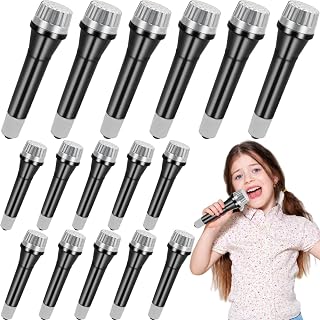
Best for: Creators who need pretend microphones for a group costume, party scene, or staged video—not for recording commentary.
The product name describes 16 plastic pretend microphones, each listed as 5.7 inches tall. It is presented as a prop for karaoke, stage costumes, role-play, birthday parties, and party favors. A Let’s Play creator might use props as background decoration or as part of a scripted scene, but the supplied information identifies these as fake toy microphones rather than functional audio equipment.
For actual gameplay narration, pair a recording setup with a real microphone such as one of the two USB options above. This pack is relevant only when the goal is visual presentation or a group activity. Its quantity may be useful when a production needs multiple matching props.
- Choose this if you need many lightweight-looking pretend mic props for a themed scene or party.
- Better for group activities than a single creator’s recording desk.
- Limitation: it is a plastic pretend-microphone set, not a microphone for capturing voice audio.
Three Pack Plastic Fake Microphones

Best for: Small sets, costume scenes, and party decorations that need a few black stage-mic props.
The listing describes three plastic fake microphones in black and names Halloween, Christmas, and birthday parties as possible uses. For a gaming channel, these may work as visual set dressing, a costume accessory, or a prop in a planned video. The product name does not describe a USB connection, audio controls, or voice-recording function, so it should not be selected as the microphone that captures a Let’s Play.
This three-piece pack is a more focused prop choice than a larger party-favor assortment when only a few stage-style objects are needed. It is not a substitute for a functional microphone, even if it resembles stage equipment on camera.
- Choose this if you need three black fake microphones for a staged scene or themed event.
- Better for small prop needs than distributing a larger set to a group.
- Limitation: these are described as plastic fake microphones, not recording gear.
Zhanmai Inflatable Microphones

Best for: Music-themed parties, group activities, or large-scale visual props where inflatable objects are appropriate.
The listing describes 24 inflatable fake microphones in simple colors. Suggested uses include rock-star karaoke, retro-themed parties, music birthdays, DJ props, and singer costumes. Their quantity makes them the largest prop set among the products here. A creator could use them for a party video or a deliberately playful background, but they are not equipment for recording spoken commentary.
Inflatable props serve a different purpose from a desktop microphone. They are intended as pretend microphones and party accessories, so buyers should not expect audio controls, a USB connection, or voice pickup based on the product details provided.
- Choose this if you need numerous colorful fake microphone props for a group event.
- Better for party scenes and costume use than a permanent recording setup.
- Limitation: it is an inflatable prop set, not functional audio gear.
Buying Guide: What Should You Look For In A Let’s Play Microphone?
Do you need a real recording microphone or a visual prop?
Start by identifying the job. A real microphone captures voice for gameplay commentary, voice-over, or streaming. A fake or inflatable microphone is a costume or party prop. Of the five products in this article, only the ZealSound and gaming USB microphones are described as recording microphones. The other three are explicitly presented as pretend products.
If you are shopping for usable audio, do not choose an item because it looks like a stage mic. Check that the listing describes it as a recording microphone and states a connection method or intended use relevant to your setup. The toy products here do not list audio-recording features.
Which listed controls matter during gameplay?
Mute controls can help when you need to stop transmitting commentary temporarily. The ZealSound listing mentions a mute button, while the gaming microphone listing specifies a quick mute. Gain or volume adjustment is also listed for the ZealSound, which may help users manage microphone level. Monitoring is another listed ZealSound feature; check the product information to understand how it is implemented before relying on it.
These features help distinguish the two recording options, but the product details provided do not establish which microphone produces better sound. Compare full specifications and setup requirements rather than treating a feature list as proof of audio quality.
Should you choose a gaming microphone or a podcast microphone?
The gaming USB microphone is marketed for gaming, podcasts, videos, and streaming. Its listed pop filter, quick mute, RGB lighting, and stated PS4, PS5, computer, and laptop compatibility may appeal to gamers who want a gaming-oriented product. The ZealSound is marketed for podcasting, streaming, and social video, with gain and volume adjustment, mute, monitoring, echo, and noise cancellation in its name.
Choose based on the features you will use, not the product label alone. If you need a particular control, verify it in the current listing. If you need a specific connection or setup, confirm the details for your device and recording software before ordering.
How important is device compatibility?
Compatibility should be checked against the exact device used to record. The gaming microphone’s name lists PS4, PS5, computers, and laptops. The ZealSound’s name lists PC, Mac, iPhone, iPad, and Android, as well as streaming and podcast uses. These descriptions do not provide every connection detail, so verify required ports, adapters, and software support for your setup.
Do not assume that a microphone works identically across a console, computer, tablet, and phone. A product may name several platforms while still requiring a particular connection arrangement. Review the manufacturer or seller’s current setup information before purchase.
What technical details should you compare?
The supplied product information does not state pickup patterns, frequency response, sample rate, bit depth, or included mounting hardware. These can be useful comparison points when detailed specifications are available. For a noisy room, check what the listing means by noise cancellation rather than assuming it eliminates every background sound. For desk recording, also review the listed package contents and placement options.
Keep the room and recording process in mind. A microphone alone does not establish how clear a finished Let’s Play will sound. Game volume, room noise, microphone position, and recording levels can all affect the result, so test the setup before recording a full session.
When do fake microphones make sense?
Fake microphones can be useful for costume scenes, party videos, or decorative sets. The 16-piece pack is described as 5.7 inches tall and intended for party favors and role-play. The three-piece pack offers black plastic stage props, while the 24-piece Zhanmai set is inflatable and aimed at parties and costumes. None is described as a recording device.
Choose a prop based on quantity, appearance, and the scene where it will be used. For spoken gameplay audio, keep a separate functional microphone in the recording setup.
Frequently Asked Questions
Which products listed here can record Let’s Play audio?
The ZealSound Podcast Microphone and the Gaming USB Microphone are described as recording microphones. The other three products are fake or inflatable props and are not listed as audio-recording equipment.
Which option lists a quick-mute feature?
The gaming USB microphone lists a quick-mute feature. The ZealSound microphone lists a mute button.
Which microphone lists gain adjustment and monitoring?
The ZealSound Podcast Microphone lists gain and volume adjustment, monitoring, and a mute button.
Can the fake microphones replace a USB microphone?
No. The products are described as plastic or inflatable pretend microphones. Their listings do not describe audio capture or USB recording features.
Which listed product is intended for the most party props?
The Zhanmai product is listed as a 24-piece set of inflatable fake microphones. The 16-piece plastic set is another option for group party favors.
What should I verify before buying a recording microphone?
Check the connection method, compatibility with your exact device, included components, and the controls or technical specifications you need. The product names alone do not provide every setup detail.