
The best MIDI controller with knobs and sliders depends on how you work: the Akai MIDImix suits hands-on mixing, the Novation Launch Control XL 3 is built for DAW and hardware integration, and the Korg nanoKONTROL2 offers a slim control surface. The EasyControl.9 adds programmable banks, while the APC Mini MK2 is a better fit for Ableton clip launching than for extensive fader control.
| Controller | Best For | Standout Feature |
|---|---|---|
| Akai MIDImix | Hands-on DAW mixing | 24 knobs and 9 faders |
| Novation Launch Control XL 3 | Hybrid studio setups | DAW integration and MIDI ports |
| Korg nanoKONTROL2 | Compact control | Low-profile design |
| LANRU EasyControl.9 | Programmable control layouts | Four memory banks |
| Akai APC Mini MK2 | Ableton clip launching | 64-pad RGB matrix |
Akai Professional MIDImix

The Akai Professional MIDImix is best for producers who want a dedicated set of controls for track levels, effects, and other DAW mixer parameters. Its layout includes eight individual line faders, one master fader, and 24 assignable knobs arranged in three per channel.
The product is described as a lightweight, compact, and robust MIDI mixer controller. Its single-button mapping feature is intended to map mixer settings to a DAW, making it a practical choice for users who want a physical mixing surface rather than relying only on a mouse.
- Best for: DAW users who regularly adjust several channel and effect parameters.
- Why it stands out: The eight channel faders and three-knob-per-channel layout make it easy to compare and control multiple mixer functions.
- Consider: Choose another option if you need stated hardware MIDI ports or a controller centered on clip-launch pads.
Novation Launch Control XL 3
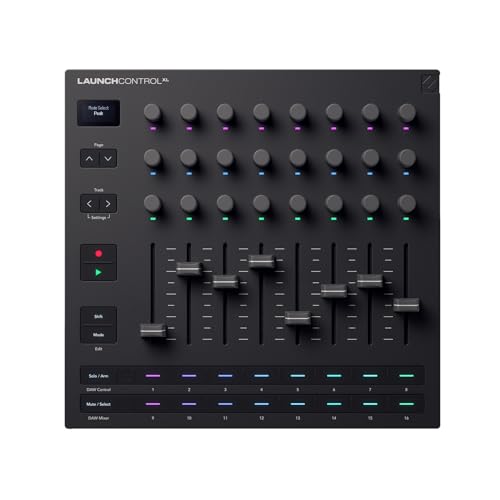
The Novation Launch Control XL 3 is best for musicians combining a computer-based DAW with external synthesizers or effects. Its listed features include integration with Ableton Live, Logic Pro, FL Studio, Cubase, HUI, and other major DAWs, as well as MIDI In, Out, and Out2/Thru ports for hardware control.
Custom Mode is designed to bring external gear, a DAW, and plugin parameters into one control layout. That makes this model a strong choice for a hybrid setup where the same surface needs to address both software and connected hardware.
- Best for: Users who need a MIDI control surface for both DAW work and external hardware.
- Why it stands out: The listed MIDI connections and Custom Mode support provide options beyond controlling software alone.
- Consider: If you only need basic track-volume adjustments, a simpler mixer-style controller may be more appropriate.
Korg nanoKONTROL2

The Korg nanoKONTROL2 is best for buyers who want a low-profile, compact control surface for music software. Korg describes it as a multi-function controller that supports numerous software titles, including major DAW programs. Its listed parameters include track select and marker advance.
This is a sensible option when a full-size mixing surface would take up too much desk space. The feature information emphasizes slim-line form and software support, making it suitable for compact studio setups and users who value a straightforward control surface.
- Best for: Home-studio users seeking a slim controller for software and DAW tasks.
- Why it stands out: It combines a low-profile design with track-selection and marker-advance functions.
- Consider: The provided features do not specify a knob-and-fader count, so compare its exact control layout with your needs before choosing.
LANRU EasyControl.9
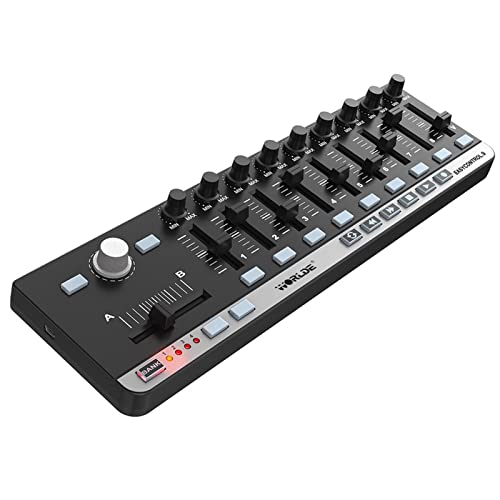
The LANRU EasyControl.9 is best for buyers who want a compact controller with multiple programmable control groups and transport buttons. Its listed layout includes nine knobs, nine sliders, and nine buttons, alongside four programmable memory banks.
The six transport buttons cover rewind, play, fast-forward, loop, stop, and record. The memory banks may help users store alternate control arrangements, although the supplied product information does not detail how programming works or which software setups are supported.
- Best for: Users who want a small controller with both knobs and sliders plus alternate saved layouts.
- Why it stands out: It specifies a balanced group of nine knobs and nine sliders, with transport controls included.
- Consider: Check software compatibility and setup instructions before buying, since those details are not provided in the listed features.
Akai Professional APC Mini MK2

The Akai Professional APC Mini MK2 is best for Ableton Live users who prioritize clip launching and visual feedback over a large bank of knobs and sliders. Its main feature is a bright 8-by-8 RGB matrix with 64 pads for launching clips, loops, vocals, and melodic samples.
The product is described as pre-mapped for one-to-one integration with Ableton Live versions 11, 12, and 7 onwards, and Ableton Live Lite is included. It can support creative looping, mixing, home-studio work, and live performance, but its listed features emphasize pads rather than a knob-and-fader layout.
- Best for: Ableton users who want clip launching and color-coded pad feedback.
- Why it stands out: The 64-pad RGB matrix provides a clear, visual way to trigger clips.
- Consider: Choose a different model if physical knobs and sliders are your main requirement.
Buying Guide: How To Choose A MIDI Controller With Knobs And Sliders
A MIDI controller sends commands to music software or compatible equipment. Knobs are commonly assigned to continuous parameters such as effect amounts or instrument settings; sliders are commonly used for levels and other parameters that benefit from longer physical travel. The best layout depends on what you want to control most often.
How Many Knobs And Sliders Do You Need?
Start by listing the controls you want to adjust at the same time. A controller with many knobs and faders can make mixer work more direct, while a smaller surface may suit a compact desk or a simpler workflow. The MIDImix has 24 knobs and nine faders. The EasyControl.9 lists nine of each, offering a more evenly matched set of controls.
Do not compare controllers by control count alone. The arrangement matters too. Several knobs grouped by channel can make mixer tasks easier to follow, while programmable banks can offer alternate layouts. Look for a layout that matches your regular tasks rather than buying controls you are unlikely to use.
Will It Work With Your DAW?
Check the controller’s stated software support and the setup requirements for your DAW. The Korg nanoKONTROL2 is described as supporting numerous software titles, including major DAWs. Novation lists integration with several major DAWs and HUI. The APC Mini MK2 is specifically presented as an Ableton Live clip-launch controller.
For the LANRU EasyControl.9, the supplied feature list does not name supported DAWs. If you are considering it, verify the manufacturer’s current compatibility and configuration information before purchase. A controller’s physical controls are useful only if the intended software can receive and assign their MIDI messages.
Do You Need Hardware MIDI Connections?
If you want to control external synthesizers or effects without relying solely on a computer, check whether the controller has the required hardware connections. The Launch Control XL 3 lists MIDI In, Out, and Out2/Thru ports and is described as suitable for hybrid setups. The other listed products are described primarily in terms of USB or DAW control, so do not assume they offer the same hardware-MIDI connections.
Also consider whether your setup needs a computer during performance. The Launch Control XL 3 feature list says its MIDI ports enable custom-mapped control of hardware without a computer. Confirm the specific routing and setup process for your equipment before relying on that workflow.
Are You Mixing Or Launching Clips?
For track levels and mixer parameters, a controller with physical faders and assignable knobs is usually the more direct fit. The MIDImix is the clearest match in this group for that purpose because its listed controls include eight line faders, a master fader, and 24 knobs.
For triggering clips in Ableton Live, the APC Mini MK2’s 64-pad matrix is the central feature. It is not the strongest match if the main goal is adjusting many parameters with knobs and sliders. Buyers who need both functions should compare the required pad layout with the available fader and knob controls rather than treating all MIDI surfaces as interchangeable.
What Should You Check Before Buying?
- Control layout: Confirm the number and arrangement of knobs, sliders, buttons, and pads.
- Software support: Verify compatibility and mapping instructions for your DAW and operating system.
- Connection type: Decide whether USB control is enough or whether you need hardware MIDI ports.
- Available space: A low-profile or compact design may be more practical for a small desk or portable setup.
- Workflow: Choose based on whether you primarily mix, adjust instruments and effects, launch clips, or control external gear.
- Programmability: If you need alternate layouts, check how banks or custom modes are saved and selected.
Frequently Asked Questions
What is the best MIDI controller here for mixing?
The Akai Professional MIDImix is the strongest match for hands-on DAW mixing in this selection. It lists eight individual line faders, a master fader, and 24 assignable knobs for mixer and other software parameters.
Which controller is best for a hybrid hardware and DAW setup?
The Novation Launch Control XL 3 is the clearest fit because its listed features include MIDI In, Out, and Out2/Thru ports, DAW integration, and a Custom Mode for combining external gear and software parameters.
Which option is designed for Ableton Live clip launching?
The Akai APC Mini MK2 is designed for Ableton Live clip launching. Its 64 RGB pads provide visual feedback, and the product information states that it is pre-mapped for specified Ableton Live versions.
Are knobs and sliders interchangeable?
No. Knobs rotate and are often assigned to continuous settings, while sliders move along a straight path and are often used for levels. Either type can be assigned to different MIDI parameters when supported by the software and controller.
What should I verify for a programmable MIDI controller?
Check which DAWs and operating systems it supports, how controls are assigned, and how saved banks are recalled. The EasyControl.9 lists four programmable memory banks, but its supplied features do not explain its software compatibility or programming process.