
The best MIDI controller sound module depends on whether you need sounds inside a standalone device or hands-on controls for software. The MIDIPLUS PianoEngine and PianoBox Mini are the clearest choices for adding sound to a MIDI keyboard. The DAIERTEK 25-key controller and M-Wave controller are better suited to software production, while the M-VAVE SMC-Mixer is a control surface whose listing provides limited feature detail.
| Product | Best suited for | Primary role |
|---|---|---|
| MIDIPLUS PianoEngine | Players who want a sound module with varied tones and display controls | GM sound module |
| PianoBox Mini | Keyboard users seeking a portable General MIDI sound source | GM sound module |
| DAIERTEK 25-Key Controller | Portable computer-based music production | Keyboard controller |
| M-VAVE SMC-Mixer | Hands-on mixing and parameter control | MIDI mixer controller |
| M-Wave Wireless Controller | Mobile DAW control with a keyboard-style playing surface | Wireless MIDI controller |
MIDIPLUS PianoEngine USB Host MIDI Sound Module

The MIDIPLUS PianoEngine is the most feature-detailed option here for buyers who want a sound module rather than only a controller. It provides 128 General MIDI sounds, with the listing highlighting improved piano and drum sounds. It also supports up to 64 complex tones and 24-bit/48 kHz audio input and output.
Best for: Keyboard players who want a broad range of built-in sounds and direct MIDI connectivity. The stated support for MIDI devices with MIDI OUT, MIDI IN, or USB output makes it a flexible candidate for varied MIDI setups. The USB Host, MIDI IN, and MIDI OUT can work simultaneously, according to the product details.
A 128-by-64-pixel LCD and three preset function buttons provide onboard controls. The listing also describes a duet arrangement in which one piano plays accompaniment while another plays melody. These features make it a better fit for users who value accessible controls and playing arrangements alongside sound selection.
Limitation: Buyers who only need a compact, simple General MIDI sound source may not need its broader functions. Confirm that your keyboard’s MIDI connection matches the module’s available connection options before buying.
PianoBox Mini General MIDI Sound Module

The PianoBox Mini is a purpose-built choice for adding General MIDI sound to a controller keyboard. Its product information emphasizes standalone use: connect a USB MIDI keyboard directly and play without turning on a computer. It also includes a standard MIDI input for keyboards or other MIDI devices with a MIDI OUT port.
Best for: Players who want to use a keyboard away from a computer or reduce reliance on computer-based sound processing. The built-in battery is another stated portable-use feature, making this a better match for users who prioritize a compact, self-contained setup.
The PianoBox Mini is especially relevant when the keyboard has USB MIDI but lacks a standard MIDI OUT port, since the listing specifically describes direct USB keyboard connection. It can also serve players whose instruments provide standard MIDI OUT.
Limitation: The provided product details do not specify the number or character of its sounds, audio output connections, or battery runtime. Check those requirements against the full product information before choosing it over the more extensively specified MIDIPLUS module.
DAIERTEK 25-Key Portable MIDI Controller
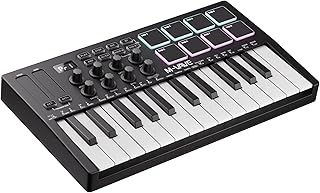
This DAIERTEK product is a MIDI controller, not a sound module described as containing built-in instrument sounds. Its 25 velocity-sensitive keys, eight RGB-backlit velocity-sensitive pads with aftertouch, eight assignable encoders, mini-display, and two capacitive touch-strips are aimed at controlling a music-production setup.
Best for: Producers who want a portable playing and control surface for a compatible computer or mobile-device workflow. The listing states compatibility with Windows, Mac OS, Android, and iOS, as well as DAWs that support BLE MIDI and USB MIDI, naming Ableton Live, FL Studio, Cubase, and GarageBand for iOS.
Bluetooth connectivity and a built-in 2,000 mAh battery are specified, with an approximately 16-hour operating time stated in the product features. This makes it a better fit for users who want wireless portability and performance controls than for someone looking for a standalone sound-generating module.
Limitation: The listing describes controller functions and software compatibility rather than onboard sounds. If you need the keyboard to produce sound without a computer or another sound source, choose a product specifically presented as a sound module instead.
M-VAVE SMC-Mixer Wireless MIDI Controller

The M-VAVE SMC-Mixer is named as a wireless MIDI mixer controller. It may suit buyers comparing control surfaces for mixer-style operation, but the supplied product information does not list specific features beyond its name.
Best for: Buyers who are specifically seeking a MIDI mixer controller and are prepared to verify its controls, connections, and compatibility from the complete listing before purchase. Its category makes it a different kind of tool from either sound module in this guide.
Limitation: No feature list was provided, so details such as the number of faders, knobs, buttons, supported software, battery, or connection method cannot be confirmed here. Do not select it as a sound module based on the available information; the listing identifies it as a controller.
M-Wave Wireless MIDI Controller

The M-Wave product is described as a wireless MIDI controller with a semi-weighted keybed, eight knobs, and music-production software included. Its listed functions point to software control and performance rather than an onboard General MIDI sound bank.
Best for: Producers who want a keyboard-style controller that can travel between a studio and other workspaces. The listing states wireless capability, a built-in rechargeable battery, and up to 16 hours of working time. It also describes compatibility with leading DAWs and multiple operating systems, without naming specific systems or software in the supplied features.
The product information says the controller is designed to avoid complex manual MIDI mapping. This may appeal to users seeking an integrated DAW workflow, although buyers should verify support for their particular software and setup.
Limitation: The supplied features do not identify the key count, exact wireless protocol, or included software titles. This is not the clearest choice for anyone whose main requirement is a standalone module that generates instrument sounds.
Buying Guide: How to Choose a MIDI Sound Module
The phrase “MIDI controller sound module” can describe two different parts of a music setup. A MIDI controller sends performance or control information. A sound module receives MIDI and generates audio using its own sounds. Some musicians need one, while others need both. Identify which role you are shopping for before comparing features.
Do you need built-in sounds or controls for software?
Choose a sound module when you want an instrument sound source that can respond to MIDI without relying on a computer for sound generation. The MIDIPLUS PianoEngine and PianoBox Mini are the two products in this selection explicitly identified as sound modules.
Choose a controller when you want keys, pads, knobs, faders, or other controls to operate a DAW or another MIDI sound source. The DAIERTEK and M-Wave products are controllers. The M-VAVE is identified as a mixer controller, but its feature information is too limited to compare specific controls.
Which MIDI connection should you check?
Check the output available on your keyboard and the input supported by the sound module. A keyboard may use USB MIDI or standard five-pin MIDI connections; the product details should explicitly confirm the connection you need. The PianoBox Mini listing describes both direct USB MIDI keyboard connection and a MIDI input for devices with MIDI OUT. The MIDIPLUS listing describes MIDI IN, MIDI OUT, and USB Host operation.
Do not assume that two devices connect directly just because both mention MIDI. Confirm whether the connection is USB Host, USB device, or standard MIDI, and check whether any required computer or adapter is part of your setup.
Will you play with or without a computer?
If computer-free playing is essential, prioritize a product expressly described as a standalone sound module. The PianoBox Mini is presented for USB MIDI keyboard use without turning on a computer, and it has a built-in battery. MIDIPLUS lists broad sound and MIDI functions, but confirm the exact power and audio connections needed for your intended setup.
For computer-based production, a controller may be the better fit. The DAIERTEK listing names Windows, Mac OS, Android, and iOS compatibility and mentions DAWs that support BLE MIDI and USB MIDI. For any controller, verify the exact operating system, DAW version, and connection method you plan to use.
How important are portability and battery operation?
Battery details matter if you plan to play away from an outlet or computer. The PianoBox Mini is listed with a built-in battery, but the supplied details do not give runtime. The DAIERTEK specifies a 2,000 mAh battery and approximately 16 hours of operation. The M-Wave states up to 16 hours. These are product-listed figures, not independent measurements.
Portability can also mean different things: a module adds a sound source, while a controller adds performance controls. Consider whether your travel setup needs both devices, and account for the keyboard, audio connection, and any other equipment required.
What controls and sounds matter for your workflow?
For variety from a sound module, compare the stated sound library and sound-related specifications. MIDIPLUS lists 128 GM sounds, support for up to 64 complex tones, and 24-bit/48 kHz audio input and output. The PianoBox Mini is identified as a General MIDI module, but the supplied information does not describe its sound count or audio specifications.
For expressive software control, compare keys, pads, knobs, displays, and touch controls. The DAIERTEK lists velocity-sensitive keys and pads, aftertouch on its pads, assignable encoders, and pitch-bend and modulation touch-strips. The M-Wave lists a semi-weighted keybed and eight knobs. These are controller features, not evidence of internal instrument sounds.
How should you compare compatibility claims?
Match the product’s stated operating systems and MIDI standards to your own equipment. “Compatible with a DAW” is not enough if the specific DAW, device, or wireless MIDI method is unclear. The DAIERTEK provides named DAWs and operating systems; the M-Wave description refers generally to leading DAWs and multiple operating systems. Confirm details directly in each full product listing before purchase.
For the M-VAVE SMC-Mixer, the supplied information does not provide a feature list. Buyers should verify the controls, connectivity, and software support rather than infer them from the product name. This is especially important when a particular workflow or direct connection is essential.
Frequently Asked Questions
What is the difference between a MIDI controller and a sound module?
A MIDI controller sends notes or control data. A sound module receives MIDI data and generates audio using its own sounds. A controller may need a computer, software instrument, or separate module to produce sound.
Can a MIDI sound module work without a computer?
Some can. The PianoBox Mini listing specifically describes connecting a USB MIDI keyboard directly without turning on a computer. Confirm the required power and audio connections for your setup.
Which product here has the most detailed sound specifications?
The MIDIPLUS PianoEngine has the most detailed listed sound specifications: 128 GM sounds, support for up to 64 complex tones, and 24-bit/48 kHz audio input and output.
Which option is described for a USB MIDI keyboard?
The PianoBox Mini is expressly described as connecting directly to a USB MIDI keyboard. The MIDIPLUS PianoEngine also lists USB Host operation, but buyers should verify the exact connection requirements for their keyboard.
Do the DAIERTEK and M-Wave controllers include standalone sounds?
The supplied descriptions focus on controller functions and software workflows; they do not identify either product as a standalone sound module. Choose a product explicitly described as a sound module if built-in sounds are required.
What should I verify before buying a wireless MIDI controller?
Confirm its supported operating system, DAW, wireless MIDI method, battery details, and whether it provides the controls you need. Wireless capability alone does not confirm compatibility with every device or music application.