
The DaierTek 25-key controller is the clearest Android-focused choice because its listed compatibility explicitly includes Android and Bluetooth MIDI and USB MIDI. For a compact controller with wireless operation and extra controls, compare it with the M-VAVE; for a simple beginner setup, consider the Donner N-25. These controllers send MIDI messages and need a compatible music app to produce sound. Check your tablet’s connection options and the app’s MIDI support before buying.
| Product | Best For | Android-Relevant Connection Notes |
|---|---|---|
| DaierTek 25-Key Controller | Android users seeking explicit compatibility | Bluetooth and USB MIDI are listed |
| M-VAVE 25-Key Controller | Wireless portability and hands-on controls | Bluetooth is listed; verify app support |
| Donner N-25 | Beginners who want basic controls | Smartphone connection may require an OTG adapter |
| Donner DMK 25 Pro | Scale and performance features | Needs a phone or computer running DAW software |
| M-AUDIO Keystation Mini 32 MK3 | More miniature keys in a simple controller | Listed for Windows and Mac; Android support is not stated |
DaierTek 25-Key Bluetooth MIDI Controller
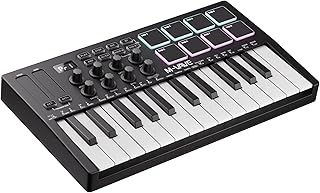
Best for: Android tablet owners who want the strongest listed evidence of platform compatibility. DaierTek states that the controller works with Android and iOS, as well as Windows and Mac, and supports DAWs that accept BLE MIDI or USB MIDI.
The compact controller has 25 velocity-sensitive keys, eight RGB backlit pads with velocity sensitivity and aftertouch, eight assignable encoders, a mini-display, and two capacitive touch strips for pitch bend and modulation. Bluetooth operation and a built-in 2,000 mAh battery are listed, with an estimated operating time of about 16 hours.
Choose this if you want pads and knobs alongside keys and want Android named in the compatibility information. Its listed compatibility with many DAWs still does not guarantee that every Android music app supports its MIDI connection method. Check the app’s documentation before purchase. The 25-key range is also compact rather than piano-sized.
M-VAVE 25-Key Wireless MIDI Keyboard

Best for: Mobile producers who want a small controller with several hands-on performance controls. The M-VAVE has 25 velocity-sensitive mini keys, eight RGB backlit velocity-sensitive pads, eight assignable rotary encoders, and two capacitive touch strips for pitch and modulation control.
The manufacturer listing describes USB power and Bluetooth connection, plus a built-in 2,000 mAh battery rated for about 16 hours of use. That combination can suit a portable setup where fewer cables are preferred. The pads and encoders also provide more direct control than a keys-only design.
Choose this if portability and extra controls matter more than a larger key range. Android compatibility is not explicitly stated in the supplied product details, so verify that both your tablet and music app support the controller’s Bluetooth MIDI connection. Avoid assuming that Bluetooth audio support on a tablet automatically means Bluetooth MIDI support.
Donner N-25 Mini MIDI Keyboard
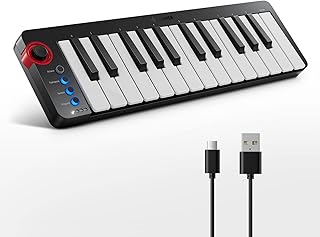
Best for: Beginners seeking a straightforward, compact controller with basic composition tools. The N-25 includes 25 velocity-sensitive mini keys, four user-programmable banks, an arpeggiator, sustain, octave controls, and tap tempo.
Donner lists plug-and-play USB-MIDI use with Mac and PC, and says the controller can connect to smartphone music apps with an OTG adapter. That makes it a possible fit for tablet-based music making when the tablet, adapter, and app support the connection. The listed 40 teaching courses may also appeal to a new player.
Choose this if you prefer a simple layout over a controller with numerous pads and knobs. The supplied information does not specifically name Android compatibility, so treat smartphone use as conditional and confirm the required OTG connection with your tablet. Its 25 mini keys provide limited range for two-handed parts.
Donner DMK 25 Pro USB-C Controller

Best for: Tablet musicians who want built-in performance and scale-assistance features in a compact controller. The DMK 25 Pro offers 25 keys, eight drum pads, an OLED display, 16 smart scales, arpeggio, note repeat, and chord functions.
Its product details state that it does not produce sound by itself and must connect to a phone or computer running DAW software. Four types of DAW software are listed as included. The smart dynamic scale mode is designed to help users play bass lines, melodies, and leads within selected scales.
Choose this if scale modes and performance functions are more important than a larger keyboard. The listing names USB-C but does not explicitly confirm Android compatibility or specify the required tablet setup. Confirm that the tablet can connect to USB MIDI and that the chosen DAW recognizes the controller. Do not select it expecting standalone sound.
M-AUDIO Keystation Mini 32 MK3

Best for: Buyers who value 32 miniature keys and a simple, expressive keyboard layout. Compared with the 25-key options here, its extra keys offer a wider playing span without moving the controller out of the compact category.
The Keystation Mini 32 MK3 has velocity-sensitive piano-style mini keys, selectable velocity curves, and pitch-bend and modulation buttons. M-AUDIO describes it as a plug-and-play USB controller for Mac and PC that needs no additional drivers or external power supply for those listed computer setups.
Choose this if you want more keys and do not need built-in drum pads or multiple knobs. The supplied compatibility details name Windows and Mac, not Android. Do not assume it will connect to an Android tablet without checking the tablet’s USB support, adapter needs, and music app compatibility first.
Buying Guide: Choosing a MIDI Keyboard For An Android Tablet
Does the keyboard explicitly support Android?
Start with the manufacturer’s stated compatibility rather than the word “MIDI” alone. Among these five products, DaierTek explicitly lists Android compatibility and support for DAWs using BLE MIDI or USB MIDI. The other listings describe Bluetooth, USB, or smartphone connections but do not all name Android directly. If the listing is unclear, check the controller documentation or contact the manufacturer before relying on it for a tablet setup.
Compatibility has two parts: the tablet must recognize the controller, and the music app must accept MIDI input. A keyboard can connect physically and still fail to work as expected if the app does not support the connection type or MIDI devices.
Should you use Bluetooth MIDI or a cable?
Bluetooth can reduce cable clutter and may suit a portable setup. The M-VAVE and DaierTek listings describe Bluetooth operation; both also list built-in 2,000 mAh batteries and an estimated operating time of about 16 hours. Confirm the exact Bluetooth MIDI support of the tablet and app. Bluetooth audio capability alone does not establish MIDI compatibility.
A wired USB MIDI setup can be more direct, but the tablet’s port and the keyboard’s connection must work together. Some tablet-and-controller combinations may require an OTG adapter or another suitable cable. The supplied product details specifically mention an OTG adapter for the Donner N-25’s smartphone-app connection. Check connector requirements before ordering.
How many keys do you need?
Twenty-five mini keys are useful for short melodies, bass lines, riffs, and portable beat-making, but they provide less range than a larger keyboard. The M-AUDIO offers 32 miniature keys, giving it a wider span than the 25-key models listed here. Mini keys save space, but they are not full-size piano keys. Choose based on the parts you plan to play and the room available in your bag or on your desk.
Are pads, knobs, and performance features important?
Choose a keys-only or simplified layout if your main task is entering notes. If you also want to trigger drum sounds or adjust software instruments, compare the additional controls. The M-VAVE and DaierTek include eight backlit pads and eight encoders. The Donner DMK 25 Pro adds drum pads, an OLED display, smart scales, arpeggio, note repeat, and chord functions. Extra controls are useful only when the music app can map or recognize them.
Will the keyboard make sound without an app?
No product in this comparison is described as a standalone instrument with its own sound engine. A MIDI controller sends performance data, such as which note was played and how strongly. A compatible music app or other sound-producing device must turn that data into audio. The Donner DMK 25 Pro listing states this requirement explicitly. Plan to install and configure a suitable Android music app before expecting to hear notes.
What should beginners check before buying?
- Confirm that the Android tablet and music app support the controller’s Bluetooth MIDI or USB MIDI connection.
- Check whether the tablet needs an OTG adapter, a USB-C cable, or another connector.
- Verify the app can receive MIDI input and produce sound through the tablet’s audio output.
- Choose 25 keys for a compact setup or consider 32 keys for a somewhat wider playing range.
- Decide whether drum pads, knobs, pitch controls, or learning resources are useful for your workflow.
- Remember that velocity-sensitive keys respond to playing force, but the listed features do not make a controller a full-size acoustic piano.
Frequently Asked Questions
What is the clearest Android-compatible option in this comparison?
DaierTek is the clearest choice based on the supplied details because its listing explicitly includes Android and support for BLE MIDI and USB MIDI. Confirm that your particular music app supports the controller before buying.
Can a MIDI keyboard play sound by itself?
These products are MIDI controllers, not standalone sound-producing keyboards. Connect one to a compatible music app or other sound source to hear notes.
Do Android tablets always need an OTG adapter?
Not always. The connection depends on the tablet’s port, the controller’s cable or wireless option, and the app’s MIDI support. The Donner N-25 listing mentions an OTG adapter for connecting to smartphone music apps.
Is Bluetooth MIDI the same as Bluetooth audio?
No. Bluetooth audio sends sound, while Bluetooth MIDI sends musical control data. The tablet and app must support Bluetooth MIDI for a wireless controller connection to work.
Which option has the most keys?
The M-AUDIO Keystation Mini 32 MK3 has 32 miniature keys. The other four products listed here have 25 keys.
Which controller is best for a beginner?
The Donner N-25 is a beginner-oriented option with a simple layout, programmable banks, arpeggiator, sustain, octave, tap tempo, and listed teaching courses. For Android use, verify the OTG connection and app compatibility first.