
The right MIDI-to-jack converter depends on the connectors and wiring your instruments use. For a 5-pin DIN MIDI device and a 3.5mm Type A MIDI device, the two Type A cable options below are the clearest matches. The OUDA adapter is best for switching between Type A and Type B mini-jack MIDI gear. A USB-to-MIDI cable is a different option for connecting a computer to traditional MIDI equipment.
| Product | Best For | Key Detail |
|---|---|---|
| 2 Pack Type-A 9.5-Inch Adapter | Short, compact connections | Two adapters; Type A |
| 2-Pack Type-A 59-Inch Cable | More reach between devices | Two cables; Type A only |
| SiYear DIN Adapter | Buyers checking a short DIN adapter | Listing has a connector-description mismatch |
| TENINYU USB-to-MIDI Cable | Computer-to-MIDI connections | USB connection; not a 3.5mm adapter |
| OUDA Type A/B Crossover | Changing mini-jack MIDI wiring type | 3.5mm female-to-male crossover |
2 Pack Type-A 9.5-Inch MIDI Adapter
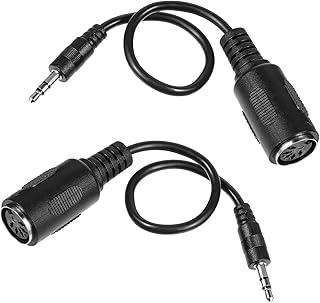
Best for: Musicians who need a short Type A connection between a 5-pin DIN MIDI port and a 3.5mm MIDI jack. The package includes two adapters, which can be useful when setting up more than one device or keeping a spare.
Each adapter has a 9.5-inch flexible cable between its connectors. That compact length can help keep a nearby keyboard, synthesizer, drum machine, or controller setup tidy. The product listing describes compatibility with 3.5mm Type A MIDI and 5-pin DIN equipment, and says the cable uses PVC shielding intended to resist wear and help maintain a secure connection.
Why it was selected: It directly addresses the common DIN-to-mini-jack MIDI conversion need and clearly specifies Type A wiring. Choose this if the devices sit close together and you want a pair of short adapters.
Limitation: The listing specifies Type A, not Type B. Confirm the mini-jack MIDI standard on your equipment before ordering; the short cable may also be unsuitable when devices are spaced farther apart.
2-Pack Type-A 59-Inch MIDI Cables

Best for: Setups where a 3.5mm Type A MIDI device and a 5-pin DIN device need more distance between them. These cables are listed as approximately 1.5 meters, or 59 inches, long and come as a two-piece set.
The longer cable can be more practical than a short breakout adapter when equipment is spread across a desk or stage setup. The listing identifies a 3.5mm Type A TRS connector and a male 5-pin DIN connector. It also describes PVC and copper-wire construction. The advertised device categories include keyboards, synthesizers, drum machines, and DAW controllers with matching ports.
Why it was selected: It offers the same basic Type A DIN-to-3.5mm connection as the shorter adapter while providing substantially more cable reach. Choose this if placement flexibility matters more than keeping the connection compact.
Limitation: The listing explicitly says the cable is not compatible with MIDI TRS Type B. Check the wiring standard as well as the physical connector shape; a 3.5mm plug alone does not establish compatibility.
SiYear Short DIN MIDI Adapter

Best for: Buyers investigating a short DIN adapter who can verify the connector details with the seller before purchase. The product name describes a 6.35mm female 1/4-inch TRS connector and a 5-pin DIN connection, while the feature text describes a DIN-male-to-3.5mm-female cable about 0.3 meters long.
That difference is important. A 6.35mm quarter-inch plug and a 3.5mm mini-jack are different sizes, and the listed connector descriptions do not agree. The feature text also refers to professional audio microphone connections and cites oxygen-free copper construction. Those details do not resolve which jack size the actual item uses.
Why it was selected: It is relevant to shoppers searching broadly for a MIDI-to-jack adapter, but its listing makes verification especially important. Do not rely on the title alone to determine whether it fits your equipment.
Limitation: The product information is inconsistent about jack size. Avoid choosing it until you confirm the actual connector type and intended MIDI wiring with the seller.
TENINYU USB-to-MIDI Cable

Best for: A buyer whose goal is to connect a computer to traditional MIDI equipment, rather than adapt a 5-pin DIN port to a 3.5mm MIDI jack. The product name describes a USB-to-MIDI cable for a PC or laptop and identifies Windows and Mac support.
The listing title also describes a two-in-one computer-to-synthesizer interface and says it supports 16 channels. These are title-level claims; the product information supplied here does not include further technical details about its connectors, setup, or operating requirements. Check the full listing and the ports on both devices before buying.
Why it was selected: It represents a related but distinct solution for people who use computer-based music software with MIDI instruments. Choose this if the connection you need starts at a computer’s USB port.
Limitation: This is not described as a 3.5mm TRS-to-DIN adapter. Avoid it if you only need a passive connection between a mini-jack MIDI port and a 5-pin DIN MIDI port.
OUDA Type A/B Crossover Adapter

Best for: Musicians whose MIDI devices both use 3.5mm jacks but follow different TRS MIDI wiring standards. The listing describes a 3.5mm female-to-male inline adapter that crosses the tip and ring connections to switch between Type A and Type B. It says the adapter works in both directions.
This is not the same job as a DIN-to-3.5mm cable. It is intended to address a wiring mismatch between mini-jack MIDI devices, and the listing gives examples of gear families that may use different standards. It can also be used with a regular AUX cable for a left/right audio-channel swap, according to the product description.
Why it was selected: It is the most targeted option here for Type A/Type B compatibility problems. Choose it if both devices have 3.5mm MIDI jacks but their TRS standards differ.
Limitation: It is described as a crossover adapter, not as a cable that converts a 5-pin DIN MIDI port to 3.5mm. It will not solve every connector mismatch; identify the port and wiring on each device first.
Buying Guide: How To Choose A MIDI-To-Jack Converter
What connectors are on each device?
Start by checking the actual MIDI ports on the instruments, controller, interface, or computer. Traditional hardware MIDI commonly uses a round, five-pin DIN connector. Some devices instead use a 3.5mm TRS jack for MIDI. Although a TRS jack resembles a small headphone connection, its use for MIDI does not mean an ordinary audio cable or any adapter will work correctly.
Write down both ends of the connection before shopping. For example, a setup may require “5-pin DIN MIDI on the keyboard to 3.5mm TRS MIDI on the synth.” This description is more useful than a search for a generic “MIDI-to-jack converter,” because it identifies the connector size and direction required.
Does the mini-jack use Type A or Type B?
TRS MIDI devices can use different wiring standards. Type A and Type B use different assignments for the 3.5mm plug’s tip and ring contacts, so two devices can have the same-looking ports but still need different wiring. Check the instrument manual or manufacturer specifications for the stated MIDI TRS type.
The two Type A DIN adapters in this list are not presented as Type B cables. The OUDA crossover is intended to correct a Type A/Type B mismatch between 3.5mm MIDI connections. Do not assume that a Type A cable becomes suitable for Type B equipment just because both ends fit physically.
Do you need a cable, a breakout adapter, or a crossover?
- Choose a DIN-to-3.5mm cable or adapter when one device has 5-pin DIN MIDI and the other has 3.5mm TRS MIDI. Match the cable’s Type A or Type B wiring to the mini-jack device.
- Choose a Type A/B crossover when both devices have 3.5mm MIDI ports but use different TRS wiring standards.
- Choose a USB-to-MIDI interface cable when connecting a computer’s USB port to traditional MIDI equipment. This is a different signal-connection task from adapting two hardware MIDI ports.
How much cable length is useful?
A short adapter can reduce cable clutter when the connected equipment is close together. The 9.5-inch option is designed for a compact connection, while the 59-inch cables offer more placement flexibility. Measure the route between devices and leave enough slack to avoid tension at the plugs. A cable that is too short can pull loose; excess length can add clutter to a small work area.
What should you verify before ordering?
- Confirm the connector size: 3.5mm mini-jack and 6.35mm quarter-inch jacks are not interchangeable.
- Confirm the MIDI wiring type: Type A, Type B, or the specific standard required by the equipment.
- Check connector gender and direction, such as male DIN to female 3.5mm, rather than relying on a general product name.
- For ambiguous listings, compare the product title, feature details, and manufacturer information before purchase.
- For computer connections, check the product’s current operating-system and setup information rather than assuming every USB-to-MIDI cable works identically.
These checks are particularly important for the SiYear listing in this roundup because its title and feature text specify different jack sizes. If a listing does not clearly identify the connector, ask the seller to confirm it before placing an order.
Frequently Asked Questions
Can I use a 3.5mm headphone cable for MIDI?
Not necessarily. A 3.5mm TRS plug can carry MIDI on some devices, but the cable and wiring must match the equipment’s MIDI standard. A regular audio cable may not provide the required MIDI wiring.
Are Type A and Type B MIDI adapters interchangeable?
No. Type A and Type B use different TRS wiring assignments. Use the type specified for your device, or use an appropriate crossover when connecting devices that use different types.
Does a DIN-to-3.5mm adapter convert MIDI to audio?
No. It adapts the physical MIDI connection; it does not turn MIDI data into an audio signal. To hear an instrument, you need an audio output and an appropriate audio connection or sound-generating device.
Is a USB-to-MIDI cable the same as a 3.5mm MIDI adapter?
No. A USB-to-MIDI cable is intended to connect a computer and MIDI equipment through USB and MIDI connections. A 3.5mm MIDI adapter connects hardware MIDI ports that use a mini-jack and, commonly, 5-pin DIN.
What should I buy if my two devices both have 3.5mm MIDI ports?
Check whether both ports use Type A or Type B. If they use the same type, use a suitable matching TRS MIDI cable. If they use different types, a Type A/B crossover may be needed.