
The right mini Toslink-to-RCA setup uses a digital-to-analog converter (DAC), not a simple passive cable. The PROZOR DAC is best for buyers who want RCA and 3.5 mm outputs, while the AUTOUTLET 7-foot cable converter suits users who want a longer optical-to-RCA connection. Before choosing, check whether your device has a mini Toslink optical output or a standard Toslink port; the listed products describe Toslink connections, so connector fit needs verification.
| Product | Best For | Notable Feature |
|---|---|---|
| PROZOR 192KHz DAC | Multiple analog output choices | RCA and 3.5 mm outputs |
| LiNKFOR Optical-to-RCA DAC | A basic converter with optical cable included | Supports up to 192 kHz |
| AUTOUTLET 7-foot Converter | Longer direct RCA cable runs | 2.1 m cable and RCA male output |
| AUTOUTLET 6-foot Converter | Built-in amplification and a separate RCA cable | Includes a 0.7 m RCA cable |
| PROZOR 7-foot Adapter | Buyers seeking a cable-style PROZOR option | Built-in audio amplifier chip |
PROZOR 192KHz DAC

This PROZOR converter accepts coaxial or Toslink digital PCM audio and converts it to analog RCA left/right and 3.5 mm audio simultaneously. Its listed sampling-rate support includes 32, 44.1, 48, 96, and 192 kHz, with 24-bit S/PDIF input.
Best for: Someone who needs both RCA and 3.5 mm analog outputs from one DAC. It is a strong fit when the audio source has digital optical or coaxial output and the receiving equipment accepts analog audio.
The product listing calls out a newer audio amplifier chipset and dual-channel operational amplifier. It also specifies that the TV output should be set to PCM and notes that TV volume is adjusted through the TV settings.
Limitation: The converter works in the digital-to-analog direction only. The listing does not state that a mini Toslink connector is included, so confirm the source port and any required optical adapter before ordering.
LiNKFOR Optical-to-RCA DAC

The LiNKFOR unit is a digital optical SPDIF Toslink-to-analog RCA converter. The supplied product name says it includes an optical cable and supports a 192 kHz sampling rate. It is described for use with HDTVs, Blu-ray players, DVD players, amplifiers, and RCA-output equipment.
Best for: Buyers who want an optical-to-RCA DAC with an optical cable listed as included. It may suit a straightforward connection from a standard Toslink digital audio output to an analog RCA input.
Choose this model if the source sends digital optical audio and the receiving device needs analog left/right RCA. Its male RCA output is a relevant detail when checking how it will connect to the receiver or amplifier.
Limitation: The supplied product information does not specify supported audio formats or whether the optical connector fits a mini Toslink port. Check those details and the physical connector requirements before purchase.
AUTOUTLET 7-Foot Optical-to-RCA Converter

This AUTOUTLET model combines an optical-to-RCA conversion function with a 7-foot (2.1-meter) cable and RCA male output. Its listed optical input supports 32, 44.1, 48, 96, and 192 kHz sampling rates and 24-bit audio. The product description also identifies a professional amplifier chip and dual-channel operational amplifier.
Best for: A setup where the RCA connection needs more reach than a short adapter may provide. The integrated cable and male RCA output can make it a practical option when the receiving equipment has corresponding RCA inputs.
The listing describes the converter as plug and play and names HDTVs, DVD and Blu-ray players, and game consoles among its intended source types. The key selection reason is the combination of a longer cable and specified high-rate audio support.
Limitation: It converts optical digital audio to analog RCA; it does not convert RCA analog audio into digital optical audio. Confirm that the device’s optical socket accepts the connector supplied or that you have the correct mini Toslink solution.
AUTOUTLET 6-Foot SPDIF-to-RCA Converter

This AUTOUTLET converter is listed with a 6-foot (1.8-meter) cable, a built-in audio amplifier, and a separate 0.7-meter RCA cable. It converts SPDIF digital audio to analog RCA and supports sampling rates of 32, 44.1, 48, 96, and 192 kHz, along with 24-bit audio.
Best for: Buyers who want the converter and an RCA cable included in the same package. The supplied RCA cable may be useful when the amplifier or stereo is not immediately beside the converter.
Its built-in amplifier chip is described as boosting RCA output levels. Select this option when the listed cable lengths and RCA connection arrangement match the layout of your equipment.
Limitation: The listing describes optical/Toslink conversion, but it does not confirm mini Toslink connector support. Check the source port’s shape and whether a compatible optical adapter is needed. The product is also a DAC, so it does not accept analog RCA as an input.
PROZOR 7-Foot Optical-to-RCA Adapter
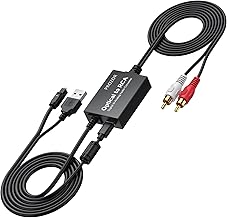
This PROZOR product is described as a 7-foot (2.1-meter) optical-to-RCA adapter with a built-in audio amplifier chip. Its product name identifies HDTVs, amplifiers, Blu-ray and DVD players, and PS3 and PS4 systems as intended equipment.
Best for: Buyers looking for a cable-style PROZOR DAC with a longer stated cable length. It is worth comparing with other options when a 7-foot run is useful and RCA analog output is required.
The listing identifies the device as a digital audio converter and specifies SPDIF Toslink-to-RCA use. That direction matters: the source must provide digital optical audio, and the receiving equipment must accept analog RCA audio.
Limitation: The supplied details do not state a sampling-rate range, included accessories, or mini Toslink compatibility. Verify those points if your source has a mini optical socket or if a particular audio format is required.
Buying Guide: How to Choose a Mini Toslink-to-RCA Setup
Does a mini Toslink-to-RCA connection need a DAC?
Yes, when the source sends digital optical audio and the destination accepts analog RCA audio. A DAC converts the digital signal into analog left and right channels. A passive cable cannot perform that conversion. Choose a product explicitly described as a digital-to-analog converter, and check that its input and output match the direction of your signal.
These five products are described as optical or SPDIF digital-to-analog converters. None of the supplied product information clearly confirms a mini Toslink plug. That distinction is important: a mini Toslink port is physically smaller than a standard Toslink port, even though both carry optical audio.
How do I check whether my source has mini Toslink?
Check the device manual or inspect its audio output. Some devices use a small optical socket, while others use a standard-size Toslink socket. A mini Toslink connection may also be combined with a 3.5 mm-style port, but appearance alone is not a reliable way to identify the signal type.
Confirm the connector requirements for both ends before buying. If the DAC has a standard Toslink input and the source has a mini Toslink output, a suitable mini-to-standard optical adapter or cable may be necessary. The product details supplied here do not confirm that such an accessory is included.
What audio output setting should I use?
The PROZOR 192KHz DAC listing specifically instructs users to set a TV’s digital audio output to PCM. This is a useful first setting to check when a DAC produces no sound or when the source offers several output formats. The other product details do not specify supported encoded formats, so consult the converter’s instructions and the source-device settings.
Also confirm that the selected source output is optical or SPDIF, rather than an analog output. A DAC cannot turn analog RCA input into optical output. The PROZOR listing notes that TV volume is adjusted in the TV settings, so do not assume the converter itself provides volume control.
Which cable length and output layout fit the setup?
Measure the route between the source, converter, and receiver before choosing a cable-style model. The two AUTOUTLET listings specify 7-foot and 6-foot converter lengths, respectively. The 6-foot option also lists a separate 0.7-meter RCA cable. The second PROZOR option is described as a 7-foot cable.
If you need to connect headphones or another 3.5 mm input as well as RCA equipment, the first PROZOR converter lists both outputs operating simultaneously. The other products in this list are described with RCA output. Match the output type to the receiver, powered speakers, or amplifier input rather than relying on the product name alone.
What sampling rate should I compare?
Several listings state support up to 192 kHz and 24-bit audio. The PROZOR converter and both AUTOUTLET products also list supported rates of 32, 44.1, 48, 96, and 192 kHz. A higher maximum specification does not guarantee that every source setting is supported by every item; check the full product instructions and set the source to a supported output.
If you only need basic TV or disc-player audio, prioritize connector fit, audio format settings, and the correct RCA connection. Sampling-rate support is most useful as a compatibility specification, not as a substitute for confirming that the signal format and connection direction are right.
What should I check before troubleshooting?
- Confirm the source is sending digital audio through its optical output.
- Confirm the converter’s RCA outputs are connected to an analog input, not an output, on the receiving equipment.
- Check that the optical plug fits the source port; mini Toslink may require a separate compatible cable or adapter.
- Set the source’s digital output to PCM when appropriate, following the converter’s instructions.
- Check the receiving equipment’s input selection and volume settings.
Frequently Asked Questions
Can I connect mini Toslink directly to RCA with one passive cable?
No. Digital optical audio must be converted to analog audio before it can enter an RCA analog input. Use a DAC and confirm that the optical connector fits the source.
Are mini Toslink and standard Toslink the same size?
No. They are different physical connector sizes. Verify whether the source uses mini Toslink or standard Toslink and obtain a compatible optical cable or adapter if needed.
Do these products convert RCA audio to optical?
No. The listed products are digital-to-analog converters, meaning the signal direction is optical or SPDIF input to analog RCA output.
Why might a TV connected to a DAC have no sound?
Check the TV’s selected audio output, the converter’s power and connections, and the receiving device’s input selection. The PROZOR listing specifically recommends setting the TV’s digital output format to PCM.
Which listed converter has both RCA and 3.5 mm outputs?
The PROZOR 192KHz DAC listing specifies simultaneous analog RCA left/right and 3.5 mm outputs. Confirm that its optical connector arrangement meets the source device’s requirements.