
The best mixer board for a PC depends on the audio sources you need to control. The FIFINE SC3 is best for streamers who want quick microphone and headphone controls, while the PUPGSIS adds sound effects and voice changing. Aveek’s four- and five-channel mixers suit users who need more input connections and USB recording. Compare inputs, monitoring, and microphone requirements before choosing.
| Product | Best For | Standout Features |
|---|---|---|
| FIFINE Ampligame SC3 | Streaming with an XLR microphone | Individual channel controls, mute, monitoring, phantom power |
| PUPGSIS Gaming Audio Mixer | Creative streaming effects | Voice changer, sound pads, reverb, noise reduction |
| Aveek 4 Channel Mixer | PC recording and mixed audio sources | USB recording, Bluetooth playback, multiple inputs |
| Aveek 5 Channel Mixer | Connecting several devices | Multiple XLR and stereo inputs, USB playback and recording |
| FIFINE Ampligame SC3W | Basic gaming and podcast controls | Four control channels, mute, monitoring, phantom power |
FIFINE Ampligame SC3

The FIFINE Ampligame SC3 is a compact choice for PC streamers who want direct control over a microphone and other audio channels. Its four independent controls adjust microphone, line-in, headphone, and line-out volume. That separation can make routine level changes easier than relying only on a computer or streaming application.
This mixer has one XLR microphone input and built-in 48V phantom power for supported condenser microphones. Front-panel mute and monitoring buttons provide quick access to two common streaming tasks. The product information also lists RGB lighting and a voice changer.
- Best for: A streamer or podcaster using an XLR microphone who wants individual channel controls.
- Why it was selected: It combines PC-focused controls, monitoring, mute, and phantom power in one device.
- Limitation: The listed microphone input is XLR; the product information says phantom power is not available for USB microphones.
Choose this model if hands-on level adjustment and a front mute button matter. It is better suited to a single-microphone setup than to buyers seeking a mixer with numerous microphone inputs.
PUPGSIS Gaming Audio Mixer

The PUPGSIS mixer is best for streamers who want built-in creative effects rather than only straightforward channel-level controls. Its listed features include a voice changer, reverb, four custom sound-effect pads, and noise reduction. These functions are intended for real-time use in gaming, streaming, and podcasting.
The product information describes a 1/4-inch TRS dynamic microphone input and says that connecting an XLR microphone requires a 1/4-inch TRS-to-XLR cable. It also states that the mixer supports XLR microphones only, is not compatible with USB microphones, and does not support 48V dynamic microphones. Check the microphone and cable requirements before buying.
- Best for: Creators who want sound effects and voice-changing options as part of a streaming setup.
- Why it was selected: Its sound pads, reverb, and noise-reduction features give it a different emphasis from the other PC mixers here.
- Limitation: USB microphones are not supported, and the specified cable for an XLR microphone may need to be added separately.
Choose this model if its effects are useful to your content. Avoid it if you need USB-microphone support or want to connect a microphone without checking the stated cable requirement.
Aveek 4 Channel Audio Mixer

The Aveek four-channel mixer is a practical option for PC users who need several types of audio connections and want a built-in recording path. It has two XLR/6.35 mm line input jacks, 6.35 mm and RCA stereo inputs, balanced XLR and 1/4-inch TRS outputs, and a headphone jack. An auxiliary output is listed for effects or monitoring equipment.
For computer use, the mixer has a built-in recording chip and a Type-C port for plug-and-play recording and playback. It also supports USB-drive MP3 playback and recording, plus Bluetooth music playback. The listing says Bluetooth is for playback and cannot connect an output device.
- Best for: A home creator who wants to combine microphones or instruments with stereo sources and record through a PC.
- Why it was selected: It offers varied input and output connections alongside computer recording and USB-drive functions.
- Limitation: Bluetooth is not a wireless output connection, and the listed speaker connection requirement is for active equipment.
Choose this mixer if connection variety matters more than gaming-specific effects. Review your speakers and other gear before purchase, particularly if you expect to use Bluetooth for sending audio to an output device.
Aveek 5 Channel Audio Mixer

The Aveek five-channel mixer is best for users who need several connection options for microphones, instruments, and stereo devices. Its listed connections include three XLR inputs, paired 6.35 mm stereo inputs, and paired RCA stereo inputs. RCA and 6.35 mm main outputs are provided for active speakers or an amplifier.
A built-in recording chip connects to a computer through USB-B for plug-and-play recording. The mixer also supports playing MP3 files from a USB drive and recording its audio output to a USB stick. Those features can be useful when a creator wants computer recording as well as local USB playback or capture.
- Best for: A small home studio or creator setup that needs multiple input types and direct PC recording.
- Why it was selected: Its three XLR inputs and stereo connections make it the most connection-focused option in this selection.
- Limitation: The listing specifies active output equipment and says Bluetooth cannot connect an output device.
Choose this model if the extra input connections match your gear. It may be more than needed for a basic one-microphone gaming setup, where a simpler mixer can provide more relevant controls.
FIFINE Ampligame SC3W
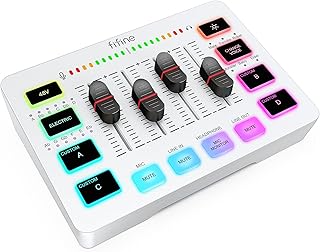
The FIFINE Ampligame SC3W is aimed at PC users who want simple control over several audio channels for gaming, streaming, or podcasting. Its four-channel design lets users adjust connected devices separately with volume faders. The listed controls include mute, volume adjustment, and real-time monitoring.
It has an XLR microphone interface and built-in 48V phantom power for a condenser microphone that requires it. These features make the SC3W a fit for buyers moving to an XLR microphone setup who also want accessible audio controls. The product details do not list the same set of additional features as the other SC3 listing, so compare the exact model and features you need.
- Best for: A gamer or creator who wants four-channel adjustment, XLR input, mute, and monitoring.
- Why it was selected: It offers core PC streaming controls and phantom power in a gaming-oriented mixer.
- Limitation: Its listed microphone connection is XLR, so it may not suit a buyer whose setup depends on a USB microphone.
Choose the SC3W if its stated core controls match your needs. Compare it with the other SC3 listing if you are choosing between FIFINE models, since their listed feature sets are not identical.
Buying Guide: How to Choose a Mixer Board for PC
What will you connect to the mixer?
Start with a list of the equipment you plan to use: microphone, headphones, speakers, instrument, computer, and any playback device. Count the required inputs and check their connector types. An XLR microphone, a 1/4-inch line source, and an RCA stereo device do not all use the same connection. A mixer with more inputs is useful only if those connections fit your actual gear.
For a single-microphone stream, a gaming-focused mixer with channel controls may be sufficient. For several microphones or multiple instruments and stereo sources, consider a model with more input jacks, such as the Aveek five-channel mixer. Confirm the exact input layout in the product details rather than choosing by channel count alone.
Does your microphone need XLR or phantom power?
Check the microphone’s connection and power requirements before selecting a mixer. The FIFINE SC3 and SC3W list XLR inputs and built-in 48V phantom power. That matters for a compatible condenser microphone. The PUPGSIS listing has specific microphone and cable restrictions, including no USB-microphone support, so read those requirements closely.
Do not assume that every mixer supports every microphone type. If you use a USB microphone, verify explicit support before buying. If you use XLR, check whether the mixer accepts the microphone directly or requires a particular cable.
Do you need physical controls, effects, or both?
Physical faders and buttons can help when you need to adjust levels or mute quickly during a stream. The FIFINE SC3 lists independent microphone, line-in, headphone, and line-out controls, along with front mute and monitoring buttons. The SC3W also lists four-channel adjustment, mute, and monitoring.
If creative sound changes are important, the PUPGSIS includes a voice changer, reverb, and four sound-effect pads. Those features serve a different purpose from the more connection-focused Aveek mixers. Choose effects because you expect to use them, not simply because they are available.
How will you record or play back audio on a PC?
Look for a clearly stated computer connection and recording method. Both Aveek models list built-in recording chips and USB connections for plug-and-play recording. The four-channel model specifies a Type-C port, while the five-channel model specifies USB-B. Check the cable and port requirements against the computer you plan to use.
USB-drive playback and recording are separate from PC recording. The Aveek mixers list support for MP3 playback from a USB drive, and their descriptions also mention recording to a USB stick. Bluetooth playback, as described for the Aveek four-channel model, does not mean Bluetooth can send audio to speakers or another output device.
What monitoring and output connections do you need?
Headphone monitoring lets you hear audio through headphones, while dedicated outputs connect to other equipment. The FIFINE SC3 lists headphone and line-out controls. The Aveek four-channel mixer lists a headphone jack, balanced outputs, and an auxiliary output; the five-channel model lists RCA and 6.35 mm main outputs.
Check whether your speakers or amplifier are active or require a separate power source. The Aveek product descriptions specify active output equipment. Match the mixer’s output connectors to the equipment you own, and do not assume that Bluetooth replaces a wired output connection.
How much input capacity is appropriate?
A compact gaming mixer can be a better fit when the main tasks are microphone level control, monitoring, and muting. A larger-input mixer is more appropriate when several sound sources must be connected at once. Consider both the number and type of connections, plus whether you need separate controls for the sources you use.
For future flexibility, identify likely additions such as another microphone or instrument. Still, avoid paying for connection types that do not match your setup. The simplest suitable mixer can be easier to configure and operate.
Frequently Asked Questions
What does a mixer board do for a PC?
A PC mixer combines or controls audio from connected sources. Depending on the model, it can provide microphone inputs, headphone monitoring, physical level controls, and a connection for recording to a computer.
Can I use a USB microphone with these mixers?
Do not assume so. The PUPGSIS listing explicitly says it does not support USB microphones. The FIFINE models list XLR microphone inputs. Confirm support for your exact microphone before purchasing.
Do I need phantom power for a PC mixer?
Only if your microphone requires phantom power and the mixer supports the required power. The FIFINE SC3 and SC3W list built-in 48V phantom power. Check the microphone’s specifications before enabling or relying on phantom power.
Can I use an audio mixer to record to my computer?
Some models support computer recording. Both Aveek mixers list built-in recording chips and USB connections for PC recording. Check the port type and connection instructions for the model you select.
Is a four-channel mixer enough for streaming?
It can be enough for a setup with a microphone and a small number of other audio sources. Count your equipment and review the mixer’s individual input and control layout; channel count alone does not explain which connections are available.
Can Bluetooth send mixer audio to speakers?
Not according to the Aveek four-channel mixer’s product information, which describes Bluetooth for music playback and says it cannot connect an output device. Use the specified wired outputs for compatible speakers or other equipment.