
The Edifier M90 is the highest-rated option here by stated output, with 100W RMS; the OHAYO 60W pair and Edifier R1280T 42W RMS are other power-focused choices. For compact Bluetooth desktop speakers, consider the Audioengine A2+; for a sound bar with a built-in mic and headphone jack, consider Nylavee. Compare stated output, connections, and desk space before choosing: wattage alone does not describe the whole listening experience.
| Product | Best For | Stated Power or Key Feature |
|---|---|---|
| Edifier M90 | High-output, multi-source desktop audio | 100W RMS |
| OHAYO 60W | Music and gaming with multiple wired inputs | 60W |
| Edifier R1280T | Near-field listening | 42W RMS |
| Audioengine A2+ Wireless | Compact Bluetooth listening | 24-bit DAC |
| Nylavee Computer Speakers | Sound-bar-style desktop setup | Four drivers |
Edifier M90 100W RMS Speakers

The Edifier M90 is the strongest match for shoppers prioritizing stated output: its product name specifies 100W RMS. It is a desktop speaker set with Hi-Res Audio, LDAC Bluetooth 6.0, and a broad selection of inputs, including HDMI eARC, optical, USB-C, and AUX. A subwoofer output and remote control are also listed.
- Best for: Buyers who want the highest stated RMS output in this selection and several ways to connect sources.
- Why it stands out: The rated 100W RMS exceeds the output figures listed for the OHAYO and Edifier R1280T.
- Consider: The many input types may be unnecessary for a simple computer-only setup. The listing does not specify cabinet dimensions here, so check available desk space before choosing.
OHAYO 60W Active Bluetooth Speakers
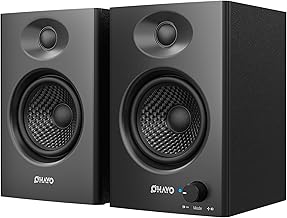
The OHAYO pair is listed as 60W and is designed for music and gaming with a desktop PC or laptop. The product name specifies active Bluetooth 5.3 and stereo 2.0 sound. It also lists 3.5mm AUX, RCA, and USB inputs, providing both wireless and wired connection options.
- Best for: People who want a stated 60W system for computer audio and prefer a choice of Bluetooth, AUX, RCA, or USB input.
- Why it stands out: Its listed output falls between the 100W RMS M90 and the 42W RMS R1280T, while its input options suit mixed-use setups.
- Consider: The product details provided do not say whether the 60W figure is RMS or peak power. Do not treat it as directly equivalent to a rating explicitly labeled RMS.
Edifier R1280T 42W RMS Speakers

The Edifier R1280T is a powered 2.0 near-field speaker system rated at 42 watts RMS. Its product name also identifies a wooden enclosure and describes the speakers as studio-monitor-style. That combination makes it a relevant choice for listeners sitting close to their desktop speakers who want a clearly stated continuous power figure.
- Best for: Desktop users seeking powered near-field speakers with a 42W RMS rating.
- Why it stands out: The RMS figure provides a useful like-for-like reference against the M90’s 100W RMS rating.
- Consider: It has less stated RMS power than the M90. The supplied product information does not list Bluetooth or additional digital inputs, so verify the connection details if those are required.
Audioengine A2+ Wireless Desktop Speakers

The Audioengine A2+ is a wireless desktop speaker option for PC and Mac, with Bluetooth and a built-in 24-bit DAC listed in its product name. It is also described for gaming and music. These features make it a connectivity-focused alternative to the higher-output models, rather than a clear choice for shoppers comparing stated wattage.
- Best for: Buyers who prioritize Bluetooth and a 24-bit DAC in a desktop speaker setup.
- Why it stands out: Its listed features emphasize wireless use and digital audio conversion, rather than a high wattage figure.
- Consider: The supplied product information does not state its power output. Choose another model if a comparable RMS rating is essential to your decision.
Nylavee Four-Driver Computer Sound Bar

The Nylavee is a sound-bar-style computer speaker with four drivers, Bluetooth, and AUX input. Its listed features also include USB A/C power, a built-in microphone, and a headphone jack. That mix makes it useful to compare when desk layout and convenient voice or headphone connections matter alongside sound.
- Best for: Desktop or laptop users seeking a compact sound-bar format with Bluetooth, AUX, a microphone, and a headphone jack.
- Why it stands out: The four-driver configuration and integrated desktop features distinguish it from the separate bookshelf-style pairs in this list.
- Consider: No wattage figure is provided in the supplied details, so its power cannot be ranked against the 60W, 42W RMS, or 100W RMS models.
Buying Guide: How to Choose Powerful Computer Speakers
How Much Speaker Power Do You Need?
Start with the power rating, but compare like with like. RMS is a useful specification because it identifies a continuous-power rating; a bare wattage number may not use the same measurement. In this selection, the M90 is listed at 100W RMS and the R1280T at 42W RMS. The OHAYO is listed at 60W, but the supplied information does not identify that rating as RMS.
More watts do not automatically mean better sound for every desk or listener. Room size, listening distance, speaker placement, and the source audio also affect the result. If your priority is a model with the highest explicitly stated RMS figure among these choices, the M90 has the clearest specification. If a product does not disclose watts, compare its other features without assuming its output.
Which Connections Match Your Computer?
Check the computer’s available outputs and the speaker’s listed inputs before buying. The M90 lists HDMI eARC, optical, USB-C, and AUX, as well as LDAC Bluetooth 6.0. The OHAYO lists Bluetooth 5.3, AUX, RCA, and USB. The Audioengine A2+ is described as Bluetooth-enabled and includes a 24-bit DAC. Nylavee lists Bluetooth and AUX.
For a wired setup, confirm which connection you plan to use instead of assuming every listed input works in the same way. For wireless listening, consider the Bluetooth version and supported features stated by the product. The R1280T product information supplied here does not specify its connections, so review the full listing if input flexibility matters.
Should You Choose Bookshelf Speakers or a Sound Bar?
Separate speakers can be positioned on either side of a monitor, while a sound bar places its drivers together in a single bar-style enclosure. The Edifier R1280T is described as a powered near-field pair with a wooden enclosure. The Nylavee is identified as a computer sound bar. Match the format to your desk width and the placement you prefer.
Do not assume that a compact-looking model is automatically the more powerful option. Product dimensions are not included for every item in this comparison. Measure the intended space and check the seller’s full specifications, especially when using stands, placing speakers beside a monitor, or fitting a bar beneath a screen.
What Extra Features Are Worth Considering?
Choose features based on how you use your computer. A built-in microphone and headphone jack may be convenient for a desktop sound bar; Nylavee lists both. A remote control and subwoofer output are listed for the M90. Bluetooth is stated for the M90, OHAYO, Audioengine A2+, and Nylavee, but the R1280T details provided do not mention it.
For music, gaming, video calls, and everyday computer playback, decide which connections and controls you will use regularly. More inputs can help when connecting multiple sources, but they may not matter for a single-computer arrangement. A DAC specification, such as the A2+’s listed 24-bit DAC, describes a different product feature from amplifier wattage.
How Should You Compare the Shortlist?
- Prioritize stated RMS power: Compare the M90 at 100W RMS with the R1280T at 42W RMS.
- Want a midrange wattage claim and multiple inputs: Consider the OHAYO, while noting that its 60W figure is not identified as RMS in the available details.
- Need several source connections: Review the M90’s HDMI eARC, optical, USB-C, and AUX inputs.
- Want compact desktop convenience: Compare the A2+ for Bluetooth and a 24-bit DAC or Nylavee for a sound-bar format and listed microphone and headphone jack.
- Need a confirmed power comparison: Verify the full product specification for models whose wattage is not stated here.
Frequently Asked Questions
Which computer speakers in this list have the highest stated power?
The Edifier M90 has the highest explicitly stated RMS rating in this selection: 100W RMS. The OHAYO is listed at 60W, but its supplied product details do not identify that figure as RMS.
Is 100W RMS always better than 42W RMS?
Not necessarily. The figures describe stated power, but they do not alone determine sound quality or suitability for a particular desk. Also consider connections, speaker placement, listening distance, and the type of setup you want.
Which option lists the most connection types?
The Edifier M90 lists HDMI eARC, optical, USB-C, AUX, and LDAC Bluetooth 6.0. The exact connections you need should guide the choice; a longer input list is not necessary for every computer setup.
Which computer speakers include a built-in microphone?
The Nylavee computer speakers list a built-in microphone and headphone jack. The other product details provided here do not list a built-in microphone.
Are any of these speakers wireless?
The Audioengine A2+, OHAYO, Edifier M90, and Nylavee product names or features list Bluetooth. The supplied information for the Edifier R1280T does not specify Bluetooth.