
If you need a portable music player with an optical connection, the Lumirio CDA-A6 is the clearest match in this selection: its listed features identify an optical output alongside 3.5mm AUX. The LEEWAVES CD boombox lists an OPT mode, but its product information does not say whether that connection is an output. The other MP3 players here do not list optical out, so they are better suited to Bluetooth or headphone listening than to a direct optical connection.
| Product | Best for | Optical connection information |
|---|---|---|
| Lumirio CDA-A6 | CD playback and digital archiving | Optical output listed |
| LEEWAVES CD Boombox | Portable CD and radio playback | OPT mode listed; direction is unspecified |
| PulsePlay 32GB MP3 Player | Wireless music during exercise | Optical out not listed |
| Picxiul 144GB MP3 Player | Large music libraries and flexible playback | Optical out not listed |
| Dyzeryk 16GB MP3 Player | Basic local music playback | Optical out not listed |
Lumirio CDA-A6 CD Player and Ripper

Best for: Listeners who want to play CDs through a home stereo with a digital optical connection, and people who want to archive discs to a USB drive.
The CDA-A6 is the strongest match here for optical-output needs. Its product name identifies optical and 3.5mm AUX outputs, and its listed features describe one-key CD ripping to uncompressed WAV files on a USB drive. That makes it useful for both listening to a CD collection and preserving music digitally.
The player also offers bidirectional Bluetooth: it can send CD audio to wireless headphones or speakers, or receive audio from a phone, tablet, or laptop for playback through a stereo system. The listing reports a 0.0012% THD+N and a 98dB signal-to-noise ratio.
Why it was selected: It is the only listed product whose name explicitly identifies an optical output. Limitation: This is a CD player, not a conventional portable MP3 player with built-in local music storage. Confirm the optical connection type and the stereo’s input requirements before buying.
LEEWAVES Portable CD Boombox

Best for: Buyers who want a portable, all-in-one CD player with built-in speakers, radio, and several playback modes.
This LEEWAVES model supports CD, USB/TF, OPT, AUX, and FM radio modes, according to its listing. It includes built-in speakers, a headphone jack, an IR remote, a rechargeable 4000mAh battery, and USB-C charging. Bluetooth 5.4 works in both transmitter and receiver modes: the player can send CD audio to Bluetooth headphones or speakers, and it can receive music from a phone.
Five EQ presets—Flat, Rock, Pop, Classic, and Jazz—offer basic sound selection. A 15-minute auto-off function is also listed.
Why it was selected: The listing mentions OPT and offers a wide range of playback options in one portable device. Limitation: The supplied details do not identify whether OPT is an optical input or output. Do not choose it for a confirmed optical-out connection without checking the manufacturer’s specifications.
PulsePlay 32GB Bluetooth MP3 Player
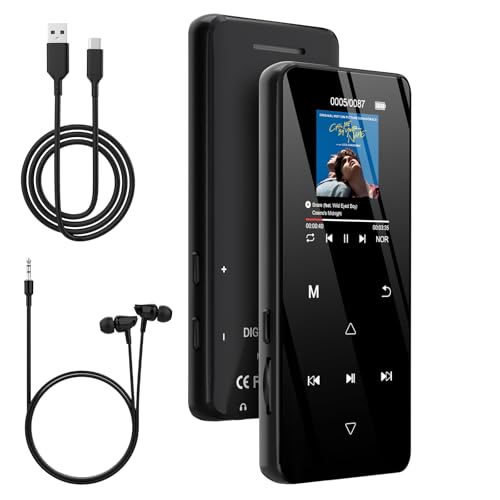
Best for: People who want a compact music player for running, gym sessions, travel, or everyday Bluetooth listening.
The PulsePlay has 32GB of internal storage and a microSD slot that supports expansion up to 128GB; the card is not included. Its Bluetooth 5.3 connection is designed for wireless headphones or speakers. It also has a built-in speaker and supports audio formats including FLAC, APE, and WAV.
Why it was selected: It is a straightforward choice for listeners searching for an MP3 player, particularly if wireless listening and expandable storage matter more than a direct digital connection to a stereo.
Optical-out limitation: Optical output is not listed in the supplied features. Bluetooth capability does not mean the player has a digital optical port. Choose another device if a confirmed optical connection is required.
Picxiul 144GB MP3 Player

Best for: Listeners with a large offline library who want multiple playback options, including Bluetooth and a 3.5mm connection.
This player combines 16GB of internal storage with an included 128GB microSD card, for 144GB of listed ready-to-use storage. The listing says it supports expansion up to 512GB. Supported audio formats include MP3, WMA, OGG, AAC, FLAC, APE, and WAV. It also includes a built-in speaker, a 3.5mm jack, and earphones.
The product information says Bluetooth 5.2 can connect to wireless headphones, earbuds, or speakers. It also notes AUX use in a car, which refers to an analog connection rather than an optical connection.
Why it was selected: It offers a large stated storage capacity and a useful choice of wired and wireless listening methods. Limitation: Optical out is not listed. Choose it for portable file playback, not as a confirmed digital optical source for a stereo.
Dyzeryk 16GB MP3 Player

Best for: Buyers who want a basic, storage-card-based music player with several additional media functions.
The Dyzeryk includes a 16GB microSD card and supports cards up to 128GB, with larger cards not included. Its listed audio formats include MP3, WMA, APE, WAV, and FLAC. The device also has a built-in speaker and supports video, photos, FM radio, voice recording, and e-book reading.
The listing states up to 10 hours of music playback and a two-to-three-hour full charge. These are manufacturer-provided claims, so actual results may vary with use.
Why it was selected: It provides a low-complexity option for local music playback and multiple file types. Optical-out limitation: No optical output is listed. Its built-in speaker does not establish that it can send digital audio to a separate stereo.
Buying Guide: How to Choose a Player With Optical Out
Does the player need a confirmed optical output?
Yes, if your stereo, DAC, or receiver must receive audio through an optical digital input. Look for explicit wording such as “optical output,” “TOSLINK output,” or “S/PDIF optical out.” A listing that says only “OPT” is ambiguous: it may describe an input, an output, or a mode that needs clarification.
Do not assume that Bluetooth, USB, AUX, or a headphone jack can substitute for optical out. Bluetooth sends audio wirelessly, AUX is typically an analog connection, and USB may serve only for charging or file transfer. Check the product manual for the signal type and connector before purchasing.
Are you shopping for an MP3 player or a CD player?
An MP3 player typically plays digital files stored on internal memory or a removable card. The PulsePlay, Picxiul, and Dyzeryk models fit that style of portable listening, but their supplied features do not list optical outputs.
The Lumirio CDA-A6 is a CD player with a listed optical output and USB CD-ripping function. It may better fit a stereo setup if optical connection is the priority, but it is not described as a conventional pocket MP3 player. Decide whether your source is a CD collection, stored music files, or both.
What connection does your stereo accept?
Check the receiver or DAC for an optical input before choosing a source. Optical ports are often labeled “Optical,” “Digital Audio In,” or “TOSLINK.” Compare the player’s documented output with the stereo’s input rather than relying on a similar-looking label.
If your stereo has only AUX or RCA inputs, an optical output alone will not provide a direct connection. You may need a different output type or a separate digital-to-analog converter, depending on the equipment. Verify the required connection path before ordering.
How much storage do you need?
For a small offline playlist, modest internal storage or a basic memory card may be sufficient. Large libraries, audiobooks, or lossless files can use more space. The PulsePlay supports a separate microSD card up to 128GB; the Picxiul includes a 128GB card and lists support up to 512GB; and the Dyzeryk includes a 16GB card and lists support up to 128GB.
These capacities do not indicate how many tracks a device will hold. File size varies with format, recording length, and audio quality. Check whether a card is included and whether the player supports the card capacity you plan to use.
Do you prefer wired or wireless listening?
Bluetooth is useful for headphones and wireless speakers, and the LEEWAVES and Lumirio listings describe bidirectional Bluetooth features. A 3.5mm jack can connect compatible wired headphones or AUX equipment. Neither feature, by itself, confirms optical output.
For home stereo use, prioritize the connection your equipment actually accepts. For exercise or travel, portability, storage, and Bluetooth may matter more. If you need both portable file playback and optical output, verify that a specific model supports both; the supplied details here do not establish that combination.
Should you consider CD ripping?
Choose a CD-ripping feature if you want to create digital copies of discs. The Lumirio CDA-A6 listing describes one-key ripping to WAV files on a USB drive. Confirm the supported USB drive and file-handling instructions in the product documentation before relying on a particular archiving workflow.
Frequently Asked Questions
Which product in this selection explicitly lists optical out?
The Lumirio CDA-A6 product name identifies optical and 3.5mm AUX outputs. The LEEWAVES boombox lists an OPT mode, but the provided description does not say whether it is an output.
Do the PulsePlay, Picxiul, or Dyzeryk players have optical output?
Optical output is not listed in the supplied features for these three MP3 players. Treat them as portable music players for their documented storage, speaker, Bluetooth, or headphone features, not as confirmed optical sources.
Is an optical connection the same as AUX?
No. Optical carries digital audio through an optical connection, while AUX usually refers to an analog audio connection. A device with AUX does not automatically have optical output.
Can Bluetooth replace optical out?
Bluetooth can send audio to compatible wireless equipment, but it is a different connection method. Use Bluetooth only if the receiving headphones, speaker, or stereo supports it and wireless audio meets your needs.
What should I check before buying an optical-output player?
Confirm that the product documentation says “optical output,” identify the connector type, and make sure your receiver or DAC has a compatible optical input. Also verify whether the player reads your intended source, such as CDs or stored audio files.