
The best multi audio input switcher depends on your connections: the BolAAzuL is suited to mixed 3.5mm and RCA setups, while Panlong’s four- and eight-input models are better for RCA-based AV systems. COOIDEA is a compact choice for two 3.5mm devices, and the Osee GoStream Deck is designed for video production with audio controls. Compare the connection types and number of sources before choosing.
| Product | Best For | Inputs And Connections |
|---|---|---|
| BolAAzuL 4-Way Switcher | Mixed analog audio setups | Four ports; 3.5mm and RCA |
| Panlong 4-Way AV Switch | Four RCA AV sources | Four inputs; composite video and stereo audio |
| Panlong 8-Way AV Switch | Many RCA AV sources | Eight inputs; composite video and stereo audio |
| Osee GoStream Deck | Live production and streaming | Four HDMI inputs; two audio inputs |
| COOIDEA 3.5mm Switcher | Two 3.5mm sources or outputs | Two-way input/output switching |
BolAAzuL 4-Way RCA And 3.5mm Switcher

The BolAAzuL is a four-port, bidirectional analog audio switcher. It can route as many as four sources to one speaker or other destination, or route one source to one of four destinations. Only one selected output plays at a time, so it is for switching rather than simultaneous playback.
Best for: People combining devices with 3.5mm and RCA stereo connections, such as a computer, game console, television, amplifier, or headphones. Its flexible connection options make it a better fit than an RCA-only selector when a setup mixes plug types.
The product uses a passive mechanical design and requires no separate power supply according to its listing. The feature description also identifies it as an option for gamers, home theater owners, audio producers, AV hobbyists, and content creators who need to select among analog devices.
- Choose this if: You need four-way switching and both 3.5mm and RCA connection flexibility.
- Limitation: Do not connect both 3.5mm and RCA to the same channel at once. It also switches one path at a time, not multiple destinations simultaneously.
Panlong 4-Way RCA AV Switcher
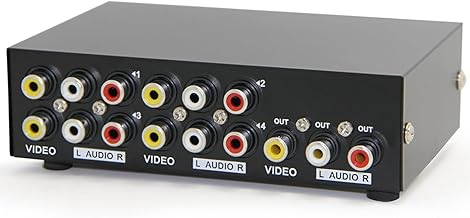
This Panlong selector accepts four RCA AV sources and switches them to a television or other compatible destination. Its yellow, white, and red RCA connections carry composite video and left-right stereo audio, making it relevant to older AV equipment that uses this connector format.
Best for: Households with up to four RCA-equipped devices, such as DVD players, game consoles, or cable boxes. It is a more suitable choice than a 3.5mm-only switcher when the source devices use composite AV cables and the goal is to switch audio and video together.
The unit has a mechanical design and push-button source selection. Its metal enclosure is listed as a construction feature. These details make it a straightforward option for a stationary setup where users want to select a source at the switcher rather than unplug cables.
- Choose this if: You have four composite RCA sources and want one selector for their audio and video signals.
- Limitation: It is an RCA composite AV product, not a general-purpose 3.5mm or HDMI audio switch. Confirm that your equipment has the matching connectors.
Panlong 8-Way RCA AV Switcher

The eight-way Panlong expands the RCA switching capacity to eight sources. Like the four-way model, it is designed for composite video and left-right stereo audio, with a mechanical selector and push-button operation. It can help consolidate numerous compatible devices that would otherwise require repeated cable changes.
Best for: An AV setup with more than four RCA sources, such as a collection of older consoles, DVD players, and cable equipment. It is better suited than the four-input version when the number of sources is the priority and all devices use composite RCA connections.
The product listing describes a metal enclosure and a simple mechanical design. Since the device switches composite AV, it can be useful when the goal is to change the selected source for both picture and stereo sound, rather than audio alone.
- Choose this if: You need to select among as many as eight RCA AV sources.
- Limitation: Its RCA composite format will not directly serve devices that use only HDMI or 3.5mm connections. Check the source and display connectors before buying.
Osee GoStream Deck HDMI Pro Switcher

The Osee GoStream Deck is a live-production video switcher with four HDMI inputs, two HDMI outputs, two audio inputs, and a headphone output. It is not a simple analog audio selector. Instead, it combines audio connections and controls with video switching, monitoring, recording, and streaming features.
Best for: Streamers and content creators who need to work with multiple HDMI video sources while monitoring and adjusting audio. Listed controls include EQ, limiter, and fader functions. The device can also record to an SD card or USB SSD, and it supports streaming through Ethernet or USB output to PC software.
The product listing also describes landscape and portrait streaming and simultaneous streaming to three platforms through Ethernet. These production features make it a better fit for a streaming desk than for someone who only needs to switch between two analog audio sources.
- Choose this if: Your job involves multi-camera or multi-source video production and audio management.
- Limitation: It is a substantially more specialized category of equipment than a basic audio switcher. Its two audio inputs may not suit a setup that needs many independent analog audio inputs.
COOIDEA 3.5mm Stereo Audio Switcher

The COOIDEA is a two-way 3.5mm stereo switcher that can work in either of two configurations: two sources to one output, or one source to two outputs. A button selects the active path. The listing describes it as plug-and-play and says that it does not require a power supply.
Best for: Someone who wants to switch between two 3.5mm audio sources, such as a phone and computer, or select between two receiving devices, such as speakers and headphones. It is a simpler and more compact choice than four- or eight-input RCA AV selectors when only two 3.5mm connections are needed.
The listed features include a low-impedance design, gold-plated contacts, and a focus on minimizing cable noise. These are product specifications, not a substitute for checking whether the connected devices have the required 3.5mm stereo ports.
- Choose this if: Your setup uses 3.5mm stereo plugs and needs a straightforward two-way selection.
- Limitation: It offers only two connections in the selected input or output configuration. It does not provide RCA or HDMI switching.
Buying Guide: How To Choose A Multi Audio Input Switcher
A multi audio input switcher lets you select which connected source sends audio to a destination. Some models also switch video, and bidirectional designs may let you reverse the source and destination arrangement. The right choice depends on the connection standard, source count, and whether you need audio-only selection or broader AV production features.
Which connectors do your devices use?
Match the switcher to the actual ports on your equipment. A 3.5mm switcher suits devices with headphone-style stereo connections. RCA selectors suit equipment with red-and-white stereo audio plugs, while composite AV models also use a yellow video connection. HDMI switchers are a different category and are relevant when switching video sources as well as their associated audio.
Do not assume an adapter will make every configuration work as intended. Check the source and destination connections, and verify whether the product supports the needed direction of signal flow. If your setup mixes RCA and 3.5mm connections, a switcher that expressly lists both may be more convenient than a single-format unit.
How many audio sources do you need to select?
Count the devices that must remain connected at the same time. A two-way switcher can be adequate for a computer and phone, while a four-way model can serve a larger collection. An eight-way selector is useful when many compatible RCA devices share one destination. Choosing more inputs than needed can add unnecessary complexity, while too few inputs may force regular cable changes.
Do you need audio-only switching or video switching too?
For stereo sound alone, a basic audio switcher may be sufficient. If you want to change both picture and sound from a console or DVD player, consider an AV selector with matching video support. A streaming production switcher is aimed at a different need: managing multiple video sources, audio controls, monitoring, and recording or streaming. It is not automatically the best option for a simple home stereo setup.
Will the switcher support your desired signal direction?
Most buyers want several sources to feed one output, such as multiple devices connected to one speaker system. Some bidirectional models can also route one source to a selected destination. This does not necessarily mean the device can play to every output at once. Check whether the product specifies one active path, simultaneous output, or a particular input/output mode.
Do you need powered controls or simple mechanical operation?
Passive mechanical selectors can be convenient when you want a basic physical button and no separate power supply. More feature-rich video switchers may require a more involved setup and provide controls for streaming, recording, or audio adjustment. Choose based on the task: basic source selection usually does not require production functions, while a live stream may benefit from them.
What setup details should you verify?
- Count the connected sources and the outputs you need to use.
- Check connector type at both ends of every signal path.
- Confirm whether the device switches audio only or composite AV or HDMI video as well.
- Look for limitations on simultaneous playback or active outputs.
- For combined RCA and 3.5mm models, follow any instructions about which connections can be used together.
- For production switchers, confirm that the listed audio inputs and monitoring connections match your workflow.
Frequently Asked Questions
What does a multi audio input switcher do?
It lets you select one connected audio source to send to a destination, such as a speaker system or headphones. Some models also support switching from one source to a selected output device, or switch video along with audio.
Can an audio switcher play multiple sources at once?
Not necessarily. Many selectors activate one source or path at a time. Check the product description for simultaneous playback support; the BolAAzuL listing specifically says only one output plays at a time.
What is the difference between RCA and 3.5mm audio switchers?
They use different physical connectors. RCA stereo audio uses separate left and right plugs, commonly red and white. A 3.5mm stereo connection uses a single headphone-style plug. Choose a switcher that matches the ports on your devices.
Can an RCA AV switcher handle HDMI devices?
No, an RCA composite AV selector does not directly switch an HDMI connection. The source and destination need compatible RCA connections unless a separate conversion method is used.
Should I choose a two-input or four-input switcher?
Choose a two-input model when you only need to select between two sources or destinations. Choose a four-input model when four compatible sources need to remain connected, and consider a higher-capacity model if you have more devices.
Is a live streaming switcher the same as an audio switcher?
No. A live streaming switcher can combine video switching, audio control, monitoring, recording, and streaming functions. A basic audio switcher focuses on selecting an audio path and is generally a better match for simple source changes.