
The best multi-track recording interface depends on how many sources you need to capture at once and whether you want a computer-based setup or a standalone recorder. The Zoom R24 is best for hands-on recording with multiple inputs, while the Behringer UMC1820 suits a computer studio that needs extensive connectivity. The Focusrite Scarlett 18i16 is a high-resolution bundled option, and the Zoom R4 is a portable choice for layering ideas. The PIYONE 2×2 is best for simple, two-channel recording.
| Product | Best for | Key distinction |
|---|---|---|
| Zoom R24 | Standalone multitrack sessions | Eight combo inputs and up to 24 tracks |
| Behringer UMC1820 | Computer studios with many connections | 18×20 USB interface with ADAT I/O |
| Focusrite Scarlett 18i16 | High-resolution recording with accessories | 24-bit/192 kHz and included bundle items |
| Zoom R4 | Portable songwriting and overdubbing | Four-track recorder with built-in effects and rhythms |
| PIYONE 2×2 | Compact two-channel recording | USB-C, bus power, and loopback |
Zoom R24 Multi-Track Recorder
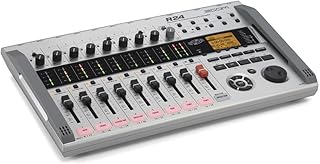
The Zoom R24 combines a tabletop multitrack recorder with an audio interface and controller. It has eight XLR combo inputs according to the product name, plus built-in stereo condenser microphones for capturing sounds, speech, and dialogue. The listed recording formats are 16- or 24-bit WAV at 44.1 or 48 kHz.
Best for: Musicians and small recording groups who want a dedicated tabletop workflow and need to connect several microphones or instruments. It is the most directly suited option here for recording multiple sources without making a basic two-input interface the center of the setup.
The product lists support for up to 24 tracks and says that two R24 units can be connected via USB for 16 tracks of simultaneous recording. Track count and simultaneous input count are different, so buyers should check the operating details for their planned session before relying on a specific number of simultaneous inputs.
Limitation: Its listed WAV rates top out at 48 kHz, below the 192 kHz specifications stated for some computer interfaces in this roundup. Choose it for its recorder-based workflow and input count rather than for the highest listed sample rate.
Behringer UMC1820 USB Audio Interface

The Behringer UMC1820 is an 18×20 USB 2.0 audio/MIDI interface with ADAT I/O. Its listed features include Midas mic preamplifiers and 24-bit/96 kHz recording resolution. The product is described for recording microphones and instruments and names compatibility with popular recording software, including Avid Pro Tools, Ableton Live, and Steinberg Cubase.
Best for: A computer-based home or project studio that needs more connection capacity than a compact two-input interface offers. The 18×20 designation and ADAT I/O make it the better fit in this group for buyers prioritizing extensive routing and expansion connections.
It is a practical choice when several microphones or instruments need to be incorporated into a software-based recording setup. The listed software compatibility gives buyers examples of the intended recording environment, although it does not establish compatibility with every computer, operating system, or software version.
Limitation: The listed maximum resolution is 24-bit/96 kHz, rather than 192 kHz. The product information also does not specify every input’s connector type or the number of preamps, so verify the detailed connection layout against your recording plan.
Focusrite Scarlett 18i16 4th Gen Bundle

This bundle includes the Focusrite Scarlett 18i16 4th Gen interface, power supply, USB cable, headphones, a pop filter, and an XLR cable. Its listed specifications include 24-bit/192 kHz resolution, USB 2.0 connectivity, and near-zero-latency monitoring for recording and performance.
Best for: Buyers who want a high-resolution interface and several recording accessories in one package. The 18i16 name makes it a candidate for a larger studio setup than a two-channel interface, while the included headphones, pop filter, and cable can help assemble a basic recording station.
Choose this option if the stated 192 kHz maximum is important to your workflow and you value the included accessories. The product description also identifies real-time monitoring as a feature, which is relevant to performers who want to hear a monitored signal while recording.
Limitation: The provided product details do not enumerate all input and output types or explain how many inputs can record simultaneously. Check the full specifications and bundle contents before choosing it for a session with a specific microphone or instrument count.
Zoom R4 Portable Multi-Track Recorder

The Zoom R4 records up to four tracks and includes two XLR/TS combo inputs with Zoom preamps. Its listed features include 32-bit float recording, a built-in microphone, effects, rhythms, battery power, and USB audio interface functionality. It supports bouncing tracks to a dedicated bounce track, with an undo option to return to the previous state.
Best for: Songwriters, musicians, and mobile creators who want a compact recorder for capturing ideas, layering parts, and working away from a fixed studio. Its combo inputs accommodate microphones, instruments, and keyboards, while the built-in microphone can be useful for quick captures.
Choose the R4 if you expect to build a song through overdubbing rather than record a large ensemble in one pass. The four-track limit is paired with bounce functionality, which frees channels for additional layers. The listed 32-bit float feature is intended to help avoid clipping without requiring gain adjustments.
Limitation: Two combo inputs and four tracks make it less suitable than the R24 or 18i16 for sessions requiring many sources at once. Bouncing also means managing layers and track space as a project grows.
PIYONE 2×2 USB-C Audio Interface

The PIYONE 2×2 is a two-channel interface with an XLR/TRS combo input, monitor mix, and loopback function. Its product description lists 24-bit/192 kHz resolution, USB-C connectivity, bus power, and class-compliant plug-and-play use with Mac and PC. It also describes gain knobs with illuminated LED rings.
Best for: A solo musician, podcaster, or home-recording beginner who needs a simple way to connect a small number of sources to a computer. USB-C bus power and the stated driver-free setup may appeal to users who want a compact interface without a separate power supply.
Choose this if two-channel recording is enough and loopback is useful for your workflow. The monitor-mix feature is relevant when balancing input monitoring and computer playback. Its stated 192 kHz maximum matches the highest listed resolution in this group.
Limitation: This is a 2×2 interface, not a high-input-count multitrack hub. Avoid it if you need to record a drum kit or several separate microphone signals at once; its listed channel count is better suited to a simpler setup.
Buying Guide: How to Choose a Multi-Track Recording Interface
How many sources do you need to record at once?
Start by counting the microphones and instruments you expect to record simultaneously. A two-channel unit such as the PIYONE is aimed at a smaller setup, while the Zoom R4 has two combo inputs and four tracks for recording and layering. The Zoom R24 lists eight combo inputs. The Behringer and Focusrite models are designed for larger computer-based systems, but check their full connection specifications to confirm the number and type of inputs available for your session.
Do not treat a product’s total track count as the same thing as its simultaneous input count. A recorder may store or play many tracks while capturing fewer sources at once. If you record a full band live, verify simultaneous recording capacity and connector types before buying.
Do you want a standalone recorder or a computer interface?
A standalone recorder provides a dedicated recording workflow. The Zoom R4 and R24 are the clearest choices for buyers who want to record directly on a tabletop device, and both also list USB audio interface functionality. The R4 emphasizes portability, battery power, and layering. The R24 emphasizes more inputs and a larger track workflow.
A computer interface is a better fit when your recording, editing, and mixing take place in desktop software. The Behringer UMC1820 lists USB and ADAT connectivity, while the Scarlett 18i16 and PIYONE products list USB connections. Check that the interface works with your computer and preferred software version; a product’s reference to popular recording programs does not guarantee every configuration.
What do sample rate and bit depth tell you?
Bit depth and sample rate describe recording formats, but a larger number alone does not determine whether an interface is the right purchase. Among these products, the Scarlett and PIYONE list 24-bit/192 kHz, the Behringer lists 24-bit/96 kHz, and the R24 lists WAV recording at 16 or 24 bit and 44.1 or 48 kHz. The R4 lists 32-bit float recording. Compare the specifications with your recording and editing workflow rather than using resolution as the only deciding factor.
Which connections and workflow features matter?
Match the connectors to your equipment. XLR inputs are commonly used for microphones, while combo connections can accept multiple listed source types; check the exact input specifications for each model. ADAT I/O on the UMC1820 is relevant to buyers considering an expanded digital setup. On the R4, bouncing, effects, and rhythms support a recorder-based layering process. On the PIYONE, loopback and monitor mix are the notable workflow features. The Scarlett bundle adds headphones, a pop filter, and a cable.
How much room do you need to expand?
Think about likely future sessions, not only your current equipment. A two-channel interface may be sufficient for a vocal and instrument, but can become limiting when adding more microphones. Higher-input models offer more room, though buyers should confirm how inputs are assigned and whether any expansion depends on additional equipment. Also consider whether you need portable battery operation, a dedicated recorder, or a computer-centered setup.
Frequently Asked Questions
What is a multi-track recording interface?
It is a device or recorder used to capture multiple audio tracks. A computer interface sends audio into recording software, while a standalone multitrack recorder can capture and manage tracks directly on the device. Some products, such as the Zoom R4 and R24, list both recorder and USB interface functions.
Is a 2×2 interface enough for recording music?
A 2×2 interface can suit a solo performer or a setup that records up to two channels at once. It is less suitable when you need to capture many separate microphones simultaneously. Count your planned sources before choosing a channel size.
What is the difference between tracks and inputs?
Inputs are the connections used to bring audio sources into a recorder or interface. Tracks are the separate audio recordings managed during a project. A device can support many project tracks without recording that same number of sources simultaneously, so check both specifications.
Should I choose a standalone recorder or USB interface?
Choose a standalone recorder if you want a dedicated device for capturing and layering audio. Choose a USB interface if your computer and recording software are central to your workflow. Some products provide both functions, so compare their recording modes and connection requirements.
Do I need 192 kHz recording?
Not necessarily. A higher stated sample rate may matter for a particular workflow, but it should be weighed alongside input count, connectors, portability, and software setup. The products in this list offer different resolution specifications, so choose based on the project requirements you actually have.