Best Multi-Track Recording Studio Gear for Home Studios
Answering the search for a multi-track recording studio setup, this guide highlights five practical options for different budgets and workflows. The selections cover standalone recorders, USB interfaces, and software that together form a complete multi-track recording environment. Best for hobbyists, podcasters, and musicians, these picks emphasize ease of use, reliable input options, and solid audio quality. Use the buying table below to compare core strengths at a glance, then read each product section for how it fits common recording scenarios.
| Product | Best For | Key Advantage |
|---|---|---|
| Tascam Model 24 | Small studios, producers | Onboard mixer and 24-track recording |
| TASCAM Studio Bridge | DAW users, live setups | Studio-to-DAW bridge with 24-in/24-out |
| Roland BR-80 | On-the-go recording | Portable, built-in mic, multiple modes |
| Zoom H4 Essential | Portable field recordings | 4-track 32-bit float, USB interface |
| MixPad Free (Mac/Windows) | Software-only workflows | Multi-track recording and editing |
Tascam Model 24 24-Track Multi-Track Studio

The Tascam Model 24 combines a traditional analog-style mixer surface with a robust multitrack recording workflow. It offers 24-track recording at 24-bit/48kHz to on-board storage with easy-to-read controls. Users benefit from surface-level access to inputs and outputs, eliminating frequent menu dives. This unit is best for small studios or producers who want tangible mix controls, quick punch-ins, and the ability to track multiple performers in real time. A limitation is that it relies on a physical workflow rather than an entirely software-based route, which may affect DAW-centric studios seeking full digital routing.
TASCAM Studio Bridge 24-Channel

The Studio Bridge acts as a gateway between analog mixers and digital workstations. It preserves analog tone while enabling 24-channel recording and a 24-in/24-out USB interface. This makes it ideal for studios with an analog console looking to integrate with a DAW, or for live environments where tracking to a computer is essential. A potential drawback is a learning curve for users who mainly work inside a DAW and may want tighter software integration beyond the bridge’s capabilities.
Roland BR-80 Portable Digital Recorder
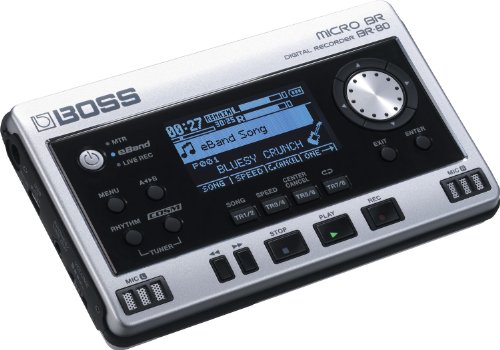
The Roland BR-80 is a portable multi-track recorder with built-in stereo mics and a suite of rhythm patterns. It supports SD/SDHC storage, eight playback tracks, and separate modes for MTR, eBand, or live recorder use. This device suits musicians and podcasters who prioritize portability and ready-to-record functionality without a computer. It may be less ideal for users needing extensive external mic options or advanced DAW-style editing directly on the device, but it excels for quick capture and live idea gathering.
Zoom H4 Essential Handheld Recorder

The Zoom H4 Essential is a versatile handheld recorder offering 4 tracks of 32-bit float recording and a built-in USB audio interface. Its dual X/Y microphones capture stereo depth, and dedicated gain knobs allow on-the-fly level control during sessions. Best for field recording, podcasting, or on-location tracking, this device provides a compact solution for multi-track capture without a full studio. A limitation is that extended field use may require external power or batteries for longer sessions, and its on-board preamps are generally quieter than larger studio interfaces.
MixPad Free Multitrack Recording Studio (Mac/Windows)

MixPad Free Multitrack Recording Studio provides an accessible software route for layered music and voice tracks, with tools for editing such as split, trim, and join. It supports multi-track recording and offers effects and editing capabilities to shape a mix. This option is best for users who want a cost-effective software-based workflow, particularly on a computer-based home studio. A caveat is that the free version may have fewer advanced features than paid editions, and performance depends on system specs and RAM for large projects.
Buying Guide
What’s Your Recording Goal?
Identify whether you need portable field recordings, a compact desktop setup, or a full studio workflow. Portable devices like the Zoom H4 Essential suit on-the-go use, while models like the Tascam Model 24 or Studio Bridge target fixed studios with hands-on control.
Do You Prefer Hardware, Software, or a Hybrid?
Hardware multi-track recorders offer tactile control and reliable performance without a computer. Software options like MixPad enable flexible editing and routing on a computer. A hybrid approach can leverage a Studio Bridge to preserve analog tone while routing to a DAW for advanced editing.
Inputs, Outputs, and I/O Clarity
Check the number and type of inputs (XLR, TRS, USB), the presence of phantom power, and whether the device can function as an audio interface. More simultaneous tracks and easy punch-in/out workflows simplify complex sessions.
Quality of Preamps and Mics
Higher-quality preamps and built-in mics matter when you plan to capture vocals, guitars, or ambient tracks without external gear. Consider whether you need phantom power for condenser mics.
Editing and Mixing Capabilities
Software tools from MixPad or similar programs can provide non-destructive editing, effects, and multimodal mixing. Hardware units may include onboard effects and EQ, which can reduce reliance on a computer during a session.
Connectivity and Expandability
Assess compatibility with your computer, DAW, or external interfaces. A device that easily integrates with your existing setup saves time and reduces compatibility concerns in future upgrades.
FAQ
- What is a multi-track recorder? A device or software that records multiple audio tracks simultaneously for layered recording and mixing.
- Do I need a computer to use these devices? Some options are standalone recorders; others are software-based and require a computer or tablet.
- Is 24-bit/48kHz necessary? It provides professional-quality audio; for casual use, 16-bit/44.1kHz is typically sufficient.
- Can I mix with these tools? Yes, all five products support multi-track mixing, either onboard or in software.
- What’s the best workflow for beginners? Start with a portable recorder for ideas, then move to software for detailed editing and mixing.
- Are there any limitations to free software? Free editions may lack advanced features or higher track counts; consider upgrading if needed.