
A multi-zone paging microphone must work with an audio system that can select or route announcements to separate zones; the microphone alone does not create that capability. Of the listed options, the Rockville CH-MIC70 is best suited to commercial paging because it has push-to-talk controls and adjustable chimes. The YO-TRONICS and Monoprice models are desktop paging alternatives, while the FIFINE and Phenyx Pro are handheld options for announcement setups that do not require a dedicated paging base. Confirm zone-routing support in your mixer, amplifier, or paging controller before choosing.
| Product | Best suited for | Key consideration |
|---|---|---|
| Rockville CH-MIC70 | Commercial paging with audible start and finish chimes | Uses a 1/4-inch connection |
| YO-TRONICS YTM-PA316 | Push-to-talk announcements with an XLR connection | Listed details do not specify power or chime features |
| Monoprice Desktop Paging Microphone | Desktop paging with a flexible gooseneck | Requires batteries or phantom power |
| FIFINE K6 | Handheld wired announcements | Not for 3.5 mm connections |
| Phenyx Pro PTU-71-2H | Wireless announcements or events | Handheld system, not a zone selector |
Rockville CH-MIC70 Commercial Paging Microphone

The Rockville CH-MIC70 is the strongest match in this list for a fixed commercial paging position. It combines a push-to-talk button, a flexible gooseneck, and built-in chimes that play when a user begins and finishes an announcement. Chime volume is adjustable, which can help tailor the cue to the setting.
The microphone has a built-in preamp, so it does not require 48V phantom power. Its included 30-foot cable ends in a 1/4-inch connection for a compatible mixer or receiver. This makes it a practical choice when the installed system accepts that connector and the operator needs a stationary announcement microphone.
- Best for: Schools, restaurants, churches, and conference spaces that need push-to-talk announcements with chime cues.
- Why it was selected: The listed features specifically describe commercial paging functions rather than only general vocal use.
- Limitation: The product information does not state that the microphone selects or controls multiple zones. The connected audio system must provide zone routing.
YO-TRONICS YTM-PA316 Push-To-Talk Microphone

The YO-TRONICS YTM-PA316 is a wired, gooseneck-style microphone designed for public voice announcements and desktop or podium use. Its product name identifies it as a push-to-talk commercial microphone, and it has an XLR connector. That connector may suit an installation built around XLR inputs, but buyers should check the input and powering requirements of their specific audio equipment.
This is a better fit than a handheld vocal mic when the operator needs a dedicated desktop microphone for meetings, a podium, or public-address announcements. Its listed description also mentions video conferences, although the suitability of any XLR microphone for a particular conferencing setup depends on the rest of the signal chain.
- Best for: Buyers looking for a wired push-to-talk microphone with an XLR connection.
- Why it was selected: The stated use includes commercial public announcements, and its desktop format suits a fixed operator position.
- Limitation: The supplied product details do not specify power requirements, cable length, chime functions, or zone controls. Confirm these before purchase.
Monoprice Desktop Paging Microphone
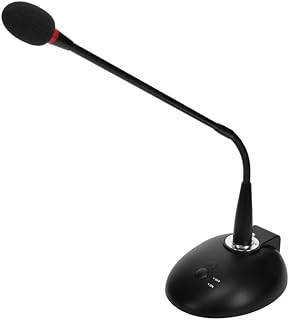
The Monoprice Commercial Audio Desktop Paging Microphone has a flexible gooseneck, a base with an on/off switch, and a cardioid pickup pattern. The product is a condenser microphone. It can be powered by two AAA batteries, which are not included, or through an XLR connection with +48V phantom power.
This model is a useful comparison for buyers who want a desktop paging microphone with a simple switch rather than the Rockville’s described push-to-talk chimes. Its power options give a choice between battery operation and phantom power, depending on the connected system and the user’s preferred setup.
- Best for: Fixed desktop paging where a flexible gooseneck and on/off switch are important.
- Why it was selected: It is explicitly described as a commercial audio paging microphone and includes a cardioid pattern and base switch.
- Limitation: Batteries are not included, and the listed features do not mention zone selection or audible paging chimes.
FIFINE K6 Wired Handheld Microphone

The FIFINE K6 is a dynamic handheld microphone with an on/off switch and a detachable 14.8-foot cable. It has a 6.35 mm (1/4-inch) plug, a cardioid pickup pattern, and a stated frequency range of 50 Hz to 18 kHz. The listed features say that it needs no power, making it a simple option for compatible wired audio inputs.
Unlike a desktop paging station, this microphone is intended to be held during use. It may suit a speaker who needs to move between locations or make occasional announcements through a compatible mixer or speaker system. Its cardioid pattern is described as helping reduce feedback and ambient noise, but it does not replace proper system setup.
- Best for: Handheld announcements, presentations, and other speech applications using a compatible 1/4-inch input.
- Why it was selected: It offers a wired, no-power-required option for announcement use where a dedicated desktop paging base is unnecessary.
- Limitation: The manufacturer’s listed information says it is not available for 3.5 mm connections, even with an adapter. It has no listed zone-selection function.
Phenyx Pro PTU-71-2H Wireless Microphone System

The Phenyx Pro PTU-71-2H is a dual UHF system with two handheld dynamic microphones. Its listed features include auto scan, selectable frequencies, IR synchronization, and a stated line-of-sight operating range of 290 to 328 feet. The system includes two channels with 100 selectable frequencies each, and the product description says up to 16 transmitters can operate in a multiset configuration.
This option is better for mobile announcements, events, or worship services where speakers need wireless handheld microphones. The frequency-selection and auto-scan features are relevant to wireless setup, but they do not mean that the microphones route announcements to different building zones. Zone control still depends on the connected audio system.
- Best for: Events or announcements where two wireless handheld microphones are useful.
- Why it was selected: It offers a wireless alternative to fixed desktop paging microphones and includes selectable-frequency features.
- Limitation: It is a handheld wireless system, not a dedicated multi-zone paging station. Its stated range is line-of-sight and should not be treated as a guarantee for every building.
Buying Guide: How To Choose A Multi-Zone Paging Microphone
Does the microphone itself control multiple zones?
Do not assume that a microphone with “paging” in its name can choose among zones. Zone selection is usually handled by a compatible paging controller, mixer, amplifier, or other routing equipment. The products listed here do not specify built-in zone-selection controls. Before buying, identify which component in your existing system selects zones and confirm that the microphone can connect to it.
Which connection should you choose?
Match the microphone’s output and cable to the audio system’s input. The Rockville CH-MIC70 is listed with a 1/4-inch cable, while the YO-TRONICS and Monoprice models have XLR connections. The FIFINE K6 also uses a 1/4-inch plug. The Phenyx Pro is a wireless system, so check the receiver and its connection to the system. Connector type alone does not confirm that a microphone is compatible.
Do you need a desktop or handheld microphone?
A desktop gooseneck microphone is a practical choice for a reception desk, podium, or control room where an operator speaks from a consistent position. The Rockville, YO-TRONICS, and Monoprice models are desktop-oriented options. A handheld microphone offers more freedom of movement, making the FIFINE K6 or Phenyx Pro more relevant for events. Choose based on where announcements are made and whether the speaker needs to move.
Should you choose a condenser or dynamic microphone?
The Rockville and Monoprice models are described as condenser microphones. The Monoprice requires either two AAA batteries or +48V phantom power through XLR. Rockville’s built-in preamp is described as removing the need for phantom power. The FIFINE and Phenyx Pro are listed as dynamic microphones, and the FIFINE is stated to need no power. Check the manufacturer’s detailed instructions for any power needs not included in the available product information.
Are chimes and push-to-talk controls important?
Push-to-talk operation can help an operator control when an announcement begins. The Rockville is specifically listed with push-to-talk operation and adjustable chime-in and chime-out sounds. The YO-TRONICS product name also identifies it as push-to-talk, but the supplied details do not describe chimes. The Monoprice has a base power switch. Choose the control style that matches the operator’s workflow, and verify any required chime behavior before purchase.
What should you check before installation?
- Confirm the audio system supports the required zone-routing method.
- Check the microphone connector, input type, and any needed power source.
- Plan the microphone’s position and make sure the cable can reach the equipment.
- For wireless use, review frequency, receiver placement, and the expected line-of-sight environment.
- Test announcement routing and audio levels across each zone before regular use.
Frequently Asked Questions
What makes a paging setup multi-zone?
A multi-zone setup can route an announcement to one or more separate areas. A compatible controller, mixer, amplifier, or paging system typically handles that routing; a microphone alone does not establish multi-zone capability.
Can the Rockville CH-MIC70 select a zone?
The listed product features describe push-to-talk operation, chimes, a built-in preamp, and a 1/4-inch output. They do not specify zone-selection controls, so confirm that a separate connected device provides the required routing.
Which listed microphone has adjustable paging chimes?
The Rockville CH-MIC70 is the product in this list described with adjustable chime volume and chime-in and chime-out sounds.
Which option is best for a fixed paging desk?
The Rockville, YO-TRONICS, and Monoprice models are desktop or gooseneck options. Compare their listed connection and control details against the input and power requirements of the installed audio system.
Can a handheld microphone work for announcements?
Yes, a compatible handheld microphone can carry announcements through an audio system. The FIFINE K6 is wired, while the Phenyx Pro system is wireless. Neither is listed as a multi-zone controller.