
The best music keyboards for computers are USB MIDI controllers that send notes and control data to music software; they do not usually make sound on their own. The Akai MPK Mini IV is best for compact beat-making with chord and scale modes, while the MPK Mini Plus suits producers who want more keys and sequencing controls. The Donner N-25 is a beginner-focused option. The MOKURU is a typing keyboard, not a music-making controller, so it is included only to clarify the difference.
| Product | Best suited for | Key distinction |
|---|---|---|
| Akai Professional MPK Mini IV | Compact beat-making | Chord and scale modes |
| Akai Professional MPK Mini Plus | Expanded desktop production | 37 keys and a 64-step sequencer |
| Akai Professional MPK Mini MK3 | Basic portable production | 25 keys, pads, and knobs |
| Donner Mini MIDI Keyboard N-25 | Beginners and learning | Teaching courses and illuminated controls |
| MOKURU Wireless Mechanical Keyboard | Computer typing | Not a music MIDI controller |
Akai Professional MPK Mini IV

The Akai Professional MPK Mini IV is a compact USB-C MIDI controller for computer-based music production. Its 25 velocity-sensitive mini keys let players enter notes with varying intensity, while eight MPC pads provide another way to trigger beats, samples, or other assigned sounds. Eight 360-degree knobs offer hands-on adjustment of software controls.
Best for: Producers who want a small controller with built-in performance aids. The listed chord and scale modes are useful for working within selected musical patterns, and the compact 25-key layout is suited to a crowded desk or portable setup.
Why it stands out: It combines keys, pads, knobs, and chord and scale modes in one computer-focused controller. Choose this if those modes and USB-C connection are priorities over a larger keyboard range.
Limitation: The 25-key mini layout provides less playing range than a full-size or 37-key instrument. The product information does not specify included software, so confirm what comes with the current package if software is a deciding factor.
Akai Professional MPK Mini Plus

The MPK Mini Plus is a 37-key USB MIDI controller with velocity-sensitive mini keys, eight MPC pads, and a 64-step sequencer. It also lists MIDI and CV/Gate inputs and outputs, giving it connection options beyond the basic USB-controller setup. A software suite is included according to the product name.
Best for: Producers who want more notes available under their hands and value sequencing or hardware-integration options. Compared with the two 25-key Akai controllers in this list, its 37-key range can reduce the need to shift octaves as often during a phrase.
Why it stands out: The combination of a 64-step sequencer and MIDI/CV/Gate I/O makes it the most feature-rich choice here for users building a broader production setup. Choose this if you need more than a compact keyboard-and-pad controller.
Limitation: It takes up more desk space than a 25-key controller. Buyers who only need a small keyboard for occasional note entry may not need its added sequencing and connection features.
Akai Professional MPK Mini MK3

The Akai Professional MPK Mini MK3 is a 25-key USB MIDI controller with velocity-sensitive mini keys, eight MPC pads, and eight knobs. Its listed software suite makes it a potential starting point for a home production setup, although the specific software titles are not provided in the supplied product details.
Best for: Beat makers and home-studio users looking for a compact controller with both keys and drum pads. The knobs add physical controls for software parameters, while the pads support beat and sample triggering.
Why it stands out: It offers a straightforward mix of 25 keys, eight pads, and eight knobs. Choose this if you want those basic controller features and do not specifically need the MPK Mini IV’s listed chord and scale modes or the Plus model’s 37 keys and sequencer.
Limitation: Its mini-key layout and 25-note range may feel restrictive for two-handed parts or players who prefer full-size keys. Check the current package contents if the included software suite matters to your purchase.
Donner Mini MIDI Keyboard N-25
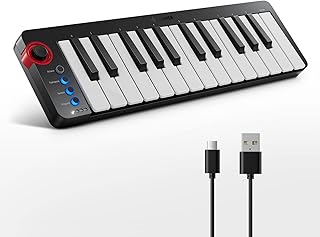
The Donner N-25 is a 25-key MIDI controller with velocity-sensitive mini keys, a light-up rocker, and music-production software. Its listed features also include 40 teaching courses, making it more explicitly beginner-oriented than the other music controllers in this comparison.
Best for: New users who want a compact keyboard for learning and basic music production. The teaching-course inclusion may be useful to buyers who want learning material alongside a small controller, while velocity sensitivity supports changes in note intensity.
Why it stands out: The 40 teaching courses distinguish it from the other listed models, and the illuminated rocker provides a visible control element. Choose this if beginner learning features are more important than a larger key range or an extensive set of pads and knobs.
Limitation: The supplied product details do not list the same eight-pad and eight-knob arrangement found on the Akai MPK Mini models. Check the software and course details before buying if particular learning materials or programs are essential.
MOKURU Wireless Mechanical Keyboard

The MOKURU is a 75% computer typing keyboard, not a piano-style music keyboard or a listed MIDI controller. Its product details describe three connection modes—Bluetooth, 2.4 GHz, and USB-C—as well as RGB lighting, a volume knob, and compatibility with Windows and Mac.
Best for: People searching for a keyboard to type on while using a computer, rather than a controller to play notes into music software. It may be relevant to a music workstation as a typing peripheral, but it does not replace any of the MIDI controllers above.
Why it is included: The phrase “keyboards for computers” can refer to typing keyboards or musical keyboards that connect to computers. This product makes the distinction clear: its listed features concern computer input and mechanical typing.
Limitation: The supplied details do not identify it as a MIDI device or music keyboard. Avoid this if your goal is to play virtual instruments, record MIDI notes, or trigger musical pads.
Buying Guide: How To Choose A Music Keyboard For A Computer
Do you need a MIDI controller or a typing keyboard?
A MIDI keyboard controller is designed to send musical note and control data to compatible music software. It commonly has piano-style keys and may include pads, knobs, or sequencing controls. A computer typing keyboard is designed for text and general computer commands. Product names that include “keyboard” can describe either category, so check the listed function before comparing models.
The products in this list identified as MIDI controllers are the Akai MPK Mini MK3, MPK Mini IV, MPK Mini Plus, and Donner N-25. The MOKURU listing describes a mechanical typing keyboard. It should not be treated as a substitute for a music controller.
How many keys do you need?
Choose a 25-key controller if desk space and portability matter more than playing range. The MPK Mini MK3, MPK Mini IV, and Donner N-25 all list 25 mini keys. A compact range can work for entering short melodies, bass parts, and chords, but players may need to change octaves for notes outside the available range.
The MPK Mini Plus offers 37 mini keys. That extra range may be more convenient for longer phrases or playing parts with both hands, while still being smaller than a full-size keyboard. The product information here does not list full-size keys for any of the four music controllers.
Are velocity-sensitive keys important?
Velocity-sensitive keys register how strongly a key is played, allowing compatible software instruments to respond with different intensities. Each of the four listed MIDI controllers specifies velocity-sensitive mini keys. This feature can make performances more expressive than fixed-response note entry, though the result also depends on software settings and the instrument being played.
Would pads, knobs, or a sequencer help?
Pads can provide a hands-on way to trigger beats or samples, while knobs can adjust software parameters. Both Akai MPK Mini models in this list specify eight MPC pads and eight knobs. The MPK Mini Plus adds a 64-step sequencer, which makes it a stronger fit for buyers who want sequencing controls on the device.
The Donner N-25 lists a light-up rocker and teaching courses but does not list the same pad-and-knob configuration. Select based on the controls you will actually use: beginners may value its learning materials, while beat makers may prefer dedicated pads.
Which connections should you check?
Match the controller’s stated connection type to your intended computer and setup. The MPK Mini IV name specifies USB-C, while the MPK Mini MK3 and MPK Mini Plus specify USB MIDI. The Donner product name describes a small USB controller. Before purchasing, confirm the exact cable, port, and software requirements in the current product listing and your music software’s documentation.
The MPK Mini Plus also lists MIDI and CV/Gate I/O. These are additional options for users who plan to connect compatible music equipment. They are not necessary for every computer-based setup, so buyers who only need to enter notes into software may prefer to focus on size and controls instead.
What should beginners prioritize?
Beginners can start by checking whether the controller includes learning resources, how many keys it has, and whether its controls match the intended use. The Donner N-25 specifically lists 40 teaching courses. The Akai products offer pads and knobs that may suit users focused on beat-making and hands-on software control.
Do not assume that a listed software suite includes a particular digital audio workstation, instrument, or course format. Product details can vary by package. Review the current listing for the specific included applications and verify that they work with the computer and music software you plan to use.
Frequently Asked Questions
Will a MIDI keyboard make sound by itself?
These products are described as MIDI controllers for computer-based music production, not as standalone sound-producing instruments. They send musical input to compatible software or equipment, which supplies the sound.
Can I use a computer typing keyboard to play virtual piano?
A typing keyboard may control certain software functions, but the MOKURU product is not listed as a MIDI music controller. Choose a product explicitly identified as a MIDI keyboard controller if you want piano-style keys for music production.
Is a 25-key controller enough for music production?
A 25-key controller can suit compact setups, beat-making, and note entry. Its range is limited compared with the 37-key MPK Mini Plus, so players may need to shift octaves more often for wider parts.
Which option has the most keys in this comparison?
The Akai Professional MPK Mini Plus has 37 mini keys. The MPK Mini MK3, MPK Mini IV, and Donner N-25 each list 25 keys.
Which controller lists learning courses?
The Donner Mini MIDI Keyboard N-25 lists 40 teaching courses. Check the current product details to confirm the course content and included software before purchasing.
Which option is designed for beat-making controls?
The Akai MPK Mini MK3 and MPK Mini IV each list eight MPC pads and eight knobs. The MPK Mini Plus also lists eight MPC pads and adds a 64-step sequencer.