
The right optical audio adapter depends on the direction of the signal: most options below convert a TV’s digital optical output to analog 3.5mm audio, while the LiNKFOR converts analog 3.5mm audio to digital optical. For a basic TV-to-headphone or powered-speaker connection, choose a unidirectional optical-to-3.5mm DAC. For a setup that also needs RCA or coaxial input, consider a converter with those connections.
| Product | Best for | Direction or connections |
|---|---|---|
| Tackston 192KHz DAC | TVs feeding 3.5mm speakers or headphones | Optical to 3.5mm; USB powered |
| LiNKFOR 3.5mm to SPDIF | Sending analog audio to an optical input | 3.5mm to optical |
| 192KHz Optical to 3.5mm DAC | Simple TV-to-AUX conversion | Optical to 3.5mm; USB powered |
| Hdiwousp Digital to Analog Converter | Systems needing optical or coaxial input | Optical/coaxial to 3.5mm and RCA |
| PROZOR 192KHz DAC | Optical sources and RCA or 3.5mm analog gear | Optical to RCA and 3.5mm |
Tackston 192KHz Optical To 3.5mm DAC

This Tackston converter is best for a TV or other source with a digital optical output that needs to feed an analog 3.5mm speaker or headphone connection. Its listed features specify a 192KHz DAC, USB power, and a PCM stereo output requirement. It was selected as a direct-fit option for buyers who need optical-to-AUX conversion rather than a general-purpose connection hub.
Important setup detail: the converter must receive power through its USB cable, and the TV audio output format must be set to PCM stereo. It is not suitable for someone seeking a reverse-direction adapter or a converter that works without USB power.
LiNKFOR 3.5mm To SPDIF Converter

The LiNKFOR is best for the opposite signal direction from the other products in this list: it converts analog audio from a 3.5mm source to digital SPDIF optical output. The product name identifies it as an analog-to-digital adapter and says it includes an optical cable. It is intended for connecting a 3.5mm audio source to equipment with an optical input, such as an amplifier or soundbar.
Choose this product when the source has a 3.5mm analog output and the receiving device needs optical digital audio. It was included because “optical audio cable 3.5 mm adapter” can refer to either direction, and direction determines whether an adapter will work. Limitation: it is not the right choice for converting a TV’s optical output into a 3.5mm headphone or speaker signal.
192KHz Optical To 3.5mm Audio Converter

This unidirectional DAC is best for a straightforward connection from an HDTV’s optical output to a 3.5mm speaker or headphone input. Its listed features include optical-to-AUX conversion, USB power, and support for a 192KHz DAC. It was selected for buyers who want a simple digital-to-analog path without needing RCA or coaxial connections.
Before choosing it, confirm that the source device can be set to PCM stereo. The product description specifically says the audio output format must be set to PCM stereo. It also requires USB power, so it is a less suitable choice if a powered USB connection is unavailable or if the intended signal needs to travel from 3.5mm to optical.
Hdiwousp Optical And Coaxial DAC
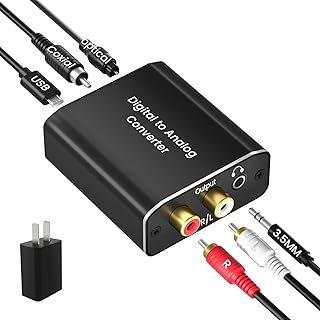
The Hdiwousp converter is best for a home audio setup that may use either optical Toslink or digital coaxial input and needs analog 3.5mm or RCA stereo output. Its product description lists a 192 kHz DAC, both digital input types, both analog output options, an optical cable, and an aluminum enclosure. Those additional connections make it more flexible than a basic optical-to-3.5mm adapter.
Choose it if you need to connect different digital sources or analog devices using RCA cables as well as a 3.5mm jack. Limitation: the added input and output choices may be unnecessary for a single TV-to-AUX connection. Check the device’s available ports and audio output format before buying.
PROZOR 192KHz Optical To Analog DAC

The PROZOR DAC is best for buyers converting a digital optical source to analog equipment that uses RCA or a 3.5mm jack. Its listed features identify a 192KHz digital-to-analog converter, SPDIF Toslink optical input, RCA stereo output, a 3.5mm jack, and an aluminum-alloy case. The product name also lists intended use with devices such as PS3, PS4, HD DVD, amplifiers, and Apple TV.
This is a practical choice when an analog stereo connection is needed and the source offers optical audio. It was selected for its clearly specified optical input and two analog output formats. Limitation: it is a digital-to-analog converter, not a bidirectional adapter; it will not send a 3.5mm analog signal to an optical input.
Buying Guide: How To Choose An Optical Audio Adapter
Which signal direction do you need?
Start by identifying the source and destination. Optical-to-3.5mm adapters take digital audio from an optical output and convert it to analog audio for a 3.5mm input. These are common when connecting a TV to analog headphones, powered speakers, or another AUX-equipped device.
A 3.5mm-to-optical converter does the reverse. It takes an analog signal from a 3.5mm source and produces a digital optical output. The LiNKFOR product in this list is described in that direction. The word “adapter” alone does not guarantee that a product converts both ways, so verify the direction before purchasing.
Does the converter need to provide 3.5mm, RCA, or both?
For a device with an AUX input, a 3.5mm output is the direct match. If the receiver or amplifier has red-and-white stereo RCA inputs, choose a converter with RCA outputs. Some products, such as the Hdiwousp and PROZOR models listed here, specify both RCA and 3.5mm analog connections.
Do not assume that a physical connector changes the type of signal by itself. Optical audio is digital, while standard AUX and RCA stereo connections are analog. A DAC performs the conversion between them.
Will the TV send a compatible audio format?
Check the audio settings on the TV, streaming device, or other source. The Tackston and 192KHz optical-to-3.5mm converter descriptions specifically require PCM stereo output. If the source is set to a format the converter does not accept, audio may not work as expected. Look for an output setting such as PCM or stereo PCM when configuring the connection.
Also confirm that the source actually has an optical audio output. A converter cannot provide an optical signal from a device that only offers an analog output unless it is designed for the reverse conversion direction.
How important is USB power?
Some small DACs require USB power to operate. The Tackston and 192KHz optical-to-3.5mm products explicitly list USB power, so the setup needs an appropriate USB power connection in addition to the audio connection. A USB lead supplies power; it does not replace the optical audio cable.
Review the product details for what is included and how power is supplied. The listed Hdiwousp description includes an optical cable, and the LiNKFOR description also says an optical cable is included. The descriptions provided for the other models do not specify every included cable, so verify the package contents before ordering.
Should you choose a basic DAC or a multi-input converter?
A basic optical-to-3.5mm DAC is a sensible match when a single digital source needs to connect to one analog AUX device. It keeps the connection choice simple. A model with optical and coaxial inputs, or RCA and 3.5mm outputs, may be a better fit if several types of gear need to connect.
More ports do not automatically improve sound or compatibility. Select based on the actual ports in your setup, the signal direction, audio format, and power needs. A 192KHz specification is listed on several products here, but that specification alone does not establish compatibility with every source format.
Frequently Asked Questions
Can I connect a TV’s optical output to 3.5mm headphones?
Yes, if you use an optical-to-analog DAC with a 3.5mm output. Check whether it requires USB power and whether the TV must be set to PCM stereo. The products described as unidirectional optical-to-3.5mm are intended for this connection direction.
Is an optical-to-3.5mm cable the same as an adapter?
Not necessarily. A passive cable cannot by itself convert digital optical audio into analog 3.5mm audio. For that connection, choose a DAC or converter that explicitly supports optical input and analog 3.5mm output.
Can one adapter work in both directions?
Do not assume so. Optical-to-3.5mm and 3.5mm-to-optical conversion are different functions. Choose a product that explicitly lists the direction required by your source and destination.
Why is there no sound after connecting an optical DAC?
Check that the optical cable is connected to the source’s output, the converter has power, and the analog output is connected to the receiving device. If the converter requires PCM stereo, change the source’s digital audio output setting to PCM stereo.
Should I choose RCA or 3.5mm output?
Match the converter output to the input on the receiving device. Use 3.5mm for an AUX input and RCA for stereo red-and-white inputs. A converter that lists both can accommodate either connection, subject to the device ports and product instructions.