
The best optical audio out to RCA adapter depends on whether you need a basic digital-to-analog converter, a longer cable, or adjustable output volume. The PROZOR B00KNNSKV0 is a flexible choice with RCA and 3.5 mm outputs; the eSynic is suited to buyers who want a 7-foot cable; and the PROZOR B06XDLCHY7 adds volume adjustment. These devices convert optical digital audio to analog stereo, but your source generally needs to output PCM audio for the converter to work.
| Adapter | Best For | Notable Listed Feature |
|---|---|---|
| PROZOR B00KNNSKV0 | Flexible output connections | RCA and 3.5 mm outputs |
| eSynic Professional | Longer cable reach | 7-foot cable; requires PCM |
| AUTOUTLET 24-bit | Simple plug-and-play setup | 7-foot cable and 24-bit description |
| PROZOR Volume Adjustable | Output-level adjustment | Adjustable volume and 3.5 mm output |
| AUTOUTLET Built-in Amplifier | Buyers seeking an amplifier feature | Built-in amplifier and 6-foot cable |
PROZOR Optical To RCA And 3.5 Mm Converter

This PROZOR digital-to-analog converter takes optical digital audio and provides analog left/right RCA and 3.5 mm outputs. Its product name specifies support up to 192 kHz and an aluminum-alloy enclosure. The listed uses include devices such as PS3, PS4, DVD players, Apple TV, amplifiers, and home-cinema equipment.
Best for: Buyers who want an optical-to-RCA converter with an additional 3.5 mm output option. That extra connection can be useful when the receiving audio equipment accepts a 3.5 mm analog input rather than RCA.
Why it was selected: It offers more than one analog output format, making it a flexible candidate for connecting an optical-output source to different stereo equipment.
Limitation: The product name does not state that it has adjustable output volume. Check that the source device can provide a supported audio format, especially PCM stereo, before setup.
eSynic Professional Optical To RCA Adapter

The eSynic converter is described as a 192 kHz optical-to-RCA adapter with a 7-foot cable, DAC chip, and aluminum shell. Its product name explicitly says the audio source must be set to PCM. The listed applications include HDTVs, Blu-ray and DVD players, and gaming consoles connected to left/right stereo audio equipment.
Best for: Buyers who need a longer cable run and can set their source device to PCM. A 7-foot cable may make placement easier when the television or player is not directly beside the stereo receiver.
Why it was selected: Its cable length and clearly stated PCM requirement make it a straightforward option for shoppers comparing both reach and setup requirements.
Limitation: The PCM setting is essential according to the product name. If the source is outputting a format the converter cannot decode, audio may not play correctly; check the source’s digital-audio menu.
AUTOUTLET 24-Bit Optical To RCA Converter

This AUTOUTLET model is described as a 192 kHz, 24-bit digital-to-analog converter with a 7-foot cable. It converts Toslink optical digital audio to RCA analog output and is listed for HDTVs, DVD and Blu-ray players, and game consoles. The product name also describes it as plug and play.
Best for: Buyers looking for a conventional optical-to-stereo-RCA connection with a longer cable and a simple setup approach. It may suit a television or media player whose optical output is some distance from the amplifier or powered speakers.
Why it was selected: It combines the commonly sought optical input and RCA output with a stated cable length and broad source-device examples, making its basic role clear.
Limitation: “Plug and play” does not remove the need to select a compatible digital-audio output format on the source. Confirm that the audio device can output PCM stereo if the converter does not produce sound.
PROZOR Optical RCA Adapter With Volume Control
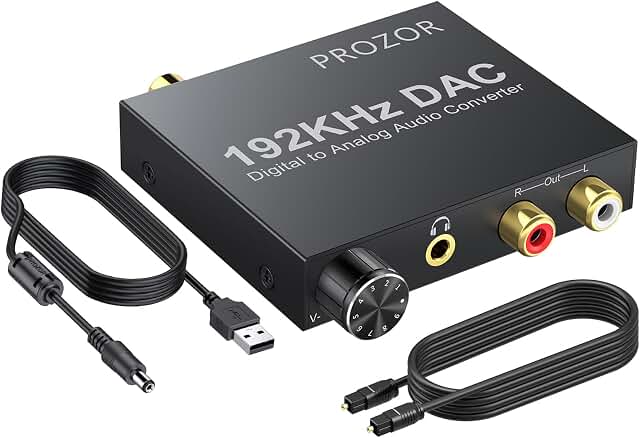
This PROZOR adapter converts optical digital audio to analog stereo left/right output and also provides a 3.5 mm jack. Its product name highlights adjustable output volume and includes an optical cable. It is described as a 192 kHz DAC, with Toslink/SPDIF optical input and analog connections for audio equipment.
Best for: Buyers who want to adjust the converter’s output level rather than relying only on the receiving device’s controls. The added 3.5 mm connection is useful when the stereo equipment accepts that analog format.
Why it was selected: Volume adjustment is a meaningful distinction from basic optical-to-RCA converters, particularly for setups where the analog output level needs to be managed at the converter.
Limitation: Adjustable output volume is not the same as a guarantee of remote or source-device volume control. Review the intended control method and connection needs before choosing it.
AUTOUTLET Optical RCA Converter With Amplifier

This AUTOUTLET converter is described as a 192 kHz SPDIF-to-RCA digital-to-analog adapter with a built-in amplifier. The listing name specifies a 6-foot cable, a 0.7-meter RCA cable, and plug-and-play operation. It is listed for HDTVs, DVD players, and game consoles.
Best for: Buyers who specifically want a converter described as having a built-in amplifier and who need the stated cable lengths to suit their equipment layout.
Why it was selected: It offers a distinct feature set within this group: an amplifier is called out in the product name, and the listing identifies both an optical-side cable and an RCA cable.
Limitation: A built-in amplifier does not by itself establish compatibility with every speaker or stereo input. Check the receiving device’s analog input requirements and the source’s audio-output setting.
Buying Guide: How To Choose An Optical Audio To RCA Adapter
An optical-to-RCA adapter is a digital-to-analog converter, often abbreviated as DAC. It receives digital audio through a Toslink optical connection and converts it into analog left and right channels carried through RCA plugs. This is useful when a source device has an optical audio output but the stereo receiver, amplifier, or powered speakers use analog RCA inputs.
Will The Adapter Work With Your TV Or Source?
First, confirm that the source has an optical audio output. The connector is typically a small, square port with a protective cover or a red light inside when active. Then check that the receiving audio equipment has RCA analog inputs. These are usually a pair of red and white sockets marked audio in, line in, or a similar label.
Do not confuse an RCA output with an RCA input. The converter’s RCA plugs must connect to an input on the stereo or speaker system. Connecting two outputs together will not create a working audio path. If the television has no optical output, an optical-to-RCA converter alone will not solve the connection problem.
Why Does PCM Matter?
Many basic optical DACs are designed to convert two-channel PCM audio. A television or media player may instead send a multichannel format such as Dolby Digital, depending on its settings and the program being played. When the converter does not support the transmitted format, the result may be silence or audio that does not behave as expected.
Look in the source device’s sound or digital-audio menu for an output option such as PCM, stereo PCM, or two-channel audio. Menu names vary by device. If the eSynic model is under consideration, its product name specifically requires PCM. For the other models, check the product instructions and the source’s format options rather than assuming every digital format is supported.
How Much Cable Length Do You Need?
Measure the route between the source and the converter, and between the converter and the analog input. The eSynic and one AUTOUTLET model list 7-foot cables. The other AUTOUTLET model lists a 6-foot cable and a separate 0.7-meter RCA cable. The two PROZOR descriptions identify different features, but the information provided here does not specify a cable length for either one.
Allow enough slack for the equipment’s placement and avoid stretching a cable tightly around corners. If you need a longer run than the listed cable provides, verify the product’s cable arrangement before ordering; do not assume an extension is included.
Do You Need RCA, 3.5 Mm, Or Both?
Choose an RCA output when the receiving equipment has a red-and-white analog input pair. A 3.5 mm jack is useful for audio equipment with a matching stereo mini-jack input. The PROZOR B00KNNSKV0 and PROZOR B06XDLCHY7 product names specify both RCA and 3.5 mm output options. The other listed product names focus on RCA output.
Match the converter’s output to an input on the receiving device. A 3.5 mm-to-RCA cable may be an alternative in some setups, but the cable and connection plan should be checked separately. The product details provided do not establish that every adapter includes every cable needed for every installation.
Is Adjustable Volume Important?
A converter with adjustable output volume can be useful when you want a control on the converter itself. The PROZOR B06XDLCHY7 specifically lists adjustable volume. The other product names do not identify that feature, so compare their descriptions if output-level control matters to your setup.
Regardless of the converter, confirm how volume is controlled after installation. Some televisions may not control the level of an optical output in the same way as their built-in speakers. The behavior depends on the source and connected audio equipment, so check their settings and instructions.
What Should You Check Before Connecting It?
- Confirm that the source has an optical digital audio output and the stereo has an analog RCA input.
- Set the source audio output to PCM stereo when required by the converter.
- Remove any protective caps from the optical cable ends before connecting them.
- Connect optical output from the source to the converter’s optical input, then connect the analog outputs to the stereo’s input.
- Select the correct input on the receiving stereo or amplifier.
- Check whether the converter’s required power connection and accessories are included in its current listing.
If there is no sound, check the source format, selected stereo input, cable seating, and converter power requirements. Optical connectors should be aligned carefully and should not be forced. These basic checks can help identify whether the issue is the audio setting, the connection, or a mismatch between source and receiving equipment.
Frequently Asked Questions
Can An Optical Audio Output Connect Directly To RCA?
No. Optical carries digital audio, while RCA stereo connections carry analog audio. A DAC is needed to convert the digital signal into left and right analog output.
Does An Optical-To-RCA Converter Support Surround Sound?
Do not assume that it does. The listed adapters are described as stereo RCA converters. Check the specific product details and use a source output format supported by the converter, commonly PCM stereo for basic models.
Why Is There No Sound After Connecting The Adapter?
Check that the source is set to PCM or another supported format, the stereo is on the correct input, the optical cable is seated, and the converter has the required power. Also confirm that the source is sending audio through its optical output.
Can I Use An Optical-To-RCA Adapter With Powered Speakers?
Yes, if the speakers accept the converter’s analog output, such as RCA or a compatible 3.5 mm input. Check the speakers’ input type and the converter’s output connections before purchasing.
Which Adapter Has Adjustable Volume?
The PROZOR B06XDLCHY7 is the model in this list whose product name specifically identifies adjustable volume. The other product names do not specify that feature.