
The right optical audio splitter switch depends on whether you need to share one source with multiple devices or select between several sources. The NEWCARE 1-in-3 and 1-in-2 models are best for distributing one optical input; the LiNKFOR and BlueRigger switches are best for choosing among sources; and the PROZOR combines source selection with two outputs.
| Product | Configuration | Best For |
|---|---|---|
| NEWCARE 1-in-3 | 1 input, 3 outputs | Sending one source to several destinations |
| LiNKFOR 4×1 | 4 inputs, 1 output | Selecting among four sources |
| PROZOR 3-in-2 | 3 inputs, 2 outputs | Switching sources and connecting two outputs |
| BlueRigger 3×1 | 3 inputs, 1 output | Switching among three sources |
| NEWCARE 1-in-2 | 1 input, 2 outputs | Sharing one source with two destinations |
NEWCARE 1-In-3 Optical Splitter

This NEWCARE splitter is designed to take one optical audio input and distribute it to three optical outputs. It is the best fit when a single source, such as a TV or game console, needs to connect to multiple audio destinations. The listed product information names Xbox, PS4, PS5, DVD players, TV boxes, home theaters, receivers, and sound bars as intended use cases.
The product listing specifies support for LPCM 2.0, Dolby Digital, and DTS 5.1. That makes format checking important: confirm that the source and receiving equipment use a supported audio format before purchasing. The 1-in-3 configuration is the reason to choose this model over an input switch; it is for distributing a source, not choosing among three sources.
- Best for: One optical source and as many as three connected destinations.
- Choose this if: You want a 1×3 optical splitter and your equipment uses a listed format.
- Limitation: It has one input, so it does not provide a way to select between multiple source devices.
LiNKFOR 4-In-1 Optical Switch

The LiNKFOR is a 4-in-1 optical switch: it accepts optical connections from four sources and routes a selected source to one output. It is best for a setup with several devices, such as a game console, Blu-ray or DVD player, and HDTV, that share an optical audio destination. The product name lists an IR remote and a 3-foot optical cable, which can make remote source selection and initial connection more convenient.
The listing describes an aluminum-alloy enclosure and identifies PS3, Xbox, Blu-ray, DVD, and HDTV equipment as intended sources. This is a source selector rather than a splitter, so it is the better choice when the problem is too many inputs for one destination. It does not provide the two-output configuration offered by the PROZOR model.
- Best for: Users who need to switch between up to four optical sources.
- Choose this if: You want remote control and a listed 3-foot optical cable.
- Limitation: The 4-in-1 layout provides one output, not multiple destinations from one source.
PROZOR 3-In-2 Optical Switcher
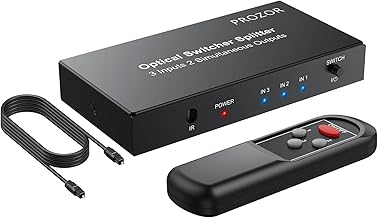
The PROZOR combines three optical inputs with two outputs, making it the most flexible configuration in this group. It is best for a system that needs both input selection and connections to two audio destinations. The listing says audio can be sent to both a soundbar and a Bluetooth transmitter for wireless headphones, providing a specific example of its intended use.
It supports manual and IR remote switching and has a Type-C power port. A 1-meter optical cable is included, according to the product information. The listing names LPCM 2.0, DTS, and Dolby-AC3 support. Check that your source and receiving equipment use a supported format, particularly if your setup depends on a format not specified in the listing.
- Best for: Users who need three source inputs and two output connections in one device.
- Choose this if: You want remote or manual switching and the listed Type-C power connection.
- Limitation: Its configuration is more complex than a basic one-input splitter if you only need to duplicate a source.
BlueRigger 3×1 Optical Switch

The BlueRigger 3×1 switch accepts three optical inputs and provides one output. It is best for a TV or audio system where three sources need to share one optical connection, such as a gaming console, HDTV, or amplifier. Its product name identifies an IR remote, so it suits buyers who want to change sources without relying only on a manual control.
The listing specifies LPCM 2.0 and describes compatibility with gaming consoles, HDTVs, amplifiers, and soundbars. That format detail is narrower than the formats stated for the NEWCARE splitters and PROZOR switcher. If your equipment requires Dolby Digital, DTS, or another format, check the complete product specifications and your devices’ output settings before choosing it.
- Best for: Three optical sources sharing one output device.
- Choose this if: Your setup needs a straightforward 3-input selector and remote control.
- Limitation: The listing names LPCM 2.0; verify format needs if your system depends on other audio formats.
NEWCARE 1-In-2 Optical Splitter

This NEWCARE model distributes one optical input to two outputs. It is best for a simpler setup than the 1-in-3 version, such as connecting one source to two audio destinations. The product name lists Xbox, PS4, PS5, DVD players, TV boxes, home theaters, receivers, and soundbars among its intended devices.
The listing specifies support for LPCM 2.0, Dolby Digital, and DTS 5.1. Buyers should still confirm that the exact source and destination devices support the chosen format and connection. The 1-in-2 layout is useful when two outputs are enough; the 1-in-3 version is the more suitable match when a third destination is needed.
- Best for: Sharing one optical source between two destinations.
- Choose this if: You need fewer outputs than a 1×3 splitter and want the listed format support.
- Limitation: It has only one input and cannot select between multiple source devices.
Buying Guide: How To Choose An Optical Audio Splitter Switch
Start by describing the direction of the connection. A splitter distributes a signal from one source to more than one destination. A switch selects one source from several inputs and sends it to an output. The word “splitter” is often used broadly in searches, but these jobs are different. Choosing the wrong configuration can leave a device without the connections you need.
Do You Need To Split One Source Or Switch Sources?
Count the devices on each side of the connection. If one TV, console, or other source needs to feed two or three destinations, look at the NEWCARE 1-in-2 or 1-in-3. If several sources must share one soundbar, receiver, or other destination, compare the LiNKFOR 4×1 and BlueRigger 3×1. If both input selection and two output connections matter, consider the PROZOR 3-in-2.
Remember that a switch with multiple inputs normally selects a source; it is not the same as a splitter that duplicates an input across outputs. Read the port count in the product name and confirm the physical input and output labels before ordering.
How Many Optical Inputs And Outputs Are Required?
Choose enough inputs for the sources you intend to connect now, with a little room for likely additions if that matters to your setup. The LiNKFOR provides four inputs, while the BlueRigger and PROZOR provide three. For distribution, the NEWCARE models offer two or three outputs. The PROZOR has three inputs and two outputs, so it covers a mixed switching-and-output need.
Do not count an unused port as a benefit if the device’s main configuration does not match your wiring plan. For example, a four-input switch is not a substitute for a splitter when one source must feed multiple devices.
Which Audio Formats Should You Check?
Compare the format requirements of the source, switcher or splitter, and receiving equipment. The NEWCARE product names specify LPCM 2.0, Dolby Digital, and DTS 5.1. The PROZOR listing names LPCM 2.0, DTS, and Dolby-AC3. The BlueRigger name specifies LPCM 2.0. The supplied LiNKFOR product details do not state a supported format.
When a format is not listed in the product information, do not assume support. Check the complete listing and device manuals, and set the source to an audio format supported across the connection. A mismatch can prevent the expected audio from being passed through.
Is A Remote Or Included Cable Important?
A remote can make a source selector easier to operate when the unit is out of reach. The LiNKFOR and BlueRigger product names specify IR remotes, and the PROZOR listing says it supports manual and IR remote switching. The PROZOR listing also includes a 1-meter optical cable, while the LiNKFOR name lists a 3-foot cable. Check what is included before assuming you have the right cable length for your setup.
Also note the power connection and requirements. The PROZOR listing identifies a Type-C power port. The supplied details for the other products do not provide enough information to compare their power arrangements, so confirm those specifications on the product page before purchase.
How Can You Reduce Setup Problems?
Before connecting the equipment, make sure you have the correct number of optical cables and that each cable can reach its intended device. Optical connectors and ports need to align correctly; avoid forcing a connector. Remove any protective caps from cable ends if present, and keep unused ports clear of dust.
After connecting the devices, select the intended input on the switch and check the source’s digital audio output setting. If there is no sound, verify that the source is sending an audio format the destination can decode, check cable seating, and confirm that the switch is powered if its instructions require power. These basic checks help distinguish a connection issue from an unsupported format.
Frequently Asked Questions
What Is The Difference Between An Optical Splitter And An Optical Switch?
An optical splitter takes one input and distributes it to multiple outputs. An optical switch takes multiple inputs and selects one source for an output. Select the configuration based on whether you need to share a source or choose between sources.
Can I Connect A TV, Console, And DVD Player To One Soundbar?
A multi-input optical switch can route one selected source to a single output. The LiNKFOR has four inputs and the BlueRigger has three. Confirm that the soundbar and all sources use compatible optical audio formats.
Which Product Is For Sending One Source To Two Devices?
The NEWCARE 1-in-2 is the listed option for one input and two outputs. For three outputs from one input, the NEWCARE 1-in-3 is the matching configuration.
Which Option Has Both Multiple Inputs And Multiple Outputs?
The PROZOR is listed as a 3-in-2 optical switcher. It combines three inputs with two outputs and supports manual and IR remote switching, according to its product information.
Will These Devices Support Every Dolby Or DTS Format?
No. The listed formats vary by product, and the supplied information does not establish support for every version of Dolby or DTS. Check the complete specifications and confirm that the source and receiving equipment support the same format.
Can An Optical Switch Send Audio To Two Destinations At Once?
Do not assume that a multi-input switch duplicates audio. A two-output model such as the PROZOR is listed with two output connections, while the NEWCARE models are explicitly described as one-input splitters. Check the device instructions for how its outputs operate in your intended setup.