
The best optical audio surround sound system depends on whether you prioritize confirmed optical connectivity, separate rear speakers, clearer dialogue, or a simple setup. Among these five options, Saiyin and Bobtot explicitly list optical connections; the LG and ULTIMEA models emphasize surround sound features, but their supplied product details do not confirm optical input. Check your TV’s audio outputs and the current product listing before choosing.
| System | Best For | Optical Connection in Supplied Details |
|---|---|---|
| Saiyin Sound Bar with Subwoofer | Optical-mode indication and simple EQ options | Optical mode indicated |
| Bobtot 1000W Peak Surround System | Multiple input choices and a separate subwoofer | Optical input listed |
| LG S40TR 4.1-Channel Soundbar | Rear speakers and a wireless subwoofer | Not specified |
| ULTIMEA 7.1-Channel Surround Sound Bar | More surround channels and dialogue processing | Not specified |
| ULTIMEA Poseidon M60 | Atmos-style sound without separate rear speakers | Not specified |
Saiyin Sound Bar with Subwoofer
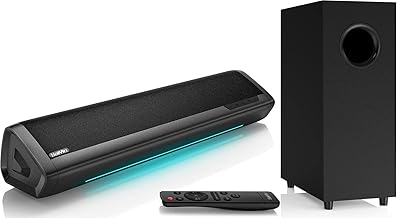
Best for: Buyers who want a sound bar and subwoofer with an optical connection mode identified in the supplied product details. The LED indicator uses purple for optical, blue for Bluetooth, and green for auxiliary, which can help distinguish the selected connection mode.
The system includes three equalizer modes for news, movies, and music. Its dedicated subwoofer is intended to add bass, while the sound bar handles the main audio. These features make it a straightforward option for people seeking a compact TV audio upgrade with basic listening-mode choices.
Why it was selected: Optical mode is specifically referenced, making this one of the clearest matches for a shopper searching for optical audio. Check the product listing and included connection details to confirm the exact cable and setup requirements for your TV.
Limitation: The supplied details do not identify separate rear speakers or specify a multichannel surround format. Its remote is also described as incompatible with universal and TV remotes.
Bobtot 1000W Peak Surround System

Best for: Buyers who want a home theater speaker system with several stated input options. The supplied details list optical, TV ARC, coaxial, AUX, USB, Bluetooth, and DVD inputs, along with a 5.1- or 2.1-channel mode.
The system includes an 8-inch subwoofer with a built-in receiver. Its listed connections may suit households that want to connect different devices, such as a TV, computer, game console, or projector. The product details also state that ARC, optical, AUX, and antenna cables are included.
Why it was selected: It explicitly lists an optical input and provides more than one channel configuration. That gives buyers a useful alternative if they want to compare a broader home theater setup with a basic sound bar.
Limitation: A peak power figure does not, by itself, describe everyday listening performance. The supplied details recommend the system for small to medium rooms; consider room size and speaker placement before selecting it.
LG S40TR 4.1-Channel Soundbar

Best for: Buyers who want separate rear speakers and a wireless subwoofer in a 4.1-channel soundbar package. The supplied details also list Dolby Digital and DTS Digital compatibility, as well as AI Sound Pro.
The rear speakers connect wirelessly, according to the product description, so they do not require a special receiver. This setup is better suited to someone who wants sound coming from behind the listening position than a single-bar system designed mainly to widen front sound.
Why it was selected: Its included rear speakers make it a relevant choice for shoppers comparing surround sound arrangements, while the wireless subwoofer helps avoid a cable running from the bar to the bass unit.
Limitation: The supplied product features do not confirm an optical input. If optical is required, verify the connection specifications before buying rather than assuming that a surround sound system supports it.
ULTIMEA 7.1-Channel Surround Sound Bar

Best for: Buyers who want a system described as having three main channels and four surround speakers, with processing features aimed at dialogue and surround placement.
ULTIMEA lists VocalMatrix, which redistributes vocals across rear surround channels, and VoiceMX, which is designed to emphasize vocal frequencies. These features may be useful for people who find speech hard to follow when music and effects are prominent. The supplied details describe 7.1-channel output and compare its surround experience with a 5.1 system.
Why it was selected: Its stated speaker arrangement and speech-processing features give it a different focus from a simple sound bar with a subwoofer. Choose it if rear-channel sound and dialogue enhancement matter more than having the fewest speakers.
Limitation: Optical connectivity is not confirmed in the supplied details. Check the current listing for input types and verify that the system can connect to your TV using the output you have available.
ULTIMEA Poseidon M60 5.1-Channel System

Best for: Buyers interested in Dolby Atmos and a wide sound presentation without placing separate rear speakers around the room. The product description says its five built-in speakers include two side-firing drivers.
The system is listed as a 5.1-channel setup with Dolby Atmos, five full-range drivers, and a dedicated wired wooden subwoofer. VoiceMX is designed to enhance vocal frequencies, which may help keep dialogue audible alongside effects. The stated peak output is 300 watts.
Why it was selected: Its built-in speaker arrangement offers a different space-saving approach from systems that include separate rear speakers. It may suit buyers who want an Atmos-labelled option but prefer fewer units to position around the room.
Limitation: The subwoofer is wired, and the supplied features do not confirm optical input. Verify both cable placement and connection compatibility against your room and TV before purchasing.
Buying Guide: How to Choose an Optical Surround Sound System
Does the system actually support optical audio?
Start by checking the inputs listed for the exact product model. An optical output on a TV does not establish that a sound system has an optical input. In this group, Saiyin identifies an optical mode and Bobtot lists an optical input. The supplied descriptions for the LG and both ULTIMEA systems do not establish optical connectivity, so confirm the full specifications if optical is essential.
Look for the words “optical input” or “digital optical input” in the product’s connection list. Do not treat Bluetooth, AUX, HDMI ARC, or coaxial as interchangeable with optical. They are different connection methods and may require different cables or TV settings.
What should you check on your TV?
Identify the audio outputs on the TV before choosing a system. If you plan to use optical, check whether the TV has an optical digital audio output and whether the sound system has a matching input. Also look in the TV’s audio settings for digital output options. Available formats and settings can vary by TV and connected device.
If your TV lacks optical output, a system’s optical input will not create that connection by itself. You may need to use another supported connection, if both devices share one. Confirm the available ports and cables in the product specifications rather than assuming a particular adapter or cable is included.
Do you want separate rear speakers or a simpler arrangement?
Separate rear speakers can place sound behind the listening area, but they also need room and appropriate placement. The LG S40TR is described with wireless rear speakers. The ULTIMEA 7.1-channel model lists four surround speakers. These options are better for buyers willing to arrange multiple speakers around the room.
The Poseidon M60 instead uses built-in speakers, including two side-firing drivers, and does not list separate rear speakers in the supplied description. That layout may be preferable when fewer separate units are practical. A sound bar’s channel label alone does not tell you how many physical speakers must be placed around the room, so check the included components.
How important is dialogue clarity?
For TV dramas, news, and movies with quiet speech, look for stated dialogue or vocal-processing features. Both ULTIMEA models list VoiceMX, which is described as enhancing vocal frequencies. The 7.1-channel system also lists VocalMatrix for vocal redistribution across rear channels. These are product features, not a guarantee that every recording or room will sound the same.
The Saiyin system offers three equalizer modes for news, movies, and music. That gives listeners preset choices, but the supplied details do not describe a dedicated dialogue-enhancement feature. Compare the specific speech features if clear conversation is your highest priority.
How should you compare bass and subwoofer placement?
A dedicated subwoofer can add low-frequency sound, but its connection and placement affect installation. The LG model lists a wireless subwoofer, while the Saiyin product includes a subwoofer without connection details supplied here. The Bobtot system lists an 8-inch subwoofer, and the Poseidon M60 lists a wired subwoofer. A wired unit needs a suitable route for its cable.
Consider the room layout as well as the product description. A system with rear speakers and a separate subwoofer has different placement needs from a single sound bar with built-in drivers. Check the full package contents and connection instructions for the exact model.
What does a channel count tell you?
Channel counts help compare intended audio layouts, but they do not alone establish which inputs are supported or how easy a system is to install. The listed systems include 4.1-, 5.1-, and 7.1-channel configurations, as well as a Bobtot system with 5.1 and 2.1 modes. Compare included speakers, connection requirements, and room arrangement alongside the channel number.
For example, a system with multiple rear speakers may suit a dedicated listening area, while a sound bar with built-in side-firing drivers may take up less space. Decide which arrangement works for your room before treating a higher channel count as the deciding factor.
Frequently Asked Questions
Can optical audio carry surround sound?
Optical can carry certain digital audio formats, but supported formats depend on the TV, source device, and sound system. Check each device’s specifications and audio settings to confirm the format available for your setup.
Which listed systems explicitly mention optical?
The Bobtot product lists an optical input. The Saiyin product identifies an optical mode with a purple LED indicator. The supplied details for the LG S40TR and both ULTIMEA systems do not confirm optical input.
Is an optical cable included with every system?
No. The supplied Bobtot details state that an optical cable is included. The information provided for the other products does not confirm that an optical cable is included. Check the package contents for the exact listing.
Are wireless rear speakers the same as a wireless subwoofer?
No. Rear speakers and a subwoofer serve different roles. Wireless rear speakers provide surround-channel sound from behind the listening area, while a subwoofer handles bass. A product may include one, both, or neither; check its listed components.
Which option is best if I want dialogue enhancement?
The ULTIMEA 7.1-channel system and Poseidon M60 both list VoiceMX, a feature described as enhancing vocal frequencies. The 7.1-channel model also lists VocalMatrix. Confirm the connection type separately if you require optical audio.