Best Optical to XLR Converters for Clear Studio-Grade Audio
Answering the common question: which optical to XLR solution fits home theater, recording, or live sound setups best? This guide covers five reliable options that convert Toslink/SPDIF optical signals to unbalanced or balanced XLR outputs. Suitable buyers include home theater enthusiasts, small studios, live sound technicians, and proprietors of HDTV/dvd set-top boxes who need clean, two-channel PCM outputs. Below, you’ll find quick comparisons, detailed product breakdowns, and a practical buying guide to help you choose.
| Product | Best For | Key Benefit |
|---|---|---|
| ESWN DNXB Optical to XLR Converter | Two-channel PCM setups | 192 kHz support with PCM/LPCM output |
| Sabary Optical to XLR Converter | Compact setups | 3.3 ft cable included, PCM/LPCM |
| NCGGY Optical to Dual XLR Converter | Two-channel stereo systems | Dual XLR outputs, 192 kHz support |
| Hebbeko BIDI 2 XLR Audio Fiber Converter | Long-distance, professional routing | Over fiber, up to 20 km, crystal-clear sound |
| Bidirectional 2 Channels 48V Phantom XLR Fiber Extender | Phantom-powered mic setups | XLR over fiber with phantom power |
Optical To XLR Converter With 192kHz Support

Product: ESWN DNXB 192KHz DAC Optical to XLR Converter
- Optical to XLR Converter: Converts SPDIF/Toslink digital audio to a single mono XLR output. Note: one-way conversion only.
- 192kHz Sampling Rate: Supports 32, 44.1, 48, 96, 192 kHz and 24-bit data streams for detailed listening.
- Dual-channel Output: Uncompressed PCM/LPCM, ensures EMI-free transmission. 5.1 channel not supported; set source to PCM/LPCM.
Best for: Small home theaters or compact studios needing clean two-channel PCM output. Limitations: Not reversible; cannot send XLR back to optical.
Compact Optical To XLR Converter With Cable
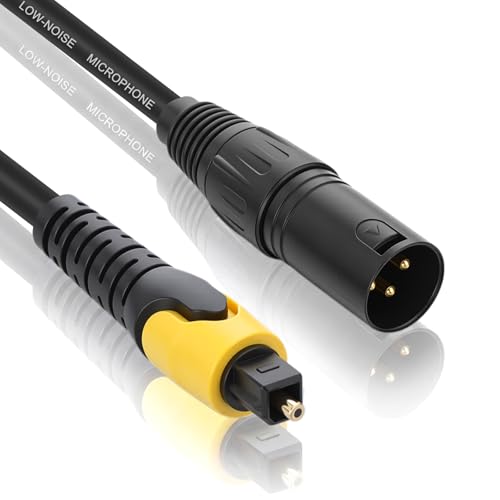
Product: Sabary 192KHz DAC Optical to XLR Converter (3.3 ft cable)
- One-way optical to mono XLR output; supports 192kHz with 24-bit data.
- Two-Channel Output: PCM/LPCM, with EMI-free transmission.
- Note: 5.1 channel formats like Dolby Digital are not supported; set to PCM/LPCM on source.
Best for: On-the-go setups or console/receiver connections where space is limited. Caution: shorter cable length may constrain placement.
Dual XLR Optical To Analog Converter

Product: NCGGY 192KHz DAC Optical to Dual XLR Converter
- Optical to XLR Converter: Converts Toslink to two unbalanced XLR outputs (left and right).
- 192kHz Sampling Rate with 24-bit data; supports PCM/LPCM outputs with EMI-free transmission.
- Two-Channel Mode: Left and right channels; 5.1 channel not supported; adjust source to PCM/LPCM.
Best for: Stereo systems needing two dedicated XLR outputs from optical sources. Caution: one-way only, XLR to optical not supported.
Hebbeko BIDI Optical To XLR Fiber Extender

Product: Hebbeko BIDI 2 XLR Audio Fiber Converter
- Bi-directional XLR Audio Over Optical Fiber: Supports two XLR paths in opposite directions.
- Long Reach: Single-mode up to 20 km; multimode up to 500 meters; professional-grade sound with no delay.
- Crystal-clear sound with fiber transmission; designed for balanced XLR connections over long distances.
Best for: Professional installations requiring long-haul, high-quality XLR audio over fiber. Caution: fiber type and distance must match the unit’s mode capabilities.
Phantom-Powered XLR Over Fiber Extender

Product: Hebbeko Bidirectional 48V Phantom XLR over Fiber Extender
- XLR Audio Over Fiber with 48V Phantom Power: Transmits two bi-directional XLR signals with phantom power option.
- Long-distance capability via single-mode or multi-mode fiber; supports two-way audio paths.
- Designed for professional microphone and balanced audio deployments.
Best for: Studio or venue applications needing phantom-powered XLR over fiber. Limitation: phantom power usage depends on the transmitter/receiver pairing and source mics.
Buying Guide: Optical To XLR Converters And Fiber Extenders
- What is your signal path? If you only need two-channel PCM from Toslink, a simple optical-to-XLR converter suffices. For long distances or stage setups, consider fiber-based extenders.
- One-way vs. bi-directional: Most Toslink-to-XLR devices are one-way. If you require two-way communication, look for models advertised as bi-directional or include two units for TX/RX.
- Channel and format compatibility: Ensure the device outputs PCM/LPCM and not 5.1 formats. Verify the sampling rate support up to 192 kHz for high-resolution audio.
- Distance and fiber type: For fiber extenders, confirm single-mode vs multi-mode compatibility and the maximum transmission distance to avoid degradation.
- Power considerations: Some XLR over fiber devices may require phantom power for mics; verify phantom power capabilities and safety for your mics.
- Cable and connector quality: Gold-plated XLR plugs and robust connectors reduce noise and corrosion, improving longevity in professional environments.
FAQ
- What does optical to XLR converter do? It converts digital optical SPDIF/Toslink signals to analog XLR outputs, typically PCM/LPCM.
- Can I get 5.1 channel sound from these converters? No. Most are designed for two-channel PCM output; 5.1 requires a different decoding path.
- Is the conversion reversible? Generally no; these devices are one-way from optical to XLR.
- Do these work with all TVs and DVD players? They work with optical output devices that provide PCM/LPCM digital audio. Check your source settings to ensure compatibility.
- When should I choose fiber extenders over standard optical converters? If you need longer transmission distances without signal loss or if you must locate the audio interface far from the source, fiber extenders are preferable.
- Are phantom-powered XLR extenders safe for microphones? They support phantom power but ensure compatibility with your microphone and preamp to avoid damage.