
The best right-angle optical cable for a crowded setup has a Toslink plug that turns toward the direction your equipment needs, helping reduce awkward bends behind a TV, soundbar, or receiver. The EMK 90-degree models are best for buyers who want a rotating right-angle connector; the Bangun is a compact 2-foot option; and the SKW is a standard straight-cable alternative when a right-angle plug is not essential. Check connector type and cable length before choosing.
| Product | Best For | Length | Right-Angle Design |
|---|---|---|---|
| EMK 90 Degree, Blue | Short runs with a rotating plug | 3.3 ft | 90-degree, 360-degree rotating |
| SKW HI-FI Toslink | Buyers who do not need an angled plug | 3.2 ft | No angled plug specified |
| EMK 90 Degree, Grey | Flexible routing in tight spaces | 3.3 ft | 90-degree, 360-degree rotating |
| Bangun Slim Optical Cable | Short, space-conscious installations | 2 ft | 90-degree, 360-degree swivel |
| EMK 90 Degree, Grey | Longer runs with a rotating plug | 6.6 ft | 90-degree, 360-degree rotating |
EMK 90-Degree Toslink Cable, Blue

This EMK cable is best for a short connection where a straight plug would press against a wall or force the cable into a sharp bend. It is a 3.3-foot, male-to-male Toslink cable with a 90-degree plug that rotates 360 degrees. Its listed 24K-gold connector detail may also appeal to buyers comparing connector finishes.
Choose this model if the plug’s orientation needs to change as you route the cable. The short length suits nearby components, such as a TV and soundbar positioned together. The product name identifies it for home theater, TVs, soundbars, PS4, and Xbox equipment, but the required condition is that both devices have Toslink optical ports.
Limitation: At 3.3 feet, it may not reach equipment placed farther apart. The provided listing details do not specify jacket construction or supported audio formats.
SKW HI-FI Toslink Optical Cable
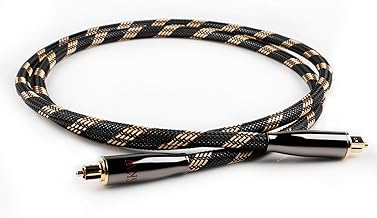
The SKW is best for buyers who need a short Toslink connection but do not specifically need a right-angle connector. It measures 3.2 feet and is described as using precision-polished PMMA fiber. That makes it a useful comparison point: a straight optical cable may suit an open installation, while an angled cable is more appropriate when rear clearance is limited.
Choose this cable if the ports are easy to access and the cable can run without being sharply bent. Its listed length is close to the 3.3-foot EMK options, so reach is similar on paper. Confirm that the plug shape shown in the current listing matches your equipment and intended routing before ordering.
Limitation: The supplied product information does not identify a right-angle or rotating plug. Avoid this choice if the main goal is to angle the connector away from a wall or other obstruction.
EMK 90-Degree Toslink Cable, Grey

This 3.3-foot EMK cable is best for buyers who want an angled connector and a flexible choice of plug orientation. The product features describe a 90-degree plug with 360-degree rotation, designed to help with narrow spaces and reduce severe bending at the connection. Its nylon mesh jacket and stated OD6.0mm construction are intended to protect the cable from kinks and nicks.
The listing names compatibility with devices that have TOSLINK or optical ports, including TVs, Blu-ray players, game consoles, PCs with optical sound cards, and DAT recorders. It also says the fiber-optic signal avoids electromagnetic and radio-frequency interference. Choose it for a close-range setup where plug positioning and a protective outer jacket matter.
Limitation: The 3.3-foot length is intended for a short run, not widely separated components. Check the optical port labels on both devices; a cable cannot connect to an HDMI, coaxial, or analog audio port without the appropriate conversion equipment.
Bangun Slim 2-Foot Right-Angle Optical Cable

The Bangun is best for a very short optical connection in a tight installation. Its 2-foot length can limit excess cable behind a nearby TV and soundbar, while its 90-degree head swivels 360 degrees. The product description also specifies a slim, lightweight, flexible cable, gold-plated connectors, buffer tubing, and dust-proof rubber caps.
Choose this option when the devices sit close together and the cable needs to turn immediately at the port. The listing states support for clear uncompressed PCM and compressed surround formats, including Dolby Digital Plus, DTS-HD High Resolution, and LPCM. Confirm that the audio format you plan to use is supported by both connected devices as well as the cable listing.
Limitation: Two feet leaves less routing slack than the EMK 3.3-foot cables. Measure the path, including the turn behind the device, before choosing this short length.
EMK 90-Degree Toslink Cable, 6.6 Feet

This longer EMK cable is best for buyers who need more routing distance than a 3.3-foot cord provides while still wanting a rotating right-angle plug. The listed length is 6.6 feet. Its product details also describe a nylon mesh jacket, OD6.0mm construction, and compatibility with equipment that has Toslink or optical ports.
Choose this model when components are separated or when the cable needs extra slack to follow a longer route. The 90-degree, 360-degree free-rotating design can help orient the connector in a restricted space. The optical signal is described as resistant to electromagnetic and radio-frequency interference, which is a benefit of transmitting audio as light rather than an electrical signal.
Limitation: Extra length can leave unused cable in a compact setup. Avoid tight coils and sharp bends, and select a shorter version if the equipment is close together and slack would be difficult to manage.
Buying Guide: How To Choose A Right-Angle Optical Cable
Will a right-angle Toslink cable fit your equipment?
Check the ports on both devices before shopping. Optical audio ports are commonly labeled “Optical,” “Digital Audio Out,” “TOSLINK,” or “S/PDIF.” The products in this comparison use Toslink-style optical connections. A right-angle optical cable will not plug directly into HDMI ARC/eARC, RCA, 3.5mm, or coaxial digital ports.
Confirm whether each device has an optical input or output. A typical connection sends audio from a source or TV output to a soundbar, receiver, or other device with an optical input. The cable itself does not convert one connection type into another.
When is a 90-degree plug useful?
A right-angle plug can reduce the space needed directly behind a device and help keep the cable from projecting straight out toward a wall. It can also make a cable route easier when a component sits in a cabinet or close to another piece of equipment. Measure the available clearance and identify which direction the plug needs to face.
A rotating head adds flexibility because its orientation can be adjusted after insertion. It does not remove the need to avoid sharp bends in the cable itself. Route the cable with a gradual curve and do not pull it sideways by the plug.
How much cable length should you buy?
Measure the complete path between the two ports, not just the straight-line distance. Include the route around furniture, the space needed for the connector turn, and enough slack to move equipment for cleaning or servicing. The Bangun’s 2-foot length is the shortest option here; the 3.2- and 3.3-foot cables suit nearby devices; the 6.6-foot EMK offers more reach.
A cable that is too short can put strain on the ports. A cable that is much longer than needed can be harder to organize. Choose a length that follows the actual route without tension or unnecessary excess.
Should you choose a protective jacket or a slim cable?
The EMK models with listed features have a nylon mesh jacket and OD6.0mm construction, which the product description presents as protection against kinks and nicks. The Bangun is described as slim, light, and flexible, and includes rubber dust caps. These details may matter when a cable will be handled often or routed through a narrow area.
Do not treat a reinforced jacket as permission to bend an optical cable sharply. Fiber-optic cables can be damaged by excessive bending or pulling. Keep the cable away from pinch points and avoid placing heavy equipment on it.
What audio format and connection details should you verify?
Optical audio support depends on the source device, the receiving device, and their settings. The Bangun listing names PCM, Dolby Digital Plus, DTS-HD High Resolution, and LPCM; the other product descriptions supplied here do not provide the same format details. Check the supported formats in both devices’ manuals and audio menus before buying, especially if a particular surround format is required.
Gold-plated connectors, polished fiber, and jacket materials are product specifications, not a guarantee that every format or setup will work. Make sure the connector is fully seated, remove any protective caps before use, and select optical output in the source device’s audio settings if necessary.
Frequently Asked Questions
What is a right-angle optical cable?
It is a digital optical audio cable with a plug that turns approximately 90 degrees rather than extending straight from the port. Some models have a head that can rotate to change the direction of the cable.
Are all Toslink cables right-angle cables?
No. Toslink describes the optical connector style, not the plug angle. Check the product description and images for a 90-degree or right-angle connector if that feature is important.
Can I use a right-angle optical cable with a soundbar?
Yes, if the soundbar and the connected TV, receiver, or source have compatible Toslink optical ports. Confirm which device has the optical output and which has the optical input before connecting.
Does optical audio need a special direction?
The cable has male connectors at both ends, but the audio connection still runs from a device’s optical output to another device’s optical input. Connect the source output to the receiving device input.
Is a longer optical cable always better?
No. Choose a length that reaches along the planned route without tension. Extra cable can add clutter, while a cable that is too short can strain the ports or connector.
Why is there no sound after connecting an optical cable?
Check that both devices have optical ports, the cable is fully inserted, protective caps are removed, and the source is set to optical audio output. Also verify that the receiving device is using its optical input and that both devices support the selected audio format.