
Best Optical to Coaxial Digital Audio Converters for Home Theater and Audio Setups
When you need to bridge optical (SPDIF Toslink) and coaxial digital audio, a reliable converter is essential. This guide highlights five top options across budgets and use cases, helping you pick the right one for your gear. Best for older TVs, soundbars, or home theater PCs, these converters enable lossless digital audio signals and easy, plug-and-play setup for different input/output needs. The top picks below are suited for music lovers, movie enthusiasts, and multi-room setups alike.
Product snapshot: the following table summarizes key traits to compare at a glance, including input/output directions, supported sampling rates, and notable strengths.
| Product | Best For | Input/Output | Max Sampling | Notes |
|---|---|---|---|---|
| LiNKFOR 192kHz Coaxial to Optical Converter | Brokers and older TVs needing optical output | Coaxial In / Optical Out | 192 kHz | Built-in 1 m Toslink and 1 m Coaxial cables |
| PROZOR Bi-Directional Optical Converter | Home theater with versatile routing | Coaxial ↔ Toslink (bi-directional) | 192 kHz | Switchable input; supports DTS/Dolby AC3/5.1 |
| Bi-Directional Coax Digital Audio Adapter | Simple two-way conversions | Coaxial ↔ Toslink | – | No drivers; plug-and-play |
| LUKFOCAB Bi-Directional Digital Converter | Streaming setups with extension needs | Coaxial ↔ Toslink | 192 kHz | Built-in repeater capability; USB power |
| DigitConvert DAC 192kHz Optical to RCA | Audio from digital to analog systems | Coaxial/Toslink → RCA/3.5 mm | 192 kHz | Analog outputs; PS4/HD systems ready |
LiNKFOR 192kHz Coaxial to Optical Converter
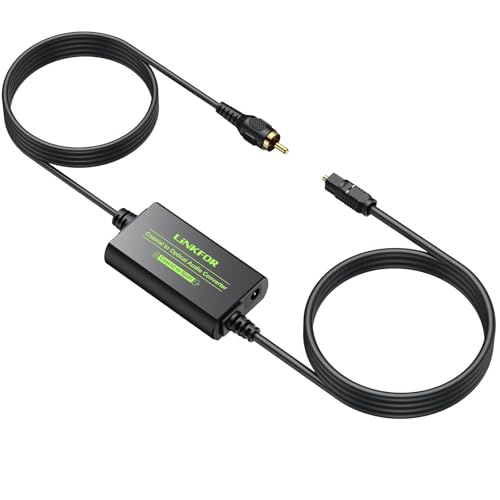
Best for: users with a coaxial digital source needing an optical output, especially older TVs or soundbars that accept Toslink. This converter supports 192 kHz sampling, 24-bit depth, and common PCM/DTS/Dolby formats. It includes built-in cables for Toslink and coaxial connections, reducing cable clutter. Consider this option if you want a compact, all-in-one package with straightforward setup.
Why chosen: it offers a straightforward path from coaxial to optical with minimal latency and no external power requirements beyond a standard USB bridge in some setups. Its integrated cables simplify placement near your gear, making it a solid first pick for simple home theater upgrades.
Caution: ensure the built-in cables reach your devices comfortably; long runs may require an external solution if your setup is spread out.
PROZOR 192K Bi-Directional Optical Converter

Best for: home theaters that require flexible routing between coaxial and optical signals. This bi-directional converter supports multiple formats, including LPCM, DTS, and Dolby Digital, up to 192 kHz. The switchable input makes it easy to adapt to different sources without swapping devices.
Why chosen: its bidirectional design and format compatibility make it a versatile hub for expanding the digital audio chain, especially if you frequently alternate between devices like Blu-ray players and DACs.
Caution: user must toggle input direction correctly; misconfiguration can lead to no audio from the selected path.
Bi-Directional Coax Digital Audio Adapter

Best for: users needing a simple two-way conversion between coaxial and Toslink with no drivers. It offers noise-free transmission and high-definition output for amplifiers and speakers, suitable for budget-conscious setups.
Why chosen: its straightforward plug-and-play nature and compatibility with common digital audio formats make it a reliable budget-friendly option for basic setups.
Caution: may not support advanced high-sample-rate formats beyond what is listed; verify compatibility with your source and receiver if you push beyond standard PCM/DTS.
LUKFOCAB Bi-Directional Digital Converter
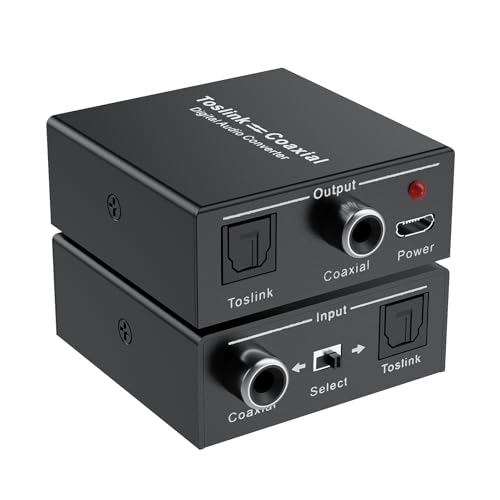
Best for: setups that require a converter with an integrated power solution and signal extension. This model supports bidirectional conversion with a built-in amplification chip, enabling the device to act as a repeater to extend transmission distance.
Why chosen: the repeater capability helps in difficult cable layouts where distance or interference might degrade signal quality, providing a practical, compact solution for larger rooms.
Caution: relies on USB power; ensure power access near the converter to avoid instability during use.
DigitConvert DAC 192kHz Optical to RCA Adapter

Best for: converting digital audio to analog for traditional AV receivers or stereo systems. This DAC supports high sampling rates up to 192 kHz and outputs through RCA and 3.5 mm jacks, making it suitable for PS4/HD setups and home cinemas that rely on analog inputs.
Why chosen: it provides a bridge from digital sources to analog audio with synchronized output, avoiding delays or uneven channel output in movies or music playback.
Caution: designed for digital-to-analog conversion only; it does not convert analog to digital signals.
Buying Guide: Key Considerations for Optical-Coax Converters
- Direction and formats: Decide if you need one-way (coaxial to optical) or bi-directional conversion. Check supported formats (PCM, DTS, Dolby Digital) and max sampling rate (commonly 96–192 kHz).
- Connectivity: Note whether the device includes built-in cables or requires separate cables. Built-in cables simplify placement but may limit reach.
- Power requirements: Some models require USB power; ensure a power source is available near the converter or choose a battery-free option when possible.
- Distance and noise: For longer cable runs, consider a converter with an amplification/repeater feature to minimize signal loss and noise.
- Output compatibility: Match the converter outputs to your receiver or DAC inputs (RCA, 3.5 mm, or Toslink). Ensure your target device supports the chosen formats.
- Ease of use: If you frequently switch between devices, prefer a bi-directional model with simple input switching rather than multiple adapters.
Frequently Asked Questions
- What is the main purpose of an optical-to-coaxial converter? Answer: It enables devices with different digital audio interfaces to communicate, converting signals between Toslink (optical) and coaxial formats.
- Do I need drivers for these converters? Answer: No. Most converters are plug-and-play and require no software or drivers.
- Can these converters handle high-resolution audio? Answer: Yes, many support up to 192 kHz/24-bit PCM and common surround formats like DTS and Dolby Digital.
- Is a power supply always required? Answer: Some models run on USB power; others are passive and do not require external power for basic operation.
- Which option is best for a simple two-device setup? Answer: A basic one-way converter (coaxial to optical or vice versa) with built-in cables can be the simplest solution.
- What should I consider if my distance is long? Answer: Look for a model with a built-in repeater or consider additional high-quality cabling to preserve signal integrity.