
An optical-to-RCA digital audio converter is the right type of adapter when a device with a Toslink optical output needs to connect to stereo equipment with analog RCA inputs. The PROZOR 192KHz DAC is a straightforward choice, while the eSynic and PROZOR 7-foot models may suit setups where cable length matters. The AUTOUTLET and coaxial-equipped DAC models offer other listed configurations. These converters provide stereo RCA output; they are not phono preamps for connecting directly to a turntable-style phono input.
| Product | Best for | Listed feature |
|---|---|---|
| PROZOR 192KHz DAC | Basic optical-to-RCA conversion | Optical input, RCA L/R and 3.5mm output |
| eSynic Professional Adapter | Longer reach | 7-foot cable |
| AUTOUTLET 192kHz Converter | Buyers comparing a 24-bit model | 192kHz, 24-bit listing |
| PROZOR 7ft Converter | Long cable and built-in amplifier chip | 7-foot cable, DAC chip |
| DAC Optical-to-RCA Adapter | Setups that may use coaxial input | Optical and coaxial cable listed |
PROZOR 192KHz Digital-to-Analog Converter

Best for: Connecting an optical digital audio source to stereo equipment with RCA inputs, with the option of using a 3.5mm analog output. This PROZOR converter is selected for its clearly listed optical-to-RCA conversion and its additional 3.5mm jack.
The product name lists a 192kHz digital-to-analog converter, Toslink optical input, analog left/right RCA output, and a 3.5mm jack. It is described for use with devices such as PS3, PS4, HD DVD players, Apple TV, amplifiers, and home cinema systems. The aluminum-alloy construction is also specified in the listing title.
Why choose it: It is a practical option when the receiving audio equipment accepts RCA or 3.5mm analog input and the source provides optical digital audio. Having both output types can help when choosing between the available analog connections.
Limitation: The supplied information does not identify supported digital audio formats or included power accessories. Check the listing and source-device settings before purchase; the RCA outputs are not a substitute for a phono preamp.
eSynic Professional 192KHz Optical-to-RCA Adapter

Best for: Buyers who need a longer connection between an optical audio source and RCA-equipped stereo equipment. The product name specifically lists a 7-foot cable, which is the main reason to consider this model for a room layout where a short adapter cable may not reach.
The listing identifies the eSynic as a professional 192kHz optical-to-RCA audio adapter. Its named connections are optical input and RCA analog output, with a 7-foot cable. Those details make it relevant for TV, player, or other source-to-stereo arrangements when the source and receiving equipment are separated by some distance.
Why choose it: Compared with models whose titles do not specify a cable length, this option gives buyers an explicit length to consider when planning placement. Measure the route between components and allow enough slack for the actual path.
Limitation: The provided product information does not state whether a separate optical cable is included, what audio formats it accepts, or whether it has additional output types. Confirm those details on the product listing if they affect your setup.
AUTOUTLET 192kHz 24-Bit Audio Converter

Best for: Shoppers looking for a listing that explicitly identifies both a 192kHz rate and 24-bit conversion. The product is described as a digital-to-analog audio converter with optical input and RCA output, matching the core need of converting digital optical audio to analog stereo connections.
The named configuration is simple: optical digital audio to RCA analog audio. The 192kHz and 24-bit details are stated in the product title. This model is worth comparing when those specifications are important to a buyer, alongside the exact connection types and any format requirements listed by the manufacturer.
Why choose it: It is a focused option for a source with an optical digital output and an amplifier, receiver, or other component with RCA line inputs. The listed conversion specifications make it easy to distinguish from product titles that mention only a sample rate.
Limitation: A high sample-rate figure alone does not guarantee compatibility with every source signal. The supplied information does not specify supported audio formats, included cables, or power requirements, so verify these before ordering.
PROZOR 7-Foot Optical-to-RCA Converter
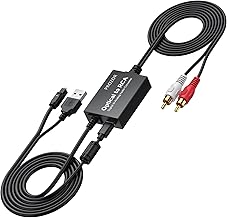
Best for: Buyers who want an optical-to-RCA adapter with a specifically listed 7-foot cable and a built-in audio amplifier chip. It is selected for those two stated features, as well as its stated use with HDTV, amplifier, Blu-ray, DVD, PS3, and PS4 equipment.
The product title describes a 192kHz digital-to-analog audio converter, a 7-foot (2.1-meter) cable, optical input, and RCA output. It also identifies a built-in audio amplifier chip. These details can help buyers compare it with shorter or less fully described converter options.
Why choose it: The stated cable length can be useful when components are not close together. The product’s listed source examples also make it relevant for a home entertainment setup that sends optical audio to stereo equipment with analog RCA inputs.
Limitation: The title does not specify supported audio formats or whether the cable is detachable. Confirm the complete package contents and source settings, particularly if your device sends a format other than standard stereo PCM.
DAC Optical-to-RCA Adapter With Coaxial Cable

Best for: Buyers comparing a converter listing that mentions both optical and coaxial connections, as well as a 3.5mm adapter. The product name describes a 192kHz digital-to-analog converter and references Toslink optical-to-3.5mm use, RCA output, and a coaxial cable.
This configuration may be worth considering when you are checking connection options for a PS4, HD DVD player, or home cinema system, which are among the uses named in the listing. Before buying, identify the exact output on the source device and the input on the receiving equipment; similar-looking connectors do not necessarily carry the same signal type.
Why choose it: Its title names more connection-related items than a basic optical-to-RCA adapter, giving buyers additional details to investigate when comparing packages and setups.
Limitation: The supplied information does not make clear which cables are included or how the coaxial connection is used. Verify the product description and diagrams to ensure the included configuration matches your equipment.
Buying Guide: Choosing an Optical-to-RCA Converter
What connections do your devices have?
First, check the source device for a Toslink optical digital audio output. Then check the receiving stereo component for analog RCA inputs, typically marked left and right. A converter is appropriate when the source outputs digital audio and the destination accepts analog audio. It will not convert an analog source into a digital optical signal.
RCA connectors are used for different audio purposes. The converters here are described as producing analog stereo RCA output. A turntable input labeled “phono” usually expects a turntable-level signal and equalization, not ordinary line-level output. Connect a converter to a line-level input such as AUX, CD, or another suitable analog input, or use an appropriate phono preamp if the system requires one.
Does the converter support your audio signal?
Do not choose only by the largest sample-rate number in a product title. The source device’s digital output settings and the converter’s supported formats must match. If compatibility is unclear, check the converter’s specifications and set the source to a supported stereo output format. The product details provided here do not establish complete format support for each model.
Some televisions and media devices can send surround or compressed audio over optical output. If the converter only accepts a different format, the system may not produce sound. Checking the source’s audio menu and the converter’s format list before purchase can prevent this mismatch.
How much cable length do you need?
Measure the distance between the source and the stereo component, including the route around furniture or a TV stand. The eSynic and one PROZOR listing explicitly name a 7-foot cable. The other product titles do not establish the same cable length. Also check whether the optical cable is included, since a converter may require a separate cable depending on its package.
Do you need an RCA or 3.5mm output?
Choose RCA when the receiving device has separate left and right analog inputs. A 3.5mm stereo jack may be more suitable for equipment with a single analog headphone-style input. The first PROZOR product lists both RCA and 3.5mm output, while other listings emphasize RCA or mention 3.5mm as part of their connection description. Confirm the actual ports shown in the product details.
What else should you verify before ordering?
- Power: Check whether the converter requires external power and whether an adapter or cable is included.
- Package contents: Confirm the optical cable, coaxial cable, or other accessories you need are actually included.
- Placement: Compare listed cable length with your setup and leave room for bends and component movement.
- Signal direction: Confirm the device converts optical digital audio to analog RCA, not the reverse.
- Input type: Use a suitable line-level input rather than assuming a phono input will work.
Frequently Asked Questions
Can an optical digital audio converter connect a TV to an older stereo?
Yes, if the TV has an optical digital audio output and the stereo has compatible analog RCA inputs. The converter changes the digital optical signal into analog stereo output. The TV’s audio format settings must also match what the converter supports.
Is optical-to-RCA the same as a phono adapter?
No. Optical-to-RCA describes conversion from digital optical audio to analog RCA output. A phono input is designed for a turntable signal and may require a phono preamp. Use a line-level RCA input unless the system’s instructions specify otherwise.
Will any optical-to-RCA converter work with every TV?
No. The TV must have an optical audio output, and its selected audio format must be supported by the converter. Check both devices’ specifications and audio settings before connecting them.
Do these converters provide stereo output?
The listed products are described as optical-to-RCA converters, and several specify analog left/right output. Confirm the port labels and supported output configuration in the individual product details before purchase.
Is a 192kHz rating enough to confirm compatibility?
No. The rating is only one specification. Compatibility also depends on the digital audio format sent by the source, the converter’s supported formats, and the connection types on both devices.