
Best Optical to Analog Audio Converters for Home Theater
Answering the common buyer question: which optical-to-analog audio converter is best for turning digital sound into robust, room-filling analog output? This guide highlights five top options that suit different setups—from simple TV sound to multi-room home theater. Best for: casual TV watchers, gaming consoles, and compact AV enthusiasts who need reliable 192 kHz/24-bit performance without 5.1 requirements.
| Product | Best For | Key Benefit |
|---|---|---|
| AUTOUTLET 192kHz DAC Digital to Analog Audio Converter | General HDTV, DVD, Blu-Ray | High 192 kHz sampling with built-in amp |
| Rybozen 192KHz DAC Converter | Coaxial or Optical to RCA plus 3.5mm | Includes optical cable and power adapter |
| PROZOR 192Khz DAC Optical to RCA | HDTVs and Blu-ray players | 5.1CH capable with 192 kHz support |
| PROZOR 192KHz Digital to Analog Audio Converter (B0FFMS7J2H) | PS4, Blu-Ray, Home Cinema | Built-in amplifier for higher RCA output |
| DigitConvert 192KHz DAC Optical to RCA | PS4, HD DVD, Home theater | Wide sampling rate support up to 192 kHz |
AUTOUTLET 192kHz DAC Digital to Analog Converter

- Best for: TV setups with optical output seeking clean 192 kHz, 24-bit capable output.
- Why selected: It uses a built-in professional audio amplifier and dual-channel op-amp to boost RCA levels while preserving clarity.
- Limitation: Optical input supports multiple rates, but output is analog only; ensure your source supports PCM to avoid distortion.
Rybozen 192KHz DAC Converter

- Best for: Systems needing simultaneous RCA and 3.5mm outputs from a single digital source.
- Why selected: It ships with the optical fiber cable and a power adapter, simplifying setup and reduces extra purchases.
- Limitation: Not intended for 5.1 channel decoding; output is two-channel PCM.
PROZOR 192Khz Digital to Analog Audio Converter (B088T8KW1C)
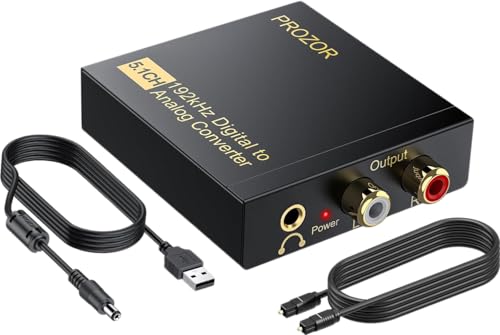
- Best for: Home theater systems that require 5.1-capable decoding when paired with compatible gear.
- Why selected: Supports 192 kHz sampling with 24-bit SPDIF input, and can connect optical or coaxial to L/R RCA and 3.5mm outputs.
- Limitation: Optical/coaxial input supports Dolby DTS via 5.1; check downstream amp compatibility for true 5.1 playback.
PROZOR 192KHz Digital to Analog Audio Converter (B0FFMS7J2H)

- Best for: Owners needing extra RCA output gain and reliable PCM/LPCM conversion.
- Why selected: Built-in audio amplifier chip and dual-channel op-amp address lower RCA volume and ensure clean sound.
- Limitation: Optical output is not supported in some configurations; verify TV output is set to PCM/LPCM.
DigitConvert 192KHz Digital to Analog Audio Converter

- Best for: PS4, Blu-ray, and home cinema setups needing reliable, synchronized sound.
- Why selected: Wide compatibility with 32KHz–192KHz sampling and 24-bit SPDIF input on left/right channels; emphasizes stable transmission.
- Limitation: Does not support Analog-to-Digital; ensure your source is digital PCM output only.
Buying Guide: How To Choose The Right Optical To Analog Converter
What matters most: sampling rate and bit depth
Look for devices that support up to 192 kHz and 24-bit PCM/SPDIF input. Higher sampling rates offer more detail, especially with lossless sources. If your system is built around two-channel audio, prioritize models explicitly offering robust stereo outputs and a clean DAC chip.
Output options: RCA, 3.5mm, and more
Consider whether you need RCA stereo outputs only or also a 3.5mm headphone/jack. Some units provide both RCA and 3.5mm, which is convenient for multi-room systems or headphones. If you have a dedicated two-channel amplifier, ensure the device can deliver adequate RCA output levels.
Power and setup
Many converters include a power adapter and a short HDMI-like design, making installation straightforward. If space is tight, pick a compact model with straightforward wiring and clear labeling for PCM/LPCM output settings.
Compatibility and format handling
Most converters handle optical or coaxial input and convert to analog L/R RCA and sometimes 3.5mm. Some models claim 5.1 compatibility; confirm that this is for down-mmixing LPCM or compatible codecs. For older soundbars or amplifiers, ensure your output matches the device’s supported formats.
Caution and limitations to consider
- Some devices require PCM/LPCM output from the source; otherwise, audio may distort or not play.
- Optical outputs may not support all formats; verify the source’s available settings.
- Output volume levels vary; some units include amplification to boost quieter sources.
Usage scenarios: which product fits which buyer
- Best for simple HDTV setups without a dedicated AV receiver: AUTOUTLET or DigitConvert for clean two-channel output.
- Best for users needing extra outputs or an included cable kit: Rybozen offers bundled accessories for easy setup.
- Best for home theater with occasional 5.1 considerations: PROZOR models provide versatile input formats and compatibility.
Quick comparison: key buying considerations
- Input type: optical vs coaxial; ensure the source device has the correct output.
- Output format: RCA only or RCA plus 3.5mm; choose based on speakers/headphones.
- Built-in amplification: beneficial for weak RCA signals but may introduce slight noise if not well-matched.
- Channel support: two-channel PCM/LPCM vs multi-channel decoding capabilities; align with your playback needs.
FAQ
- Do I need a DAC with 5.1 support to enjoy surround sound?
Answer: Not necessarily. If your amplifier or receiver handles decoding, a high-quality two-channel DAC may suffice for stereo listening. Check your system’s capabilities before buying. - Can these converters work with a gaming console?
Answer: Yes, many models support optical or coaxial PCM output from consoles and convert to RCA or 3.5mm audio. - Will using PCM/LPCM be enough for my soundbar?
Answer: In most two-channel setups, PCM/LPCM is suitable. If your soundbar requires specific formats, verify compatibility with the converter. - Is 192 kHz/24-bit essential for casual viewing?
Answer: It improves detail for high-fidelity listening but may not be perceptible in typical TV watching; choose based on your source quality and headphones/speakers. - Do these devices introduce noticeable latency?
Answer: Modern DACs aim for low latency; however, timing is less critical for video than for gaming with fast action. If latency is a concern, test in your setup and adjust source settings if needed.