
Best USB DVD Players for Cars to Play CDs in the Car
If you need a simple, portable solution to play CDs in a vehicle without a built‑in CD player, a USB or external car DVD player is the right choice. This guide highlights five reliable options that work with most modern car stereos and Android navigation systems. The top picks are best for drivers who want plug‑and‑play setup, wide compatibility, and compact design. Each option includes who it’s best for, why it stands out, and a clear limitation to consider.
Summary table of selected products:
| Product | Best For | Key Benefit |
|---|---|---|
| POSSPO Jupiter USB CD Player for Car | Cars with WAV-capable stereos | USB plug‑and‑play with WAV support |
| ENVYCLOUD Portable Car CD Player | Budget-conscious buyers | Easy USB/AUX connectivity with universal use |
| KLIM CD Player for Car | Users needing anti‑skip and remote | Anti‑skip tech and remote control |
| WOOPKER External Portable CD Player | Compact, versatile setups | 2026 chip upgrade for better readability |
| Bovrou USB External Car CD Player | Android navigation users | Designed for Android car systems with USB |
POSSPO Jupiter USB CD Player for Car

Best for cars with WAV‑capable stereos that need a simple USB connection. This portable CD player plugs into the car’s USB port and uses the car stereo as the playback device. It includes a USB extension cable for flexible placement inside the vehicle. The unit supports plugging in via USB‑A or USB‑C adapters for broader compatibility. A potential limitation is that it relies on the car stereo recognizing the USB drive, which may vary by model.
Who it’s for: drivers with a modern head unit that can read WAV or standard USB audio from a USB CD drive. Why selected: straightforward plug‑and‑play operation, flexible placement, and added USB adapters increase compatibility across more vehicles.
ENVYCLOUD Portable Car CD Player with USB/AUX
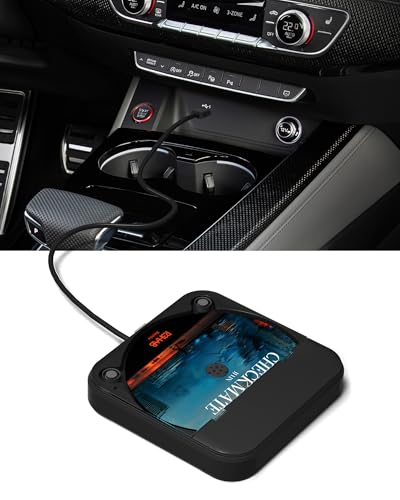
Best for drivers seeking a budget option with broad versatility. It plugs into USB or AUX and is designed for easy insertion and operation, including compatibility with vehicle USB ports and external devices like a laptop or TV. The product emphasizes minimal lag and robust construction. Limitation: some vehicles may require manual navigation to select USB playback on the head unit.
Who it’s for: budget shoppers who want universal use beyond the car. Why selected: reliable plug‑and‑play, no special drivers, and broad device compatibility beyond cars.
KLIM CD Player for Car

Best for users who want anti‑skip performance and remote control. This external CD player works via USB and AUX, offering a straightforward plug‑and‑play setup. It doubles as an external CD drive for laptops and cars, enhancing versatility. Limitation: the included features emphasize basic playback; advanced car system integration may vary by model.
Who it’s for: drivers who value anti‑skip technology and remote control for easier operation. Why selected: dependable anti‑skip tech and flexible usage with laptops or cars.
WOOPKER External Portable CD Player for Car

Best for compact setups that still deliver solid performance. It plugs into USB and includes a USB extension cable for flexible placement. The 2026 chip upgrade aims to improve readability, shock resistance, and data transmission. Limitation: some cars may require USB mode navigation to access the CD’s music files.
Who it’s for: shoppers wanting a smaller, easily stowed option with improved electronics. Why selected: upgraded chipset supports better reliability and compatibility across devices.
Bovrou USB External Car CD Player

Best for Android navigation users seeking seamless USB integration. This model is designed to work with Android car navigations and supports a wide range of disc formats. It emphasizes plug‑and‑play use without driver installation and is powered via the car’s USB port. Limitation: feature emphasis on Android systems may not fully apply to non‑Android setups.
Who it’s for: drivers with Android in‑car navigation who want a straightforward CD playback path. Why selected: deep compatibility with Android car systems and simple setup.
Buying Guide
What to consider when choosing a USB DVD/CD player for your car:
- Car stereo compatibility: Check if your head unit or Android navigation system can read CDs via USB or support WAV playback. Some systems require manual USB music selection.
- Power and connection: Most devices run off the car’s USB port. Some include USB extensions for flexible placement; ensure your car has available USB ports (A or C).
- Format support: Look for CD, CD‑R/RW, and WAV support if you plan to use a wide range of discs. Anti‑skip features improve playback on rough roads.
- Portability vs. permanence: Portable external players suit temporary or shared vehicles, while more compact designs fit smaller cabins.
- Ease of use: Plug‑and‑play setups with straightforward controls are safer for driving. Consider devices with remote or console‑mounted operations.
- Durability and build: A sturdy enclosure with anti‑skip decoding helps preserve disc quality and minimize skipping under vibration.
Comparison At a Glance
- Best for WAV support: POSSPO Jupiter USB CD Player
- Best budget option: ENVYCLOUD Portable Car CD Player
- Best for anti‑skip and remote control: KLIM CD Player for Car
- Best for compact upgrade: WOOPKER External Portable CD Player
- Best for Android navigation users: Bovrou USB External Car CD Player
FAQ
- Do these devices require a built‑in CD player in the car? No. They connect via USB or AUX to the car stereo system.
- Will every car stereo recognize a USB CD player? Most modern head units will, but some older or basic stereos may have limited support. Check WAV/USB compatibility.
- Can I use these with laptops or TVs? Some models are designed for universal use, including laptops and TVs, via USB connections.
- Is skipping a concern with external CD players? Anti‑skip features and robust decoding help reduce skipping on bumpy roads.
- Do I need drivers for these devices? Most are plug‑and‑play and do not require drivers for car or computer use.
- Are USB‑C ports supported? Some models include USB‑C adapters or support USB‑C ports via adapters; confirm compatibility before purchase.