
If you need to connect a TV’s optical audio output to an analog stereo system, choose an optical-to-RCA DAC, not a phono preamp. These five converters change digital optical audio into analog RCA audio; they do not turn it into the very low-level signal required by a turntable’s phono input. The PROZOR cable model is best for a longer reach, the AUTOUTLET for a stated 24-bit specification, and the compact PROZOR for RCA and 3.5mm output options.
| Product | Best For | Key Detail |
|---|---|---|
| PROZOR Optical-to-RCA/3.5mm DAC | Flexible analog connections | RCA and 3.5mm outputs |
| 192KHz Optical-to-3.5mm Converter | Headphones or AUX speakers | 3.5mm output; PCM stereo required |
| PROZOR DAC With 7ft Cable | Longer placement distance | Built-in amplifier chip and 7-foot cable |
| AUTOUTLET 24-bit Optical-to-RCA DAC | Buyers comparing stated audio specifications | 192kHz, 24-bit; 7-foot cable |
| eSynic Optical-to-RCA Adapter | Compact, USB-powered setup | Aluminum shell; PCM output required |
PROZOR Optical-To-RCA And 3.5mm DAC

This PROZOR converter is best for someone who wants a digital optical input and more than one analog output option. Its product name identifies RCA left/right and 3.5mm output, along with a 192kHz digital-to-analog conversion specification and an aluminum-alloy housing. That makes it a flexible choice when the receiving device uses stereo RCA or a 3.5mm AUX connection.
Choose this model if you need to route audio from an optical source such as a television or game system to an analog amplifier or powered speaker. It was selected because it directly addresses the optical-to-analog conversion in the search, while offering both common analog connection types. Check that the receiving device has an AUX or line-level input rather than a turntable phono input.
- Best for: Setups that may use RCA or 3.5mm analog connections.
- Listed detail: 192kHz DAC and aluminum-alloy construction.
- Limitation: The product information does not state cable length or power method.
As with any optical DAC in this category, the source must provide a supported digital audio signal. If a TV offers an audio-format setting, PCM stereo is a useful setting to check when the converter does not produce sound.
192KHz Optical-To-3.5mm Audio Converter

This unidirectional converter is best for connecting an optical audio source to a 3.5mm AUX speaker or headphones. The listed features specify optical-to-3.5mm conversion, USB power, and a requirement to set the source to PCM stereo audio. It is a focused option if your receiving device has a 3.5mm input and you do not need RCA output.
Choose it if you want a direct optical-to-AUX path for an HDTV or another optical source. It was selected because its product description clearly identifies both the input and output types and spells out the audio-format setup. The 192kHz figure is a product specification, not a guarantee that every source or audio format will operate at that rate.
- Best for: 3.5mm AUX speakers or headphones.
- Listed detail: USB-powered, unidirectional optical-to-analog conversion.
- Limitation: It is not an RCA-output model, and the source must be set to PCM stereo.
“Unidirectional” matters: this device is described for optical input to 3.5mm output, not for converting an analog 3.5mm signal back to optical. Confirm the output jack on your speaker or headphones before choosing it.
PROZOR Optical-To-RCA DAC With 7ft Cable
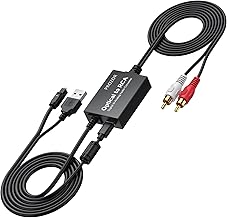
This PROZOR model is best for a layout where the optical source and analog receiver are separated by some distance. Its name specifies a 7-foot (2.1-meter) cable, optical-to-RCA conversion, and a built-in audio amplifier chip. It is listed for use with devices such as HDTVs, Blu-ray and DVD players, and game consoles.
Choose this version if the cable length is a deciding factor and the receiving equipment has stereo RCA inputs. The included cable can reduce the need to source a separate connection cable, while the built-in DAC chip handles the digital-to-analog conversion. It was selected as the long-cable option among the supplied products.
- Best for: Optical sources positioned farther from an RCA-input device.
- Listed detail: 7-foot cable and built-in audio amplifier chip.
- Limitation: The listed output is RCA, so it is not the best match for equipment that only accepts 3.5mm AUX.
Before ordering, verify that the receiving RCA sockets are labeled for an auxiliary, CD, tape, or other line-level input. A phono input is designed for a turntable cartridge and is not interchangeable with ordinary RCA line inputs.
AUTOUTLET 24-Bit Optical-To-RCA DAC

The AUTOUTLET converter is best for buyers who want an optical-to-RCA adapter with a clearly stated 24-bit and 192kHz specification. The product name also lists a 7-foot (2.1-meter) cable, Toslink input, RCA male output, and plug-and-play operation. It is described for HDTVs, DVD and Blu-ray players, and game consoles.
Choose this model if your receiving equipment takes stereo RCA and you value a stated cable length and digital specification in the product description. It was selected as a straightforward RCA-focused alternative to products that also include a 3.5mm output. The plug-and-play description does not remove the need to select a supported audio format on the source device.
- Best for: RCA-connected systems and buyers comparing stated bit-depth and sample-rate specifications.
- Listed detail: 24-bit, 192kHz, 7-foot cable, and plug-and-play description.
- Limitation: The product name does not list a 3.5mm output.
For a television connection, check the sound-output menu if the receiver remains silent. The product data for this model does not specify a separate power method, so review the product listing for the exact power requirements before buying.
eSynic USB-Powered Optical-To-RCA Adapter

This eSynic converter is best for a compact optical-to-RCA connection where USB power is suitable. Its listed features include a 192kHz specification, built-in DAC chip, USB power, and aluminum shell. The product description identifies HDTVs, Blu-ray players, and gaming consoles as intended source devices and says the output must be set to PCM.
Choose it if you need analog RCA output and prefer a product whose description explicitly mentions USB power and a built-in DAC. It was selected because those details help buyers assess both the conversion function and power arrangement. Before buying, make sure you can provide USB power near the converter and that your source can output PCM audio.
- Best for: USB-powered setups needing optical input and RCA analog output.
- Listed detail: Built-in DAC chip, 192kHz specification, and aluminum shell.
- Limitation: The source must be set to PCM audio format; the product is not described as a 3.5mm-output adapter.
This is a DAC adapter, not a phono preamplifier. Its RCA output should go to a suitable analog line input, not directly to a receiver’s dedicated phono input.
Buying Guide: How To Choose An Optical-To-Analog Converter
Does “Phono” Mean RCA On Your Stereo?
Check the label beside the input on your receiver or amplifier. RCA describes the familiar red-and-white connector style; “phono” describes a specific input intended for a turntable cartridge. An optical-to-RCA DAC produces an analog signal for a line-level input. It does not convert optical audio into the low-level phono signal that a phono input expects.
If your stereo has only a phono input and no AUX, CD, tape, or other line input, these five converters are not a direct solution. Connecting a DAC’s RCA output to a phono input can produce unsuitable sound levels and equalization. Look for a proper line input or an appropriate separate solution rather than assuming any red-and-white sockets are interchangeable.
Which Output Do You Need: RCA Or 3.5mm?
Match the converter’s analog output to the input on the receiving device. Choose an RCA-output model for a stereo receiver or amplifier with left/right RCA line inputs. Choose a 3.5mm-output model for a speaker, headphones, or other device with an AUX jack. If the receiving device uses only one of these connection types, avoid paying attention to features you cannot use.
- RCA options: Both PROZOR models, AUTOUTLET, and eSynic.
- 3.5mm option: The 192kHz optical-to-3.5mm converter; the first PROZOR listing also specifies 3.5mm output.
- Check carefully: Confirm whether your cable and receiving input are stereo, and do not confuse an output jack with an input jack.
Will It Work With Your TV Or Console?
The source needs a digital optical audio output, often labeled Optical, Digital Audio Out, or Toslink. The converter then connects to an analog input on the amplifier or speaker. These are one-way conversion devices as described in the supplied product names, so they do not send analog audio back to an optical input.
Digital audio format settings can affect whether a DAC receives usable audio. One supplied product explicitly requires PCM stereo, and another says PCM output must be selected. When there is no sound, check the TV or source menu and select PCM or stereo PCM if available. A bitstream or surround format may not be suitable for a basic stereo DAC.
How Important Are Sample Rate, Cable Length, And Power?
Several models list 192kHz conversion, and AUTOUTLET also identifies 24-bit conversion. Those numbers describe stated product specifications; they do not mean a source will output every format or that a higher figure automatically makes the connection better. Check the source’s audio settings and prioritize the right connectors, format support, and power method for your setup.
Cable length is useful when the source and amplifier are not close together. The PROZOR cable model and AUTOUTLET list a 7-foot cable. Power details differ in the supplied descriptions: the 3.5mm converter and eSynic model specify USB power, while other supplied names do not state a power method. Confirm power needs in the listing and make sure a suitable USB power source is available where required.
What Should You Check Before Ordering?
- Confirm that the source has an optical digital audio output.
- Confirm that the receiver has a line-level RCA or 3.5mm input, not only a phono input.
- Match the converter’s output connector to the receiving device.
- Check the source’s audio output settings and use PCM stereo when required.
- Verify cable length and power arrangements for the intended location.
- Remember that these products convert digital optical audio to analog audio; they are not phono preamps or two-way converters.
Frequently Asked Questions
Can I Connect Optical Out Directly To A Phono Input?
No. Optical is a digital output, while a phono input is an analog input designed for a turntable cartridge. An optical-to-RCA DAC changes the signal to analog, but its output is intended for a line-level input, not a phono input.
Do Optical-To-RCA Converters Need A Separate DAC?
No separate DAC is needed for the conversion when you use one of these products as described. Each is a digital-to-analog converter or adapter with a built-in DAC function or chip listed in its product description.
Why Is There No Sound After I Connect The Converter?
Check that the optical cable is connected to the source’s output, the analog plugs reach the receiving device’s input, and the converter has the power it requires. Then check the source’s sound menu for PCM stereo output, which is specifically required by some listed models.
Can I Use An Optical-To-RCA DAC With Powered Speakers?
Yes, if the speakers have a compatible analog RCA line input and the DAC’s output and power requirements match the setup. If the speakers have only a 3.5mm AUX input, select a converter with that output or use a suitable audio cable or adapter.
Does “192kHz” Mean Every TV Audio Format Is Supported?
No. A 192kHz specification does not establish support for every source format. Check the product details and set the source to a supported format, such as PCM stereo when the converter requires it.
Are These Adapters Bidirectional?
No bidirectional operation is specified for these products. The listed use is optical digital input to analog RCA or 3.5mm output, so do not choose one to convert an analog signal into optical audio.