
For an optical switch with two inputs and one output, none of the listed models is an exact 2-in-1-out match. The closest options provide three or four inputs to one output, so they can serve the same purpose when you have two sources and want room for more. The LiNKFOR is best for four sources and lists supported formats; the eSynic, BlueRigger, and Tendak are three-input alternatives. The PROZOR adds a second output but has three inputs, making it useful when output flexibility matters.
| Product | Configuration | Best Suited For |
|---|---|---|
| LiNKFOR | 4 inputs, 1 output | Several sources and stated format details |
| eSynic | 3 inputs, 1 output | Buyers seeking a portable, USB-powered option |
| BlueRigger | 3 inputs, 1 output | Buyers prioritizing a simple remote-controlled switch |
| Tendak | 3 inputs, 1 output | Common optical sources such as a TV or game console |
| PROZOR | 3 inputs, 2 outputs | Setups that need two optical outputs |
LiNKFOR 4-In-1 Optical Audio Switch

The LiNKFOR accepts four optical fiber signal sources and routes one selected signal to a single SPDIF/Toslink receiving device. It exceeds the input count in a 2-in-1-out setup, but the extra ports can accommodate more devices without changing the basic one-output arrangement.
- Supports LPCM 2.0, DTS, and Dolby-AC3 audio formats.
- Supports 96 kHz audio.
- Includes an IR remote control and a 3-foot optical cable.
- Lists output transmission distance up to 40 meters or 130 feet.
Best for: Buyers with two or more optical sources who want one receiving device and may use the remaining inputs later. It is selected for its four-input layout and clearly stated audio-format and distance details.
Limitation: It does not support 7.1-channel Dolby Digital Plus or Dolby TrueHD, according to the supplied product information. It is also a 4-in-1 model, not a two-input switch.
eSynic Portable 3-In-1 Optical Switch

This eSynic switch routes among three optical inputs and one output. Its listed features identify an aluminum-alloy body, USB power, and an IR remote control. The product name also states that it works with Dolby Digital and DTS audio formats and identifies PS4, Blu-ray, DVD, HDTV, and optical soundbar use cases.
Best for: Buyers who want a three-source switch with USB power and remote control. It is a close functional alternative to a 2-in-1-out model because two sources can occupy two of its inputs while leaving one input available.
Limitation: The supplied product details do not specify supported sample rates, cable inclusion, or transmission distance. Confirm those requirements before choosing it for a setup with specific format or installation needs.
BlueRigger 3×1 Toslink Optical Switch

The BlueRigger is a three-input, one-output optical switch. Its product name lists LPCM 2.0 support and an IR remote control, with gaming consoles, HDTVs, amplifiers, and soundbars among the intended device categories. It can switch between several optical sources feeding one optical audio destination.
Best for: Buyers looking for a straightforward 3×1 layout and remote selection. It suits a two-source setup that may later add another optical device, while keeping the output count at one.
Limitation: The supplied details specifically name LPCM 2.0 but do not establish support for additional formats or sample rates. Check the product’s current specifications if your audio source requires a particular format beyond LPCM 2.0.
Tendak 3-In-1 Toslink Optical Switch

The Tendak provides three optical, SPDIF, or Toslink ports as inputs and one output, according to its product name. It includes a remote control and is identified for use with a TV, PS4, Xbox, or Blu-ray player. This is another expanded-input alternative for someone searching for a 2-in-1-out switch.
Best for: Buyers with several familiar optical sources who want remote-controlled selection and one output device. It is selected because its stated 3-in-1 direction matches the central task of choosing among sources.
Limitation: The supplied information does not state supported audio formats, sample rates, power requirements, or whether an optical cable is included. Verify these details if they affect your system.
PROZOR 3-In-2-Out Optical Switch
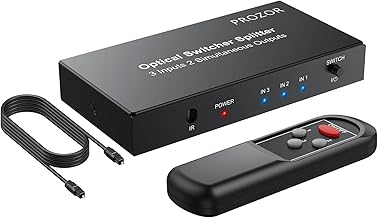
The PROZOR combines three optical inputs with two outputs. Its listed features include manual and IR remote switching, a Type-C power port, and a 1-meter optical cable. The product information describes connecting sources such as a TV, DVD player, and game console, with audio directed to two output devices.
Best for: Buyers who need more than one output, such as sending optical audio to two devices. It offers more routing flexibility than a standard 2-in-1-out switch, though its specific 3-in-2-out operation is different.
Limitation: Choose another model if you specifically need a simple two-input, one-output device. The listed formats are LPCM 2.0, DTS, and Dolby-AC3; the supplied details do not list broader format support.
Buying Guide: How To Choose An Optical Switch
Do you need two inputs and one output?
A 2-in-1-out optical switch takes audio from either of two source devices and sends the selected signal to one receiving device. Typical sources include a game console and a television, while a soundbar or receiver may be the output. Check the direction carefully: an optical splitter that sends one input to two outputs solves a different problem.
The products listed here provide three or four inputs, rather than exactly two, except the PROZOR, which has three inputs and two outputs. If you only need two source connections, an extra input may offer useful room for expansion, but it may also mean buying a larger or differently powered device than necessary. Compare the port count with your actual setup.
How many sources and outputs should the switch support?
Count the devices that will send optical audio into the switch. A two-source setup can use a 3×1 or 4×1 switch, but a one-output model sends the selected source to only one destination. If you want to connect two listening devices, consider whether the device explicitly supports two outputs, as the PROZOR does.
Do not assume that two outputs mean independent audio selection or separate volume control. The supplied PROZOR details describe two outputs and audio streaming to both a soundbar and a Bluetooth transmitter, but do not establish independent control functions.
Which audio formats matter?
Check the formats supported by the source, switch, and receiving device. A switch cannot make an unsupported audio format compatible. The LiNKFOR lists LPCM 2.0, DTS, and Dolby-AC3 at 96 kHz, and explicitly excludes 7.1-channel Dolby Digital Plus and Dolby TrueHD. The PROZOR lists LPCM 2.0, DTS, and Dolby-AC3, while the BlueRigger product name lists LPCM 2.0.
For the eSynic, Dolby Digital and DTS are named, but the supplied details do not give sample rates. The Tendak listing information provided here does not specify formats. If format support is central to your purchase, verify the current full specifications rather than inferring capabilities from a product category or connector type.
Is remote control or manual switching important?
A remote can be useful when the switch is tucked behind a television or other equipment. The LiNKFOR, eSynic, BlueRigger, Tendak, and PROZOR product details identify remote controls. The PROZOR also lists manual switching. Confirm how a model selects inputs if you need to change sources without a remote or want to place the switch out of reach.
What should you check about power and cables?
Power requirements and included cables vary. The eSynic product name specifies USB power. The PROZOR lists a Type-C power port and a 1-meter optical cable, while the LiNKFOR listing includes a 3-foot optical cable. The supplied information for the BlueRigger and Tendak does not establish power or cable details. Check the full listing for these items before planning the installation.
Will cable distance affect the setup?
Measure the route from source to switch and from switch to receiver, and account for the optical cables needed for each connection. The LiNKFOR listing states an output distance up to 40 meters or 130 feet and optical fiber cable loss below 0.2 dB per meter. Do not apply that stated distance to other products; their supplied details do not provide the same specification.
Keep the purchase focused on the actual connection path. A switch with the correct number of ports still needs suitable optical cables and compatible source and receiving-device connections. If a setup uses a format or cable run that is not addressed in the product details, check with the manufacturer or consult the full product specifications.
Frequently Asked Questions
What does optical switch 2 in 1 out mean?
It means two optical audio sources connect to the switch, and the switch sends the selected source’s signal through one output to a receiving device.
Can a 3-in-1-out switch replace a 2-in-1-out switch?
Yes, if the devices and audio formats are compatible. A 3-in-1-out switch can serve a two-source setup while leaving one input unused.
Is an optical switch the same as an optical splitter?
No. A switch typically selects one of multiple inputs for one output. A splitter typically distributes one input to multiple outputs. Check the listed input and output counts to confirm the direction.
Does an optical switch improve sound quality?
The supplied product details describe signal switching and supported formats, not sound-quality enhancement. Choose a model that supports the formats and connections required by your source and receiving device.
Can optical audio carry Dolby TrueHD?
Do not assume it can. The LiNKFOR listing specifically says it does not support Dolby TrueHD over its optical connection. Check the audio format limits of every device in the signal path.