
The best PC audio jack splitter depends on whether you need to connect a single headset to separate computer audio and microphone jacks or share one audio source between two listeners. The UGREEN and ienza adapters are designed for a headset with one four-pole plug and a PC with separate ports; the SYNCWIRE and IIISOGNO cables split one source toward two listening devices. Check the direction of the connections before choosing: these splitter styles are not interchangeable.
| Product | Best For | Connection Type |
|---|---|---|
| UGREEN Headphone Splitter | PC calls, classes, and gaming | One headset plug to separate PC audio and mic plugs |
| ienza Headset Splitter | CTIA gaming headsets | One headset plug to separate PC audio and mic plugs |
| D & K Exclusives Adapter | Portable headset-to-PC connection | One headset plug to separate PC audio and mic plugs |
| SYNCWIRE Headphone Splitter | Listening through two outputs | One source to two headphone or speaker outputs |
| IIISOGNO TRRS Splitter | Sharing audio and mic between two headsets | One source to two headset connections |
UGREEN Headphone Splitter For Computer

The UGREEN adapter is a strong match for a computer that has separate headphone and microphone jacks but a headset that ends in one 3.5 mm TRRS plug. Its single female socket accepts the headset plug, while the two male plugs connect to the computer’s audio and mic ports. That layout makes it suitable for online gaming, voice calls, classes, and meetings when the computer does not have a combined headset jack.
The listed construction includes polished gold-plated connectors, oxygen-free copper wire, an aluminum alloy casing, and a nylon-braided jacket. UGREEN says the cable passed more than 10,000 bending tests. These are useful listed details for shoppers comparing connector protection and cable construction, but they do not guarantee compatibility with every headset standard.
- Best for: People using a CTIA-compliant four-pole headset with a PC that has separate mic and audio ports.
- Why it stands out: Its connection layout directly addresses the common one-headset-plug-to-two-PC-jacks setup.
- Limitation: The product notes that a CTIA-compliant TRRS headset cable is needed for microphone output; OMTP or other standards may prevent the mic from working.
ienza PC Headset Splitter Adapter

The ienza adapter is another option for connecting a four-pole headset to a desktop or laptop with separate microphone and audio ports. It is listed for CTIA TRRS headsets and names gaming headset brands and models including Astro A10 and A40, Turtle Beach, HyperX Cloud, SteelSeries, Razer Kraken, Sennheiser, and Sades. These examples help identify the intended headset category; check the plug type and PC ports rather than relying on brand name alone.
The cable is listed as 8 inches, or 20 centimeters, long. Its one female 3.5 mm connection accepts the headset, and its two male connections go to the PC’s separate mic and headphone jacks. The product description also mentions PS4, Xbox One, Switch, and smartphone headsets that use a single TRRS plug. The PC’s port layout still determines whether this particular adapter is the right direction of connection.
- Best for: Owners of a CTIA four-pole gaming headset who need separate PC audio and mic plugs.
- Why it stands out: Its listing clearly describes the headset-to-PC use case and names several headset families.
- Limitation: At 8 inches, it may not provide much extra reach between a headset and computer ports.
D & K Exclusives Headset To PC Adapter

This compact Y adapter is intended to connect a newer headset with a combined audio-and-microphone plug to a computer or laptop with separate headphone and mic jacks. The listing describes one 3.5 mm female connector and two male plugs: one for the computer’s headphone port and one for its microphone port. It is positioned for voice-over-IP use, chat programs, and similar applications that need both listening and microphone input.
The listed features include gold-plated connectors and oxygen-free copper, along with a compact design intended for carrying in a laptop bag. The important comparison point is its function: it splits a headset connection into the two computer connections, rather than splitting one computer audio output for two listeners.
- Best for: Laptop users who want a small adapter for a single-plug headset and separate PC ports.
- Why it stands out: Its compact form and explicitly described mic-and-headphone connection suit portable computer use.
- Limitation: The listing does not specify compatibility with every headset wiring standard, so confirm the headset plug standard if microphone input matters.
SYNCWIRE 3.5mm Headphone Splitter

The SYNCWIRE cable has the opposite connection direction from the PC headset adapters above. It uses one 3.5 mm male plug to connect to an audio source and two 3.5 mm female ports for output devices, such as headphones or speakers. It is better for sharing a source’s audio than for connecting a combined headset microphone to separate computer jacks.
The product is listed for use with devices such as laptops, tablets, phones, MP3 players, and game systems. Its features include a nylon-braided cable, double shielding, and polished 24K gold-plated connectors. The listing says the slim connector fits almost all cases except LifeProof cases, so a bulky device case may affect the connection.
- Best for: People who want to connect two listening devices to one 3.5 mm audio output.
- Why it stands out: Its male-to-dual-female layout is clearly suited to sharing audio, with a braided cable and shielding listed as construction features.
- Limitation: Do not choose it to turn one headset plug into separate PC microphone and headphone plugs; it has the opposite port arrangement.
IIISOGNO Dual-Headset TRRS Splitter
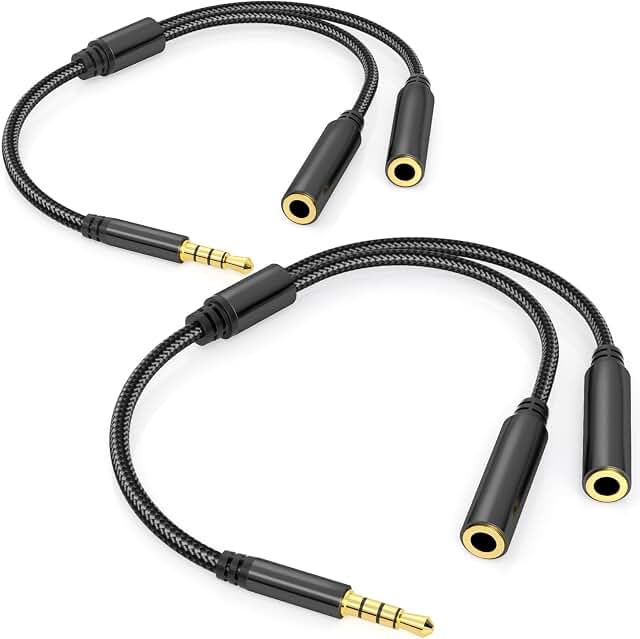
The IIISOGNO splitter is intended to let two TRRS headsets connect to one compatible source, with the listing describing support for audio and microphone on both headsets. It is a different solution from a PC adapter that separates one headset into dedicated computer audio and mic plugs. Its dual-female arrangement is aimed at shared listening or calls from a phone, tablet, laptop, PC, or game console with a compatible 3.5 mm connection.
The package is listed as two 1-foot cables, and the connectors are described as gold-plated. The listing also says TRS headphones or speakers can be used for sound, but microphone use requires a TRRS headset with a built-in mic. Check the source device’s port and intended use before choosing this style.
- Best for: Two people who want to use compatible TRRS headsets with one source and share audio and mic functionality.
- Why it stands out: The listing specifically describes two headset connections and includes two cables.
- Limitation: A TRS headphone or speaker can provide sound but does not provide the headset microphone function described for TRRS headsets.
Buying Guide: How To Choose A PC Audio Jack Splitter
Does your PC have one headset jack or two separate jacks?
Start by checking the computer’s ports. A combined headset port accepts audio output and microphone input through one compatible connection. A desktop or laptop with separate headphone and microphone jacks needs an adapter that splits a headset’s single plug into two plugs. The UGREEN, ienza, and D & K Exclusives products are listed for that second arrangement.
Look for the port symbols or labels near the jacks. Headphone symbols usually identify audio output, while a microphone symbol identifies mic input. If the computer has only one combined port, a splitter designed for two separate PC jacks may not be the correct choice.
Do you need to connect one headset or share audio?
“Headphone splitter” can describe cables that perform opposite jobs. A headset-to-PC adapter has one female headset socket and two male plugs for separate computer ports. A sharing splitter has one male plug for the source and two female sockets for listening devices. Compare the number and gender of each connector with the ports on your headset and computer before ordering.
For one headset with a microphone and a PC with separate jacks, choose a headset-to-PC adapter. For two people listening to one source, consider an output-sharing cable such as the SYNCWIRE. For two headsets that need audio and microphone connections through one source, the IIISOGNO listing describes that use case, subject to device and plug compatibility.
What does TRRS mean, and why does it matter?
TRRS refers to a 3.5 mm plug with four contact sections, commonly used to carry stereo audio and microphone signals through one headset connector. TRS plugs have three contact sections and are commonly used for stereo audio without a headset microphone connection. A splitter’s intended wiring determines whether it carries a mic signal, audio only, or both.
The UGREEN listing specifically calls for a CTIA-compliant TRRS cable for microphone output and warns that OMTP or other standards may cause mic failure. If the headset’s wiring standard is unknown, verify it in the headset documentation before choosing an adapter, especially when microphone function is essential.
How much cable length do you need?
Measure the distance between the headset cable and the computer’s audio ports. A short adapter can keep a laptop setup compact, but it may be awkward if ports are far apart or difficult to reach. The ienza cable is listed as 8 inches, while the IIISOGNO package includes two 1-foot cables. The other product descriptions emphasize compactness or construction without providing a length in the supplied details.
Which construction details are worth comparing?
Connector plating, shielding, cable braiding, and casing materials are listed by some manufacturers as design features. UGREEN lists gold-plated connectors, oxygen-free copper wire, an aluminum alloy casing, and a braided jacket. SYNCWIRE lists shielding, a nylon braid, and gold-plated connectors. These details can help compare stated construction, but they do not replace checking connector layout, plug standard, or device ports.
Will any 3.5 mm splitter make the microphone work?
No. A cable may fit physically but still have the wrong direction or wiring for the intended job. A male-to-dual-female audio splitter may share sound without separating a headset microphone for a PC. A headset-to-PC adapter may require a particular TRRS wiring standard. Match the cable’s function, connector layout, and headset standard to the devices.
Frequently Asked Questions
What kind of splitter connects a headset to separate PC mic and audio jacks?
Choose a headset-to-PC Y adapter with one female 3.5 mm headset socket and two male plugs, one for audio and one for microphone. Confirm that the headset plug and wiring standard are supported.
Can a headphone splitter give two people separate volume controls?
The listed splitter descriptions do not specify independent volume controls. A basic splitter connects multiple outputs to one source; check the product details for controls if separate adjustment is required.
Can I use a TRS headphone with a headset splitter?
A TRS headphone can carry sound, but it does not have the four-pole headset connection used for a built-in microphone. The IIISOGNO listing specifically states that TRS headphones or speakers work for sound only.
Why does my headset microphone not work through a splitter?
Possible causes include choosing the wrong splitter direction, connecting the plugs to the wrong PC ports, or using an incompatible headset wiring standard. The UGREEN listing specifies CTIA compliance for microphone output and notes that OMTP or other standards may cause mic failure.
Is a PC audio jack splitter the same as a headphone sharing splitter?
No. A PC headset adapter separates one headset connection into computer audio and mic plugs. A sharing splitter connects one source to two listening outputs. Check the connector layout and stated use before buying.