
If you are searching for PC gaming speakers from 2015, these five options offer a range of modern choices for a similar desktop setup. The Edifier G2000 is best for gamers who want multiple inputs and sound modes, while the Logitech Z313 is better for buyers seeking a separate subwoofer. Compact stereo speakers and a USB-C soundbar suit desks where space and cable management matter. The listed product details do not establish that any model was released in 2015, so this guide compares the supplied products rather than presenting them as historical 2015 releases.
| Product | Best For | Notable Feature |
|---|---|---|
| Edifier G2000 | Multiple devices and sound modes | USB, Bluetooth, and AUX inputs |
| Logitech Z313 | Buyers who want a subwoofer | 2.1 speaker system and control pod |
| Redragon GS520 | RGB desktop styling | Touch-controlled lighting |
| Razer Leviathan V2 X | Compact soundbar setup | Single USB-C power and audio cable |
| OFFSIR 2-in-1 | Flexible stereo placement | Two speakers that can be joined |
Edifier G2000
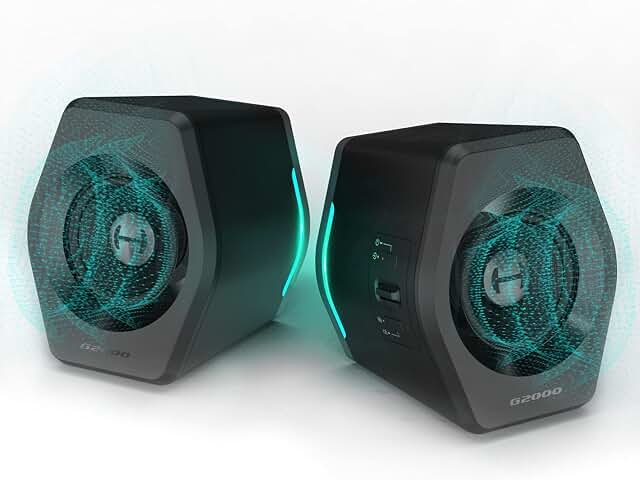
Best for: PC gamers who want flexible connections and selectable sound profiles. The Edifier G2000 combines a pair of full-range speakers with several input options and three listening modes, making it the most adaptable choice in this group for people who use more than one device.
The product listing specifies 2.75-inch full-range speaker units, a bass port, 16 watts RMS, and 32 watts peak power. Its Game, Music, and Movie modes let users choose a profile suited to different activities. USB, 3.5mm AUX, and Bluetooth inputs provide ways to connect a computer and other listed device types.
- Choose this if you want USB, Bluetooth, and AUX connectivity.
- Choose this if separate Game, Music, and Movie modes are useful.
- The listed subwoofer output interface may matter to buyers planning a speaker setup with additional bass equipment.
Limitation: The product information does not include a separate subwoofer in the listed package. Buyers seeking a complete 2.1 system should compare it with the Logitech Z313 instead.
Logitech Z313 2.1 Speaker System

Best for: Buyers who prefer a traditional 2.1 speaker layout with a separate subwoofer. The Logitech Z313 is the clearest fit in this selection for shoppers who want more than two desktop satellites and value a dedicated bass component.
The supplied details list 25 watts RMS output, a compact subwoofer, and a convenient control pod. The control pod gives the system a dedicated way to manage it, while the separate subwoofer distinguishes this option from the compact stereo pairs and soundbar listed here.
- Choose this if a separate subwoofer is a priority.
- Choose this if a control pod is preferable to relying only on computer controls.
- Compare the 2.1 layout with a stereo pair before buying if desk space is limited.
Limitation: The provided product details do not specify connection types or the dimensions of the speakers and subwoofer. Check the current listing for those details if your computer connections or available desk and floor space are important constraints.
Redragon GS520 RGB Speakers

Best for: Gamers who want a simple stereo speaker pair with touch-controlled lighting. The Redragon GS520 uses a 2.0-channel design and offers six lighting modes, including the option to switch the lights off. Its brushed-style finish is intended to suit a modern desktop setup.
The product listing describes an enhanced full-range stereo sound driver and touch controls for the lighting. That makes this a better match for buyers who value visual customization alongside basic stereo playback than for shoppers whose primary requirement is a subwoofer or a broad range of inputs.
- Choose this if you want multiple lighting modes controlled by touch.
- Choose this if a two-speaker desktop arrangement fits your setup.
- The option to turn the lighting off is useful for buyers who prefer a less illuminated desk.
Limitation: The supplied features do not give a wattage, connection types, or input options. Verify those specifications in the product listing before choosing it for a particular computer or other device.
Razer Leviathan V2 X Soundbar

Best for: Desktop users who want a compact soundbar beneath a monitor instead of separate left and right speakers. The Leviathan V2 X is described as the most compact soundbar in its product range and uses two full-range drivers with two passive radiators.
A single USB Type-C cable provides both power and audio, according to the supplied listing. This arrangement can reduce the number of cables running to the soundbar. The stated maximum volume output is up to 90 dB, and its form factor is designed to fit under a monitor.
- Choose this if a single USB-C cable for power and audio suits your setup.
- Choose this if a soundbar is easier to place than two separate speakers.
- Consider whether your computer has a suitable USB-C connection before selecting it.
Limitation: The product is explicitly listed as not waterproof, so it is not intended for use where exposure to water is a concern. Its single-cable setup also makes USB-C support an important point to verify.
OFFSIR 2-in-1 PC Speakers

Best for: Buyers who want the option to place two compact speakers separately or join them into a soundbar-like arrangement. The OFFSIR set is described as a 2-in-1 design for desktop computers and laptops, with RGB lighting and USB power alongside a 3.5mm AUX connection.
The listed audio features include dual 5-watt drivers and a 2.0-channel stereo configuration. Its removable design gives it a placement option that fixed-form speakers do not provide. This makes it a useful comparison for shoppers who are deciding between a speaker pair and a compact, joined layout.
- Choose this if you want two speakers that can be joined together.
- Choose this if USB power and a 3.5mm AUX connection match your setup.
- The dual 5-watt drivers make the listed output straightforward to compare with other compact stereo options.
Limitation: The listing stresses that the package contains two removable speakers only, not a separate soundbar. The joined configuration should not be mistaken for an additional soundbar included in the box.
Buying Guide: How To Choose PC Gaming Speakers
Start with the speaker format you can accommodate. A 2.0 pair uses two speakers, a 2.1 system adds a separate subwoofer, and a soundbar places the audio hardware in one horizontal unit. These formats serve different desk layouts; none is automatically the right choice for every gaming setup.
Do you want stereo speakers, a soundbar, or a subwoofer?
Choose a stereo pair if you want to position speakers on either side of a monitor. The Redragon GS520 and Edifier G2000 are listed as stereo options, while the OFFSIR speakers can be used separately or joined. Choose the Razer soundbar if a single horizontal unit fits better beneath your monitor. Choose the Logitech Z313 if a separate subwoofer is a priority.
A separate subwoofer takes additional space, so consider where it could sit before choosing a 2.1 system. A soundbar can simplify placement, but it does not provide the same separate-speaker layout. Check the product listing for dimensions when the space under or beside your monitor is limited.
Which connections should you check?
Match the speaker inputs to the outputs on your computer or other devices. The Edifier G2000 lists USB, Bluetooth, and 3.5mm AUX. The OFFSIR listing specifies USB power and 3.5mm AUX, while the Razer soundbar uses USB-C for power and audio. The supplied Redragon and Logitech details do not identify their connection types, so check their current listings if connectivity is decisive.
Do not assume that a USB power connection also carries audio unless the product information says so. Likewise, a 3.5mm audio input and a USB-C audio connection are not interchangeable without the right computer port or adapter. Confirm the required cable and connection method before purchase.
How much do sound modes and lighting matter?
Sound modes provide a way to select a preset for different activities. The Edifier G2000 lists Game, Music, and Movie modes. If customization matters more than presets, the Redragon GS520 offers six touch-controlled lighting modes and can turn its lights off. The OFFSIR product also lists RGB lighting, though the supplied details do not describe its lighting modes.
Lighting does not establish sound quality, and the feature lists do not provide enough information to compare every model’s audio performance directly. For a practical comparison, focus on disclosed specifications such as speaker format, stated power, driver arrangement, and connection options.
What does the listed power rating tell you?
Power figures can help distinguish product specifications, but compare like with like. Edifier lists 16 watts RMS and 32 watts peak power; Logitech lists 25 watts RMS; and OFFSIR specifies dual 5-watt drivers. RMS and peak figures describe different measurements, so they should not be treated as equivalent ratings.
Redragon and Razer’s supplied feature summaries do not include comparable power ratings. Do not infer that an unlisted rating means a speaker is quieter or louder. Consult the full listing if output power is a deciding factor.
Are these actually 2015 PC speakers?
The search phrase “PC gaming speakers 2015” may refer to older recommendations or a setup from that period. The product information supplied for this guide does not confirm that these models were released in 2015. Treat them as current product options from the provided list, not as verified 2015-era models. If you specifically need equipment released in that year, verify the model’s release date independently before buying.
Frequently Asked Questions
Which listed PC speakers have a separate subwoofer?
The Logitech Z313 is described as a 2.1 multimedia speaker system with a compact subwoofer. The Edifier G2000 listing mentions a subwoofer output interface, but the supplied details do not say that a separate subwoofer is included.
Which option offers the most connection types?
The Edifier G2000 lists USB, Bluetooth, and 3.5mm AUX inputs. These options make it the most clearly specified choice for buyers comparing connection variety in this product group.
Which speakers can be arranged as a soundbar?
The OFFSIR product is described as two removable speakers that can be joined into a soundbar-like arrangement. The package contains the two speakers, not an additional separate soundbar.
Which product is designed to sit beneath a monitor?
The Razer Leviathan V2 X is described as a compact desktop soundbar that fits beneath a monitor. Its USB-C cable provides power and audio, so check that the connection suits your computer.
Do the supplied products include verified 2015 models?
No release dates are provided in the supplied product information. The listed features are not enough to verify that any model was released in 2015.