
For a PC-to-receiver connection, choose a USB sound card with an output that matches the receiver’s available input. The StarTech 7.1 USB Audio Adapter is the most versatile choice here because it offers analog outputs and SPDIF digital output. For a basic stereo receiver connection, the UGREEN, SABRENT, biaze, and VENTION adapters provide USB audio with 3.5mm output; confirm the cable and receiver input you need before buying.
| Product | Best For | Connection Highlight |
|---|---|---|
| StarTech 7.1 USB Audio Adapter | Receivers with digital or multichannel inputs | SPDIF digital and 3.5mm analog outputs |
| UGREEN USB Sound Card | Simple stereo audio | USB audio with 3.5mm output |
| SABRENT USB External Stereo Sound Card | Basic stereo output and separate mic input | Dedicated 3.5mm stereo output |
| biaze USB Audio Adapter | Replacing a PC’s failed audio port | 3.5mm speaker/headphone output |
| VENTION USB Sound Card | Everyday audio with convenient controls | 3.5mm audio and onboard controls |
StarTech 7.1 USB Audio Adapter
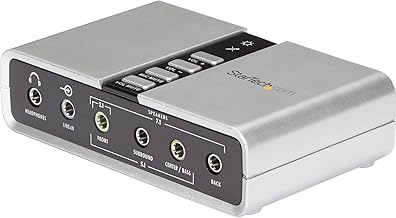
Best for: PC owners who want a choice of analog or digital connections to a receiver. This adapter adds up to 7.1-channel audio over USB and supports 7.1-, 5.1-, and two-channel output through 3.5mm jacks. It also includes SPDIF digital output, which can suit a receiver with a compatible optical digital input.
It supports 44.1kHz and 48kHz sampling rates for analog playback and recording. SPDIF digital output supports 48kHz playback, and the listed optical input passthrough supports up to two-channel audio at 48kHz. A one-meter USB cable is included.
Why it was selected: It offers more connection options than the stereo-only adapters in this list, making it the strongest fit when the receiver has digital input or multichannel analog inputs. Limitation: Check the receiver’s input type and the adapter’s output requirements before purchase; the listed SPDIF output is limited to 48kHz playback.
UGREEN USB Sound Card Adapter

Best for: A straightforward stereo connection from a computer to a receiver with an appropriate analog audio input. The adapter connects to the PC through USB and provides 3.5mm audio connectivity. Its listed features include a DAC chip, plug-and-play operation, and no need for an external power source.
Why it was selected: It is a practical option for buyers who need USB audio conversion rather than multichannel or optical output. If the receiver has a stereo RCA input, check whether you need a separate 3.5mm-to-RCA cable; the product details provided do not say that such a cable is included.
Limitation: The listed features do not specify SPDIF or multichannel receiver output. Choose another option if your setup depends on those connections.
SABRENT USB External Stereo Sound Card

Best for: A basic two-channel receiver setup that also needs a separate microphone input. The SABRENT adapter has a USB Type-A connector, a 3.5mm stereo output, and a separate 3.5mm mono microphone input. It is bus-powered and listed as plug and play, with no drivers or external power required.
For receiver use, connect the green stereo output to a compatible receiver input using an appropriate audio cable. Select the adapter as the PC’s sound output after connecting it.
Why it was selected: Its separate, clearly identified stereo output makes it easy to distinguish playback from microphone connections. Limitation: SABRENT states that it does not support a single-plug four-pole headset, passive speakers, or surround sound. It is a stereo adapter, not a multichannel receiver interface.
biaze USB Audio Adapter

Best for: Replacing a computer’s faulty audio port or adding a simple USB audio output. The biaze adapter provides a 3.5mm speaker/headphone output and a separate microphone input. Its listed DAC supports audio up to 16-bit/48kHz, and the product features include noise reduction.
The adapter supports listening and speaking and is listed for use with several operating systems, including Windows, macOS, and Linux. For a receiver, use the 3.5mm output and confirm that the receiver accepts the signal through the cable and input you plan to use.
Why it was selected: It suits buyers who need a replacement audio interface as well as a way to send stereo sound toward a receiver. Limitation: Its listed output is 3.5mm; the provided features do not identify SPDIF or multichannel receiver output.
VENTION USB Sound Card

Best for: Buyers who want a simple USB audio adapter with physical controls for everyday playback. VENTION lists support for stereo audio and 3.5mm headphones, headsets, and microphones. Its controls include a volume knob, microphone and sound buttons, and a sound switch button. The adapter is also described as plug and play.
For receiver use, its 3.5mm audio connection can be relevant when the receiver has a compatible analog input. Check the required cable and input format before ordering, because the listed product details do not specify a digital output.
Why it was selected: It combines basic stereo functionality with onboard controls, which can be useful when adjusting audio at the adapter. Limitation: The provided features do not establish multichannel or SPDIF output, so choose another model if either is essential.
Buying Guide: How To Connect A PC Sound Card To A Receiver
Which input does your receiver have?
Start by checking the receiver’s rear panel or manual for available audio inputs. Common possibilities include stereo analog inputs, such as RCA, and digital inputs, such as optical SPDIF. The receiver’s input determines which sound card output and cable will work. Match the PC adapter’s output to the receiver’s input rather than choosing based only on the phrase “USB sound card.”
- Stereo analog input: A USB adapter with a 3.5mm stereo output may work with a suitable cable, depending on the receiver’s input.
- Optical digital input: Choose an adapter that specifically lists SPDIF optical output, such as the StarTech model above.
- Multichannel analog inputs: Check that the sound card supports the required channel output and that you have the correct connections for each channel.
Do you need stereo or surround sound?
For music, video, and general computer audio through a two-channel receiver input, a stereo USB adapter may be sufficient. The SABRENT, UGREEN, biaze, and VENTION products are described primarily around stereo or 3.5mm audio. They should not be treated as surround-sound interfaces based on the listed features.
If you need 5.1- or 7.1-channel output, look for explicit channel support and verify how the adapter sends those channels to the receiver. The StarTech adapter lists 7.1-, 5.1-, and two-channel output through 3.5mm jacks. Its SPDIF output has separate stated limitations, so do not assume that every digital format or channel configuration is supported.
Will a 3.5mm output connect directly to your receiver?
Not always. A 3.5mm output is a connector type, while a receiver may use RCA analog inputs or a digital input. If the receiver has stereo RCA inputs, you may need a compatible 3.5mm-to-RCA cable. The listed product information does not confirm that these adapters include that cable, so check package contents before purchase.
Do not connect a sound card’s output to an input that does not match its signal type. A 3.5mm analog output is not the same as an optical digital output. For a digital connection, both the adapter and receiver need compatible digital connections.
Does the adapter need separate power or drivers?
The SABRENT, UGREEN, and VENTION features describe plug-and-play operation without external power or drivers. The SABRENT is USB bus-powered. Check the specific product details and your computer’s operating system before buying, since compatibility can vary by device and software configuration.
After connecting a USB adapter, the computer may need to use it as the playback device. Open the operating system’s sound settings, select the adapter as the output, and then select the matching input on the receiver. If sound does not play, verify the cable connections, output device, receiver input selection, and volume settings.
Do you need a microphone connection too?
A microphone input matters if you use a headset or microphone with the computer. SABRENT clearly lists separate stereo output and mono microphone input jacks, while biaze also lists speaker/headphone output and microphone input. The VENTION features list support for headphones and microphones but do not fully specify the jack arrangement. Confirm that the adapter’s connector setup matches your headset before choosing it.
What should you compare before ordering?
- Output type: Confirm whether you need 3.5mm analog, SPDIF digital, or multichannel analog.
- Receiver input: Check the exact input available and whether an additional cable is needed.
- Channel count: Choose stereo for a basic two-channel setup; look for explicit multichannel support for surround configurations.
- PC connection and system: Verify the USB connector and operating-system support for your computer.
- Extra functions: Decide whether you need a microphone input, volume controls, or separate playback and microphone jacks.
Frequently Asked Questions
Can I connect a USB sound card directly to an audio receiver?
Yes, if the sound card’s audio output matches an input on the receiver. A USB sound card connects to the PC, while a separate analog or digital audio connection carries sound to the receiver.
Can I use a 3.5mm-to-RCA cable with a USB sound card?
It may work when the sound card provides stereo analog output and the receiver has compatible RCA analog inputs. Check that the cable and inputs match; a 3.5mm analog connection cannot substitute for an optical digital input.
Which product here supports optical digital output?
The StarTech 7.1 USB Audio Adapter lists SPDIF digital output. Its listed SPDIF output supports 48kHz playback, so check that limitation against your receiver and playback needs.
Will a basic USB sound card provide 5.1 surround sound?
Not necessarily. Stereo adapters provide two-channel audio. Choose a sound card that explicitly lists multichannel output and confirm that its connection method matches the receiver.
Do these adapters work with passive speakers?
A receiver normally sits between the audio source and passive speakers. The SABRENT adapter specifically states that it does not power passive speakers; connect it to a compatible receiver input instead of expecting the adapter to drive those speakers.
Why is there no sound after connecting the adapter?
Check that the PC has selected the USB adapter as its audio output, the receiver is set to the correct input, and the cable connects matching audio outputs and inputs. Also check volume and confirm that the adapter’s output type is compatible with the receiver.