
The best phone audio interface depends on what you need to connect: the JOYO MOMIX CAB is best for guitarists who want direct headphone monitoring, while the MAONO P1 suits creators who need microphone control and phone-plus-computer connectivity. The KYXAIN and Ueteto are compact, simple choices for recording guitar to a phone. The Synido offers more monitoring options for a broader recording setup.
| Product | Best For | Key Distinction |
|---|---|---|
| JOYO MOMIX CAB | Guitar practice and mobile recording | Direct monitoring and guitar input |
| KYXAIN Pocket Interface | Basic guitar recording | 24-bit/48 kHz recording specification |
| Ueteto Guitar Interface | Portable beginner setups | Compact plug-and-play design |
| MAONO P1 | Podcasting and creator workflows | Phone and computer connectivity |
| Synido USB-C Interface | Flexible recording and monitoring | Three monitoring modes |
JOYO MOMIX CAB Guitar Interface

The JOYO MOMIX CAB is a pocket-size interface for connecting an electric guitar to a phone. It has a 6.35 mm guitar input and a 3.5 mm headphone output, with USB-C and Lightning connection options. Its listed features include plug-and-play operation without charging, drivers, or separate software.
Best for: Guitarists who want to capture dry guitar audio on a phone while listening through wired headphones. The interface sends the clean guitar signal directly to the headphones and to the phone, so its direct monitoring avoids monitoring delay from the recording app.
It is also a practical choice for mobile practice, video recording, or live streaming when a small device matters. A signal indicator helps identify whether the input is clean or too hot; the listed guidance is to reduce guitar volume if the indicator turns red.
Limitation: The dry guitar signal cannot be muted. The product is not designed for real-time software amp simulations or effects processing, so choose another setup if you need to hear app-based guitar effects while playing.
KYXAIN Pocket Guitar Audio Interface

The KYXAIN is a compact phone and computer interface for electric guitar and bass. It provides a 6.35 mm instrument input and a 3.5 mm headphone output. The product listing specifies 24-bit/48 kHz recording and low-latency digital processing intended to keep audio synchronized with video.
Best for: Beginners who want a simple guitar-to-phone recording connection and headphone monitoring. It connects through USB-C, and the listing says a Lightning-to-USB-C adapter is included for iPhone and iPad use. It can also connect to a laptop, according to the product details.
This is a better fit for straightforward recording or streaming than for detailed production. Its listed role is to send audio to a device; it does not provide editing or mixing functions. The plug-and-play design does not require batteries.
Limitation: Do not choose it if you need the interface itself to edit or mix audio. The listing also does not name every supported app, so verify that your recording or streaming app accepts an external audio input before buying.
Ueteto Compact Guitar Interface
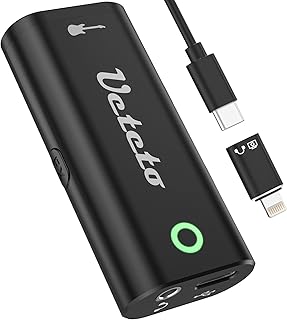
The Ueteto is a small, battery-free interface for recording guitar on a phone. Its listed package includes a USB-C cable and a Lightning converter, and the product description identifies support for iPhones, iPads, and Android phones. It is intended for recording and live streaming without a driver installation.
Best for: Beginners who value a compact, simple setup and want to record guitar without carrying a larger interface. Its pocket-sized design and no-charging operation make it suitable for basic mobile recording or streaming.
Choose this model if your needs are limited to sending guitar audio to a compatible app. The product description specifically notes that it records without providing editing or mixing tools, which helps set expectations for a beginner-oriented device.
Limitation: App compatibility is not universal, and the listing explicitly says it is not compatible with GarageBand. Android users may need to turn on OTG. Check your phone settings and target app before choosing it, especially if GarageBand is part of your planned workflow.
MAONO P1 USB Audio Interface

The MAONO P1 is a creator-oriented USB interface for phone, tablet, computer, and camera workflows. It has dual USB ports for connecting a computer and a phone or iPad at the same time. The listed specifications include up to 70 dB of gain and 24-bit/192 kHz recording, along with ASIO support.
Best for: Podcasters, streamers, and musician-creators who need more control than a basic guitar-to-phone adapter provides. Features include auto gain, loopback, independent mute controls, and routing software. The product description also identifies use with microphones, guitar, and bass.
It is a better fit for a mixed recording and streaming workflow than the pocket guitar interfaces. For example, its dual USB connections are intended to let a creator record on a computer and connect to a phone or tablet for streaming or uploading.
Limitation: This is a more feature-rich setup than a simple plug-in guitar adapter. If you only need to capture a dry guitar signal on a phone, its extra controls and workflow features may not be necessary.
Synido USB-C 2×2 Audio Interface

The Synido is a 2×2 USB-C audio interface for recording, streaming, and podcasting. Its listed audio specifications are 24-bit depth and 48 kHz sampling. The interface supports XLR and 6.35 mm connections, with a switch for line-in or instrument input.
Best for: Users who want to switch how they monitor audio instead of relying on a single fixed monitoring setup. The three listed modes are Stereo, which monitors the original input; Mix, which combines input and computer audio; and USB, which monitors computer audio.
Its controls and colored level indicators can help users check signal levels during recording. Choose it if your phone-based setup is part of a broader recording or live-broadcast workflow and you need input and monitoring options beyond a basic guitar adapter.
Limitation: The supplied product details emphasize USB-C and computer audio, but do not specify phone models, phone operating-system requirements, or included mobile adapters. Confirm the connection method for your specific phone before purchasing.
Buying Guide: How To Choose A Phone Audio Interface
A phone audio interface connects an instrument or microphone to a mobile device so an app can record or stream the incoming audio. The right choice depends on the source you want to capture, the phone’s connector, and whether you need monitoring or extra controls. A small guitar interface and a multi-input creator interface serve different jobs, even when both can be part of a phone-based setup.
What Do You Need To Connect?
Start with the audio source. The JOYO, KYXAIN, and Ueteto models are designed around a 6.35 mm guitar connection. The MAONO P1 is positioned for microphones and creator workflows as well as guitar and bass. The Synido lists both XLR and 6.35 mm connections, with line and instrument input selection.
Check the source connector before buying. A guitar’s instrument cable, a microphone’s XLR cable, and a phone’s USB port are different connection points. An interface only solves the connection problem if its inputs match the equipment you plan to use.
Does It Connect To Your Phone?
Compare the interface’s connection with your phone’s port. The JOYO includes USB-C and Lightning options, while the KYXAIN listing describes USB-C and a Lightning-to-USB-C adapter. The Ueteto listing also identifies a USB-C cable and Lightning converter. The MAONO lists support for phones and tablets, including simultaneous connection with a computer. Synido’s provided details do not specify mobile adapters or exact phone compatibility.
Connector fit alone does not guarantee that a recording app will recognize an interface. Review the product’s app notes and the app’s external audio-input support. This is particularly important for the Ueteto, whose listing says it is not compatible with GarageBand, and for any model whose listing does not identify your preferred app.
Do You Need To Hear Yourself While Recording?
Monitoring lets you hear incoming audio while recording. The JOYO provides direct headphone monitoring of the guitar’s dry signal. KYXAIN lists a headphone output for monitoring, while Synido offers three monitoring modes. The MAONO includes independent headphone and monitor controls. Consider whether you need to hear only your instrument, a mix of input and playback audio, or software effects.
Do not assume direct monitoring lets you hear effects from an app. The JOYO’s listing clearly says its dry signal cannot be muted and that it is not designed for real-time software amp simulations or effects processing. If software processing is central to your setup, confirm the monitoring path before choosing an interface.
Is A Simple Adapter Or A More Flexible Interface Better?
A compact guitar adapter can be a sensible choice when the main goal is to capture guitar audio on a phone. These models typically have fewer controls and require less setup. A more configurable interface is a better match for users who need microphone inputs, routing, loopback, multiple monitoring modes, or connections to both a phone and computer.
The MAONO P1 emphasizes creator controls such as auto gain, loopback, and independent mute. Synido emphasizes selectable monitoring modes and input options. These features can help in broader workflows, but they are not necessary for every basic mobile recording task.
What Audio Quality And Controls Matter?
Use published audio specifications to compare products, but do not treat higher sample-rate figures as a guarantee that one recording will sound better in every situation. KYXAIN lists 24-bit/48 kHz, Synido lists 24-bit/48 kHz, and MAONO lists 24-bit/192 kHz. The JOYO and Ueteto details provided here do not state comparable recording specifications.
Also consider practical controls. A level indicator can help flag a signal that is too strong, while gain adjustment or mute controls can help manage recording or streaming. These features matter most when you have multiple sources or need to make changes during a session.
What Limitations Should You Check First?
Review app support, phone connection requirements, and the monitoring design before purchasing. Some interfaces are recording adapters rather than mixers or editing tools. The KYXAIN and Ueteto listings say they do not provide editing or mixing functions. The Ueteto also calls out an app limitation and an Android OTG setting. The JOYO warns that its always-audible dry signal is unsuitable for certain software-effects workflows.
For phone recording, a reliable setup also depends on your app, cables, and device settings. Confirm these details before a session rather than assuming every interface works with every phone and app.
Frequently Asked Questions
Can I Connect An Audio Interface Directly To A Phone?
Yes, if the interface has a connection method that works with the phone and the recording app recognizes it. Check whether you need USB-C, Lightning, an adapter, or a phone setting such as Android OTG.
What Is The Best Phone Audio Interface For Guitar?
For direct, dry guitar monitoring, the JOYO MOMIX CAB is a focused option because it has a 6.35 mm guitar input, a headphone output, and direct monitoring. Choose another interface if you need software amp effects in the monitored signal.
Do Phone Audio Interfaces Need Batteries?
Not always. The JOYO MOMIX CAB, KYXAIN, and Ueteto listings describe plug-and-play use without batteries or charging. Check the individual product details because power requirements can vary by model.
Can I Use A Phone Audio Interface With Any Recording App?
No. App compatibility varies by interface and app. The Ueteto listing specifically excludes GarageBand, and the KYXAIN details do not identify every supported app. Check compatibility before relying on an interface for a particular workflow.
What Is The Difference Between Direct Monitoring And App Monitoring?
Direct monitoring sends the input signal to headphones through the interface, while app monitoring routes audio through software on the phone. Direct monitoring can avoid software monitoring delay, but it may not include app-based effects. Check which signal the interface sends to its headphone output.
Should I Choose A Guitar Adapter Or A Full Audio Interface?
Choose a compact guitar adapter for simple guitar recording when a basic input and headphone connection meet your needs. Choose a more feature-rich interface if you need microphone connections, multiple monitoring modes, routing, or a phone-and-computer workflow.