
The best way to connect a phone to a car stereo depends on the vehicle’s inputs: use a USB-C-to-AUX cable for a stereo with a 3.5 mm input, an FM transmitter for a radio without an AUX input, or a portable CarPlay and Android Auto screen for a larger smart-display upgrade. The JXMOX cable is best for direct wired audio, the LENCENT and PD30W/QC3.0 transmitters suit FM-radio connections, and the two 9-inch screens are better for drivers seeking navigation and smartphone features on a separate display.
| Product | Best for | Connection approach |
|---|---|---|
| IK5 9-inch Wireless Screen | Adding a large smart display | Portable CarPlay and Android Auto screen |
| 9-inch Wireless CarPlay Screen | Navigation and multiple connection options | Portable screen with FM and AUX listed |
| PD30W/QC3.0 FM Transmitter | Wireless audio and charging features | Bluetooth-to-FM radio adapter |
| JXMOX USB-C to 3.5 mm Cable | Wired audio through an AUX input | USB-C to analog audio cable |
| LENCENT FM Transmitter | FM audio with dual USB charging | Bluetooth-to-FM radio adapter |
IK5 9-Inch Wireless CarPlay Screen

This portable 9-inch touchscreen is best for drivers who want to add a larger smartphone display rather than connect a phone only for music. Its listed features include wireless Apple CarPlay, Android Auto, a 4K dash camera, a 1080p backup camera, touchscreen operation, and Mirror Link. It is selected for combining phone-display functions with camera features in one product.
Choose this if you want a portable screen with both CarPlay and Android Auto plus listed front and backup camera functions. Limitation: the provided product details do not specify how the screen sends audio to the vehicle stereo, so check its connection method and your car’s available inputs before choosing it as an audio-only solution.
9-Inch Wireless CarPlay Screen With FM And AUX

This portable 9-inch screen is best for drivers who want smartphone navigation and voice control, with several listed ways to connect or route audio. Features include Apple CarPlay, Android Auto, OTA updates, a backup camera, Bluetooth 5.0, Mirror Link, voice control, GPS navigation, FM, and AUX. FM and AUX are useful details for shoppers comparing how a separate screen may work with an existing stereo.
Better for buyers who want a touchscreen upgrade and want FM or AUX listed among the connection options. Limitation: the product description does not explain which audio connection method is preferable for a particular vehicle; confirm that the stereo has a matching input or usable FM radio before purchase.
PD30W/QC3.0 Bluetooth FM Transmitter
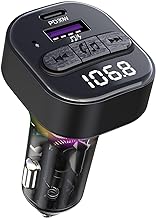
This FM transmitter is best for a driver whose car stereo has a working FM radio but lacks a convenient phone connection. The listed features include Bluetooth, FM transmission, PD30W and QC3.0 fast charging, a microphone, hands-free calling, bass sound, MP3 playback, LED backlighting, and U-disk support. It combines audio connection options with charging features in a compact adapter format.
Choose this if you want Bluetooth audio routed through FM and value the listed fast-charging formats. Limitation: FM transmitters rely on finding a usable radio frequency, and the product information does not specify how clear reception will be in every location. It does not add a CarPlay-style screen.
JXMOX USB-C To 3.5mm AUX Cable

This 4-foot cable is best for a direct wired connection when the car stereo has a 3.5 mm AUX input and the phone has USB-C audio output support. Its listed compatibility includes iPhone 17, 16, and 15 models, Samsung Galaxy S25 through S21, Note 20, Pixel 9 and 8, and iPad Pro. A wired link can be a straightforward choice for drivers who do not need a large display or wireless transmission.
Better for buyers who want to connect a compatible USB-C device to an AUX input with a cable. Limitation: this cable does not provide Bluetooth, FM transmission, or a touchscreen. Check that the specific phone supports audio through USB-C and that the vehicle has a 3.5 mm AUX jack.
LENCENT Bluetooth FM Transmitter
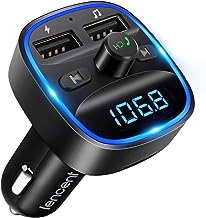
The LENCENT transmitter is best for drivers who want to send phone audio to a car radio over FM and also want dual USB charging. Listed features include Bluetooth, FM transmission, a car charger, MP3 playback, hands-free calling, TF card support, and USB-disk support. Its combination of wireless phone audio and removable-media playback makes it a flexible option for older stereos without a listed AUX connection.
Choose this if your stereo can tune to FM and you want a transmitter with dual USB charging and hands-free calling. Limitation: it depends on FM reception and does not add a dedicated smartphone display. The supplied details do not specify charging output, so compare the product’s current specifications with your device’s charging needs.
Buying Guide: How To Connect A Phone To A Car Stereo
Which connection type does your car stereo support?
Start by checking the stereo and the phone. An AUX input supports a wired audio path when paired with an appropriate cable and a phone that outputs audio through its port. A USB-C-to-3.5 mm cable is a candidate only when the phone supports that function and the car has the matching AUX jack. If the stereo has no AUX input but can receive FM radio, an FM transmitter may be a practical alternative.
Bluetooth support can provide a wireless connection, but the products in this list use Bluetooth in different ways. The FM transmitters receive phone audio by Bluetooth and then transmit it over FM. The portable screens list Bluetooth as a feature, but product descriptions should be checked for the exact audio-routing method. Do not assume that every Bluetooth-enabled accessory connects to the stereo in the same way.
Do you want music only or a full display upgrade?
For music and calls, a cable or FM transmitter may be enough. A cable keeps the audio connection wired and requires a suitable phone port and AUX input. An FM transmitter avoids a wired audio cable but depends on finding a clear frequency. Both approaches are more focused on audio than on adding a large navigation display.
A portable CarPlay and Android Auto screen is a better fit for drivers who want a touchscreen interface, smartphone navigation, or listed camera features. The two 9-inch products include smart-display features; the IK5 listing also names a 4K dash camera and 1080p backup camera. Confirm how the screen connects to the vehicle’s audio system, since a display feature alone does not confirm a specific stereo connection method.
Should you choose an AUX cable or an FM transmitter?
Choose an AUX cable when both ends match your setup: a 3.5 mm input in the car and a compatible audio output on the phone through USB-C. A direct cable avoids the need to select a radio frequency, but it does add a physical wire and does not provide wireless audio.
Choose an FM transmitter when the car has FM radio but no suitable AUX connection. Pair the phone to the transmitter as directed, then tune the stereo and transmitter to the same available FM frequency. Local radio signals can affect which frequency works best, so the experience may vary by location. If your stereo already has built-in Bluetooth or a USB audio input, compare those options before buying an FM accessory.
What should you verify before ordering?
- Phone connector: Check whether the phone uses USB-C and whether it supports audio through that connection.
- Stereo inputs: Look for a 3.5 mm AUX port, usable FM radio, or another connection listed for the product.
- Audio routing: For a separate screen, verify how sound reaches the vehicle stereo instead of assuming the display handles it.
- Display needs: Decide whether you need navigation and a touchscreen or only music and calls.
- Charging: Compare the adapter’s listed charging features with your phone’s needs; not all product listings specify output details.
- Installation and placement: For a portable screen or adapter, consider where it can be positioned without obstructing the driver’s view or access to controls.
Which option is the simplest starting point?
For a phone and stereo with matching USB-C audio and AUX connections, a cable is a direct option. For a car that has FM radio but no AUX input, consider an FM transmitter. For a driver seeking CarPlay or Android Auto on a separate touchscreen, compare the portable-screen features and verify the audio connection method. Matching the product to the car’s actual inputs is more important than choosing the accessory with the longest feature list.
Frequently Asked Questions
How can I connect my phone to a car stereo without Bluetooth?
Use a compatible audio cable if the car has an AUX input, or use an FM transmitter if the stereo can tune to FM radio. Check that the phone supports the cable’s connection type.
Can a USB-C-to-AUX cable work with every USB-C phone?
No. The phone must support audio output through USB-C, and the car stereo must have a 3.5 mm AUX input. Confirm both requirements before choosing a cable.
How does a Bluetooth FM transmitter connect a phone to a car stereo?
The phone pairs to the transmitter over Bluetooth, and the transmitter broadcasts audio on an FM frequency. The car stereo is tuned to that same frequency. Reception can vary with local radio conditions.
Do portable CarPlay screens automatically connect to the car stereo?
Not necessarily. A screen may provide CarPlay or Android Auto while using a separate method to send sound to the car stereo. Check the specific product’s listed audio outputs and compare them with the vehicle’s inputs.
What is the best option for music and hands-free calls?
A compatible AUX cable can provide wired audio, while an FM transmitter with listed hands-free calling is an option for a car stereo that relies on FM. The right choice depends on the phone’s features and the car’s available inputs.
Will an FM transmitter work in any car?
It requires a car stereo with FM radio reception and a transmitter-compatible power or connection setup. Check the product requirements and available vehicle connections before buying.