
The best piano for beat making is usually a MIDI keyboard controller that lets you play notes and trigger drums inside your music software. The Akai MPK Mini MK3 is best for compact, straightforward beat production, while the MPK Mini Plus suits players who want more keys and hardware connections. For wireless portability, consider the DaierTek; for a larger playing range, compare the MUSTAR and Rhymo 61-key keyboards.
| Product | Best suited for | Key distinction |
|---|---|---|
| Akai MPK Mini MK3 | Compact beat-making setups | 25 keys, thumbstick, and arpeggiator |
| Akai MPK Mini Plus | More melodic range and external gear | 37 keys, CV/Gate, and MIDI I/O |
| DaierTek 25-Key Controller | Portable wireless production | Bluetooth, drum pads, and assignable knobs |
| MUSTAR 61-Key Keyboard | Buyers seeking a full-size key count | 61 keys and light-up keys |
| Rhymo Folding Piano | Portable 61-key playing | Foldable design and Bluetooth MIDI |
Akai MPK Mini MK3: Best Compact Controller

The Akai Professional MPK Mini MK3 is a 25-key USB-powered MIDI controller designed for music production, virtual synthesizer control, and beat production. Its compact key range makes it a practical choice when desk space is limited or when a producer mainly enters short melodies, bass lines, and chord ideas.
The controller’s listed features include velocity-sensitive mini keys, a four-way thumbstick for pitch and modulation, and a built-in arpeggiator with adjustable resolution, range, and modes. It also supports Native Kontrol Standard integration, giving buyers a stated way to control supported NKS content from the controller.
- Best for: Producers who want a small, USB-powered controller for entering notes and shaping synth parts.
- Why it stands out: Its thumbstick and arpeggiator add hands-on performance controls without requiring a larger keyboard.
- Consider: The 25-key layout provides less playing range than 37- or 61-key options, so it may be limiting for two-handed parts.
Akai MPK Mini Plus: Best for More Key Range

The Akai Professional MPK Mini Plus expands the compact-controller format to 37 keys, providing three full octaves for melodic and harmonic performance. That additional range can reduce octave switching when writing keyboard parts, while retaining a USB-powered MIDI controller format.
Its connection options set it apart from a basic computer-focused controller. The listed CV/Gate and MIDI I/O connections are intended for connecting to different sound sources, including modular gear, sound modules, and synthesizers. The model also supports Native Kontrol Standard integration.
- Best for: Producers who want more room to play notes or expect to connect external music equipment.
- Why it stands out: Three octaves and CV/Gate plus MIDI I/O make it the more expandable choice in this group for a hybrid setup.
- Consider: It is larger in key count than the 25-key controllers; choose a smaller model if minimizing keyboard footprint is the main priority.
DaierTek 25-Key: Best for Wireless Portability
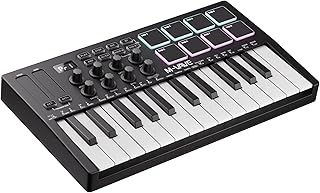
The DaierTek MIDI keyboard controller combines 25 velocity-sensitive keys with eight RGB backlit drum pads, eight assignable encoders, a mini-display, and two capacitive touch-strips for pitch bend and modulation. This layout is useful for beat makers who want keys and several performance controls in one compact device.
The product listing describes wireless Bluetooth connectivity, a built-in 2,000 mAh battery, and about 16 hours of operation. It also states compatibility with Windows, Mac OS, Android, and iOS, and names DAWs including Ableton Live, FL Studio, Cubase, and GarageBand for iOS when they support BLE MIDI or USB MIDI.
- Best for: Producers who value wireless operation, portability, and integrated pads for triggering drum sounds.
- Why it stands out: Its listed pads, encoders, touch-strips, and Bluetooth option provide several ways to control a production session.
- Consider: Wireless DAW use depends on BLE MIDI support. Confirm that the intended device and software support the connection method you plan to use.
MUSTAR 61-Key: Best for a Larger Keybed

The MUSTAR Keyboard Piano is listed as a 61-key electric piano keyboard with light-up keys. Its larger key count makes it a potential fit for buyers who want a broader range for playing melodies, chords, or two-handed parts rather than a compact mini controller.
The supplied product information does not specify MIDI connectivity, DAW compatibility, velocity response, or other production controls. For beat making, those details matter: a keyboard that produces its own sound is not automatically a MIDI controller that can trigger instruments in a computer or tablet.
- Best for: Buyers whose priority is a 61-key keyboard and light-up keys.
- Why it was selected: It provides a larger listed key count, which may suit players who find mini controllers restrictive.
- Consider: Verify MIDI or USB connectivity and DAW support before choosing it for computer-based beat production; those specifications were not provided here.
Rhymo Folding Piano: Best for Foldable 61-Key Play
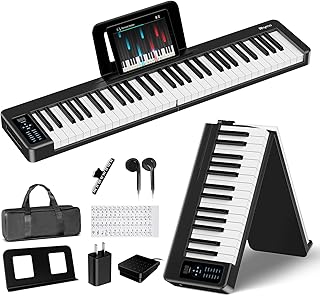
The Rhymo Folding Piano is described as a portable, foldable 61-key electric keyboard with sensitive keys and Bluetooth MIDI. Its combination of a larger key count and folding design is relevant to buyers who want more playing room but also need a keyboard that can be stored or transported more easily.
Bluetooth MIDI is the stated production-related feature. Before relying on it in a beat-making setup, check whether the intended computer, mobile device, and music software support the required Bluetooth MIDI connection. The supplied product details do not identify particular DAWs or provide further connection specifications.
- Best for: Players who want a 61-key format with a foldable design and Bluetooth MIDI listed.
- Why it stands out: It combines a wider playing range than mini controllers with a design intended to fold for portability.
- Consider: The listing calls the keys “weighted,” but provides no further key-action details here. Check the full product specifications if key feel is a deciding factor.
Buying Guide: How to Choose a Piano for Beat Making
Should you buy a MIDI controller or an electric keyboard?
A MIDI keyboard controller sends performance information, such as notes, to compatible music software or sound equipment. It typically relies on the connected device or software to provide the sound. An electric keyboard may produce sound on its own, but that does not by itself confirm that it can control a DAW.
For a computer-based beat-making setup, check for explicit USB MIDI or Bluetooth MIDI support and confirm that the DAW accepts that connection. The Akai controllers are described as USB MIDI controllers. The DaierTek listing specifies USB MIDI and BLE MIDI compatibility with supported software. The Rhymo listing states Bluetooth MIDI. The supplied MUSTAR details do not confirm MIDI support.
How many keys do you need for beat production?
A 25-key controller is compact and can work well for short melodies, bass lines, and one-handed parts. It is a practical choice when drum programming and arranging happen mainly in the DAW. Its trade-off is a narrower range, which may require octave changes when playing larger parts.
A 37-key controller offers more room for phrases and chords while remaining smaller than a 61-key keyboard. A 61-key model gives the widest playing range among these options, but buyers should compare its footprint, portability, and confirmed production connections before choosing it for a desk-based setup.
Do drum pads matter for making beats?
Drum pads provide a physical surface for triggering drum sounds, samples, or other assigned software functions. They can be useful for finger-drumming, but they are not essential if you prefer programming beats with a mouse, typing notes into a piano roll, or using another controller.
Among the listed models, the DaierTek specifically includes eight RGB backlit, velocity-sensitive pads with aftertouch. The MPK Mini MK3 and MPK Mini Plus listings emphasize keyboard performance and control features instead. Compare the control layout with the way you expect to enter drums and melodies.
Which controls are useful beyond the keys?
Knobs, pads, pitch controls, and arpeggiators can make common production tasks more direct, but their usefulness depends on whether your DAW or instrument can assign or recognize them. The MPK Mini MK3 lists a four-way thumbstick and adjustable arpeggiator. The MPK Mini Plus highlights connections for external equipment. The DaierTek lists eight assignable encoders and two touch-strips.
Do not assume that a control automatically operates every DAW feature. Confirm mapping options and software support for your specific setup, particularly if you are buying mainly for a particular application or external synthesizer.
Is Bluetooth MIDI the right choice?
Bluetooth MIDI can reduce cable use and support portable production, but both the controller and the intended device or software need compatible support. A wireless connection also makes compatibility checks important: confirm the operating system, DAW, and connection method before buying. Choose a wired USB controller if its stated connections better match your workflow.
What should beginners compare first?
Start with the music software and device you plan to use. Then check connection type, key count, playing controls, and portability. A beginner making beats mainly in a DAW may find a compact MIDI controller easier to fit into a small setup. Someone who wants a broader piano-style range may prefer a 37- or 61-key option, provided its MIDI features suit the intended workflow.
Frequently Asked Questions
Can I make beats with a 25-key MIDI keyboard?
Yes. A 25-key MIDI keyboard can enter melodies, bass parts, chords, and other notes in compatible software. The smaller range may mean switching octaves or recording parts in separate passes.
Do I need drum pads to make hip-hop or electronic beats?
No. Drum pads can provide hands-on triggering, but beats can also be programmed in a DAW using a piano roll, mouse, or other input method. Choose pads if finger-drumming or direct sample triggering is part of your preferred workflow.
Does a keyboard labeled “piano” automatically work with a DAW?
No. A keyboard needs a supported MIDI connection to control a DAW. Check its specifications for USB MIDI, Bluetooth MIDI, or another compatible connection, and confirm support in your software.
Is a 61-key keyboard better than a 25-key controller for beat making?
Not necessarily. A 61-key keyboard offers more playing range, while a 25-key controller is more compact. The better choice depends on whether you prioritize space and portability or a larger range for playing parts.
Which listed option includes wireless connectivity and drum pads?
The DaierTek 25-key controller lists Bluetooth connectivity, eight backlit velocity-sensitive pads, and USB MIDI. Its listing also names compatible operating systems and DAWs that support BLE MIDI or USB MIDI.