
The best popular headphones for kids match a child’s age and device, provide a comfortable fit, and offer a suitable volume limit. The iClever HS19S is a straightforward pick for 85 dBA-limited listening, while the Botesty Sound model is better for school calls and adjustable listening modes. For a microphone and audio sharing, consider the iClever HS19; the Acer HK03 adds a foldable design, and EarFun K1 combines a microphone with a sharing jack.
| Headphones | Best For | Standout Feature |
|---|---|---|
| iClever HS19S | Simple everyday listening | 85 dBA limit and 3.5mm connection |
| Botesty Sound | Online classes | Microphone and adjustable 85/94 dB modes |
| iClever HS19 | Calls and shared audio | Microphone and sharing port |
| Acer HK03 | School and travel | Foldable design and 85/94 dB limiter |
| EarFun K1 | Learning and family use | Microphone, controls, and sharing jack |
iClever HS19S: Best For Simple Listening

The iClever HS19S is a wired, over-ear option for children who need headphones for schoolwork, games, or music. Its listed features include an 85 dBA volume limit, 40 mm drivers, and a standard 3.5 mm audio jack. The connection is designed for devices with a matching headphone jack, including Chromebooks, laptops, tablets, and Nintendo Switch.
Best for: Families looking for a simple wired model with a stated volume limit and broad compatibility with 3.5 mm devices. The over-ear design and stereo drivers make it suitable for a range of listening activities.
Consider: The listed product details do not specify a built-in microphone or an in-line remote. Check the child’s device for a headphone jack before choosing it; devices without one may require an appropriate adapter.
Botesty Sound: Best For Online Classes

Botesty Sound’s wired headphones include a microphone and in-line controls for school calls and video chats. The product description lists two volume-limiting settings: 85 dB for study mode and 94 dB for travel mode. It also features soft over-ear cushions, an adjustable headband, 90-degree swivel ear cups, and a foldable structure for packing.
Best for: Children who regularly attend online lessons or need a microphone for voice calls. The adjustable modes may suit families who want different listed volume limits for study and travel situations.
Consider: The higher 94 dB setting is not the same as the 85 dB study setting. Parents should check which mode is active and decide whether that setting suits the child and listening situation.
iClever HS19: Best For Sharing Audio
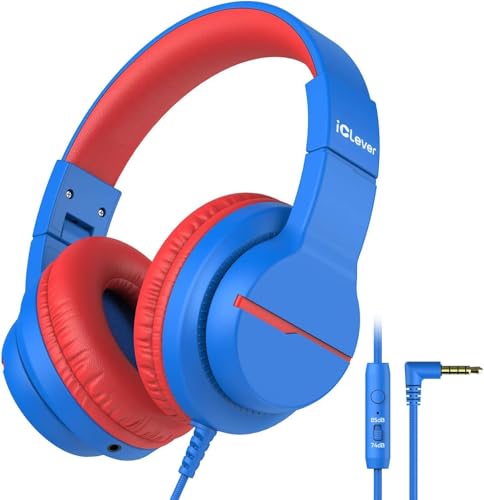
The iClever HS19 combines an 85 dBA volume limit with features for school and shared listening. It has a built-in microphone for online courses and voice calls, 40 mm drivers, and a 3.5 mm connection for compatible devices. A sharing jack lets another headphone plug in so two listeners can hear audio without a separate splitter.
Best for: Kids who need a microphone for lessons and families who want to share audio between two sets of headphones. Its listed compatibility includes devices such as Chromebooks, tablets, laptops, and PCs with a 3.5 mm jack.
Consider: The sharing jack is a headphone-sharing feature, not a wireless connection. Confirm that the source device has a compatible audio jack or use a suitable adapter if needed.
Acer HK03: Best For Foldable Travel Use

The Acer HK03 is a wired model with a 3.5 mm jack and a listed 85/94 dB volume-limiting system. Its features include soft, breathable over-ear cushions, an adjustable headband, a foldable design, and stereo sound. The product description also states that its materials are CPSIA-approved and hypoallergenic.
Best for: Families seeking headphones that can fold for storage in a backpack or carry-on. The stated dual volume settings may be useful for parents who want to select between the lower 85 dB mode and the 94 dB mode.
Consider: The description mentions both 85 dB and 94 dB limits, so check how the mode is selected and which setting is active. The listed features do not specify microphone or audio-sharing functions.
EarFun K1: Best For Calls And Controls

EarFun K1 is a wired kids’ headset with a microphone on the cable, in-line controls, and a 3.5 mm sharing jack. The controls are described for playing or pausing audio, answering or ending calls, and skipping tracks. Its volume-limiting options are listed as 85 dB and 94 dB, and the product description identifies its materials as recycled and sustainable.
Best for: Children who need a microphone and accessible audio controls for learning or calls. The sharing jack also makes it a practical choice when a child wants to share audio with another listener without a splitter.
Consider: The product lists both 85 dB and 94 dB limits, so the selected mode matters. Check the instructions to confirm how to choose the setting before handing the headphones to a child.
Buying Guide: How To Choose Kids’ Headphones
Should you choose a volume-limited model?
A stated volume limit can help families narrow down headphones for children, but it is not a guarantee that every listening situation is safe. The products here list fixed 85 dBA or selectable 85/94 dB limits. Where there are two settings, identify the active mode and decide whether it fits the child’s age, surroundings, and listening habits. Volume limits also do not replace sensible listening breaks or adult supervision.
Compare the wording carefully: the iClever HS19S and HS19 list an 85 dBA limit, while Botesty Sound, Acer, and EarFun list 85/94 dB options. If a single lower stated limit is the priority, the two iClever models are the most direct match from this selection. If adjustable modes are useful, check how the controls work before purchase.
Does your child need a microphone?
A microphone is useful for remote classes, voice calls, and some games. Botesty Sound, iClever HS19, and EarFun K1 explicitly list microphone features. The iClever HS19S and Acer HK03 descriptions provided here do not specify a microphone, so choose one of the models with a clearly listed mic if two-way communication is essential.
In-line controls can make calls and media easier to manage, but their functions vary. EarFun lists play, pause, call, and track controls. Botesty lists buttons for answering or ending calls and video chats. Review the product information to confirm that controls suit the child’s device and intended use.
Which connection does the child’s device use?
All five selected products are wired and list a 3.5 mm connection or compatibility. Check the device itself: some tablets, laptops, and phones may not have a headphone jack. A separate adapter may be needed for a device without a matching port, and the supplied product information does not establish compatibility with every adapter or device configuration.
Wired headphones do not need to be charged for audio playback, but the cord can snag or tangle. For travel, consider how the cable will be stored. The noot products and iRAG models in the product list, for example, describe a five-foot braided cord, but they are not included in the five selected product comparisons above.
Over-ear or on-ear: which fit is more suitable?
Over-ear cushions surround the ears, while on-ear cushions rest on them. The selected iClever, Botesty, Acer, and EarFun products are described as over-ear or feature over-ear cushions. A comfortable fit depends on the individual child, so an adjustable headband and soft padding are useful features to compare. If headphones feel tight or uncomfortable, try a different fit rather than relying on the product category alone.
Do foldability and audio sharing matter?
A folding design can reduce the space headphones take up in a school bag or carry-on. Botesty Sound and Acer explicitly list foldable designs; the iClever HS19 includes a sharing jack but does not list foldability in the provided features. For shared listening, compare the iClever HS19 and EarFun K1, both of which list a 3.5 mm sharing jack. A sharing port does not mean the headphones are wireless.
What should parents check before buying?
- Confirm the child’s device has a 3.5 mm headphone jack or identify an appropriate adapter.
- Choose a model with a clearly stated microphone if online classes or calls are important.
- Check whether a volume limiter is fixed or offers more than one setting.
- Look for an adjustable headband and cushioned ear cups to support a comfortable fit.
- Consider foldability, cable storage, and audio sharing based on school and travel needs.
- Review the seller’s current product details for included features and operating instructions.
Frequently Asked Questions
What are the best popular headphones for kids in this selection?
The best choice depends on the child’s needs. iClever HS19S is a straightforward option with an 85 dBA limit; Botesty Sound is suited to online classes; iClever HS19 and EarFun K1 include audio-sharing features; Acer HK03 folds for storage.
Which kids’ headphones include a microphone?
Botesty Sound, iClever HS19, and EarFun K1 list microphones. The provided feature details for iClever HS19S and Acer HK03 do not specify one.
Which models have an audio-sharing jack?
iClever HS19 and EarFun K1 list a sharing jack that allows another headphone to connect for shared listening.
Are these headphones wireless?
No. The selected products are described as wired headphones with a 3.5 mm connection. Check the child’s device for a matching jack or an appropriate adapter.
What does an 85/94 dB volume limit mean?
It indicates that the product lists two volume-limiting settings, 85 dB and 94 dB. The exact mode controls differ by model, so consult the product instructions and check which setting is active.
Can kids use these headphones for school?
Yes, the listed features make several models suitable for school audio. For online lessons that require two-way communication, choose a model that explicitly lists a microphone, such as Botesty Sound, iClever HS19, or EarFun K1.