
To put internet Wi-Fi in your car, use your phone’s mobile hotspot or a dedicated mobile hotspot with a cellular data plan. The products below offer related connectivity, but they do not all create an internet hotspot: Oryhn and MAHVEC support wireless CarPlay or Android Auto, while the Kingslim dash cam provides Wi-Fi for connecting to its app. The Car and Driver transmitter adds Bluetooth audio and charging, and CARLOCK uses 4G for vehicle monitoring. Choose based on whether you need internet, phone integration, or a specific connected-car feature.
| Product | Best suited for | Connectivity provided |
|---|---|---|
| Oryhn Wireless Adapter | Cars with factory-wired CarPlay or Android Auto | Wireless phone-to-car connection |
| MAHVEC Android Stereo | Compatible 2011–2015 Smart Fortwo vehicles | In-dash Wi-Fi and wireless phone integration |
| Kingslim Dash Cam | Reviewing dash-cam footage on a phone | Local Wi-Fi app connection |
| Car and Driver FM Transmitter | Adding Bluetooth audio and charging ports | Bluetooth and FM audio connection |
| CARLOCK 4G Device | Remote vehicle alerts and tracking | 4G-connected vehicle monitoring |
Oryhn Wireless CarPlay And Android Auto Adapter

Best for: Drivers whose vehicles already support factory-wired CarPlay or Android Auto and who want to connect a phone without plugging it in each trip.
The Oryhn adapter converts supported wired CarPlay and Android Auto systems to wireless connections. The listed features describe dual-band 2.4GHz and 5GHz Wi-Fi, Bluetooth pairing, plug-and-play setup, and support for USB-A or USB-C ports. A USB-C adapter is included, according to the product description.
This is a useful choice for households with both iPhone and Android users because it is designed to support both systems. Its Wi-Fi is part of the wireless phone-to-car connection; it should not be mistaken for a cellular hotspot that gives passengers internet access.
Limitation: It requires a car with factory-wired CarPlay or Android Auto. Check the vehicle’s existing system and port before choosing it.
MAHVEC Smart Fortwo Android Stereo
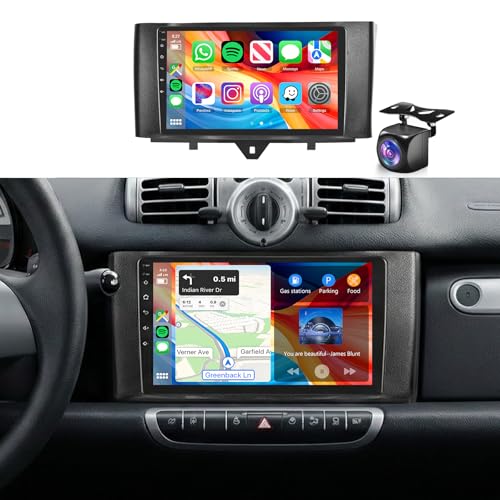
Best for: Owners of a 2011–2015 Mercedes-Benz Smart Fortwo seeking an in-dash multimedia upgrade with Wi-Fi and wireless phone integration.
This unit is described as a 9-inch touchscreen stereo with Android 15, 2GB of RAM, 64GB of storage, built-in Wi-Fi, GPS, Bluetooth, and wireless CarPlay and Android Auto. The listing also identifies DSP EQ, FM/RDS radio, steering-wheel control support, and a backup camera.
Unlike a small wireless adapter, this product replaces or upgrades the in-dash radio. It may suit a driver who wants the display and connectivity features integrated into the dashboard. The listed Wi-Fi can support the stereo’s connected features, but the product information does not establish that it includes cellular service or independently supplies internet access. Internet functions may require a separate connection.
Limitation: The stated vehicle fit is limited to Mercedes-Benz Smart Fortwo model years 2011–2015. Verify fitment and installation details before purchase.
Kingslim Front And Rear Wi-Fi Dash Cam

Best for: Drivers who want to connect a phone to a dash cam to view or download recordings and adjust camera settings.
The Kingslim camera records with a 2K front camera and a 1080P rear camera, according to the product details. It has built-in Wi-Fi for a smartphone app connection, a 1.5-inch display, and parking-monitor options using either G-sensor detection or time-lapse recording.
This product is relevant to in-car Wi-Fi only in a limited sense: its Wi-Fi links the camera with a phone for managing footage. It is not described as a hotspot for browsing the web or connecting passengers’ devices to the internet. Choose it for recording and reviewing driving video, not for adding general-purpose car internet.
Limitation: The listing says a hardwire kit is needed for 24/7 parking recording. Confirm the installation requirements if parked-vehicle monitoring is important.
Car And Driver Bluetooth FM Transmitter

Best for: Drivers who want Bluetooth audio, hands-free calls, voice-assistant access, and additional charging connections in one accessory.
This cup-holder device has an FM Bluetooth transmitter, a built-in microphone, two USB charging ports, and two 12-volt cigarette-lighter sockets. Its listed voice-assistant support includes Alexa, Siri, and Google Assistant. The product description says it can play audio through Bluetooth or a USB drive.
It can help bring phone-based music and calls into a vehicle, especially when the driver wants multiple power connections. However, Bluetooth and FM transmission are not the same as Wi-Fi. The listing does not say that this accessory creates a wireless internet network or provides cellular data.
Limitation: Choose this for audio, calls, and charging rather than for in-car internet. Its cup-holder design also means it uses a cup holder in the vehicle.
CARLOCK 4G Vehicle Tracker And Alarm

Best for: Vehicle owners who want phone alerts about movement, engine starts, unusual vibration, or driving behavior.
CARLOCK is described as an OBD plug-in device with 4G tracking and a phone app. Its listed alerts cover vehicle movement, engine starts, vibration, and disconnection. It also identifies harsh acceleration, hard braking, and sharp cornering, and can report a dangerously low vehicle battery or high battery drain.
This product uses cellular connectivity for vehicle monitoring, making it relevant to connected-car features. But 4G tracking does not automatically mean the device provides a Wi-Fi network for passengers. The product information describes alerts and monitoring, not a shared internet hotspot.
Limitation: It is designed for monitoring and alerts, not for adding passenger Wi-Fi. The listing does not specify service-plan terms, so review the current product details for connectivity requirements.
Buying Guide: How To Get Wi-Fi In Your Car
Start by deciding what you mean by “Wi-Fi.” A car can have a Wi-Fi hotspot for internet access, a wireless link between a phone and an infotainment system, or a local connection between a phone and a camera. These serve different purposes. A device that lists Wi-Fi does not necessarily provide internet service.
Do you need internet access for passengers?
For web browsing, video streaming, or connecting tablets and laptops, choose a source that provides mobile data and a Wi-Fi hotspot. Common options include enabling the hotspot feature on a smartphone or using a dedicated mobile hotspot with a cellular plan. Check your carrier’s hotspot availability, data allowance, coverage, and any device limits before relying on it for a long trip.
None of the five products reviewed here is clearly described as a general-purpose passenger hotspot. The Oryhn adapter, dash cam, and stereo have Wi-Fi-related features, but those features serve phone integration, camera management, or in-dash functions. CARLOCK’s 4G is for vehicle monitoring.
Does your car already have CarPlay or Android Auto?
If your goal is to use navigation, calls, and music from your phone on the car’s existing screen without a cable, the Oryhn adapter is the relevant option among these products. Its listed requirement is factory-wired CarPlay or Android Auto. A wireless adapter changes how a compatible phone connects to the car; it does not replace a mobile data plan or create passenger internet.
Are you replacing the stereo?
An in-dash unit can combine a display with navigation, audio, and phone-integration features. The MAHVEC model is specifically listed for 2011–2015 Mercedes-Benz Smart Fortwo vehicles. Confirm vehicle fitment and installation needs before buying any replacement stereo. Its Wi-Fi and Android features should not be treated as proof of an included cellular connection.
What is the difference between Wi-Fi and Bluetooth in a car?
Wi-Fi can carry data between devices, but its purpose depends on the product. Bluetooth commonly connects phones for audio and calls, while an FM transmitter sends audio to a radio frequency the car stereo can receive. Neither Bluetooth nor FM transmission alone gives a phone internet access. A cellular connection or an existing internet source is needed for online services.
Which features matter for a dash cam?
For camera use, compare front and rear recording, app access, screen size, parking modes, and power requirements. The Kingslim listing specifies 2K front and 1080P rear recording, Wi-Fi app access, and G-sensor or time-lapse parking options. Its listed hardwire-kit requirement for 24/7 parking recording is an important installation consideration.
How should you compare cellular devices?
Look at the job the cellular connection performs. CARLOCK’s listed 4G function supports remote vehicle monitoring and alerts. That is different from a hotspot designed to share internet with multiple devices. Check current service requirements and coverage information directly in the product details and with the relevant provider.
Frequently Asked Questions
Can I put Wi-Fi in my car using my phone?
Yes, if your smartphone and carrier support a mobile hotspot. Turn on the hotspot feature, then connect other devices using the network name and password shown in your phone settings. Carrier data limits and coverage apply.
Does a wireless CarPlay adapter give my car internet?
Not by itself. The Oryhn adapter is described as converting factory-wired CarPlay and Android Auto to wireless connections. It is intended for phone-to-car integration, not as a standalone cellular hotspot.
Does a dash cam’s Wi-Fi let passengers browse the internet?
Not necessarily. The Kingslim dash cam’s listed Wi-Fi connects the camera with a smartphone app for video review, downloads, and settings. The product details do not describe it as an internet hotspot.
Is a 4G car tracker the same as a car Wi-Fi hotspot?
No. CARLOCK is described as using 4G for tracking and vehicle alerts. A product needs explicit hotspot or internet-sharing functionality to provide Wi-Fi access to passengers.
What is the simplest way to get internet in a car?
For occasional use, a phone hotspot may be the simplest option if your plan supports it. For frequent use or several connected devices, compare dedicated mobile hotspots and carrier plans based on coverage, data limits, and device support.