
If you need to convert analog RCA audio into digital SPDIF, none of the five products below is the right converter: each changes digital optical audio into analog RCA output, which is the opposite direction. They may suit someone connecting a TV’s optical output to an older stereo. For true RCA-to-SPDIF conversion, look for an analog-to-digital converter with RCA inputs and an optical or coaxial SPDIF output.
| Product | Listed conversion direction | Best suited for |
|---|---|---|
| PROZOR 192KHz DAC | Optical/coaxial digital to RCA analog | Multiple output options |
| AUTOUTLET 192kHz Converter | Optical digital to RCA analog | Optical audio to a stereo amplifier |
| LiNKFOR Optical-to-RCA DAC | Optical digital to RCA analog | TV optical output to older speakers |
| PROZOR 7ft Optical-to-RCA | Optical digital to RCA analog | A longer attached cable |
| Neoteck 7ft Optical-to-RCA | Optical digital to RCA analog | Longer cable and broad source-device use |
What “RCA-to-SPDIF” Means
RCA-to-SPDIF describes a signal path from an analog RCA output to a digital SPDIF input. A converter for this job must accept analog audio through RCA inputs and create a digital output, usually optical Toslink, coaxial SPDIF, or both. Product descriptions may call this an ADC, meaning analog-to-digital converter.
A DAC does the reverse: it takes digital audio and produces analog audio. The products reviewed below are DACs. Their names and features describe optical or coaxial digital input and RCA analog output. They cannot be treated as RCA-to-SPDIF converters merely because their descriptions mention SPDIF and RCA.
Check the direction of conversion before choosing a device. Match the source’s output to the converter’s input, then match the converter’s output to the receiving equipment’s input. Connector shape alone does not establish compatibility.
PROZOR 192KHz Digital-to-Analog DAC

This PROZOR unit converts coaxial or Toslink digital PCM signals to analog left/right RCA and 3.5mm audio simultaneously. Its listed sampling rates run from 32 kHz through 192 kHz, with support for 24-bit SPDIF input. The supplied feature information also describes an upgraded amplifier chipset and dual-channel operational amplifier.
Best for: Someone who needs to turn a compatible digital audio output into RCA and 3.5mm analog outputs. It was selected because it offers more than one analog output connection and lists both optical and coaxial digital input.
Important limitation: This is a DAC, not an RCA-to-SPDIF ADC. The source must provide compatible digital PCM audio; the product notes advise setting a TV’s output to PCM. The listing also says TV volume may need adjustment in settings.
AUTOUTLET 192kHz Optical-to-RCA Converter

The AUTOUTLET converter is described as an optical Toslink digital-to-analog device with RCA output for a stereo amplifier. Its listed input processing supports 32, 44.1, 48, 96, and 192 kHz sampling rates and 24-bit audio. The feature list says it includes a professional amplifier chip and dual-channel operational amplifier.
Best for: A user whose source has optical digital output and whose amplifier accepts analog RCA input. It was selected for its clearly stated optical-to-RCA purpose and detailed sampling-rate support.
Important limitation: It does not perform RCA-to-SPDIF conversion. Despite wording in the feature text that mentions an “analog to digital audio converter,” the described signal path is optical digital input to analog RCA output. Confirm the port direction before ordering.
LiNKFOR Digital Optical SPDIF-to-RCA DAC

LiNKFOR describes this product as converting optical Toslink digital audio into left and right analog RCA audio. Its feature list includes an audio amplifier chip and sampling-rate support at 32, 44.1, 48, 96, and 192 kHz, with 24-bit SPDIF input.
Best for: Someone trying to connect a device’s optical output to older equipment with RCA audio inputs. It was selected because the product description directly identifies the TV-optical-to-RCA use case.
Important limitation: The signal direction is digital-to-analog, not analog-to-digital. Choose another type of converter if the source is an RCA output and the receiving device requires SPDIF input.
PROZOR 7ft Optical-to-RCA Cable Converter
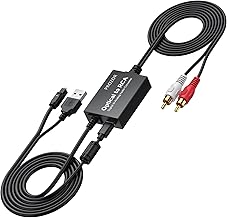
This PROZOR model combines a 7-foot (2.1-meter) cable with a digital optical-to-analog RCA converter. The listed features include a built-in audio amplifier chipset, dual-channel operational amplifier, 24-bit SPDIF input, and sampling rates up to 192 kHz. The description names HDTVs, Blu-ray or DVD players, and game consoles as example source devices.
Best for: A setup that needs a longer cable run between an optical digital source and RCA analog equipment. It was selected for its integrated cable length and stated amplifier features.
Important limitation: The product description explicitly identifies optical-to-RCA conversion and says optical output is not supported. It is not suitable for converting RCA analog audio into SPDIF. The listing also advises using PCM output from a TV.
Neoteck 7ft 192kHz Optical-to-RCA Cable

Neoteck describes a 7-foot (2.1-meter) cable that converts digital optical audio to analog RCA. Its features list a built-in amplifier chipset, support for 32, 44.1, 48, 96, and 192 kHz sampling rates, and 24-bit SPDIF input. The stated example sources include HDTVs, set-top boxes, DVD and Blu-ray players, and game consoles.
Best for: A buyer who needs an optical-to-RCA converter with a longer attached cable and wants the listed source-device examples to match their setup. It was selected for its cable length and clearly specified digital-to-analog direction.
Important limitation: Optical digital input becomes analog RCA output. The product does not meet a requirement for RCA input and SPDIF output.
Buying Guide: How to Choose the Right Converter
Which direction does your audio need to travel?
Start by identifying the source and destination. If a device sends analog audio over red-and-white RCA connectors and the receiving equipment needs digital SPDIF, search for an RCA-to-optical SPDIF ADC or an analog-to-digital audio converter. Verify that its RCA ports are inputs and its SPDIF port is an output.
If the source sends digital audio through optical Toslink and the destination accepts analog RCA, a DAC is the appropriate type. The five products in this article fit that second situation, not RCA-to-SPDIF conversion.
Does the converter have the right input and output ports?
Read port labels and diagrams carefully. “RCA” may describe either analog inputs or outputs, and “SPDIF” may refer to optical Toslink or coaxial digital audio. A converter can have the right connector types but still be unusable if the signal direction is reversed.
- RCA source to SPDIF destination: Choose an ADC with RCA analog input and a digital SPDIF output.
- Optical source to RCA destination: Choose a DAC with optical input and analog RCA output.
- Coaxial source: Confirm that the converter specifically supports coaxial SPDIF input; optical-only devices are not interchangeable.
What audio format does the source output?
Check the source’s audio-output settings and the converter’s supported formats. The products listed here specify PCM support and sampling rates up to 192 kHz, but those specifications do not establish support for every surround-sound or encoded format. The PROZOR feature notes specifically recommend setting a TV output to PCM. Check both devices’ instructions when the sound is missing or distorted.
Do you need an attached cable or a compact converter?
The PROZOR and Neoteck models described as 7-foot cables may fit a setup where the source and stereo are farther apart. The other listed models are described as converters rather than long attached-cable options. Consider the distance, available space, and how the converter will connect before choosing. The listed cable length does not change the conversion direction.
Will the output level and volume controls work for your setup?
These product descriptions mention built-in amplifier chips intended to raise RCA output level, but that does not make them analog-to-digital converters. The PROZOR feature notes say TV volume may need adjustment through settings. Check how the source controls output level and how the receiving amplifier handles its input.
How can you avoid buying the wrong device?
- Write down the source output and destination input before shopping.
- Look for explicit wording such as “analog RCA input to optical SPDIF output.”
- Do not rely on “RCA-to-SPDIF” alone; verify the direction in the port labels and product diagram.
- Check whether the digital connection is optical Toslink or coaxial SPDIF.
- Confirm supported audio formats, sampling rates, and channel requirements for both devices.
Frequently Asked Questions
Can an optical-to-RCA DAC convert RCA audio to SPDIF?
No. An optical-to-RCA DAC converts digital optical audio into analog RCA output. RCA-to-SPDIF conversion requires an ADC with RCA analog input and digital SPDIF output.
What should I search for to convert RCA to optical SPDIF?
Search for “RCA analog to optical SPDIF ADC” or “RCA input to Toslink output converter.” Confirm that RCA is labeled as the input and optical SPDIF as the output.
Are RCA and SPDIF the same type of audio connection?
No. RCA can carry analog left/right audio, while SPDIF carries digital audio through optical Toslink or coaxial connections. Some coaxial SPDIF connectors use an RCA-style plug, so check the format and port label rather than the plug shape alone.
Do the products in this list support PCM?
The PROZOR feature information advises setting a TV’s audio output to PCM. Check the individual product details and source settings for format support; a sampling-rate specification alone does not confirm support for every audio format.
Can I use one of these products if my TV has optical output?
Possibly, if the TV’s optical output sends a supported digital signal and the receiving equipment accepts analog RCA input. These products are designed for digital-to-analog conversion, but you should confirm the TV’s output format and the converter’s input requirements first.