
A rear seat entertainment system with WiFi lets passengers stream, mirror, or play downloaded content on screens mounted behind the front seats. The AINAVITO 13.5-inch pair is best for families who want two independent Android screens and offline downloads; the Seventour 15.6-inch pair suits buyers who prioritize a larger display and multiple audio options. The other options offer different screen sizes and listed connectivity features.
| Product | Best For | Notable Listed Features |
|---|---|---|
| AINAVITO 13.5-inch Pair | Independent viewing and downloads | Android 13, 4GB RAM, 64GB storage per screen |
| Seventour 15.6-inch Pair | Larger displays and audio choices | Android 13, WiFi, HDMI, Bluetooth, FM |
| 14-inch Android Pair | Wireless mirroring and varied connections | WiFi, Bluetooth, HDMI, USB |
| AINAVI 10.8-inch Pair | Smaller screens with Android 13 | 5G WiFi, mirroring, 2GB RAM and 32GB storage |
| 14-inch Universal Pair | Touchscreen and mirroring features | WiFi, Bluetooth, HDMI, USB, 2GB RAM and 32GB storage |
AINAVITO 13.5-Inch Android Pair
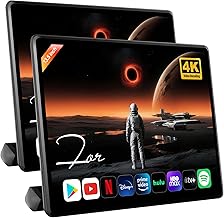
Best for: Families who want two passengers to watch different content, or who want to download entertainment before traveling outside reliable cellular coverage. This pair has two independent Android 13 monitors, each listed with 4GB RAM and 64GB storage.
The product description says apps such as Netflix can be used to download movies over WiFi for offline viewing. Passengers can watch separately or use HDMI input and output to synchronize a movie across both screens. The HDMI input is also listed for connecting a game console.
Both screens are described as 13.5-inch, 1920 × 1280 anti-glare IPS displays with 4K video decoding. Choose this option if storage, separate viewing, and a shared HDMI picture are priorities. The supplied details do not establish vehicle-specific fit, so check mounting requirements before buying.
Seventour 15.6-Inch Android Pair

Best for: Buyers who want larger screens and several ways to connect devices or listen to audio. The pair has 15.6-inch IPS touchscreens, Android 13, and support for 2.4GHz and 5GHz WiFi. The listing also describes 4K video decoding and wireless mirroring through Apple AirPlay and Android Miracast.
For external sources, the monitors have HDMI input and output, USB, and microSD card ports; the listing says USB drives up to 1TB are supported. Audio options include built-in speakers, Bluetooth or wired headphones, and FM transmission to a car radio. The product also includes a universal mounting bracket and dual power adapters, according to its description.
Choose this model if screen size, connection choices, and audio flexibility matter more than compact displays. The listing says the bracket is compatible with more than 98% of car models, but buyers should still confirm that the mounting arrangement fits their vehicle.
14-Inch Android Pair With Wireless Mirroring

Best for: Buyers looking for a paired 14-inch system with WiFi, Bluetooth, and several connection types named in the product description. The listed title identifies Android car TV headrest monitors and says they support phone wireless mirror link, HDMI, WiFi, Bluetooth, USB, and portable video playback.
This combination may suit passengers who want to connect a phone wirelessly or use a wired accessory through HDMI or USB. Comparing the listed ports and wireless features with the devices you plan to use can help determine whether it meets your needs.
The available product details do not specify Android version, storage, screen resolution, audio outputs, or mounting compatibility. Avoid assuming those specifications; check the current listing and confirm the included mounting and power arrangements before purchase.
AINAVI 10.8-Inch Android Pair

Best for: Buyers who prefer a smaller listed screen size and want Android apps, wireless phone mirroring, and 5G WiFi support. The product title identifies two monitors with 2GB RAM and 32GB storage. The description lists Android 13 and a Cortex A55 CPU.
The listing describes Google Play Store app downloads, Apple AirPlay and Android Miracast mirroring, and MyCar Link phone control. It says the phone and monitor must use the same WiFi network for mirroring. It also cautions that some protected apps cannot be mirrored, though they may be installed directly on the monitor.
Choose this pair if app installation and phone control are more important than a larger display. Its 2GB RAM and 32GB storage are lower than the listed AINAVITO 13.5-inch model, so buyers planning to store many apps or files should compare capacity carefully.
14-Inch Universal Touchscreen Pair

Best for: Buyers comparing a 14-inch touchscreen pair with phone mirroring and common wired and wireless connections. The product title lists WiFi, Bluetooth, HDMI, USB, 4K support, and wireless mirror link. It also identifies the system as a universal rear entertainment system and lists 2GB RAM and 32GB storage for two pieces.
These listed features may make it worth considering if you want touch controls and expect to connect phones or external devices. Compare its stated memory with other Android options if you intend to install apps or keep media on the monitors.
The supplied information does not specify the Android version, WiFi band, resolution details, audio outputs, or exact mounting requirements. Check those details in the current listing before deciding whether it suits your car and intended devices.
Buying Guide: How to Choose a WiFi Rear Seat System
Do you need WiFi, a phone hotspot, or offline playback?
WiFi capability does not by itself guarantee internet access on the road. Streaming generally needs an available internet connection, such as a phone hotspot or another WiFi source. If your route includes areas with poor cellular coverage, look for a system that supports app downloads and offline playback. The AINAVITO 13.5-inch description specifically mentions downloading movies over WiFi for offline entertainment.
Check whether your chosen apps allow downloads and whether the system has enough storage for them. Streaming, downloading, and screen mirroring are different functions: a monitor may support wireless mirroring without providing internet access to the phone or display.
Should passengers have separate screens or watch together?
Two monitors do not always mean two independent entertainment experiences. The AINAVITO 13.5-inch pair is described as supporting separate viewing as well as HDMI synchronization across both screens. If passengers have different preferences, prioritize independent operation. If they usually watch together, confirm how the screens share a picture and whether the connection requires a cable.
What screen size is practical for your back seat?
The products listed here range from 10.8 to 15.6 inches. Larger displays may be preferable for viewing from farther away, while smaller screens can be a better fit for buyers seeking a more compact option. Measure the available space and consider seat position, passenger viewing distance, and whether the screen could obstruct visibility or access to vehicle controls.
Which connections and audio options matter?
Compare the exact ports and wireless functions rather than relying on a broad “entertainment system” label. HDMI can be useful for an external video source or game console when supported. USB and microSD can provide additional media options, while Bluetooth, wired headphones, built-in speakers, or FM transmission address different listening preferences. Do not assume every product offers every connection.
How much storage and memory do you need?
Storage affects how much downloaded content and how many apps can be kept on a monitor. Among these options, the AINAVITO 13.5-inch pair lists 64GB per screen and 4GB RAM, while the AINAVI 10.8-inch pair and universal 14-inch pair list 32GB and 2GB RAM. Compare these figures with your plans for app use and offline media; they do not, on their own, establish overall performance.
Will the system fit your vehicle?
Before ordering, verify how the monitors attach to the headrests, how they receive power, and whether the included cables reach the intended locations. A product described as universal may still require a fit check for your vehicle. Review the current product details for mounting dimensions, power accessories, and any installation requirements that are not specified in the information provided here.
Frequently Asked Questions
Does a rear seat entertainment system with WiFi include internet?
Not necessarily. WiFi lets a device connect to a WiFi network, but internet access may require a phone hotspot or another connected network. Check how you plan to provide connectivity during travel.
Can passengers watch content without cellular service?
They may be able to if the system supports downloading content in advance and the app permits offline playback. The AINAVITO 13.5-inch product description specifically says movies can be downloaded over WiFi for offline viewing.
Can a phone mirror any video app to a headrest monitor?
No. Wireless mirroring support does not guarantee that every app will display. The AINAVI 10.8-inch product description warns that some protected apps cannot be mirrored and suggests installing supported apps directly on the monitor.
Can two monitors show different programs?
That depends on the model. The AINAVITO 13.5-inch pair is described as supporting independent viewing and HDMI synchronization. Confirm independent operation in the details for any other model before buying.
What should I verify before placing an order?
Confirm vehicle mounting fit, power and cable arrangements, WiFi requirements, storage, audio options, and the connection types you need. Check current product details for specifications that are not included in the information available for a particular model.